giriiş
Thank you for choosing the Mesqool CR1025 Digital Alarm Clock Radio. This device combines multiple functions including a digital alarm clock, Bluetooth 5.0 speaker, FM radio, night light, and dual USB charging ports. This manual provides detailed instructions to help you set up and operate your new device effectively.
Paket İçeriği
- Mesqool CR1025 Digital Alarm Clock Radio
- Güç Adaptörü
- Kullanıcı Kılavuzu
- C Battery (for backup)
Ürün Bittiview
Familiarize yourself with the components and controls of your Mesqool CR1025 Digital Alarm Clock Radio.
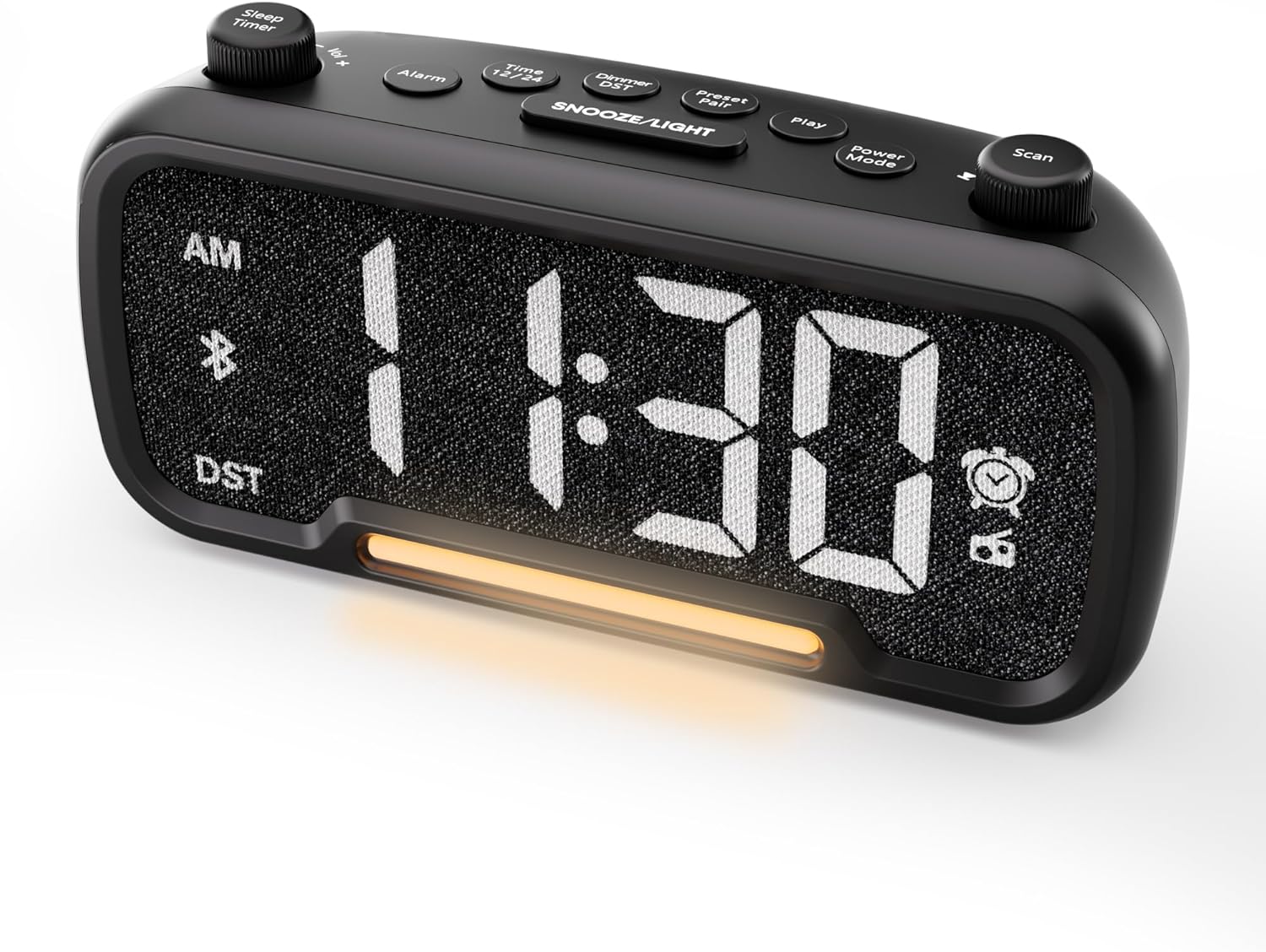

Control Buttons and Knobs:
- Sleep Timer / Vol +/- Knob (Left): Adjusts volume, sets sleep timer duration.
- Alarm butonu: Sets and activates/deactivates alarms.
- Time 12/24 Button: Switches between 12-hour and 24-hour time formats.
- Dimmer / DST Button: Adjusts display brightness, activates/deactivates Daylight Saving Time (DST).
- Preset / Pair Button: Saves FM radio presets, initiates Bluetooth pairing.
- Oynatma düğmesi: Plays/pauses media in Bluetooth mode.
- Güç Modu Düğmesi: Cycles through operating modes (FM, Bluetooth, AUX).
- Scan / TU +/- Knob (Right): Scans FM radio stations, manually tunes FM frequency.
- ERTELEME/IŞIK Düğmesi: Activates snooze function, turns night light on/off.

Kurmak
1. İlk Güçlendirme
Connect the provided power adapter to the DC 5V IN port on the back of the alarm clock and plug it into a standard wall outlet. The display will light up. Ensure the C battery is installed for backup in case of power outage.

2. Zaman Ayarı
- Basılı tutun Zaman 12/24 button for 2 seconds. The hour digits will begin to flash.
- Döndür Hacim +/- knob (left knob) to adjust the hour.
- Basın Zaman 12/24 Tekrar düğmeye basın. Dakika rakamları yanıp sönmeye başlayacaktır.
- Döndür Hacim +/- Dakikayı ayarlamak için düğmeyi kullanın.
- Basın Zaman 12/24 button once more to confirm the time setting.
Video demonstrating how to set the time on the Mesqool Digital Alarm Clock Radio.
3. 12/24 Saatlik Zaman Formatı
To switch between 12-hour and 24-hour time formats, short press the Zaman 12/24 Düğmeye basın. Ekran buna göre değişecektir.
4. Daylight Saving Time (DST) Adjustment
To activate or deactivate DST, press and hold the Dimmer / DST button for 2 seconds. The time will adjust by one hour forward or backward, and the DST indicator will appear or disappear on the display.
Kullanım Talimatları
1. Alarm Ayarı
- Basılı tutun Alarm button for 2 seconds. The hour digits will flash.
- Döndür Hacim +/- knob to adjust the desired alarm hour.
- Basın Alarm Tekrar düğmeye basın. Dakika rakamları yanıp sönecektir.
- Döndür Hacim +/- knob to adjust the desired alarm minute.
- Basın Alarm button again. The alarm sound selection will flash (bell icon for buzzer, radio icon for FM radio). Rotate the Hacim +/- knob to choose between buzzer or FM radio as the alarm sound.
- If FM radio is selected, press the Alarm button again. The volume level will flash (L01-L16). Rotate the Hacim +/- knob to set the desired alarm volume.
- Basın Alarm button once more to confirm and activate the alarm. The alarm icon will appear on the display.
To deactivate the alarm, short press the Alarm Düğmeye basın. Alarm simgesi ekrandan kaybolacaktır.

Erteleme İşlevi:
Alarm çaldığında, düğmesine basın. ERTELEME / IŞIK button to activate the snooze function for 9 minutes. The alarm will sound again after 9 minutes. To turn off the alarm completely, press any other button except ERTELEME / IŞIK.

2. FM Radyonun Çalıştırılması
- Basın Güç Modu button repeatedly until the radio icon lights up on the display, indicating FM radio mode.
- Auto-Scan and Save Presets: Basın Scan / TU +/- knob (right knob) to automatically search for available FM stations and save them as presets (up to 20 stations). The display will show "P01", "P02", etc., as stations are saved.
- Manuel Ayarlama: Döndür Scan / TU +/- knob to manually browse frequencies.
- Ön Ayarları Geri Çağır: Kısa basın Ön Ayar / Eşleştirme Kaydedilmiş önceden ayarlanmış istasyonlar arasında geçiş yapmak için kullanılan düğme.
- Sesi Ayarla: Döndür Hacim +/- knob (left knob) to adjust the radio volume (L01-L16).

Video demonstrating how to set the FM radio alarm on the Mesqool Digital Alarm Clock Radio.
3. Bluetooth Hoparlörün Çalıştırılması
- Basın Güç Modu button repeatedly until the Bluetooth icon (bt) starts flashing on the display, indicating pairing mode.
- On your mobile device, enable Bluetooth and search for "CR1025" in the list of available devices.
- Select "CR1025" to pair. Once connected, the Bluetooth icon will stop flashing and remain solid.
- You can now play audio from your device through the alarm clock's speaker.
- Kullanın Hacim +/- knob on the alarm clock or your mobile device to adjust the volume.
- Basın Oynamak Sesi oynatmak veya duraklatmak için düğmeye basın.

Video demonstrating how to set up Bluetooth on the Mesqool Digital Alarm Clock Radio.
4. Gece Lambası Çalıştırma
The alarm clock features a gentle night light. To turn the night light on or off, short press the ERTELEME / IŞIK düğme.

5. Dimmer Setting
The display brightness can be adjusted to 5 levels. Short press the Dimmer / DST button to cycle through the brightness levels (L01-L05). Select the level that best suits your environment.

6. Sleep Timer Setting
The sleep timer allows you to set a duration for the FM radio or Bluetooth speaker to play before automatically turning off. This is useful for falling asleep to music or podcasts.
- While in FM radio or Bluetooth mode, press the Uyku Zamanlayıcısı button. The display will show the current sleep timer duration (e.g., "30" for 30 minutes).
- Döndür Sleep Timer / Vol +/- knob to select the desired duration: 15, 30, 60, 90, or 120 minutes. You can also select "OFF" to disable the sleep timer.
- The timer will start counting down, and the device will automatically turn off after the selected duration.
7. USB Şarj Bağlantı Noktaları
The alarm clock is equipped with two USB charging ports (Type-C and USB-A) on the back, each providing 5V/1A output. These ports can be used to conveniently charge your smartphone, tablet, or other USB-powered devices.

Sorun giderme
| Sorun | Olası Çözüm |
|---|---|
| Saat göstergesi boş. | Ensure the power adapter is securely connected to both the clock and a working power outlet. Check if the power outlet is functional. |
| Alarm çalmıyor. | Verify that the alarm is set and activated (alarm icon visible on display). Check the alarm volume level. Ensure the correct alarm sound (buzzer or FM radio) is selected. |
| FM radyo alımı zayıf. | Extend the FM antenna fully. Try repositioning the antenna or the clock for better signal. Perform an auto-scan again to find stronger stations. |
| Bluetooth cihazı eşleştirilemiyor. | Ensure the clock is in Bluetooth pairing mode (flashing 'bt' icon). Make sure Bluetooth is enabled on your mobile device and it is within range. Forget "CR1025" from your device's Bluetooth list and try pairing again. |
| USB şarj portları çalışmıyor. | Confirm the alarm clock is powered on. Ensure the charging cables are properly connected to both the clock and your device. Try a different USB cable or device to rule out cable/device issues. |
Özellikler
| Özellik | Detay |
|---|---|
| Marka | meskûl |
| Model Numarası | CR1025 |
| Renk | Siyah |
| Görüntü Türü | Dijital LED |
| Ürün Boyutları | 6.61"U x 3.31"G x 2.32"Y |
| Güç Kaynağı | Kablolu Elektrikli (AC adaptör dahil) |
| Pil Yedekleme | 1 C pil (dahil) |
| Bluetooth Sürümü | V5.0 |
| FM Radyo Frekansı | 87.5-108MHz |
| FM Ön Ayarları | Up to 20 stations |
| Dimmer Ekranı | 5 seviye |
| Alarm Sesleri | Zil, FM Radyo |
| Erteleme süresi | 9 dakikadır. |
| USB Şarj Çıkışı | Type-C & USB-A, 5V/1A each |
| Malzeme | Plastik |
| Ürün Ağırlığı | 0.48 Pound (yaklaşık 7.7 ons) |
Bakım
- Cihazı yumuşak, kuru bir bezle temizleyin. Sıvı temizleyiciler veya aşındırıcı malzemeler kullanmayın.
- Cihazı doğrudan güneş ışığından, aşırı sıcaklıklardan ve yüksek nemden uzak tutun.
- Aşırı ısınmayı önlemek için cihazın çevresinde uygun havalandırma olduğundan emin olun.
- If the device will not be used for an extended period, remove the backup battery.
Güvenlik Bilgileri
- Cihazı suya veya neme maruz bırakmayın.
- Cihazı kendiniz sökmeye veya onarmaya çalışmayın. Yetkili servis personeline başvurun.
- Cihazı çocukların erişemeyeceği yerde saklayınız.
- Yalnızca ürünle birlikte verilen güç adaptörünü kullanın. Yetkisiz adaptörlerin kullanılması cihaza zarar verebilir ve garantiyi geçersiz kılabilir.
- Avoid placing the device near heat sources or open flames.
Garanti ve Destek
Specific warranty details are not provided in the product information. For warranty claims, technical support, or further assistance, please contact Mesqool customer service through their official website or the retailer where the product was purchased. Please retain your proof of purchase for any warranty-related inquiries.
Visit the Mesqool Store for more information: Mesqool Official Store


