1. Giriş
Satın aldığınız için teşekkür ederizasing the OFFNOVA 21-Hole Binding Machine. This manual provides detailed instructions for the safe and efficient operation, maintenance, and troubleshooting of your new binding machine. Please read this manual thoroughly before use and keep it for future reference.

Figure 1: OFFNOVA 21-Hole Binding Machine. This image shows the complete binding machine with its dual-arm handle and the comb binding mechanism.
2. Güvenlik Talimatları
- Always operate the machine on a stable, flat surface.
- Çalışma sırasında ellerinizi ve bol giysilerinizi hareketli parçalardan uzak tutun.
- Do not attempt to bind materials thicker than the specified maximum capacity.
- Keep the machine away from water or other liquids.
- Çocukların yetişkin gözetimi olmadan makineyi kullanmalarına izin vermeyin.
- Ensure the punching lever is fully depressed during punching to prevent paper jams.
- Clean the machine regularly as instructed in the Maintenance section.
3. Paket İçeriği
Lütfen kutuyu açtığınızda paket içeriğini kontrol ederek tüm öğelerin mevcut olduğundan emin olun:
- 1 x OFFNOVA 21-Hole Binding Machine (Model CD12)
- 100 x 0.95 cm (3/8 inch) Black Comb Spines
- 1 x Comb Protector
- 1 x Oil Absorbent Paper Sheet

Figure 2: Included accessories and machine dimensions. This image illustrates the machine's dimensions and shows the oil absorbent paper and the box of 100 black comb spines that are included with the product.
4. Ürün Bittiview
Familiarize yourself with the main components of the OFFNOVA Binding Machine:
- Dual-Arm Handle: Designed for improved efficiency and reduced effort during punching.

Figure 3: Dual-Arm Handle. This image highlights the ergonomic dual-arm handle, designed for effortless punching and binding.
- Punch Margin Adjustment Knob: Allows customization of the paper margin (3mm, 4mm, 5mm) for professional-looking documents.

Figure 4: Punch Margin Adjustment. This image shows the knob for adjusting the punch margin to 3mm, 4mm, or 5mm.
- Paper Slider / Edge Guide: Ensures precise alignment for Letter, A4, and A5 paper formats.

Figure 5: Paper Slider and Size Lock. This image demonstrates how the paper slider locks the paper size, indicating hole counts for A5 (15 holes), Letter (19 holes), and A4 (21 holes).
- Punching Mechanism: Advanced cutting blade for effortless paper punching.

Figure 6: Punching Blade Mechanism. This image provides a detailed view of the "Offset on another" blade design, which facilitates effortless punching.
- Comb Binding Mechanism: Located at the top, used to open and close comb spines for binding.
- Cips Tepsisi: Collects paper chads from punching.
5. Kurulum
The OFFNOVA Binding Machine comes fully assembled for immediate use. Follow these steps before your first binding project:
- Makineyi Ambalajından Çıkarın: Carefully remove the binding machine and all accessories from the packaging.
- İlk Temizlik: Before first use, clean the machine with the included oil absorbent paper. Punch at least 8 times with the oil absorbent paper to remove any pre-lubrication residue and prevent staining your documents.
- Sağlam Bir Yüzeye Yerleştirin: Position the machine on a flat, stable, and clean surface.
6. Kullanım Talimatları
The binding process involves two main steps: punching and binding.
6.1 Punching Documents
- Adjust Paper Margin: Use the punch margin adjustment knob (Figure 4) to set the desired margin depth (3mm, 4mm, or 5mm) based on your document's requirements.
- Set Paper Size: Adjust the paper slider/edge guide (Figure 5) to align with your paper size (Letter, A4, or A5) for precise hole alignment.
- Kağıdı Yerleştir: Insert up to 10-12 sheets of 80g paper, 2 sheets of 230g cover paper, or 1 sheet of 5-12mm PVC cover into the punching slot. Ensure the paper is flush against the edge guide.
- Yumruk: Firmly press the dual-arm punching lever down completely and without pause. Releasing the lever mid-punch can cause paper jams.
- Tekrarlamak: Remove the punched sheets and repeat the process until all pages are punched.
Note: For optimal results and to prevent paper jams, always press the punching handle all the way down without stopping.
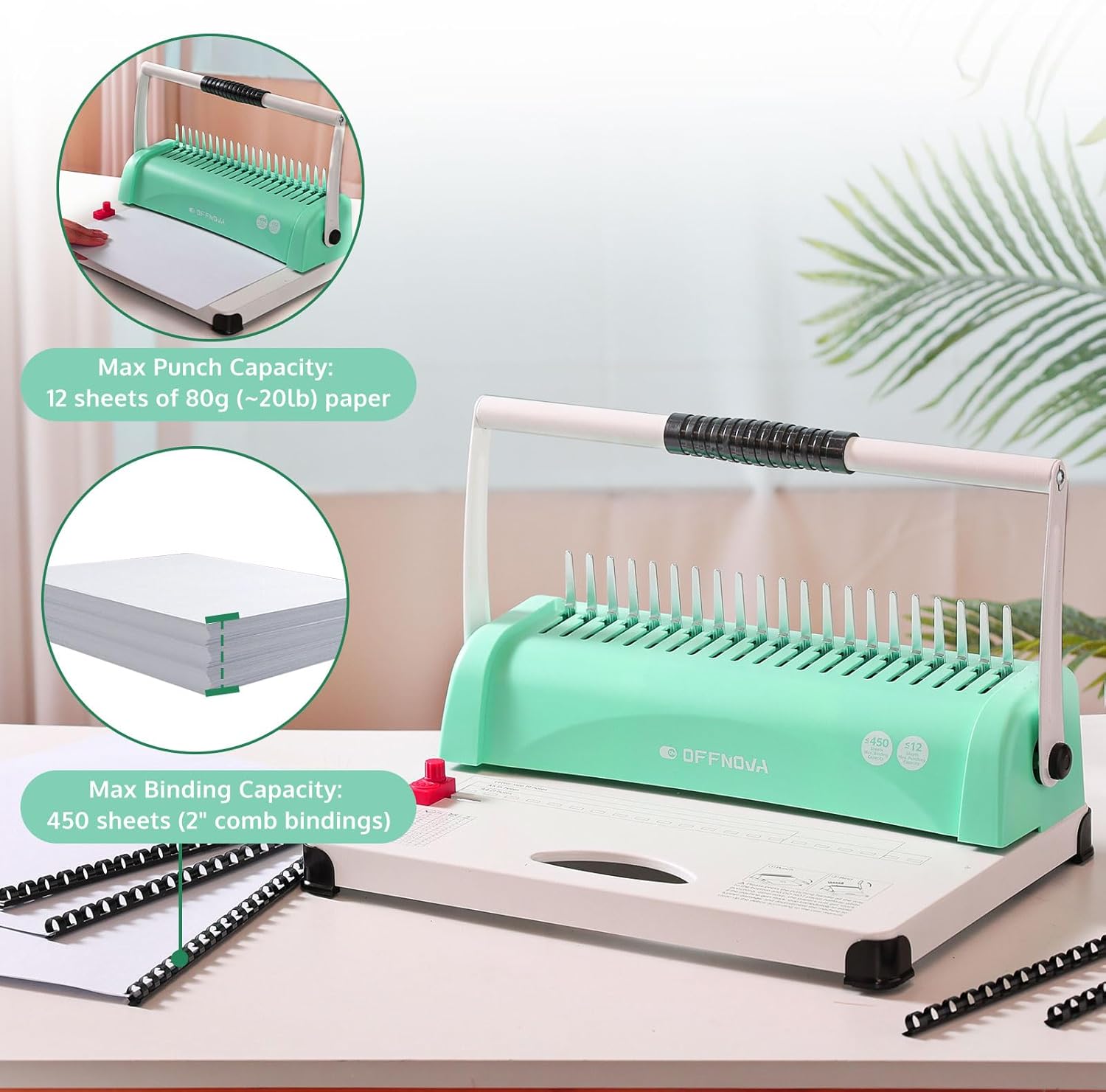
Figure 7: Punching and Binding Capacity. This image illustrates the maximum punch capacity of 12 sheets of 80g paper and a maximum binding capacity of 450 sheets using 2-inch comb bindings.
6.2 Binding Documents
- Open Comb Spine: Place a comb spine onto the binding mechanism's teeth. Pull the dual-arm handle towards you to open the comb spine.
- Insert Punched Pages: Carefully slide the punched pages onto the open comb spine, starting with the front cover, followed by the document pages, and finally the back cover. Ensure all pages are correctly aligned on the comb.
- Close Comb Spine: Push the dual-arm handle away from you to close the comb spine, securing the document.
- Belgeyi Kaldır: Carefully remove the bound document from the machine.
7. Bakım
Regular maintenance ensures the longevity and optimal performance of your binding machine:
- Empty Chip Tray: Regularly empty the chip tray located at the bottom of the machine to prevent accumulation of paper chads, which can interfere with punching.
- Bıçakları Temizleyin: Periodically punch the included oil absorbent paper (or a few sheets of scrap paper) to clean the punching blades and remove any paper dust or residue.
- Silin: Use a soft, dry cloth to wipe down the exterior of the machine. Do not use abrasive cleaners or solvents.
- Depolamak: When not in use, store the machine in a clean, dry place, away from direct sunlight and extreme temperatures.
8. Sorun Giderme
| Sorun | Olası Neden | Çözüm |
|---|---|---|
| Paper jam during punching. | Punching lever not fully depressed; too many sheets inserted; paper not aligned. | Ensure the lever is pressed completely down. Reduce the number of sheets. Align paper correctly against the edge guide. |
| Holes are not clean or complete. | Dull blades; chip tray is full; too many sheets. | Punch oil absorbent paper or scrap paper to clean blades. Empty the chip tray. Reduce the number of sheets. |
| Comb spine does not open/close smoothly. | Mekanizma sertleşmiş veya kirlenmiş. | Operate the binding mechanism a few times without a comb to loosen it. Ensure no debris is obstructing the mechanism. |
| Documents are stained after punching. | Pre-lubrication residue from manufacturing. | Punch the included oil absorbent paper at least 8 times before first use with actual documents. |
9. Özellikler
| Özellik | Detay |
|---|---|
| Marka | OFNOVA |
| Model Numarası | CD12 |
| Delme Kapasitesi | Up to 10-12 sheets (80g paper), 2 sheets (230g cover paper), or 1 sheet (5-12mm PVC cover) |
| Bağlama Kapasitesi | Max 450 sheets (using 2-inch comb bindings) |
| Delik Sayısı | 21 delik |
| Desteklenen Kağıt Boyutları | Letter, A4, A5 |
| Adjustable Margin | 3mm, 4mm, 5mm |
| Ürün Boyutları (U x G x Y) | Yaklaşık 370 mm x 260 mm x 240 mm (14.6 x 10.2 x 9.45 inç) |
| Ürün Ağırlığı | 4.3 Kilogram |
| Renk | Nane |
10. Garanti ve Destek
Specific warranty details for this product are not provided in this manual. For warranty information, technical support, or service inquiries, please contact OFFNOVA customer service or refer to the product's purchase documentation.
İletişim bilgilerini genellikle üreticinin resmi internet sitesinde bulabilirsiniz. website veya ürünün satın alındığı perakendeci aracılığıyla.


