1. Ürün Bittiview
The OBDSTAR iScan BRP is a professional, portable diagnostic tablet specifically designed for BRP (Can-am) systems. It offers comprehensive diagnostic capabilities for motorcycles, snowmobiles, ATVs, and UTVs. Featuring a 5.0-inch capacitive touchscreen and running on Android 5.1.1, this tool provides an intuitive and efficient diagnostic experience.

Figure 1.1: The OBDSTAR iScan BRP Diagnostic Tool, showcasinKullanıcı arayüzü ve sağlam tasarımıyla öne çıkıyor.
Temel Özellikler:
- Professional Diagnostics: Tailored for BRP systems, offering superb performance.
- Gelişmiş Fonksiyonlar: Supports automatic scanning, VIN recognition, control module programming/coding, ECU setting, instrument coding, TPMS, maintenance light reset, CO/idle speed/A/F value adjustment, ABS control unit setting, EOL mode, transmission memory reset, and clear computer memory.
- Kullanıcı Dostu Arayüz: Equipped with Android 5.1.1 operating system and a simple, intuitive menu guide for quick operation.
- Gerçek Zamanlı Veri İzleme: Records and plays back data streams to quickly and accurately locate sensor and component faults.
- Çoklu Dil Desteği: Available in English, Spanish, Portuguese, French, German, Italian, Polish, Russian, Turkish, Indonesian, Farsi, Thai, Vietnamese.
- Bağlantı: Wi-Fi for one-click software updates and remote assistance.
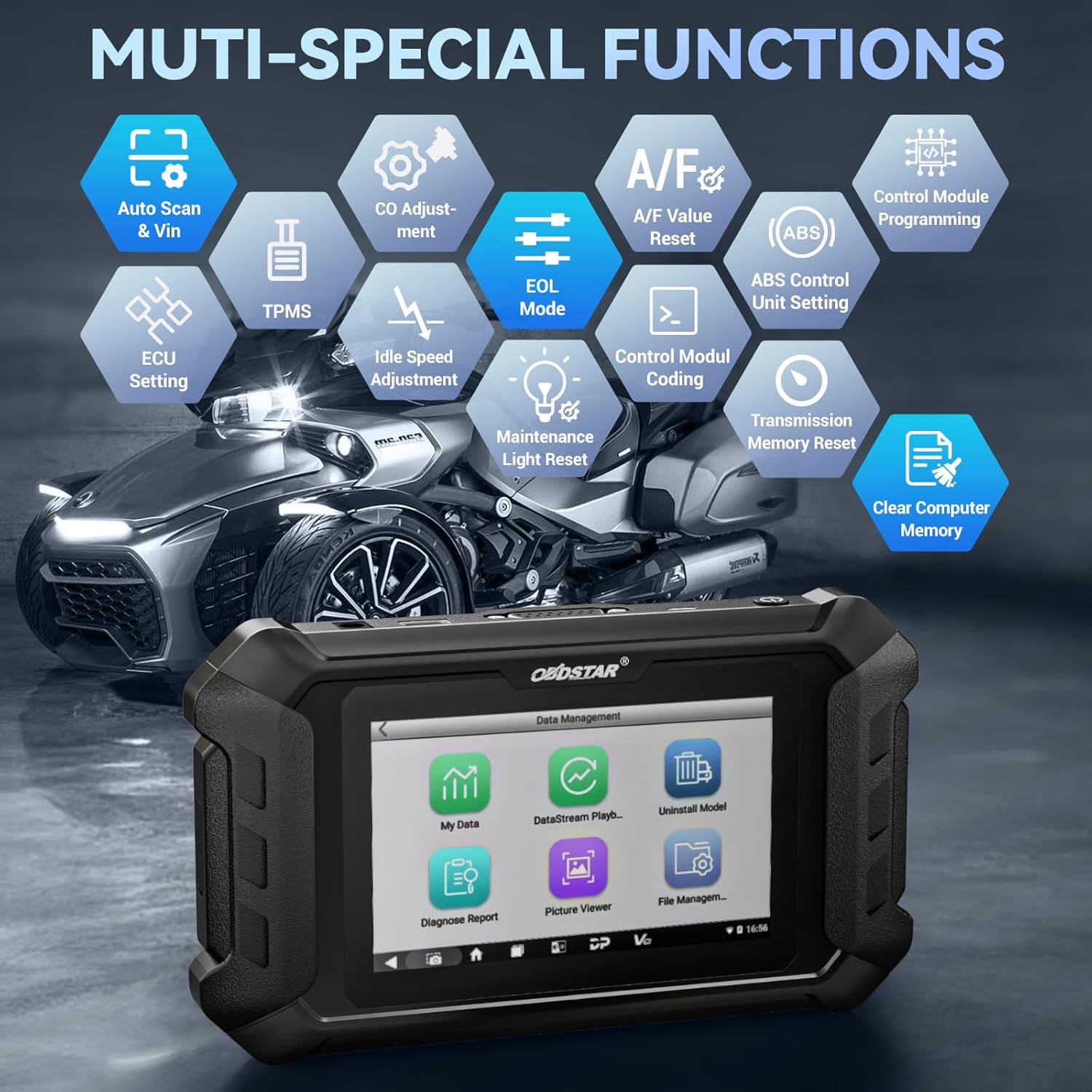
Şekil 1.2: Üzeriview of the multi-special functions supported by the OBDSTAR iScan BRP, including Auto Scan & VIN, ECU Setting, TPMS, A/F Value Reset, and more.
2. Paket İçeriği
Paketi açtığınızda, lütfen aşağıdaki tüm öğelerin eksiksiz ve iyi durumda olduğundan emin olun:
- Main Tablet (OBDSTAR iScan BRP Diagnostic Tool)
- 12V2A Şarj Cihazı
- Ana Kablo
- BRP Cable
- Kullanıcı Kılavuzu

Figure 2.1: All components included in the OBDSTAR iScan BRP package: Main Tablet, 12V2A Charger, Main Cable, BRP Cable, and User Manual.
3. Kurulum Kılavuzu
3.1 İlk Güç Açma ve Yapılandırma
- Cihazı Şarj Edin: Connect the 12V2A charger to the diagnostic tool and a power outlet. Ensure the device is fully charged before first use.
- Güç Açık: Press and hold the power button located on the side of the tablet until the screen illuminates.
- Dil Seçimi: Upon first boot, you will be prompted to select your preferred language. Choose English or another supported language from the list.
- Wi-Fi Bağlantısı: Navigate to the system settings and connect to a stable Wi-Fi network. This is crucial for software updates and remote assistance.
- Yazılım Güncellemesi: After connecting to Wi-Fi, it is recommended to perform a one-click software update to ensure you have the latest diagnostic software and vehicle coverage.
4. Kullanım Talimatları
4.1 Bir Araca Bağlanma
- Teşhis Portunu Bulun: Identify the diagnostic port on your BRP vehicle (motorcycle, snowmobile, ATV, or UTV). Refer to your vehicle's service manual for the exact location.
- Kabloları Bağlayın: Use the appropriate Main Cable and BRP Cable to connect the diagnostic tool to the vehicle's diagnostic port. Ensure connections are secure.
- Kontağı Açın: Turn the vehicle's ignition to the 'ON' position (do not start the engine unless instructed by the diagnostic procedure).
4.2 Tanılama Gerçekleştirme
- Select 'MOTO Diag': From the main menu of the diagnostic tool, tap on the 'MOTO Diag' icon to enter the motorcycle diagnostic interface.
- Araç Seçimi: Select the correct vehicle brand (BRP) and model from the list.
- Otomatik Araç Numarası Tanıma: The tool supports automatic VIN recognition. If prompted, allow the tool to read the VIN for faster vehicle identification.
- System Scan: Initiate an automatic system scan to identify all available control modules and detect any diagnostic trouble codes (DTCs).
- Teşhis Fonksiyonları:
- Kodları Okuyun: View current, pending, and historic diagnostic trouble codes.
- Kodları Temizle: Erase diagnostic trouble codes from the vehicle's ECU.
- Veri akışı: Monitor real-time data parameters from various sensors and components. Data can be displayed in text, waveform, or instrument diagram formats.
- Active Test (Motion Test): Perform specific tests on actuators and components to verify their functionality.
- Özel Fonksiyonlar: Access advanced functions such as ECU setting, instrument coding, TPMS reset, maintenance light reset, CO adjustment, idle speed adjustment, A/F value reset, ABS control unit setting, EOL mode, transmission memory reset, and clear computer memory.
- Save and Print Reports: After diagnosis, you can save diagnostic reports and, if connected to a compatible printer, print them for record-keeping.

Figure 4.1: The diagnostic tool's interface highlighting features like Auto VIN & Scan, One Click Upgrade, Professional Tech Support, and Live Data monitoring.

Figure 4.2: The Auto VIN & Scan feature streamlines vehicle identification for efficient diagnostics.

Figure 4.3: The Data Play Back function allows for review of recorded real-time data, aiding in fault analysis.
5. Bakım
5.1 Yazılım Güncellemeleri
Regular software updates are essential to ensure your diagnostic tool has the latest vehicle coverage, bug fixes, and new features. Connect the device to a Wi-Fi network and use the 'Upgrade' function on the main menu for one-click updates.
5.2 Temizlik ve Depolama
- Cihazı yumuşak bir bezle silin.amp bezle silin. Aşındırıcı temizleyiciler veya çözücüler kullanmayın.
- Store the tool in a cool, dry place, away from direct sunlight and extreme temperatures.
- Kabloları hasar görmemesi için düzgün bir şekilde sarın.
6. Sorun Giderme
| Sorun | Olası Neden | Çözüm |
|---|---|---|
| Cihaz açılmıyor. | Pil zayıf; şarj cihazı/kablo arızalı; cihaz arızası. | Charge the device for at least 30 minutes. Try a different charger/cable. If problem persists, contact support. |
| Araca bağlanılamıyor. | Incorrect cable connection; vehicle ignition off; incompatible vehicle model; damaged diagnostic port. | Ensure cables are securely connected. Turn vehicle ignition ON. Verify vehicle compatibility. Check vehicle's diagnostic port for damage. |
| Yazılım güncellemesi başarısız. | Unstable Wi-Fi connection; insufficient storage; server issue. | Ensure strong Wi-Fi signal. Check available storage space. Try updating again later. |
| Ekran tepkisiz. | Yazılım hatası; fiziksel hasar. | Cihazı yeniden başlatın. Sorun devam ederse destek ekibiyle iletişime geçin. |
7. Özellikler
- Modeli: SP540
- İşletim Sistemi: Android 5.1.1
- İşlemci: RK3128 Quad-core
- Görüntülemek: 5.0 inç Kapasitif Dokunmatik Ekran
- Bağlantı: Wifi
- Pil: 1 Lityum Polimer pil (dahil)
- Ürün Ağırlığı: Yaklaşık 2.55 pound
- Paket Boyutları: Yaklaşık 12.91 x 9.29 x 2.76 inç
- Menşei ülke: Çin
- Desteklenen Diller: EN, ES, PT, FR, DE, IT, PL, RU, TR, ID, FA, TH, VN

Figure 7.1: Hardware highlights of the OBDSTAR iScan BRP, including Wi-Fi, Android 5.1.1, 5.0 Inch Touch Screen, RK3128 Quad-core Processor, and Intuitive Menu Guidance.
8. Destek ve Garanti
8.1 Teknik Destek
OBDSTAR provides technical support for the iScan BRP diagnostic tool. You can utilize the one-click remote help function on the device to receive assistance from OBDSTAR technical staff.
8.2 İade Politikası
This product is eligible for a 30-day refund/replacement return policy from the date of purchase. Please refer to your retailer's specific return terms and conditions for detailed information.


