giriiş
Satın aldığınız için teşekkür ederizasing the Apera NNS NS-8091BT Music System. This portable device combines a classic FM radio with modern connectivity options, including USB, Micro SD, and Bluetooth 5.0. Its stylish design and versatile features make it an ideal companion for enjoying your favorite audio content anywhere. Please read this manual carefully before use to ensure proper operation and to maximize your listening experience.
Önemli Güvenlik Bilgileri
- Cihazı yağmura, neme veya aşırı sıcaklıklara maruz bırakmayın.
- Cihazı düşürmekten veya güçlü darbelere maruz bırakmaktan kaçının.
- Cihazı kendiniz sökmeyin veya tamir etmeye çalışmayın. Tüm servis işlemlerini yetkili personele yaptırın.
- Cihazı doğrudan güneş ışığından ve ısı kaynaklarından uzak tutun.
- Cihazı çalıştırırken yeterli havalandırmayı sağlayın.
- Use only the provided charging cable or a compatible 5V DC adapter for charging.
- Before first use, fully charge the device for approximately 2 hours.
Paket İçeriği
- NNS NS-8091BT Music System
- USB Şarj Kablosu
- Kullanıcı Kılavuzu
Ürün Bittiview
Familiarize yourself with the various parts and controls of your NNS NS-8091BT Music System.
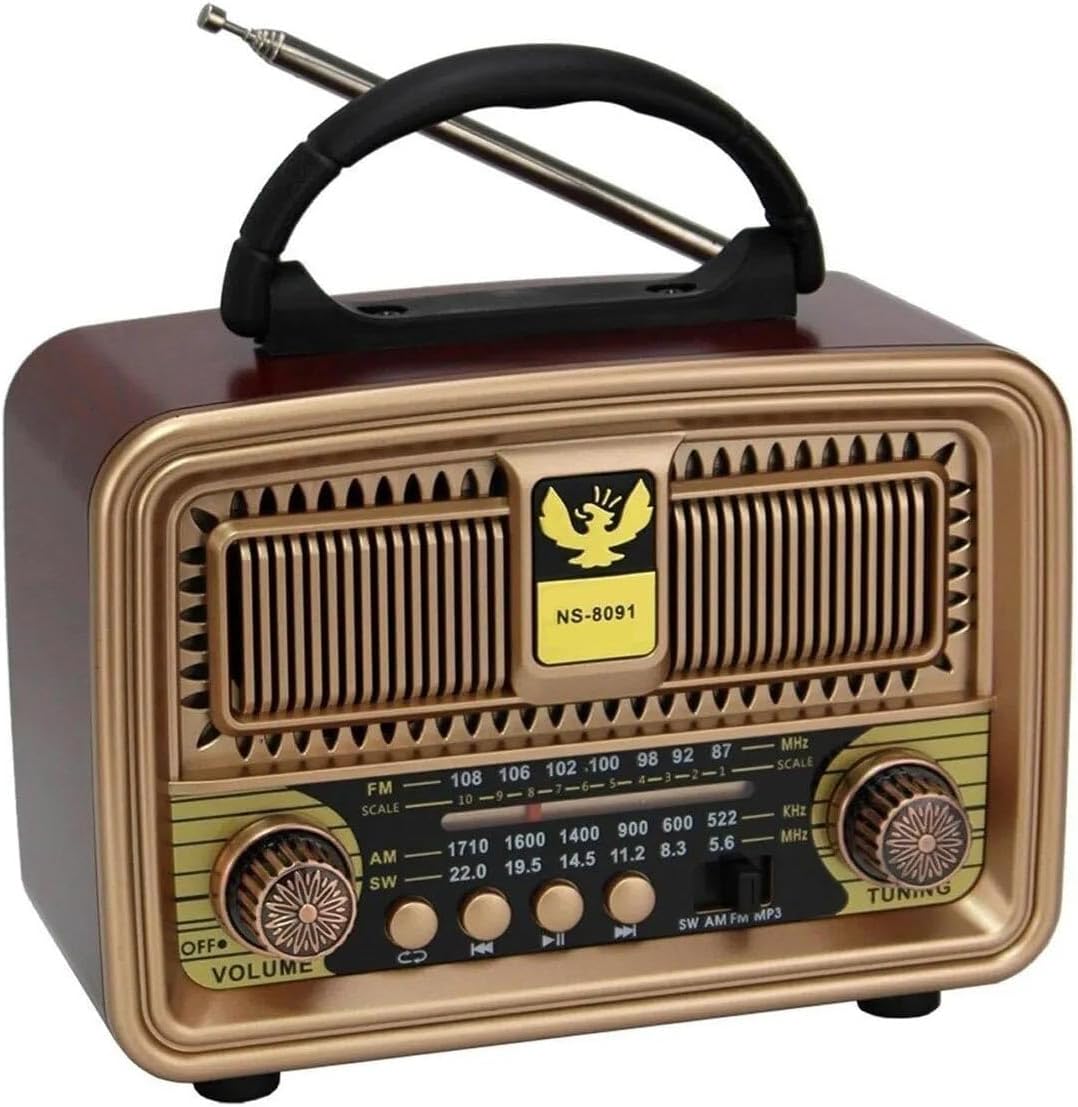
Şekil 1: Ön View of the Music System
This image displays the front of the NNS NS-8091BT Music System, highlighting its vintage-inspired design with a prominent speaker grille, a frequency display, and two rotary knobs for volume/power and tuning. The model number "NS-8091" is visible on the front panel.

Şekil 2: Yan View Bağlantı Noktaları ile
This image shows the side panel of the music system, detailing the input ports. From top to bottom, these include a standard USB port, a Micro SD (TF) card slot, and a DC 5V charging port, along with a "CHARGE" indicator.

Şekil 3: Arka View Pil bölmesi ile
This image illustrates the back of the music system, revealing the battery compartment. It is designed to accommodate one 18650 rechargeable battery (visible in blue) and two UM-1 (D-cell) 1.5V batteries, providing flexible power options.
Kontroller ve Göstergeler:
- OFF/VOLUME Knob: Turns the unit on/off and adjusts the volume level.
- AYAR Düğmesi: Radyo istasyonlarını dinlemek için kullanılır.
- Bant Seçici Anahtar: Selects between FM, AM, and SW radio bands.
- Mod Düğmesi: Switches between FM Radio, USB/Micro SD, and Bluetooth modes.
- Oynatma Kontrol Düğmeleri: Previous Track, Play/Pause, Next Track (for USB/Micro SD/Bluetooth modes).
- USB Bağlantı Noktası: MP3 çalmak için filebir USB flash sürücüden.
- Micro SD (TF) Card Slot: MP3 çalmak için files from a Micro SD card.
- DC 5V Şarj Bağlantı Noktası: Şarj kablosunu bağlamak için.
- Şarj Göstergesi: Lights up when the device is charging.
- Teleskopik Anten: For improving FM and SW radio reception.
- Pil Bölmesi: Houses the 18650 rechargeable battery and slots for two D-cell batteries.
Kurmak
1. Pilin Şarj Edilmesi:
- Locate the DC 5V charging port on the side of the unit.
- Kutuda bulunan USB şarj kablosunu bağlantı noktasına takın.
- USB kablosunun diğer ucunu standart bir USB güç adaptörüne (dahil değildir) veya bir bilgisayarın USB portuna bağlayın.
- The "CHARGE" indicator light will illuminate, indicating that the device is charging.
- For first use, charge the device for approximately 2 hours to ensure the 1200mAh 18650 rechargeable battery is fully charged.
- Once fully charged, the indicator light may change color or turn off (behavior may vary by unit). Disconnect the charging cable.
Not: The unit can also be powered by two D-cell (UM-1 1.5V) batteries. Insert them into the battery compartment on the back, ensuring correct polarity.
2. Anten Kurulumu:
For optimal radio reception, extend the telescopic antenna fully when using FM or SW radio modes.
Kullanım Talimatları
1. Güç Açma/Kapama ve Ses Kontrolü:
- To turn on the device, rotate the KAPALI/SES knob clockwise until you hear a click and the unit powers on.
- Sesi artırmak için düğmeyi saat yönünde çevirmeye devam edin. Sesi azaltmak için ise saat yönünün tersine çevirin.
- To turn off the device, rotate the KAPALI/SES knob counter-clockwise until you hear a click and the unit powers off.
2. FM Radio Operation:
- Cihazı kullanarak açın KAPALI/SES topuz.
- Set the Band Selector switch to "FM".
- Daha iyi alım için teleskopik anteni uzatın.
- Döndür AYARLAMA knob to scan for available FM radio stations. The frequency display will show the current frequency.
- Ayarla AYARLAMA knob until you find a clear signal for your desired station.
Not: The device also supports AM and SW bands. Select the appropriate band using the Band Selector switch and tune as described above.
3. USB / Micro SD MP3 Player Operation:
- Cihazı açın.
- Insert a USB flash drive into the USB port or a Micro SD card into the TF card slot. Ensure the card is inserted correctly.
- The unit should automatically switch to USB/Micro SD mode and begin playing MP3 fileEğer değilse, s'ye basın. Mod button to cycle through modes until you reach USB/Micro SD mode.
- Kullanın Önceki Parça, Oynat/Duraklat, Ve Sonraki Parça oynatmayı kontrol etmek için düğmeler.
4. Bluetooth İşlemi:
- Cihazı açın.
- Basın Mod button to switch to Bluetooth mode. The unit will emit an audible prompt indicating it's ready for pairing.
- Akıllı telefonunuzda, tabletinizde veya Bluetooth özellikli diğer cihazınızda Bluetooth'u etkinleştirin ve kullanılabilir cihazları arayın.
- Select "NS-8091BT" (or similar name) from the list of found devices to pair.
- Once successfully paired, the unit will emit another audible prompt. You can now play audio from your connected device wirelessly through the music system.
- Use the playback controls on your connected device or the Oynatma Kontrol Düğmeleri on the music system to manage your audio.
Bakım
- Temizlik: Cihazın dış yüzeyini temizlemek için yumuşak, kuru bir bez kullanın. Aşındırıcı temizleyiciler, cilalar veya çözücüler kullanmayın.
- Depolamak: Uzun süre kullanılmayacaksa, cihazı serin, kuru ve doğrudan güneş ışığından uzak bir yerde saklayın.
- Pil Bakım: If using the rechargeable battery, ensure it is charged regularly to maintain its lifespan. If using D-cell batteries, remove them if the unit will not be used for a long time to prevent leakage.
Sorun giderme
| Sorun | Olası Neden | Çözüm |
|---|---|---|
| Güç yok | Pil bitmiş veya doğru takılmamış. | Charge the rechargeable battery or replace the D-cell batteries. Ensure batteries are inserted with correct polarity. |
| Zayıf radyo alımı | Anten uzatılmamış; sinyal alanı zayıf. | Fully extend the telescopic antenna. Try repositioning the unit for better signal. |
| USB/Micro SD oynatmıyor | Yanlış mod; desteklenmiyor file Biçim; bozuk medya. | Press the Mode button to select USB/Micro SD mode. Ensure fileDosyalar MP3 formatındadır. Farklı bir USB bellek veya Micro SD kart deneyin. |
| Bluetooth bağlanmıyor | Not in Bluetooth mode; device not discoverable; already paired with another device. | Press the Mode button to select Bluetooth mode. Ensure Bluetooth is enabled on your external device and it's in pairing mode. Disconnect from other Bluetooth devices. |
| Düşük ses seviyesi veya bozuk ses | Volume too low; battery low; audio source issue. | Adjust the volume knob. Charge the battery. Check the volume on your connected Bluetooth device or the quality of the MP3 file/radio signal. |
Özellikler
| Örnek | NS-8091BT |
| Marka | Apera |
| Bağlantı | Bluetooth 5.0, USB, Micro SD (TF) |
| Radyo Bantları | FM, AM, SW (3-band) |
| Hoparlör Çıkış Gücü | 5 Vat |
| Güç Kaynağı | 1200mAh 18650 Rechargeable Battery (included), 2 x UM-1 (D-cell) 1.5V Batteries (not included) |
| Şarj Girişi | Doğru Akım 5V |
| Ürün Ölçüleri (Uzunluk x Derinlik x Yükseklik) | 18 cm x 8 cm x 13.5 cm |
| Malzeme Türü | Oak Wood (finish) |
| Uyumlu Cihazlar | Smartphones, Tablets, USB Flash Drives, Micro SD Cards |
Garanti ve Destek
For warranty information and technical support, please refer to the warranty card included with your product or contact Apera customer service through their official website or the retailer where you purchased the product. Please have your model number (NS-8091BT) and purchase details ready when contacting support.
Apera Store: Visit Apera Store on Amazon


