Önemli Güvenlik Bilgileri
Lütfen bu ürünü kullanmadan önce tüm güvenlik talimatlarını dikkatlice okuyun. Bu talimatlara uyulmaması yaralanmaya veya hasara neden olabilir.
- Kulaklıkları veya şarj kutusunu aşırı sıcaklıklara, doğrudan güneş ışığına veya ateşe maruz bırakmayın.
- Avoid using the product in environments with high humidity or water, beyond its IP7 waterproof rating.
- Ürünü sökmeyin, tamir etmeyin veya üzerinde değişiklik yapmayın. Bu, garantiyi geçersiz kılacaktır.
- Ürünü çocukların ve evcil hayvanların erişemeyeceği yerlerde saklayınız.
- Use only the provided charging cable or a certified standard charger (5V/1A; 5V/2A) to charge the case.
- İşitme hasarını önlemek için uzun süre yüksek ses seviyesinde dinlemekten kaçının.
Paket İçeriği
Paketinizde tüm öğelerin mevcut olduğundan emin olun:
- 2x Bluetooth Earbuds (Left and Right)
- 1x Taşınabilir Şarj Kutusu
- 1x Type-C Şarj Kablosu
- 1x Kullanım Kılavuzu
Ürün Bittiview
Familiarize yourself with the components of your Cillso H97 Wireless Earbuds.
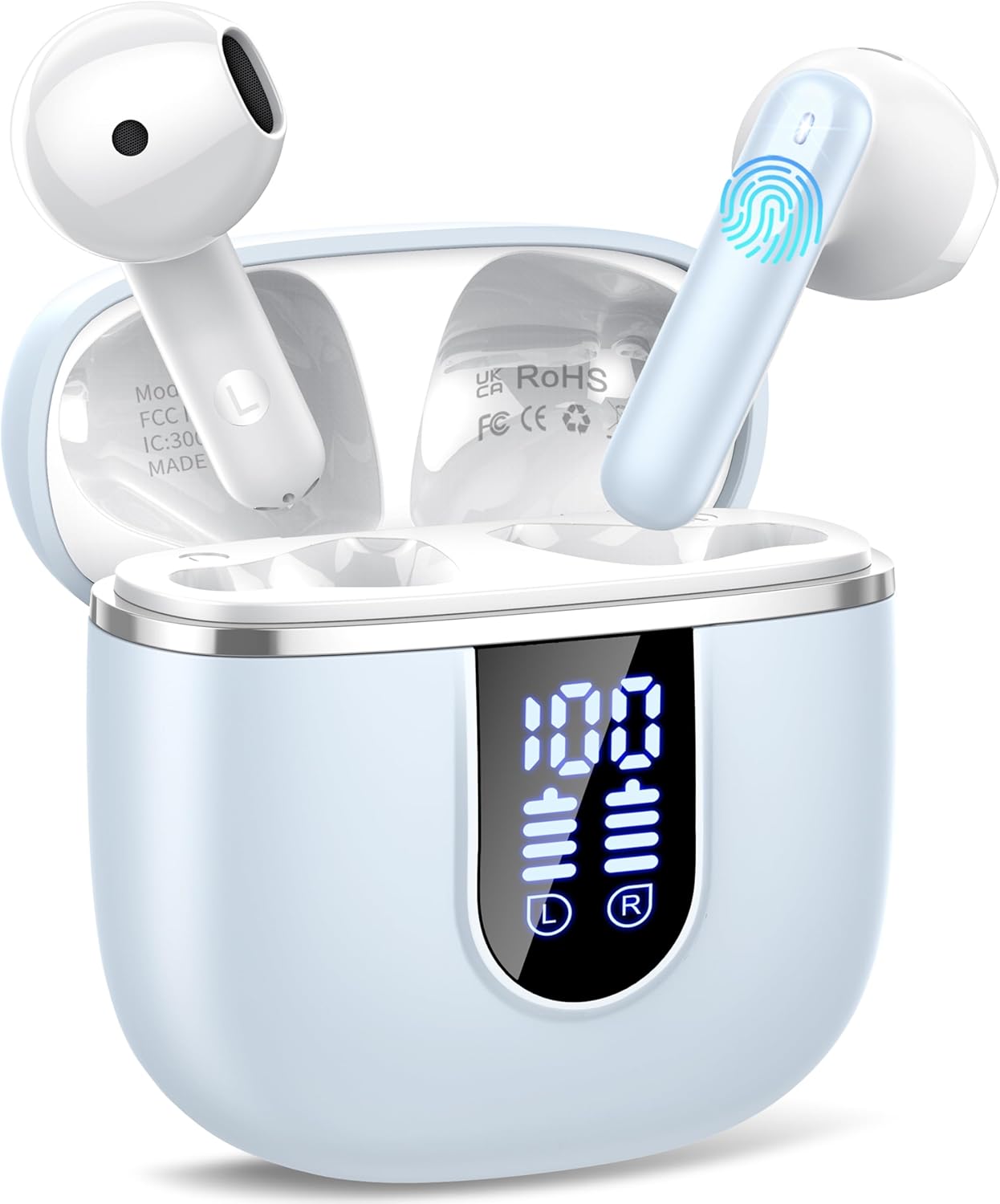
Image: The Cillso H97 Wireless Earbuds are shown inside their open charging case. The case features a dual LED display indicating battery percentages for the case and individual earbuds. The earbuds are white with a sleek design, and the charging case is a light azure color.
The image above displays the earbuds within their charging case. Key features include the dual LED display on the charging case, which shows the battery status for both the case and each earbud. The earbuds themselves are designed for in-ear comfort and feature touch control areas.
Kurmak
1. Kulaklıkları ve Kutuyu Şarj Etme
İlk kullanımdan önce kulaklıklarınızı ve şarj kutusunu tamamen şarj edin.
- Connect the provided Type-C charging cable to the charging port on the case and to a standard USB power adapter (5V/1A or 5V/2A).
- The dual LED display on the charging case will show the charging progress. A full charge for the case takes approximately 1.5 hours.
- Place the earbuds into the charging case. They will automatically begin charging. The LED display will indicate their charging status.
- The earbuds provide up to 8 hours of playback on a single charge, and the charging case provides an additional 32 hours of playtime.
2. Cihazınızla Eşleştirme
The H97 earbuds utilize Bluetooth 5.4 for a stable and efficient connection.
- İlk Eşleştirme:
- Cihazınızın Bluetooth özelliğinin açık olduğundan emin olun.
- Şarj kutusunun kapağını açın. Kulaklıklar otomatik olarak açılacak ve eşleştirme moduna girecektir.
- On your device, search for Bluetooth devices and select "H97" from the list.
- Bağlantı kurulduktan sonra bir onay sesi duyacaksınız ve kulaklıklar kullanıma hazır olacaktır.
- Otomatik Yeniden Bağlantı: After the initial pairing, the earbuds will automatically connect to the last paired device when the charging case lid is opened.
- Tek Kulaklık Modu: Either earbud can be used independently. Simply take one out of the case, and it will connect.
Kullanım Talimatları
1. Kulaklıkların Takılması
The H97 earbuds are designed for an ergonomic and secure fit.

Image: A diagram illustrating the correct angle and position for wearing the earbud in the ear canal for optimal comfort and sound.
- Her bir kulaklığı yavaşça kulak kanalınıza yerleştirin.
- Adjust the earbud until it feels snug and comfortable. A proper fit ensures optimal sound quality and noise isolation.
- Each earbud weighs only 3.5 grams, providing lightweight comfort for extended wear.
2. Dokunmatik Kontroller
The earbuds feature sensitive touch sensors for easy control of various functions:
| Aksiyon | İşlev |
|---|---|
| Tek Dokunuş (Sol/Sağ) | Müziği çal/duraklat, Çağrıyı cevapla/bitir |
| Çift Dokunma (Sol) | Önceki Şarkı |
| Çift Dokunma (Sağ) | Sonraki Şarkı |
| Üçlü Dokunma (Sol) | Sesi Azalt |
| Üçlü Dokunma (Sağ) | Sesi Aç |
| Uzun Basma (2 saniye) | Çağrıyı Reddet, Sesli Asistanı Etkinleştir |
3. Güç Açma/Kapatma
- Güç Açık: Open the charging case lid, or long-press the touch area on both earbuds for 3 seconds if they are outside the case and off.
- Kapat: Kulaklıkları şarj kutusuna geri yerleştirin ve kapağı kapatın. Alternatif olarak, her iki kulaklığın dokunmatik alanına 5 saniye boyunca uzun süre basılı tutun.
4. Arama Yapma ve Alma
The H97 earbuds are equipped with 4 ENC (Environmental Noise Cancelling) microphones to ensure clear call quality.
- Cevap Çağrısı: Her iki kulaklığa da tek dokunuşla ulaşın.
- Çağrı Sonu: Arama sırasında herhangi bir kulaklığa tek dokunuşla ulaşın.
- Çağrıyı Reddet: Kulaklıklardan herhangi birine 2 saniye boyunca uzun basın.
5. Ses Çalma
Experience immersive HiFi stereo sound with deep bass, delivered by 14.2mm diaphragm drivers and AAC/SBC audio encoding.
- Oynat/Duraklat: Her iki kulaklığa da tek dokunuşla ulaşın.
- Sonraki Şarkı: Sağ kulaklığa iki kez dokunun.
- Önceki Şarkı: Sol kulaklığa iki kez dokunun.
Bakım
Doğru bakım kulaklığınızın ömrünü uzatacaktır.
- Temizlik: Kulaklıklarınızı ve şarj kutusunu temizlemek için yumuşak, kuru ve tiftiksiz bir bez kullanın. Sert kimyasallar veya aşındırıcı malzemeler kullanmayın.
- Depolamak: Kullanılmadığı zamanlarda kulaklıkları korumak ve şarjlarının dolu kalmasını sağlamak için şarj kutusunda saklayın. Serin ve kuru bir yerde muhafaza edin.
- Suya Dayanıklılık: The earbuds feature IP7 nano-coating technology, protecting them from daily splashes, sweat, and rain. Do not submerge them in water or expose them to strong jets of water. Ensure they are dry before placing them back in the charging case.
Sorun giderme
Herhangi bir sorunla karşılaşırsanız aşağıdaki yaygın sorunlara ve çözümlere bakın:
| Sorun | Olası Çözüm |
|---|---|
| Kulaklıklar cihazla eşleşmiyor |
|
| Sadece tek kulaklık çalışıyor |
|
| Şarj kutusu şarj olmuyor |
|
| Kötü ses kalitesi veya kesintili bağlantı |
|
Özellikler
Key technical details of the Cillso H97 Wireless Earbuds:
- Modeli: H97
- Bluetooth Sürümü: 5.4
- Ses Kodlaması: AAC / SBC
- Sürücü Boyutu: 14.2 mm Diyafram Sürücüsü
- Kulaklık Çalma Süresi: 8 saate kadar (tek şarj)
- Toplam Çalma Süresi (şarj kutusuyla birlikte): 40 saate kadar
- Şarj Süresi (Kılıf): Yaklaşık 1.5 saat (C Tipi)
- Su Geçirmezlik Derecesi: IP7
- Kulaklık Ağırlığı: 3.5 gram (her biri)
- Şarj Kutusu Ağırlığı: 32 gram
- Ürün Ölçüleri: 0.79 x 0.79 x 0.79 inç (kulaklık uçları, yaklaşık)
- Ürün Ağırlığı: 3.2 ons (toplam paket ağırlığı)
- Piller: 2 A pil gereklidir (dahil)
- Uyumluluk: Most Bluetooth devices (Android 4.4+, iOS 8.0+, Bluetooth 4.0+)
Garanti ve Destek
Cillso products are designed for reliability and performance. This product comes with a standard manufacturer's warranty against defects in materials and workmanship.
- For warranty claims or technical support, please refer to the contact information provided with your purchase or visit the official Cillso webalan.
- Lütfen garanti hizmeti için satın alma belgenizi saklayın.


