1. Giriş
Satın aldığınız için teşekkür ederizasing the Paladone Gudetama Icon Light. This flexible rubber egg 3D lamp is designed to provide a soft, ambient light. Please read this manual carefully to ensure proper setup, operation, and maintenance of your product.

The Paladone Gudetama Icon Light in its off state, positioned on a shelf. This image illustrates the product's appearance when not in use.
2. Güvenlik Bilgileri
- Bu ürün yalnızca iç mekanda kullanıma yöneliktir.
- Do not expose the light to water or excessive moisture.
- Küçük çocukların erişemeyeceği yerde saklayın. Bu bir oyuncak değildir.
- Use only the specified battery type (3x AAA batteries, not included).
- Eski ve yeni pilleri veya farklı pil türlerini karıştırmayın.
- Ürün uzun süre kullanılmayacaksa pilleri çıkarın.
- Kullanılmış pilleri yerel düzenlemelere uygun şekilde sorumlu bir şekilde atın.
3. Kurulum
3.1 Pil Kurulumu
- Locate the battery compartment on the underside of the Gudetama Icon Light.
- Pil bölmesinin kapağını açın.
- Pil yuvasının içindeki işaretlere uyarak 3 adet AAA pil takın ve doğru kutuplara (+/-) dikkat edin.
- Pil bölmesi kapağını sıkıca kapatın.
3.2 Yerleştirme
Place the Gudetama Icon Light on a flat, stable surface. Ensure it is not near heat sources or in direct sunlight, which could affect its material or battery life.

The Gudetama Icon Light placed on a white shelf, ready for use. This image demonstrates a typical placement for the product.
4. Kullanım Talimatları
4.1 Açma/Kapatma ve Parlaklık Ayarı
The Gudetama Icon Light features a touch-sensitive activation. To operate:
- Açmak için: Gently press down on the top of the Gudetama figure. The light will illuminate at its lowest brightness setting.
- Parlaklığı Ayarlamak için: Press down on the Gudetama figure again to cycle through different brightness levels. The light has multiple intensity settings.
- Kapatmak: Continue pressing until the light turns off.

A hand is shown pressing the top of the Gudetama Icon Light, demonstrating the touch activation method to turn the light on or adjust its brightness.
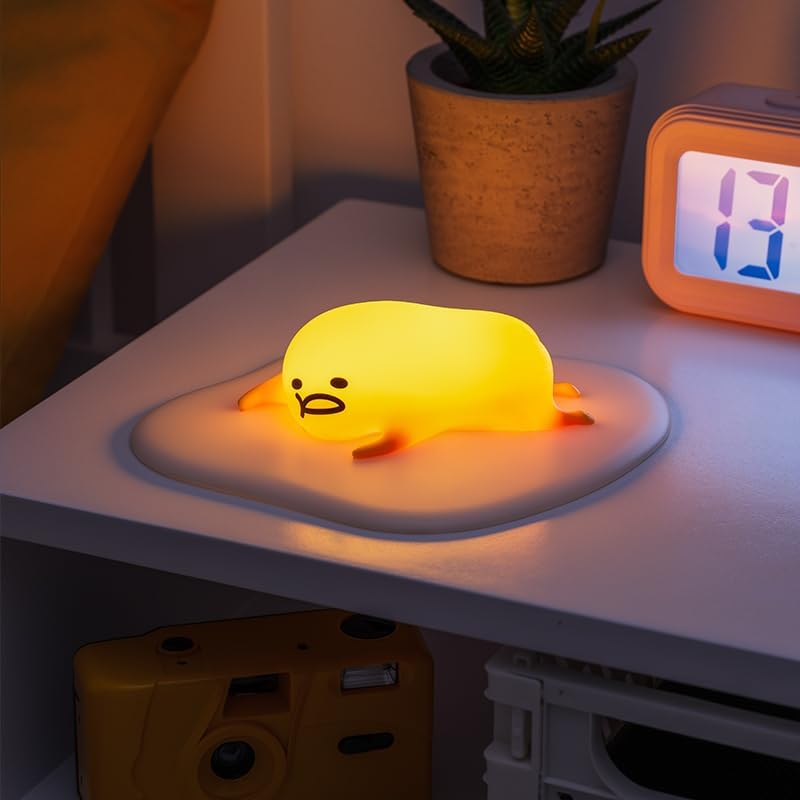
The Gudetama Icon Light fully illuminated, emitting a soft yellow glow. This image shows the product in its operational state.
5. Bakım
5.1 Temizlik
To clean the Gudetama Icon Light, gently wipe it with a soft, dry cloth. Do not use abrasive cleaners, solvents, or immerse the product in water.
5.2 Pil Değişimi
When the light dims or stops functioning, it is time to replace the batteries. Follow the battery installation steps in Section 3.1.
6. Sorun Giderme
- Işık açılmıyor:
- Pillerin doğru kutuplara dikkat edilerek düzgün şekilde takıldığından emin olun.
- Yeni AAA pillerle değiştirin.
- Işık titriyor veya sönük:
- Yeni AAA pillerle değiştirin.
- Touch sensor is unresponsive:
- Ensure your hand is clean and dry.
- Pil seviyesi düşükse yenisiyle değiştirin.
7. Özellikler
| Model Numarası | 12897 |
| Boyutlar (D x G x Y) | 15.9D x 18G x 4.4Y santimetre |
| Ürün Ağırlığı | 0.21 Kilogram |
| Güç Kaynağı | Pille Çalışır (3 adet AAA pil, dahil değildir) |
| Işık Kaynağı Türü | NEDEN OLMUŞ |
| Kontrol Yöntemi | Dokunmatik / Basmalı Düğme |
| Malzeme | Silicone / Rubber |
| İç/Dış Mekan Kullanımı | Kapalı |
8. Garanti ve Destek
This product is covered by a standard manufacturer's warranty. For specific warranty details, please refer to the packaging or contact your retailer. If you encounter any issues not covered in the troubleshooting section, please contact Paladone customer support through their official website or your point of purchase for assistance.
Üretici: Paladon


