giriiş
This manual provides instructions for the safe and effective use of your Ashfly Portable Handheld Kids Microscope. Please read this manual thoroughly before operating the device and retain it for future reference.
The Ashfly Portable Handheld Kids Microscope is designed to introduce young scientists to the microscopic world. Featuring a 2-inch LCD screen and 200x magnification, it allows for real-time observation of small objects.
Paket İçeriği
Aşağıda listelenen tüm öğelerin paketinizde mevcut olduğundan emin olun:
- Ashfly Portable Handheld Kids Microscope
- USB Şarj Kablosu
- Lanyard/Wrist Strap
- Kullanım Kılavuzu (bu belge)

Image: Contents of the Ashfly Portable Handheld Kids Microscope package, including the microscope, USB cable, and wrist strap.
Kurmak
1. Cihazın Şarj Edilmesi
- Locate the USB charging port on the microscope.
- Connect the provided USB charging cable to the microscope and a compatible USB power source (e.g., computer, wall adapter).
- Şarj gösterge ışığı yanacaktır. Tam şarj için yaklaşık 2-3 saat bekleyin.
- Tamamen şarj olduktan sonra şarj kablosunu çıkarın.
2. Attaching the Lanyard/Wrist Strap
Thread the lanyard or wrist strap through the designated loop on the microscope to prevent accidental drops during use.
Kullanım Talimatları
1. Güç Açma/Kapatma
- To power on, press and hold the power button (usually marked with a power symbol) for a few seconds until the screen illuminates.
- Kapatmak için güç düğmesine tekrar basın ve ekran kapanana kadar basılı tutun.
2. Observing Objects
- Place the object you wish to observe on a flat surface.
- Position the microscope's lens directly over the object.
- Adjust the focus wheel (if present) or move the microscope closer/further from the object until a clear image appears on the 2-inch LCD screen.
- Use the zoom adjustment button (4x zoom) to further magnify the image up to 200x.

Image: A child holding the Ashfly microscope, observing a small object on a surface, demonstrating its handheld operation.
3. Fotoğraf ve Video Çekme
The microscope supports photo and video functions. It comes with built-in memory for storing observations.
- To take a photo: Press the designated photo capture button (refer to device markings).
- To record a video: Press the designated video record button to start recording, and press it again to stop.

Image: The Ashfly microscope's screen displaying a magnified image of an insect, illustrating its digital imaging capability.
4. Dual-Lens Design
This microscope features a dual-lens design. One side is the digital microscope for recording observations, and the other side is a physical magnifier for quick viewnesnelerin yerleştirilmesi.
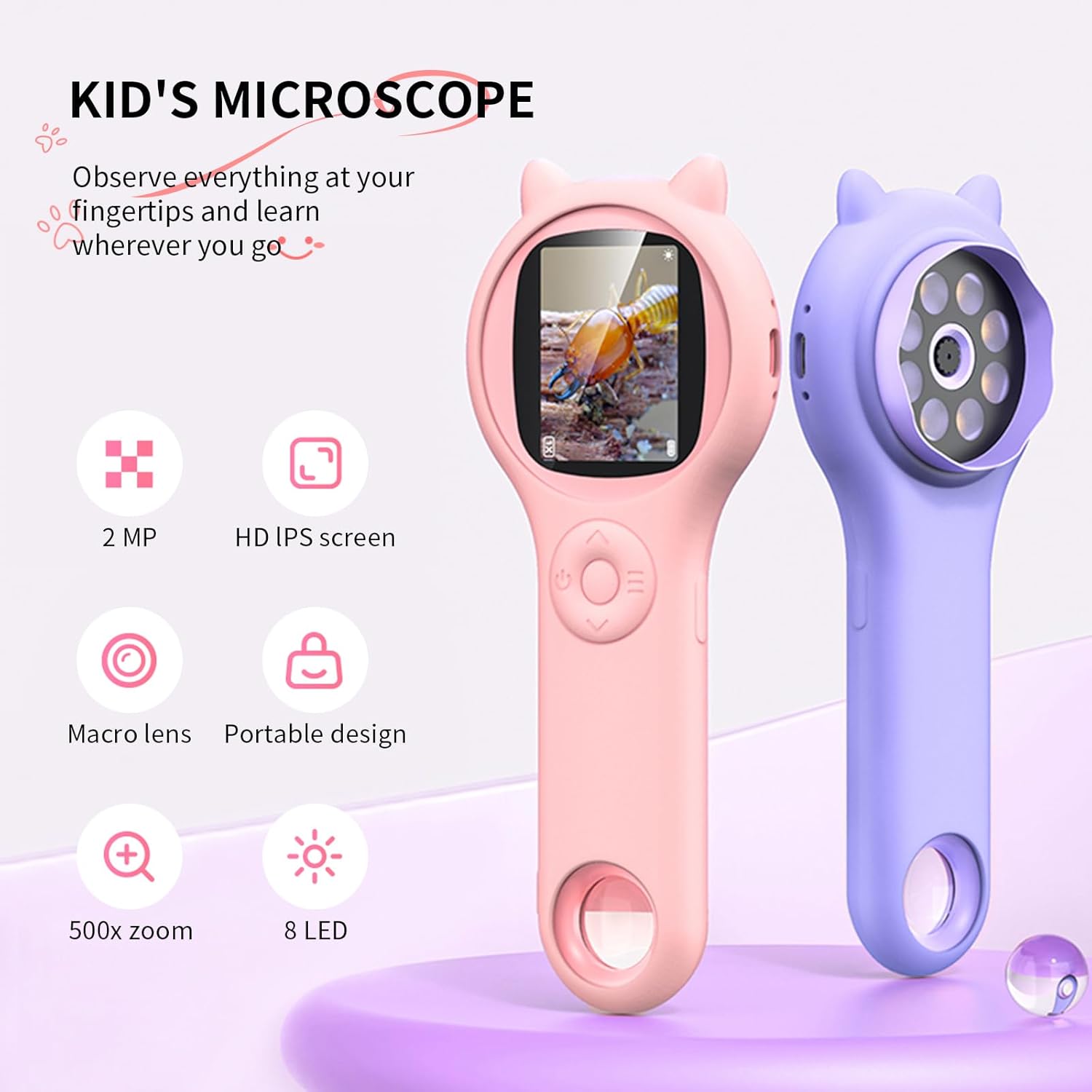
Image: Two Ashfly Kids Microscopes, one pink and one purple, illustrating the compact design and the different lenses/screens on each side.
Bakım
- Temizlik: Use a soft, dry cloth to clean the exterior of the microscope. For the lens and screen, use a specialized lens cleaning cloth. Do not use abrasive cleaners or solvents.
- Depolamak: Mikroskobu serin, kuru bir yerde, doğrudan güneş ışığından ve aşırı sıcaklıklardan uzakta saklayın.
- Pil Bakım: Pil ömrünü uzatmak için, pili sık sık tamamen boşaltmaktan kaçının. Cihazı uzun süre kullanmasanız bile düzenli olarak şarj edin.
Sorun giderme
| Sorun | Olası Neden | Çözüm |
|---|---|---|
| Cihaz açılmıyor. | Pil boşalmış. | Sağlanan USB kablosunu kullanarak cihazı şarj edin. |
| Image on screen is blurry. | Incorrect focus or distance from object. | Adjust the microscope's distance from the object or use the focus wheel (if applicable) until the image is clear. |
| Cannot capture photos/videos. | Dahili bellek dolu. | Transfer existing photos/videos to a computer to free up space. |
Özellikler
| Özellik | Detay |
|---|---|
| Örnek | ASIN B0DBVB3RGT |
| Marka | Kül sineği |
| Büyütme | Up to 200x (with 4x zoom adjustment) |
| Ekran | 2-inch LCD, 1080P HD digital imaging |
| Işık kaynağı | NEDEN OLMUŞ |
| Malzeme | Plastik |
| Renk | Mor |
| Güç Kaynağı | Pil ile çalışır |
| Objektif Mercek | Akromatik |
Garanti Bilgileri
Ashfly products are designed for quality and durability. For specific warranty details, please refer to the warranty card included with your product or visit the official Ashfly webSite. Satın alma fişinizi, garanti talepleriniz için satın alma belgeniz olarak saklayın.
Müşteri Desteği
If you encounter any issues or have questions regarding your Ashfly Portable Handheld Kids Microscope, please contact our customer support team:
- Çevrimiçi destek: Ziyaret edin Ashfly Store on Amazon SSS ve iletişim seçenekleri için.
- E-posta: Ürün ambalajına veya resmi talimatlara bakın. webDoğrudan e-posta desteği için site.


