giriiş
The Wireless Express Sing-Along Bling Karaoke Microphone and Stereo Speaker is a versatile 2-in-1 device designed for entertainment. It combines a microphone with a Bluetooth speaker, allowing users to sing along to music from various compatible devices. This manual provides essential information for setup, operation, and maintenance of your device.
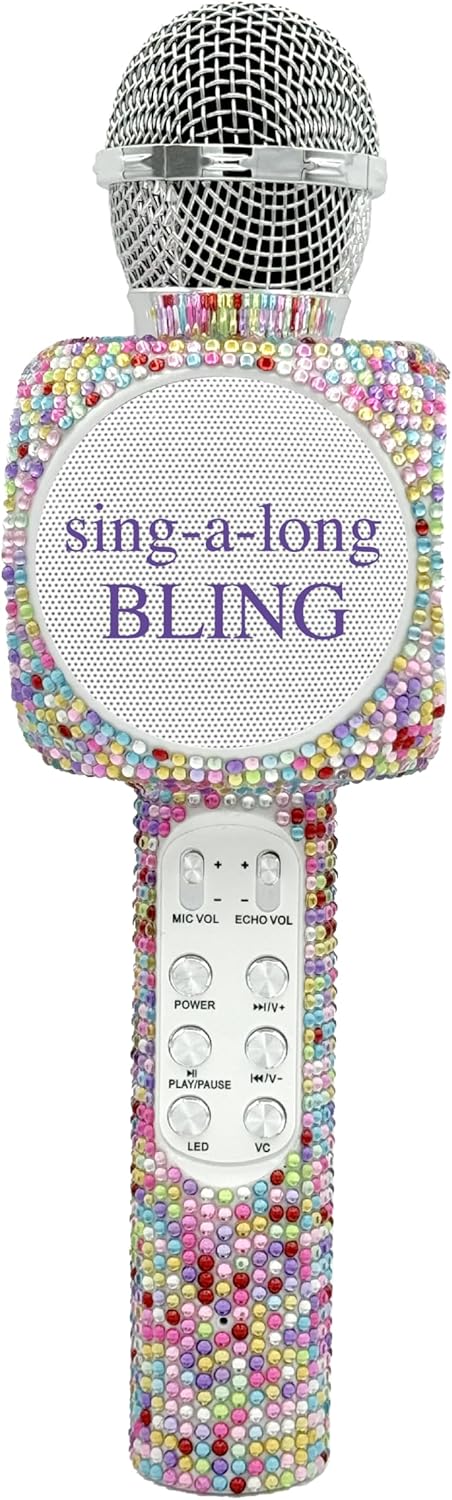
The Sing-Along Bling Karaoke Microphone, featuring its unique Confetti Bling design.
Temel Özellikler
- 2'ü 1 arada Tasarım: Combines a microphone and a Bluetooth stereo speaker for integrated audio and vocal performance.
- Bluetooth Bağlantısı: Easily connects wirelessly to smartphones, tablets, and computers (Android & Apple compatible) for streaming music.
- Dinamik LED Işıklar: Features dazzling LED lights that enhance the karaoke experience.
- Ses efektleri: Includes echo effects and voice changers for varied vocal styles.
- Entegre Kontroller: Offers convenient buttons for volume control, track skipping (previous/next), and recording.
- Taşınabilir Tasarım: Compact and lightweight, suitable for both indoor and outdoor use.
- Şarj Edilebilir Pil: Powered by a battery for wireless operation.
- SD Kart Yuvası: Allows for playback from an SD card.
- Kulaklık girişi: Provides an option for private listening or monitoring.

Bir fazlaview of the microphone's features, highlighting its Bluetooth capability, voice changer, LED lights, portability, and rechargeable battery.
Kurulum Kılavuzu
1. Mikrofonun Şarj Edilmesi
- Locate the Micro USB charging port on the microphone.
- Connect the provided charging cable to the microphone and a compatible USB power source (e.g., computer, USB wall adapter).
- The LED indicator will show charging status (refer to product-specific LED behavior for details, usually red for charging, off/blue for full).
- İlk kullanımdan önce tam şarj olması için yeterli süre tanıyın.
2. Açma/Kapama
- To power on, press and hold the Power button (usually marked with a power symbol) until the device activates and the LED lights illuminate.
- To power off, press and hold the Power button again until the device shuts down.
3. Bluetooth Eşleştirme
- Ensure the microphone is powered on and in pairing mode (indicated by a flashing LED light, often blue).
- Akıllı telefonunuzda, tabletinizde veya bilgisayarınızda Bluetooth'u etkinleştirin ve kullanılabilir cihazları arayın.
- Select "WE-BLING-MIC" or a similar device name from the list.
- Once paired, the microphone will usually emit an audible confirmation and the LED light will become solid.
Kullanım Talimatları
1. Temel Kontroller
- Ses Kontrolü: Use the "VOL+" and "VOL-" buttons to adjust the overall speaker volume.
- Mikrofon Ses Seviyesi: Use the "MIC VOL" slider or buttons to adjust your vocal volume.
- Yankı Etkisi: Use the "ECHO VOL" slider or buttons to add or reduce echo to your voice.
- Müzik Çalma:
- Oynat/Duraklat: Press the "PLAY/PAUSE" button.
- Önceki parça: Press the "PREV" button.
- Sonraki Parça: Press the "NEXT" button.
- LED Işıklar: Press the "LED" button to cycle through different light modes or turn them off.
- Ses Değiştirici: Press the "VC" button to activate and cycle through various voice changing effects.
2. Singing with Music
Once connected via Bluetooth, open your preferred karaoke app or music streaming service on your device. Play a song, and the music will stream through the microphone's speaker. You can then sing into the microphone, adjusting your vocal volume and echo as desired.
3. Recording Your Performance
The microphone supports recording. Connect an audio cable from the microphone's audio output to your recording device (e.g., smartphone with a recording app). Alternatively, some karaoke apps may allow direct recording through the Bluetooth connection.
4. Using the SD Card Slot
Insert a compatible SD card loaded with MP3 files into the designated slot. The microphone will automatically detect and begin playing music from the SD card. Use the music playback controls to manage tracks.
Demonstration of a similar wireless microphone's sound quality and features in a car environment, including FM radio connectivity and various sound modes. This video is provided by a seller and offers insights into potential usage scenarios and audio performance.
Bakım
- Temizlik: Mikrofonun dış yüzeyini temizlemek için yumuşak, kuru bir bez kullanın. Sert kimyasallar veya aşındırıcı temizleyiciler kullanmayın.
- Depolamak: Store the microphone in a cool, dry place away from direct sunlight and extreme temperatures. If a carrying case is provided, utilize it for protection during storage and transport.
- Pil Bakım: Pil ömrünü uzatmak için, pili sık sık tamamen boşaltmaktan kaçının. Cihazı uzun süre kullanmasanız bile düzenli olarak şarj edin.
Sorun giderme
| Sorun | Çözüm |
|---|---|
| Mikrofon açılmıyor. | Pilin şarjlı olduğundan emin olun. Şarj kablosunu bağlayın ve tekrar deneyin. |
| Bluetooth üzerinden eşleştirme yapılamıyor. | Make sure the microphone is in pairing mode (flashing LED). Ensure Bluetooth is enabled on your device and it's within range. Try restarting both devices. |
| Hoparlörden ses gelmiyor. | Check the volume levels on both the microphone and your connected device. Ensure the microphone is properly paired. |
| Echo/Voice Changer not working. | Ensure the "ECHO VOL" or "VC" functions are activated and adjusted to an audible level. |
Özellikler
| Özellik | Detay |
|---|---|
| Marka | Kablosuz Ekspres |
| Model Numarası | WE-BLING-MIC |
| Bağlantı Teknolojisi | Bluetooth |
| Güç Kaynağı | Pil ile çalışır |
| Malzeme | Plastic And Metal |
| Donanım Platformu | Karaoke Machine, Smartphone, Tablet |
| Ürün Ağırlığı | 1.46 pound |
| Paket Boyutları | 15.04 x 5.71 x 3.7 inç |
| Kutup Deseni | Tek yönlü |
| Mikrofon Form Faktörü | Elde taşınabilir |
| Özel Özellik | Ses Kontrolü |
| Bağlayıcı Türü | Mikro USB |
Kutuda Neler Var?
- Birlikte Şarkı Söyleyin Bling Bluetooth Karaoke Mikrofonu
- Şarj kablosu
Garanti ve Destek
For warranty information or technical support, please refer to the product packaging or contact Wireless Express customer service directly. Contact details can typically be found on the manufacturer's official website içinde veya ürün dokümanında.


