1. Giriş
This manual provides essential information for the installation, operation, maintenance, and troubleshooting of your PNY RTX 4000 Ada Generation 20GB DDR6 Quadro Graphics Card. This professional graphics card is designed for demanding applications such as 3D rendering, CAD/CAM, scientific simulations, and AI workflows, leveraging the NVIDIA Ada Lovelace architecture.
Key features include 6,144 CUDA cores, 48 RT Cores, 192 Tensor Cores, and 20GB of GDDR6 ECC memory, all within a single-slot, 130W design. It supports up to four 4K monitors or two 8K monitors via DisplayPort 1.4a.

Figure 1: PNY RTX 4000 Ada Generation Graphics Card overview, showing the single-slot design and an illustrative power connector icon.
2. Güvenlik Bilgileri
Please read and follow all safety instructions carefully to prevent damage to the product or personal injury.
- Herhangi bir bileşeni takmadan veya çıkarmadan önce daima bilgisayarınızın güç bağlantısını kesin.
- Ekran kartını kullanmadan önce statik elektriği boşaltmak için antistatik bileklik takın veya sık sık topraklanmış metal bir nesneye dokunun.
- Aşırı ısınmayı önlemek için bilgisayar kasanızın içinde yeterli havalandırma olduğundan emin olun.
- Ekran kartını neme veya aşırı sıcaklıklara maruz bırakmayın.
- Handle the card by its edges; avoid touching the gold-plated connectors or components on the PCB.
3. Paket İçeriği
Ürün paketinizde tüm öğelerin mevcut olduğunu doğrulayın:
- PNY RTX 4000 Ada Generation Graphics Card (VCNRTX4000ADA-PB)
- Documentation (this manual, quick start guide, etc.)
Note: Additional accessories such as display adapters or power cables may be sold separately or included depending on your region/retailer.
4. Kurulum
4.1. Fiziksel Kurulum
- Sisteminizi Hazırlayın: Bilgisayarınızı kapatın ve güç kablosunu prizden çıkarın. Bilgisayarınızın kasasını açın.
- Bir PCIe yuvası bulun: Identify an available PCI Express x16 slot on your motherboard. The RTX 4000 Ada Generation is a single-slot card.
- Yuva Kapaklarını Çıkarın: Remove the metal slot cover(s) from the back of your computer case corresponding to the chosen PCIe slot.
- Grafik Kartını Takın: Carefully align the graphics card with the PCIe slot and press down firmly until it is securely seated. Ensure the retention clip on the PCIe slot locks into place.
- Gücü bağlayın: The RTX 4000 Ada Generation requires an 8-pin PCIe power connector from your power supply. Connect this cable to the power connector on the top edge of the graphics card. Ensure a secure connection.
- Kartı Güvenceye Alın: Use a screw to fasten the graphics card's mounting bracket to the computer case.
- Close Case and Connect Displays: Close your computer case. Connect your display monitor(s) to the DisplayPort outputs on the graphics card.
4.2. Sürücü Kurulumu
- Güç Açık: Reconnect the power cable to your computer and power it on. Your system may boot with a basic display driver.
- Sürücüleri İndirin: Navigate to the official PNY or NVIDIA website to download the latest drivers for the RTX 4000 Ada Generation. It is recommended to download drivers directly from the manufacturer's webEn iyi performans ve istikrar için site.
- PNY Desteği: www.pny.com/destek
- NVIDIA Drivers: www.nvidia.com/drivers
- Sürücüleri Yükle: İndirdiğiniz sürücü yükleyicisini çalıştırın ve ekrandaki yönergeleri izleyin. Kurulumdan sonra sistemin yeniden başlatılması gerekebilir.
- Kurulumu Doğrulayın: After restarting, open the NVIDIA Control Panel or NVIDIA Settings to confirm that the graphics card is recognized and operating correctly.

Figure 2: Display output section of the PNY RTX 4000 Ada Generation, showing four DisplayPort 1.4a connectors.
5. Grafik Kartının Çalıştırılması
5.1. Temel İşlem
Once installed and drivers are updated, your PNY RTX 4000 Ada Generation graphics card will automatically handle graphics processing for your system. Applications that benefit from GPU acceleration will utilize the card's capabilities.
- NVIDIA Denetim Masası: Use the NVIDIA Control Panel (Windows) or NVIDIA Settings (Linux) to adjust display settings, manage 3D application profiles, and monitor GPU status.
- Yazılım Uyumluluğu: Ensure your professional applications (e.g., CAD, rendering software) are updated to versions that support NVIDIA Ada Lovelace architecture for optimal performance.
5.2. Çoklu Monitör Kurulumu
The RTX 4000 Ada Generation supports up to four DisplayPort 1.4a outputs, allowing for flexible multi-monitor configurations.
- Connect your monitors to the available DisplayPort outputs on the graphics card.
- Access your operating system's display settings (e.g., Windows Display Settings) or the NVIDIA Control Panel to configure display arrangement, resolution, and refresh rates.
- The card supports resolutions up to 4K on four monitors simultaneously, or two 8K monitors.
6. Bakım
6.1. Temizlik
Düzenli temizlik, ekran kartınızın optimum performansını korumaya ve ömrünü uzatmaya yardımcı olur.
- Kapat: Always power off your computer and disconnect it from the power source before cleaning.
- Toz Giderimi: Use compressed air to gently blow dust from the heatsink fins and fan blades. Hold the fan blades in place while blowing to prevent over-spinning and potential damage to the fan bearings.
- Dış Temizlik: Wipe the exterior of the card with a soft, dry, lint-free cloth. Do not use liquid cleaners directly on the card.
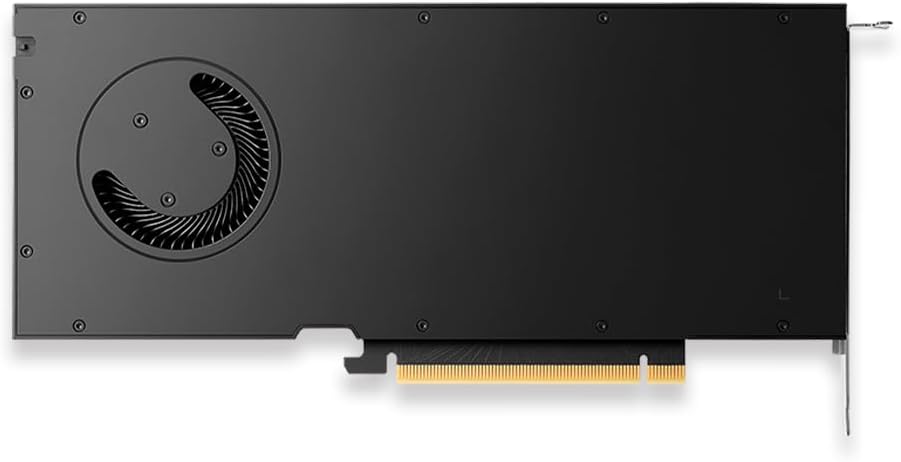
Şekil 3: Arka view of the PNY RTX 4000 Ada Generation, highlighting the cooling fan for maintenance reference.
6.2. Depolama
If storing the graphics card, place it in an anti-static bag and store it in a cool, dry environment away from direct sunlight and extreme temperatures.
7. Sorun Giderme
Bu bölümde karşılaşabileceğiniz yaygın sorunlar ele alınmaktadır.
- Görüntü Çıkışı Yok:
- Monitörün açık olduğundan ve anakartın entegre grafik kartına değil, grafik kartına bağlı olduğundan emin olun.
- Verify the graphics card is fully seated in the PCIe slot and the power cable is securely connected.
- Farklı bir ekran kablosu veya monitör deneyin.
- Check your BIOS/UEFI settings to ensure the primary display output is set to PCIe graphics.
- Sürücü Kurulum Sorunları:
- Uninstall any previous graphics drivers using a utility like Display Driver Uninstaller (DDU) in Safe Mode, then attempt a fresh installation of the latest drivers.
- Ensure you downloaded the correct drivers for your operating system and graphics card model.
- Sistem Kararsızlığı veya Çökmeleri:
- Güç kaynağı ünitenizin (PSU) minimum watt gereksinimlerini karşıladığından emin olun.tagSisteminiz için gerekenler, grafik kartı da dahil olmak üzere.
- Monitor GPU temperatures using software utilities. Excessive heat can cause instability. Ensure proper case airflow.
- Verify that your operating system and motherboard BIOS are up to date.
8. Özellikler
| Özellik | Detay |
|---|---|
| Marka | PNY |
| Model Numarası | VCNRTX4000ADA-PB |
| Grafik Eş İşlemcisi | NVIDIA Quadro RTX 4000 Ada Generation |
| Mimarlık | NVIDIA Ada Lovelace |
| CUDA Çekirdekleri | 6,144 |
| RT Çekirdekleri | 48 (3rd Generation) |
| Tensör Çekirdekleri | 192 (4th Generation) |
| Grafik RAM Boyutu | 20 GB GDDR6 ECC |
| Bellek Arayüzü | 160 bitlik |
| Bellek Bant Genişliği | 360 GB/s |
| GPU Saat Hızı | 2220 MHz (Artırılmış) |
| Bellek Hızı | 2250 MHz |
| FP32 Performansı | Up to 26.7 TFLOPS |
| Ray Tracing Performance | 61.8 TFLOP |
| AI Performance (FP8) | 327.6 TFLOP |
| Video Çıkış Arayüzü | 4x DisplayPort 1.4a |
| Maksimum Ekran Çözünürlüğü | 3840x2160 (4K) per display, up to 4 displays; 8K on 2 displays |
| Güç Tüketimi | 130W |
| Form Faktörü | Tek yuvalı |
| Ürün Boyutları (UxGxY) | 14.65 x 8.55 x 0.1 inç |
| Ürün Ağırlığı | 1.85 pound |
9. Garanti Bilgileri
PNY products are covered by a manufacturer's warranty. The specific terms and duration of the warranty may vary by region and product type. Please refer to the official PNY website or your product's packaging for detailed warranty information.
For warranty claims or to register your product, visit: www.pny.com/support/warranty
10. Teknik Destek
If you encounter issues that cannot be resolved using the troubleshooting steps in this manual, or require further assistance, please contact PNY Technical Support.
- PNY Desteği Webalan: www.pny.com/destek
- Destek website provides FAQs, driver downloads, and contact information for technical assistance.


