1. Giriş
Thank you for choosing PROHEAR 037 Bluetooth Hearing Protection Headphones. This manual provides detailed instructions for the safe and effective use of your new hearing protection device. The PROHEAR 037 series offers advanced hearing protection combined with Bluetooth audio capabilities, allowing you to enjoy music and make calls while working in noisy environments. This product is designed to protect your hearing while providing a comfortable and convenient audio experience.

Figure 1: PROHEAR 037 Bluetooth Hearing Protection Headphones. This image displays both the standard headband version (orange earcups) and the hard hat attachment version (black earcups), highlighting their design and controls.
2. Temel Özellikler
- Gelişmiş Bluetooth 5.0 Teknolojisi: Provides a smoother, faster, and more stable connection with an effective wireless range of up to 80 feet (24 meters).
- Effective Hearing Protection:
- Orange Model: NRR 25dB (Noise Reduction Rating).
- Hard Hat Attachment Model: SNR 30dB (Single Number Rating).
- Uzun Ömürlü Pil: Built-in 1100mAh rechargeable lithium battery offers up to 40 hours of playtime in Bluetooth mode.
- Kullanımı Kolay Kontroller: Intuitive buttons allow for easy adjustment of volume, song switching, and call management without removing the earmuffs.
- Rahat Tasarım: Features soft, breathable ear pads and an ultra-padded headband (for the headband model) for extended wear comfort.
- Wired Audio Mode: Supports infinite playtime via a 3.5mm audio input for non-Bluetooth devices or when the battery is low.
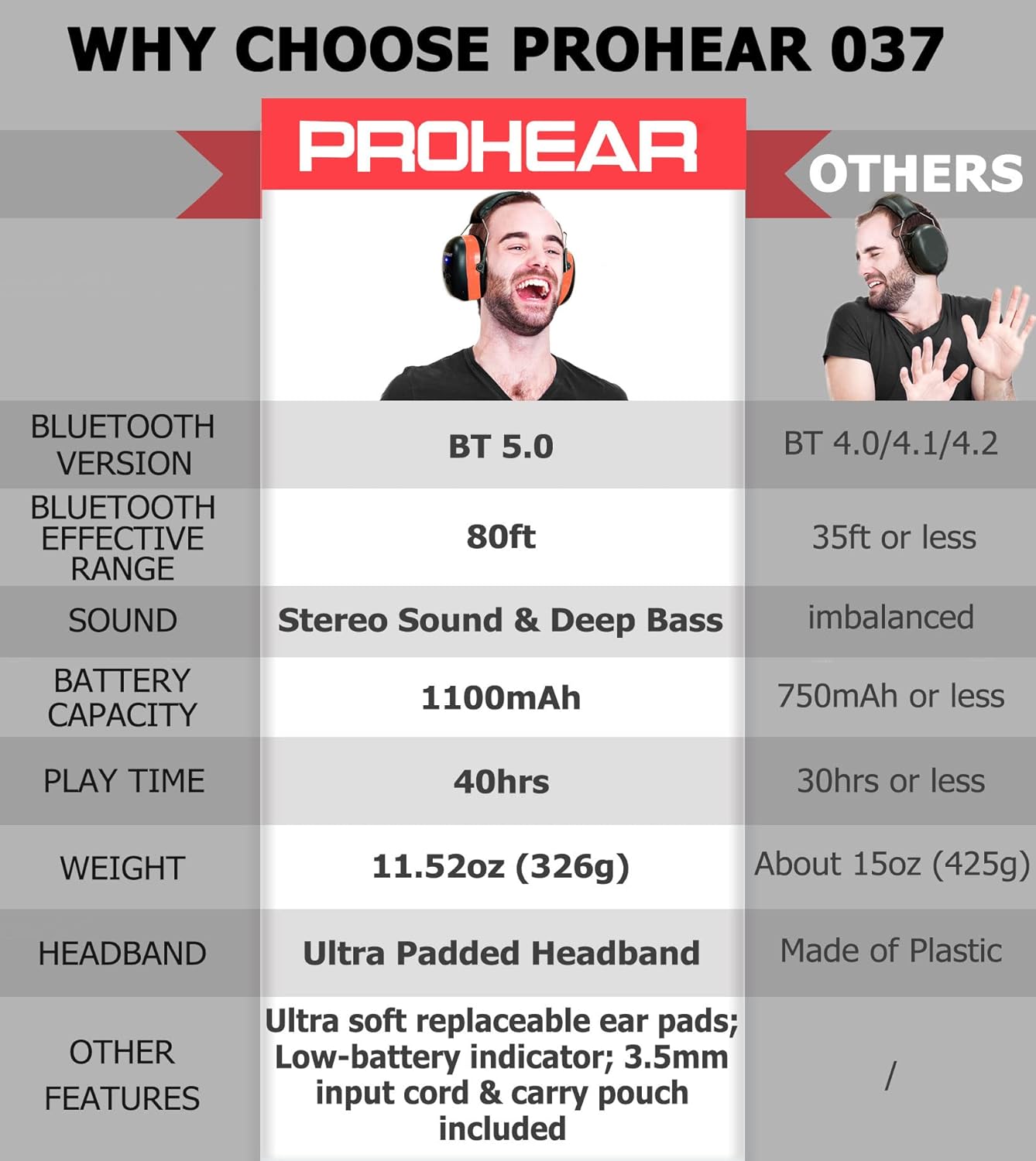
Figure 2: Feature Comparison. This table illustrates key advantages of the PROHEAR 037, including Bluetooth 5.0, 80ft effective range, stereo sound, 1100mAh battery, 40 hours playtime, and ultra-padded headband with soft replaceable ear pads.
3. Kurulum
3.1 Pilin Şarj Edilmesi
İlk kullanımdan önce kulaklıkları tamamen şarj edin. Tam şarj yaklaşık 4 saat sürer.
- Locate the charging port on the earmuff.
- Connect the provided charging cable to the port and a compatible USB power source (e.g., computer USB port, USB wall adapter).
- The LED indicator will show charging status (refer to the LED indicator section for details). Once fully charged, the indicator will change or turn off.

Figure 3: Battery and Charging Information. This image highlights the 1100mAh rechargeable battery, 4-hour charging time, and 40+ hours of playtime in wireless mode, along with infinite playtime in wired mode.
3.2 Bluetooth Eşleştirme
To connect your PROHEAR 037 headphones to a Bluetooth-enabled device:
- Kulaklıkların kapalı olduğundan emin olun.
- Eşleştirme modunu gösteren LED göstergesi mavi ve kırmızı renklerde dönüşümlü olarak yanıp sönene kadar Güç/Çok Fonksiyonlu düğmesine basılı tutun.
- Cihazınızda (akıllı telefon, tablet vb.) Bluetooth'u etkinleştirin ve kullanılabilir cihazları arayın.
- Select "PROHEAR 037" from the list of found devices.
- Bağlantı sağlandığında LED göstergesi sabit mavi renge dönecek veya yavaşça mavi renkte yanıp sönecektir.
Note: The Bluetooth 5.0 technology provides a stable connection up to 80 feet (24 meters) in open areas.
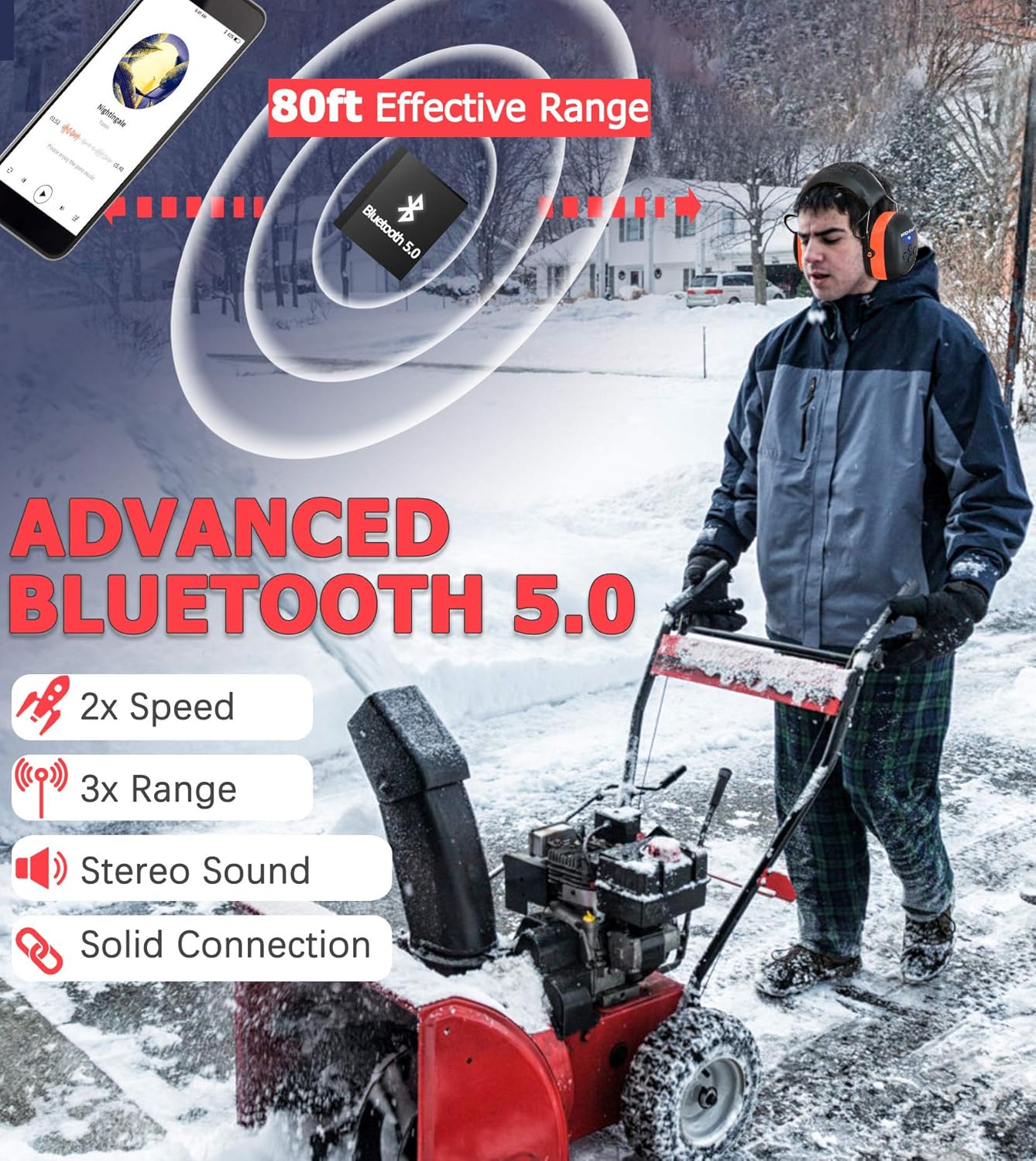
Figure 4: Advanced Bluetooth 5.0 Connectivity. This image demonstrates the 80-foot effective range of the Bluetooth 5.0 connection, emphasizing its speed, range, stereo sound, and solid connection.
3.3 Hard Hat Attachment Installation (for Hard Hat Model)
For the PROHEAR 037 Hard Hat Attachment model, follow these steps to securely attach the earmuffs to a compatible hard hat (hard hat not included):
- Step 1: Easy Installation: Align the attachment clips on the earmuffs with the slots on your hard hat.
- Step 2: Adjustable: Push the earmuffs firmly into the slots until they click into place. Ensure they are securely fastened and can be adjusted up and down.
- Step 3: Usage: Pull the earmuffs down over your ears to achieve a snug fit, ensuring full ear coverage for optimal hearing protection.
- Step 4: Un-usage: When not in use, pivot the earmuffs upwards and away from your ears, allowing them to rest against the hard hat.
Compatible with hard hats such as Pyramex Safety HP50011 HP500 and Dewalt DPG11-W.

Figure 5: Hard Hat Attachment Guide. This image provides a step-by-step visual guide for easy installation, adjustment, proper usage, and storage of the hard hat attachment earmuffs.
4. Kullanım Talimatları
4.1 Kontrollerview
The PROHEAR 037 features intuitive controls located on the earmuff. The "raised part" design allows for easy operation even with work gloves.
- Güç/Çok Fonksiyonlu Düğme: Açma/kapatma, oynatma/duraklatma, çağrıları yanıtlama/sonlandırma için kullanılır.
- Sesi Aç/Sonraki Parça Düğmesi: Increases volume, skips to the next song.
- Sesi Azaltma/Önceki Parça Düğmesi: Decreases volume, skips to the previous song.
4.2 Güç Açma/Kapatma
- Güç Açık: Press and hold the Power/Multi-function button for approximately 3 seconds until you hear a power-on prompt and the LED indicator lights up.
- Kapat: Press and hold the Power/Multi-function button for approximately 3 seconds until you hear a power-off prompt and the LED indicator turns off.
4.3 Müzik Oynatma
- Oynat/Duraklat: Güç/Çok Fonksiyonlu düğmesine kısa süre basın.
- Sonraki Parça: Sesi Açma/Sonraki Parça düğmesine kısa süre basın.
- Önceki parça: Ses kısma/önceki parça düğmesine kısa süre basın.
- Sesi aç: Long press the Volume Up/Next Track button.
- Sesi kıs: Long press the Volume Down/Previous Track button.
4.4 Çağrı Yönetimi
- Çağrıyı Cevapla/Sonlandır: Short press the Power/Multi-function button when a call comes in or during a call.
- Çağrıyı Reddet: Long press the Power/Multi-function button when a call comes in.
4.5 Wired Audio Mode
The PROHEAR 037 can be used in wired mode using a 3.5mm audio cable (not included). This mode allows for infinite playtime and is useful when the battery is depleted or for non-Bluetooth devices.
- Connect one end of the 3.5mm audio cable to the audio input port on the earmuff.
- Connect the other end to your audio source (e.g., smartphone, MP3 player).
- In wired mode, the volume and track control must be adjusted directly on your connected audio device. The headphone controls will not function.

Figure 6: Wired Audio Mode. This image illustrates the use of the 3.5mm audio input for infinite playtime, noting that volume adjustment is done via the connected device in this mode.
5. Bakım ve Özen
- Temizlik: Kulaklıkları yumuşak bir bezle silin.amp bez. Aşındırıcı temizleyiciler kullanmayın veya cihazı suya batırmayın.
- Depolamak: Kulaklığınızı serin, kuru ve doğrudan güneş ışığından ve aşırı sıcaklıklardan uzak bir yerde saklayın.
- Pil Bakım: Pil ömrünü uzatmak için, sık kullanılmasa bile kulaklıkları düzenli olarak şarj edin. Pilin uzun süre tamamen boşalmasından kaçının.
- Kulak Yastığı Değişimi: The ultra-soft ear pads are replaceable. Refer to the PROHEAR webYedek parçalar ve talimatlar için lütfen web sitesini ziyaret edin veya müşteri desteğiyle iletişime geçin.
6. Sorun Giderme
| Sorun | Olası Neden | Çözüm |
|---|---|---|
| Kulaklık açılmıyor. | Pil zayıf. | Kulaklığı tam şarj edin. |
| Bluetooth cihazıyla eşleştirilemiyor. | Kulaklık eşleştirme modunda değil; cihazın Bluetooth'u kapalı; cihazdan çok uzakta. | Ensure headphones are in pairing mode (flashing blue/red). Turn on Bluetooth on your device. Move headphones closer to the device (within 80ft). |
| Ses yok veya ses seviyesi düşük. | Volume too low on headphones or device; not properly connected; wired mode volume. | Increase volume on both headphones and connected device. Re-pair Bluetooth. If in wired mode, adjust volume on the connected device. |
| Bağlantı kesintisi. | Too far from device; interference; obstacles. | Move closer to the connected device. Avoid physical obstacles between headphones and device. |
7. Teknik Özellikler
| Özellik | Şartname |
|---|---|
| Örnek | PROHEAR 037 Series |
| Bluetooth Sürümü | Bluetooth 5.0 |
| Bluetooth Etkili Menzili | 80 feet'e (24 metre) kadar |
| Gürültü Azaltma Derecesi (NRR) | 25dB (Orange Headband Model) |
| Single Number Rating (SNR) | 30dB (Hard Hat Attachment Model) |
| Pil Kapasitesi | 1100mAh Şarj Edilebilir Lityum Pil |
| Çalma Süresi (Bluetooth Modu) | 40 saate kadar |
| Şarj Süresi | Yaklaşık 4 saat |
| Ses Girişi | 3.5 mm AUX girişi |
| Renk | Orange (Headband) / Black (Hard Hat Attachment) |
| ASIN | B0DBQ1TBCB |
| İlk Mevcut Tarih | 31 Temmuz 2024 |
8. Güvenlik Bilgileri
Proper use of hearing protection is crucial for preventing noise-induced hearing loss. Please read and follow these safety guidelines:
- Always wear the hearing protection in noisy environments where sound levels exceed safe limits.
- Ensure a snug fit over your ears to achieve the stated Noise Reduction Rating (NRR) or Single Number Rating (SNR). Any gaps can significantly reduce effectiveness.
- Do not modify the earmuffs. Modifications may compromise their protective capabilities.
- Keep the earmuffs clean and free from debris that could affect the seal or internal components.
- While using the Bluetooth audio feature, be aware of your surroundings, especially in environments where situational awareness is critical for safety.
- Avoid listening to audio at excessively high volumes for prolonged periods, even with hearing protection, as this can still contribute to hearing fatigue or damage.
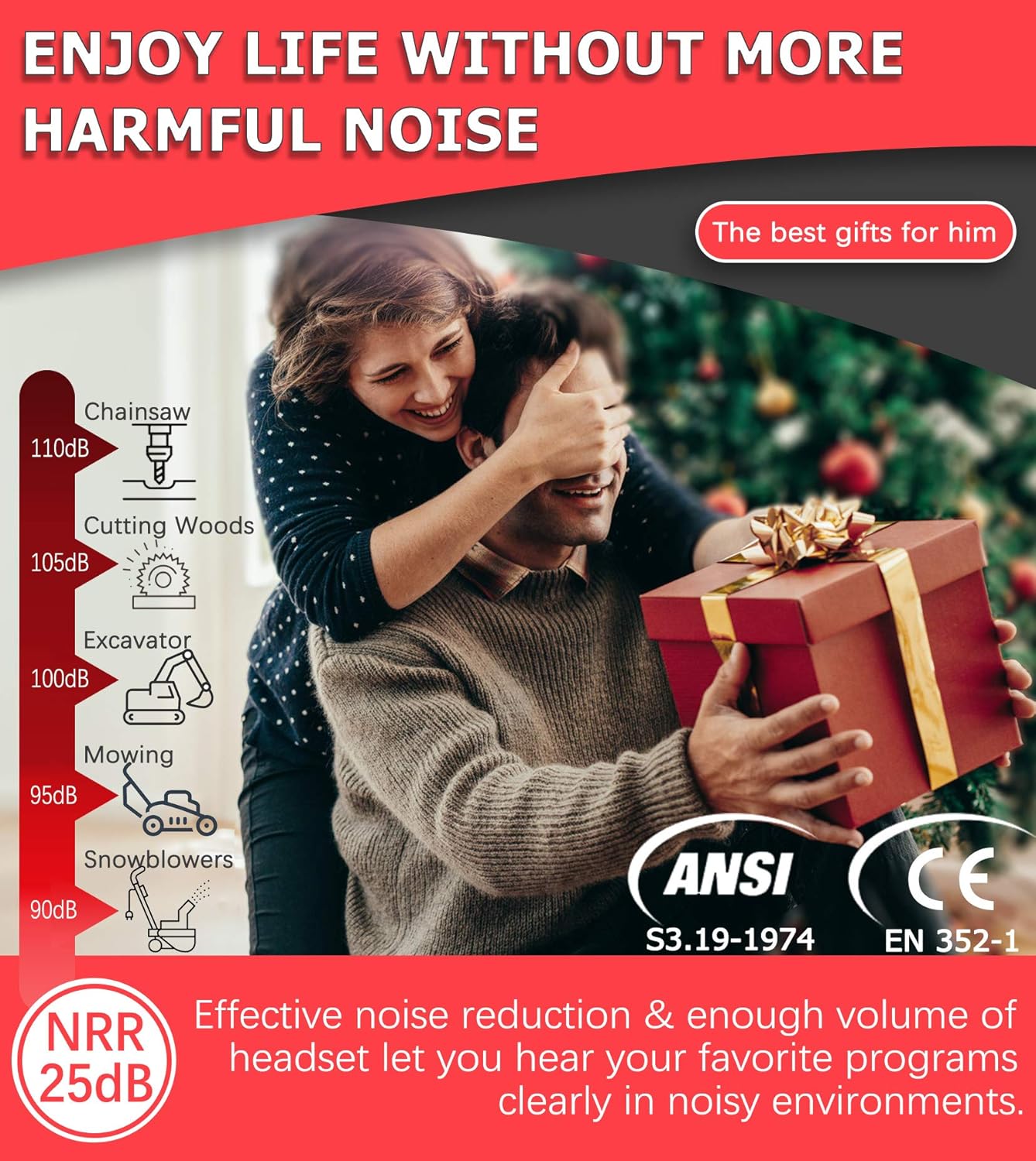
Figure 7: Noise Reduction Effectiveness. This image illustrates common noise levels and highlights the PROHEAR 037's NRR 25dB rating, indicating its capability to effectively reduce harmful noise and allow clear audio listening in loud environments.
9. Garanti ve Destek
PROHEAR products are designed for durability and performance. For warranty information, technical support, or to purchase replacement parts, please visit the official PROHEAR webSite üzerinden veya müşteri hizmetleri departmanıyla iletişime geçin. Garanti talepleriniz için satın alma belgenizi saklayın.


