1. Giriş
Satın aldığınız için teşekkür ederizasing the VolantexRC F4U Corsair 3-Channel RC Plane. This Ready-to-Fly (RTF) model is designed for both beginners and experienced enthusiasts, featuring a 6-axis gyro stabilizer for enhanced flight stability and ease of control. Please read this manual thoroughly before operating the aircraft to ensure safe and optimal performance.
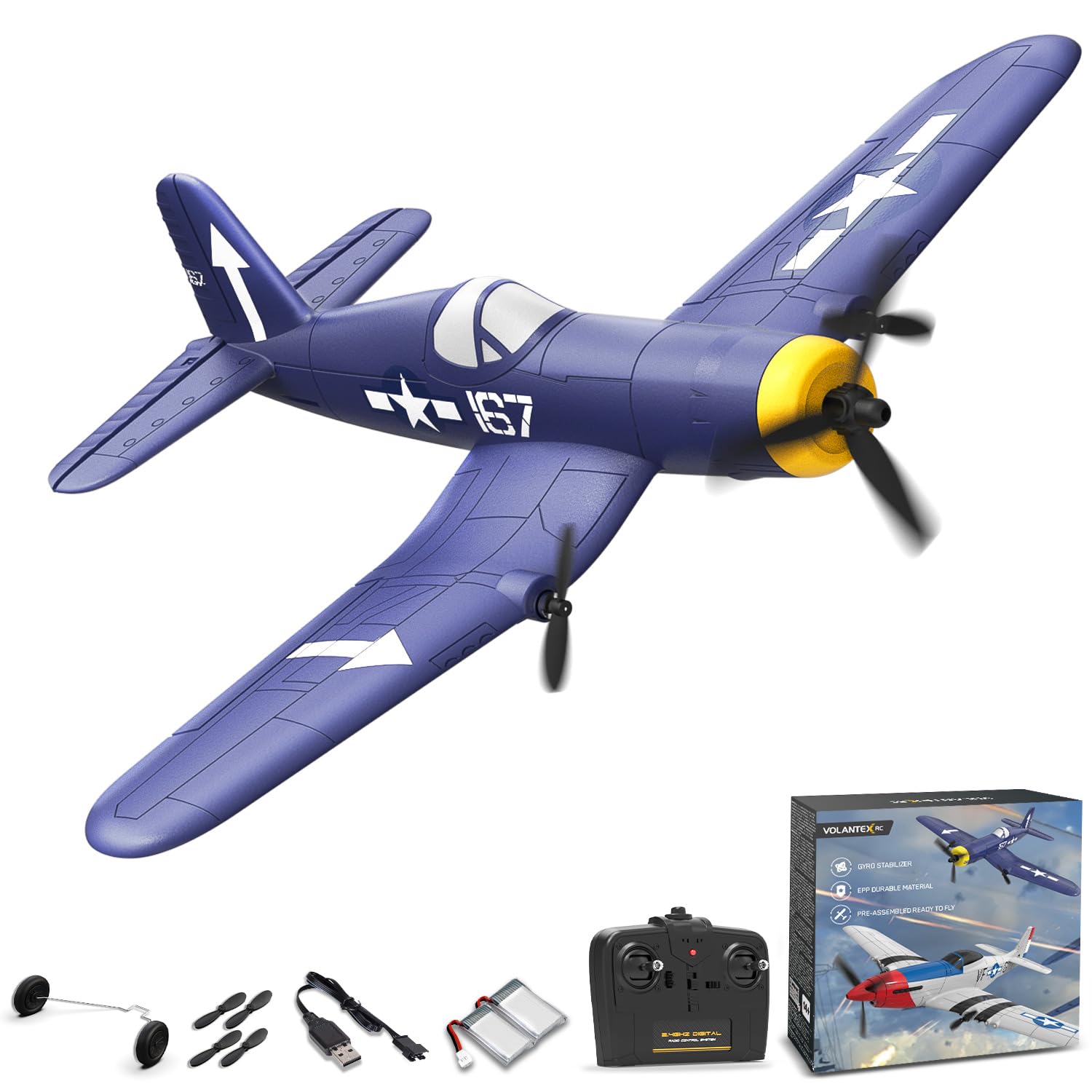
Image 1.1: The VolantexRC F4U Corsair 3-Channel RC Plane, a blue model with white markings, ready for flight.
2. Güvenlik Bilgileri
Always prioritize safety when operating your RC plane. Failure to follow these guidelines may result in injury or damage to the aircraft.
- Yaş Önerisi: This product is recommended for users 14 years and up. Adult supervision is advised for younger operators.
- Uçuş Ortamı: Fly in open areas, away from people, buildings, trees, power lines, and water. Avoid flying in windy conditions.
- Uçuş Öncesi Kontrol: Always ensure the aircraft and remote control batteries are fully charged and properly installed. Check all control surfaces for free movement.
- Pervane Güvenliği: Keep hands and face clear of the propellers when the battery is connected. Propellers can cause injury.
- Pil Kullanımı: Use only the provided charger and batteries. Do not overcharge or short-circuit batteries. Disconnect batteries after use.
- Hava Koşulları: Do not fly in rain, snow, strong winds, or lightning.
3. Kurulum Kılavuzu
3.1 Paket İçeriği
Before starting, verify all components are present:
- VolantexRC F4U Corsair RC Plane
- 2.4GHz Uzaktan Kumanda Vericisi
- LiPo Flight Batteries (2 included)
- USB Şarj Kablosu
- Yedek Pervaneler
- İniş Takımları Seti
- Kullanıcı Kılavuzu

Image 3.1: Illustration of the VolantexRC F4U Corsair package contents, including the plane, remote, batteries, and accessories.
3.2 Pilin Takılması ve Şarj Edilmesi
- Uçak Aküsü: Open the battery compartment on the underside of the aircraft. Connect the flight battery to the aircraft's power connector. Securely close the compartment.
- Uzaktan Kumanda Pilleri: Install 2 AA batteries (included) into the remote control transmitter.
- Şarj: Use the provided USB charging cable to charge the flight batteries. Connect the battery to the charger, then plug the charger into a USB power source. The indicator light will show charging status (refer to charger for specific light patterns).

Resim 3.2: Yakın çekim view of the battery compartment on the underside of the F4U Corsair, showing where to insert the flight battery.

Image 3.3: The USB charging cable connected to a flight battery, illustrating the charging process.
3.3 İniş Takımı Montajı
The landing gear can be easily attached for ground take-offs and landings, or removed for hand launches.
- Locate the slots on the underside of the wings and fuselage.
- Gently push the landing gear struts into the corresponding slots until they are secure.
- Ensure the wheels are free to rotate.

Image 3.4: The underside of the F4U Corsair, highlighting the attachment points for the landing gear.
3.4 Uzaktan Kumandanın Eşleştirilmesi
The aircraft and remote control are typically pre-bound. If re-binding is necessary:
- Uzaktan kumandayı açın.
- Uçuş aküsünü uçağa bağlayın.
- Place the aircraft on a flat surface. The indicator light on the aircraft will flash.
- Move the throttle stick on the remote control to the lowest position, then to the highest, and back to the lowest.
- The aircraft's indicator light will become solid, indicating successful binding.
4. Kullanım Talimatları
4.1 Uçuş Öncesi Kontroller
- Tüm pillerin tamamen şarj olduğundan emin olun.
- Check that the propellers are securely attached and undamaged.
- Verify that all control surfaces (rudder, elevator) move freely and correctly in response to remote control inputs.
- Uçuş alanının engellerden ve insanlardan arındırılmış olduğundan emin olun.
4.2 Take-off
The F4U Corsair offers two take-off methods:
- Hand Throw: Hold the aircraft firmly with one hand, apply full throttle, and gently throw it forward into the wind. The 6-axis gyro stabilizer will assist in maintaining level flight.
- Yerden Kalkış: Place the aircraft on a smooth, flat surface (e.g., pavement or short grass) with the landing gear installed. Gradually increase throttle and steer with the rudder until the aircraft gains enough speed to lift off.

Image 4.1: A hand launching technique for the F4U Corsair, demonstrating how to initiate flight with a gentle throw.

Image 4.2: The F4U Corsair accelerating on the ground for a conventional take-off.
Video 4.1: A demonstration of the VolantexRC F4U Corsair taking off and flying, showcasing its stability and ease of control for beginners.
4.3 Flight Controls and Gyro Stabilizer
The 3-channel remote control allows for basic flight maneuvers:
- Gaz: Controls the speed of the propellers (up/down on left stick).
- Dümen: Controls yaw (left/right on left stick).
- Asansör: Controls pitch (up/down on right stick).
The integrated 6-axis gyro stabilizer automatically corrects for turbulence and maintains stable flight, making it easier for beginners to learn. This system provides assistance to prevent crashes and allows for smoother control.

Image 4.3: A visual representation of the 6-axis gyro stabilizer actively correcting the aircraft's orientation during flight.
4.4 Düşük Pil Alarmı
The remote control transmitter will beep and flash a light when the aircraft's battery is low. This indicates it's time to land the plane and recharge the battery.

Image 4.4: The remote control displaying a flashing light and indicating a low battery alarm for the aircraft.
4.5 İniş
To land the aircraft, gradually reduce throttle and guide the plane towards a clear, open area. Maintain a slight nose-up attitude with the elevator for a smooth touchdown. If using landing gear, aim for a gentle glide onto a flat surface. If hand-launching, reduce throttle to minimum and allow the plane to glide to a soft landing on grass.
5. Bakım
5.1 Temizlik
Wipe the aircraft clean with a soft, dry cloth after each flight. Avoid using harsh chemicals or solvents that could damage the EPP foam material.
5.2 Pervane Değişimi
In case of damage, replace propellers with genuine VolantexRC spare parts. Carefully remove the damaged propeller and install the new one, ensuring it is oriented correctly and securely fastened.

Image 5.1: A set of spare propellers, essential for maintaining flight performance after wear or damage.
5.3 Depolama
Store the aircraft in a cool, dry place away from direct sunlight and extreme temperatures. Disconnect all batteries before storage.
6. Sorun Giderme
| Sorun | Olası Neden | Çözüm |
|---|---|---|
| Uçak uzaktan kumandaya yanıt vermiyor. | Low battery in aircraft or remote; not bound; interference. | Charge batteries; re-bind remote; move to an area with less interference. |
| Uçak düzensiz uçuyor veya dengesiz. | Strong wind; damaged propeller; gyro malfunction. | Fly in calm conditions; replace propeller; ensure gyro is enabled. |
| Propellers spin but aircraft does not take off. | Insufficient throttle; heavy landing gear on soft surface; damaged propeller. | Apply full throttle; try hand launch or harder surface; replace propeller. |
| Kısa uçuş süresi. | Pil tam şarjlı değil; eski pil. | Ensure full charge; consider replacing battery if performance degrades. |
7. Özellikler
| Özellik | Detay |
|---|---|
| Model Numarası | EXA76208RB2 |
| Kanallar | 3-Kanal |
| İstikrar | 6 eksenli Jiroskop Sabitleyici |
| Malzeme | EPP Durable Material |
| Motor Tipi | Çift Çekirdeksiz Motorlar |
| Uzaktan Kumanda Frekansı | 2.4 GHz |
| Ürün Boyutları | 13 x 13 x 5 inç |
| Ürün Ağırlığı | 1.06 pound |
| Önerilen Yaş | 14 yaş ve üzeri |
8. Garanti ve Destek
For warranty information, returns, or technical support, please refer to the product packaging or contact VolantexRC customer service directly. Keep your purchase receipt for any warranty claims.


