giriiş
This manual provides comprehensive instructions for the setup, operation, maintenance, and troubleshooting of your Logitech G915 X Lightspeed Wireless Mechanical Gaming Keyboard. Designed for high-performance gaming and versatile connectivity, this keyboard features LIGHTSPEED wireless technology, GL mechanical switches, customizable G-keys, and LIGHTSYNC RGB lighting. Please read this manual thoroughly to ensure optimal use and longevity of your device.

Resim: Yukarıdan aşağıya view of the Logitech G915 X Lightspeed Wireless Mechanical Gaming Keyboard, showcasing its full layout and RGB backlighting.
Kutuda Neler Var?
Upon unboxing your Logitech G915 X Lightspeed keyboard, verify that all the following components are present:
- Logitech G915 X Lightspeed Wireless Mechanical Gaming Keyboard
- LIGHTSPEED USB Receiver
- USB Genişletici
- USB-C Data/Charging Cable
- Kullanıcı Dokümantasyonu (bu kılavuz)

Image: All components included in the Logitech G915 X keyboard packaging, including the keyboard, USB-A to USB-C cable, USB extender, and USB wireless receiver.
Kurmak
İlk Şarj
Before first use, it is recommended to fully charge the keyboard.
- Connect the supplied USB-C data/charging cable to the USB-C port on the keyboard (located on the top edge).
- Connect the other end of the cable (USB-A) to a powered USB port on your computer or a USB wall adapter.
- The battery indicator light on the keyboard will show charging status. A full charge typically takes approximately 4 hours.
Klavyeyi Bağlama
The G915 X offers three connectivity options: LIGHTSPEED Wireless, Bluetooth, and Wired USB.

Image: Close-up of the Logitech G915 X keyboard's connectivity buttons (LIGHTSPEED, Bluetooth, Wired) located above the F5-F8 keys.
LIGHTSPEED Wireless (Recommended for Gaming)
- Locate the LIGHTSPEED USB receiver. For optimal signal, use the USB extender to position the receiver closer to the keyboard.
- Plug the LIGHTSPEED USB receiver into an available USB-A port on your computer.
- On the keyboard, slide the power switch to the ON position (located on the top right).
- Press the LIGHTSPEED button (indicated by a wireless signal icon) on the keyboard. The indicator light above the button will turn solid cyan when connected.
Bluetooth Bağlantısı
- Klavyenin açık olduğundan emin olun.
- Press and hold the Bluetooth button (indicated by a Bluetooth icon) on the keyboard until the indicator light above it starts blinking blue rapidly. This indicates pairing mode.
- On your computer or device, navigate to Bluetooth settings and select "G915 X" from the list of available devices.
- The indicator light will turn solid blue when successfully paired.
Kablolu USB Modu
- Connect the USB-C data/charging cable to the keyboard and the USB-A end to your computer.
- Klavye otomatik olarak kablolu moda geçecek ve şarj olmaya başlayacaktır.
Kullanım Talimatları
Temel Özelliklerview
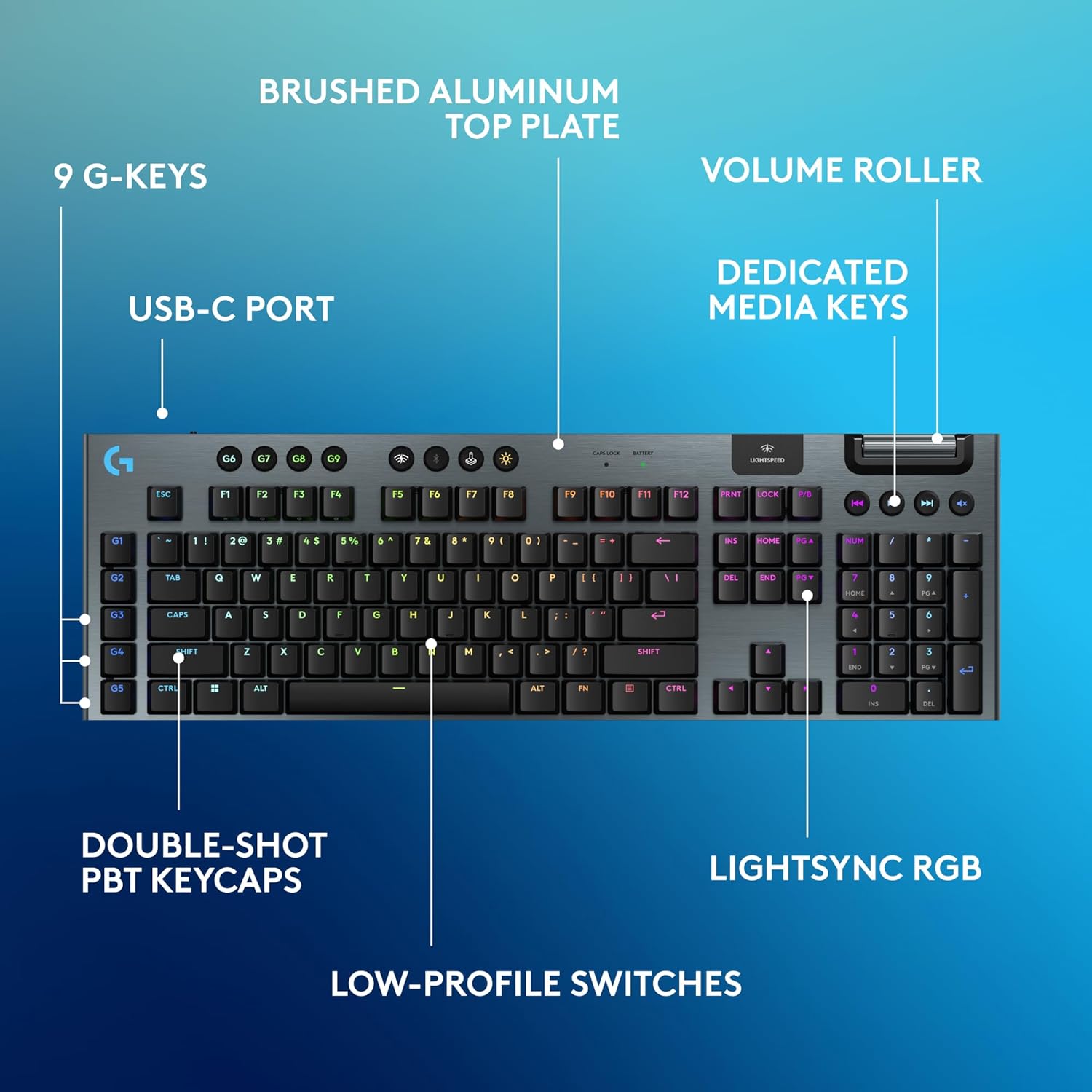
Image: Diagram highlighting key features of the Logitech G915 X keyboard, including G-keys, USB-C port, double-shot PBT keycaps, low-profile switches, brushed aluminum top plate, volume roller, dedicated media keys, and LIGHTSYNC RGB.
- GL Mechanical Switches: Düşük profesyonelfile switches designed for speed, precision, and comfort with a 1.3mm actuation point.
- LIGHTSPEED Wireless: Pro-grade wireless technology for ultra-fast and reliable connection.
- Bluetooth: For connecting to other devices that support Bluetooth.
- Özel Medya Tuşları: Control audio and video playback with ease.
- Hacim Artırıcı Silindir: Smoothly adjust audio volume.
- LIGHTSYNC RGB: Customizable per-key RGB lighting with approximately 16.8 million colors.
- G-Keys (G1-G5): Five dedicated programmable macro keys on the left side of the keyboard.
- Çift Katmanlı PBT Tuş Kapakları: Durable keycaps resistant to wear and shine.
Customizing with G HUB Software
To unlock the full potential of your G915 X keyboard, download and install the Logitech G HUB software from the official Logitech website. G HUB allows for extensive customization.
- G-Key Programming: Assign custom macros, commands, or system functions to the G1-G5 keys. You can create multiple profileFarklı oyunlar veya uygulamalar için.
- LIGHTSYNC RGB Customization: Personalize lighting effects, colors, and animations. Sync lighting with other Logitech G devices.
- Oyun Modu: Disable specific keys (e.g., Windows key) during gaming to prevent accidental interruptions.
- KEYCONTROL: Set up to 15 functions per key for advanced control.

Image: Screenshot of the Logitech G HUB software interface showing options for customizing commands and assigning functions to G-keys on the G915 X keyboard.
Media Controls and Volume
Dedicated media controls and a volume roller are located on the top right of the keyboard for quick access.
- Hacim Artırıcı Silindir: Roll up to increase volume, roll down to decrease.
- Media Buttons:
- Önceki Parça
- Oynat/Duraklat
- Sonraki Parça
- Sesini kapatmak
Pil Yönetimi
The Logitech G915 X keyboard provides up to 36 hours of continuous battery life with lighting enabled. Battery life may vary based on usage and lighting intensity.
- Pil Göstergesi: A dedicated battery indicator light is located near the LIGHTSPEED logo on the top right. It changes color to indicate battery level.
- Şarj: Connect the USB-C cable to the keyboard and a powered USB port. You can continue to use the keyboard in wired mode while it charges.
- Güç tasarrufu: The keyboard will enter a low-power state after a period of inactivity to conserve battery.
Bakım
Doğru bakım, klavyenizin uzun ömürlü olmasını ve yüksek performans göstermesini sağlar.
- Tuş Takımlarının Temizlenmesi: Yumuşak, tiftiksiz bir bez kullanın ve hafifçe kurulayın.ampSu veya hafif bir temizleme solüsyonu ile temizleyin. Sert kimyasallardan kaçının.
- Removing Dust/Debris: Tuş takımları ve anahtarlar arasındaki toz ve kalıntıları temizlemek için basınçlı hava kullanın.
- Yüzey Temizliği: Wipe the aluminum top plate with a soft, dry cloth.
- Depolamak: Uzun süre kullanılmayacaksa klavyeyi kuru, serin ve doğrudan güneş ışığından uzak bir yerde saklayın.
Sorun giderme
If you encounter issues with your Logitech G915 X keyboard, refer to the following common troubleshooting steps.
| Sorun | Olası Çözüm |
|---|---|
| Klavye yanıt vermiyor (Kablosuz) |
|
| Bluetooth bağlantı sorunları |
|
| Anahtarlar kaydedilmiyor veya çift yazılıyor |
|
| RGB aydınlatma çalışmıyor veya yanlış |
|
| G-keys or macros not working |
|
Özellikler
| Özellik | Detay |
|---|---|
| Model Numarası | 920-012670 |
| Bağlantı | LIGHTSPEED Wireless (2.4 GHz RF), Bluetooth, Wired USB-C |
| Anahtar Türü | GL Tactile Mechanical Switches (Low-Profile) |
| Harekete Geçme Noktası | 1.3 mm |
| Toplam Seyahat Mesafesi | 3.2 mm |
| keycaps | Çift Atışlı PBT |
| Aydınlatma | LIGHTSYNC RGB (Per-key customizable) |
| Programlanabilir Tuşlar | 5 dedicated G-keys, up to 15 functions per key via KEYCONTROL |
| Pil Ömrü | Up to 36 hours (with lighting) |
| Şarj Süresi | Yaklaşık 4 saat |
| Boyutlar (UxGxY) | 18.7 x 5.91 x 0.87 inç (47.5 x 15 x 2.2 cm) |
| Ağırlık | 2.38 pound (1.08 kg) |
| Malzeme | Aluminum top plate |
| İşletim Sistemi Uyumluluğu | PC, Mac OS |
Garanti ve Destek
Logitech products are designed for durability and performance. For information regarding warranty coverage, technical support, and frequently asked questions, please visit the official Logitech support webalan.
Logitech Desteği Webalan: https://support.logi.com/
Ek koruma için satın almayı düşünün.asing an extended protection plan available at the time of purchase.


