1. Giriş
The Triplett WS230 Wall Scanner is a versatile and compact tool designed for accurately detecting hidden objects behind walls. It features advanced capabilities to locate wood studs, metal objects (ferrous and non-ferrous), and live AC wiring, providing essential information for construction, home improvement, and maintenance tasks. This manual provides detailed instructions for safe and effective use of your WS230 Wall Scanner.
2. Güvenlik Bilgileri
Lütfen cihazı kullanmadan önce tüm güvenlik uyarılarını ve talimatlarını dikkatlice okuyun. Bu talimatlara uyulmaması elektrik çarpmasına, yangına veya ciddi yaralanmaya neden olabilir.
- Always assume that live electrical wires are present behind walls. Exercise extreme caution.
- Do not rely solely on the detection results. Always verify findings through other means if possible.
- Cihazı kuru ve temiz tutun. Neme veya aşırı sıcaklıklara maruz bırakmayın.
- Cihazı açmaya veya değiştirmeye çalışmayın. Tüm servis işlemlerini yetkili personele yaptırın.
3. Paket İçeriği
Paketinizde tüm öğelerin mevcut olduğundan emin olun:
- Triplett WS230 Wall Scanner
- 3.7V/300mAh Lithium Ion Battery (pre-installed)
- Soft Protective Pouch Case
- Kullanım Kılavuzu (bu belge)
- USB Tip C Şarj Kablosu

Figure 3.1: WS230 Wall Scanner with Pouch and USB-C Cable
4. Ürün Bittiview
Familiarize yourself with the components of your Triplett WS230 Wall Scanner.

Şekil 4.1: Ön View of WS230 Wall Scanner

Şekil 4.2: Geri View of WS230 Wall Scanner (QR Code: C242594011)
4.1 Temel Bileşen
- Renkli LCD Ekran: Displays detection mode, depth, battery status, and object location.
- Güç Düğmesi: Cihazı açar/kapatır.
- Mod Seçim Düğmeleri: Allows switching between Stud, Metal, and AC Voltage detection modes.
- Sensör Alanı: Located on the back of the device, this area must be in contact with the wall for accurate scanning.
- USB-C Şarj Portu: For recharging the internal Lithium-ion battery.
5. Kurulum ve Şarj
5.1 Pilin Şarj Edilmesi
The WS230 is equipped with a rechargeable 3.7V/300mAh Lithium-ion battery. Before first use, ensure the device is fully charged.
- Connect the provided USB Type C charging cable to the charging port on the device.
- USB kablosunun diğer ucunu standart bir USB güç adaptörüne (dahil değildir) veya bir bilgisayarın USB portuna bağlayın.
- LCD ekrandaki pil göstergesi şarj durumunu gösterecektir. Tam şarj genellikle birkaç saat sürer.
5.2 Açma/Kapatma
- Açmak için, düğmesine basın ve basılı tutun. Güç Düğmesi (red button) until the screen illuminates.
- Kapatmak için tuşunu basılı tutun. Güç Düğmesi Ekran kapanana kadar tekrar.
6. Operasyon
6.1 Genel Kullanım Yönergeleri
- Duvar yüzeyinin temiz ve kuru olduğundan emin olun.
- Avoid scanning over freshly painted or wallpapered surfaces until they are completely dry, as moisture can affect accuracy.
- Hold the scanner flat against the wall, ensuring the sensor area is in full contact.
- Tarayıcıyı yüzey üzerinde yavaş ve istikrarlı bir şekilde hareket ettirin.
6.2 Otomatik Kalibrasyon
The WS230 features automatic calibration for accurate results. Calibration occurs automatically upon power-on or when switching detection modes.
- Place the scanner flat against the wall in an area where you are certain there are no studs, metal, or live wires.
- Basın Güç Düğmesi or select your desired mode. The screen will display "Calibrating, please wait."
- Keep the device still against the wall until calibration is complete.

Figure 6.1: Calibration in Progress
6.3 Algılama Modları
The WS230 offers three primary detection modes:

Figure 6.2: Multiple Detection Mode Displays
6.3.1 Stud Detection
This mode locates the center and edges of wood or metal studs behind walls.
- Select the Stud Detection mode using the appropriate button.
- Place the scanner flat against the wall and slowly move it horizontally.
- The display will indicate the presence of a stud, its center, and depth (up to 1.5 inches / 38mm). Audio alerts will also sound.

Figure 6.3: Wood Stud Detection
6.3.2 Metal Algılama
This mode identifies ferrous and non-ferrous metals, such as pipes and electrical wiring (even if not live).
- Select the Metal Detection mode.
- Scan the wall slowly. The display will show "Detect metal" and indicate the object's location and type (magnetic/non-magnetic).
- Maximum detection depth is 4.0 inches (100mm).

Figure 6.4: Metal Detection

Figure 6.5: Non-Magnetic Metal Detection
6.3.3 AC Hacmitage Algılama
This mode specifically detects live AC wires behind walls, providing an essential safety feature.
- Select the AC Voltage Detection mode.
- Scan the wall slowly. The display will show a lightning bolt icon and indicate the presence of live AC wiring.
- Maximum detection depth is 2 inches (50mm).
7. Bakım
- Cihazı yumuşak ve kuru bir bezle temizleyin. Aşındırıcı temizleyiciler veya çözücüler kullanmayın.
- Store the device in its protective pouch in a cool, dry place when not in use.
- Regularly charge the battery to maintain its health, even if the device is not used frequently.
8. Sorun Giderme
If you encounter issues with your WS230 Wall Scanner, try the following:
- Yanlış Okumalar: Ensure the device is properly calibrated on a clear section of the wall. Check for moisture on the wall surface.
- Güç Yok: Verify the battery is charged. Connect the USB-C cable and allow it to charge for at least 30 minutes before attempting to power on again.
- Intermittent Detection: Ensure the sensor area is in full contact with the wall and you are moving the device slowly and steadily.
If problems persist, contact Triplett customer support.
9. Özellikler
| Özellik | Şartname |
|---|---|
| Ürün Boyutları | 4.8 x 1 x 2.4 inç |
| Ürün Ağırlığı | 4 Ons |
| Model Numarası | WS230 |
| Piller | 1 Lityum İyon pil (dahil) |
| Güç Kaynağı | Pil ile çalışır |
| Stud Detection Depth | 1.5 inçe (38 mm) kadar |
| Metal Algılama Derinliği | 4.0 inçe (100 mm) kadar |
| AC Hacmitage Detection Depth | 2 inçe (50 mm) kadar |
| Optimum Çalışma Sıcaklığı | 0 ila 40°C |
| Depolama Sıcaklığı | -20 ila 60°C |
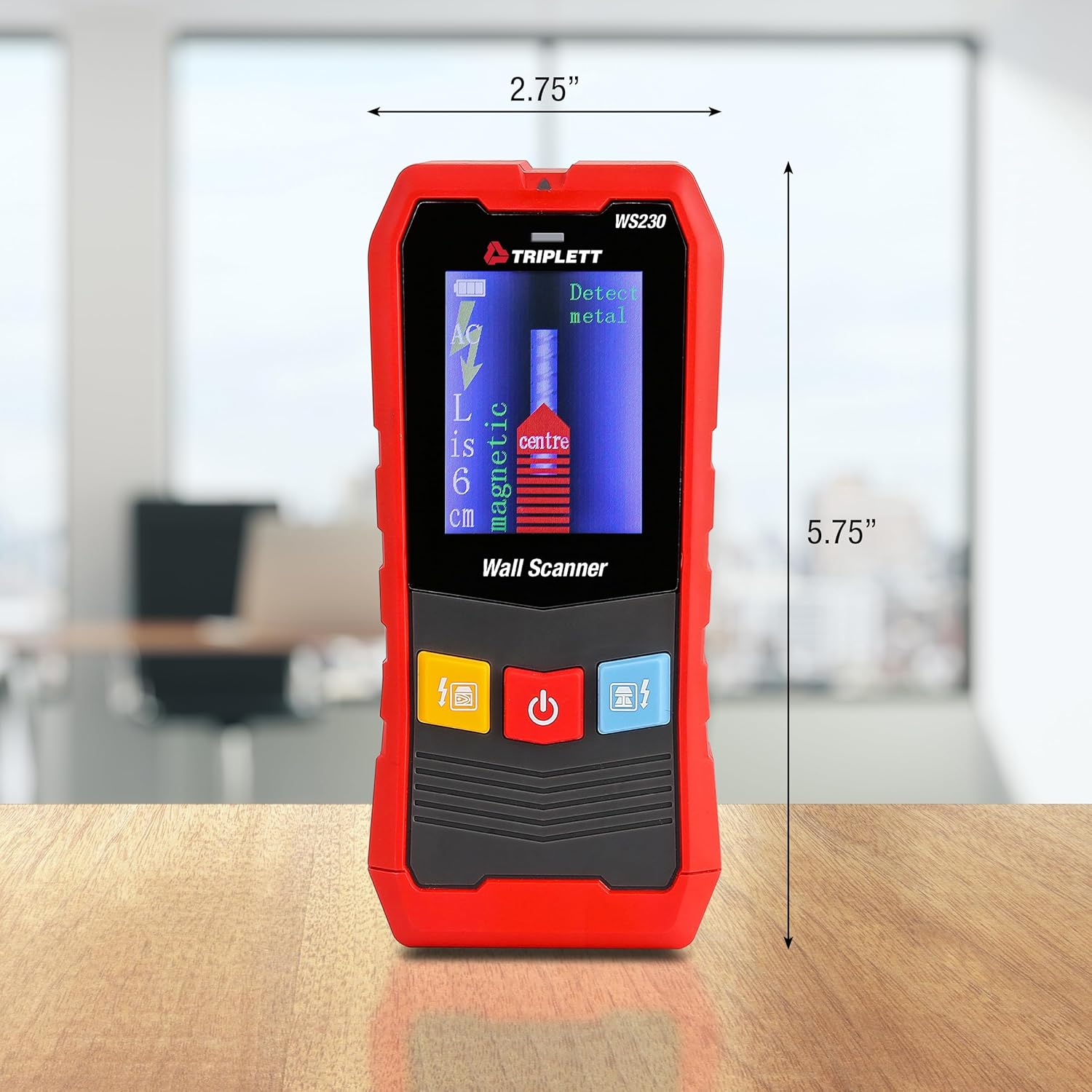
Figure 9.1: WS230 Dimensions
10. Garanti ve Destek
For warranty information or technical support, please refer to the official Triplett webSite üzerinden veya müşteri hizmetleri departmanıyla iletişime geçin. Satın alma belgenizi saklayın.
Visit the official Triplett Store: Triplett Mağazası Amazon'da


