1. Giriş
This manual provides detailed instructions for the operation and maintenance of your Docooler Digital Voice Recorder. Please read this manual thoroughly before using the device to ensure proper function and to maximize its capabilities. This device is designed for recording audio in various settings, including lectures, meetings, and interviews, featuring noise reduction and voice-activated recording.
2. Ürün Bittiview
The Docooler Digital Voice Recorder is a compact and portable audio recording device. It features a clear digital display, intuitive controls, and a robust design for reliable performance. Key features include intelligent noise cancellation, voice-activated recording, and a choice of 8GB or 32GB storage capacity.

Şekil 2.1: Ön view of the Docooler Digital Voice Recorder, showing the display and control buttons.

Figure 2.2: The compact size of the Docooler Digital Voice Recorder, shown held in a hand.

Figure 2.3: Illustration of the voice-activated recording feature, automatically starting when sound reaches a detectable level.
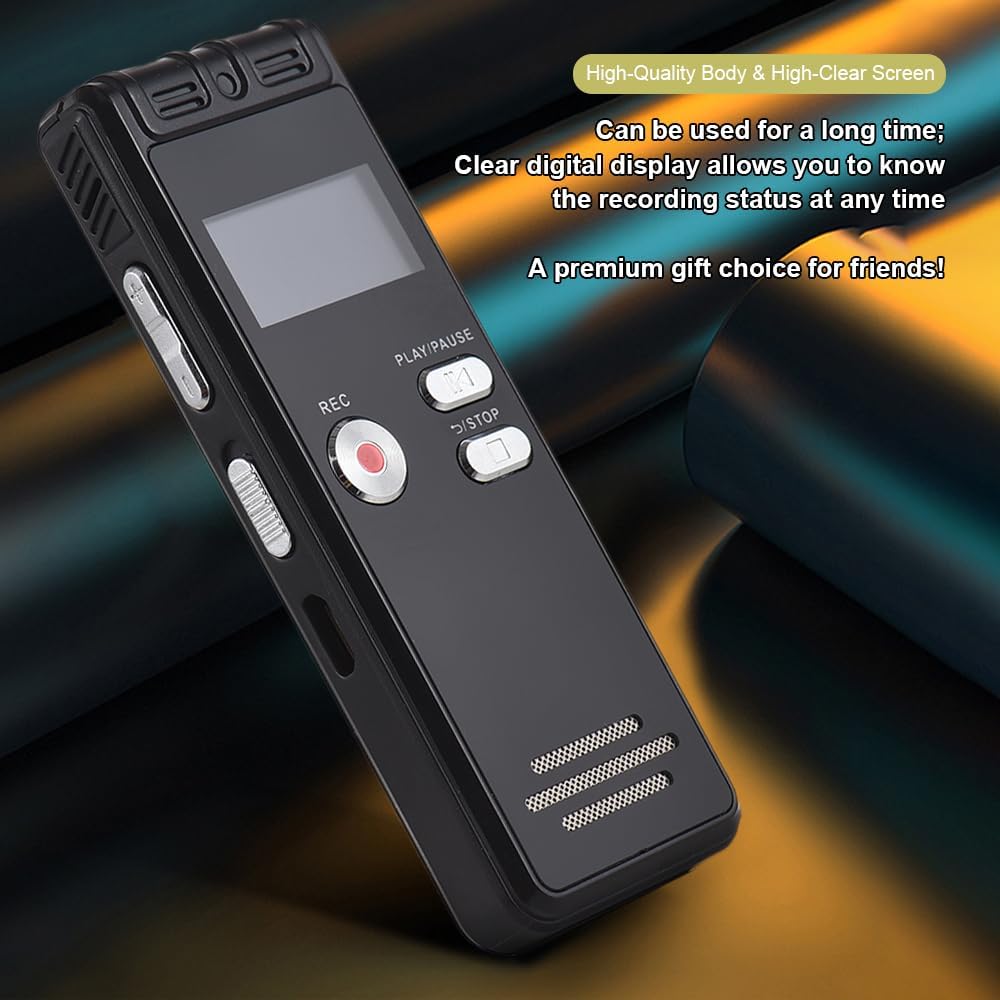
Figure 2.4: The durable construction and clear digital display of the recorder, providing real-time recording status.

Figure 2.5: The device features a built-in high-quality omnidirectional microphone for 360-degree panoramic sound capture.

Figure 2.6: The recorder's compact dimensions allow it to be easily carried in a pocket or bag.

Figure 2.7: The device supports one-click recording and saving, simplifying the recording process.

Şekil 2.8: Ör.amples of various environments where the recorder can be effectively used, such as meetings, lectures, training sessions, and teaching.
3. Paket İçeriği
Lütfen aşağıda listelenen tüm öğelerin paketinizde yer aldığından emin olun:
- 1x Voice Recorder
- 1x USB Kablosu
- 1x Kulaklık
- 1x Adapters (likely phone line adapter)
- 1x Connect Cable (likely for phone recording)
- 1x Kullanım Kılavuzu (bu belge)

Figure 3.1: The Docooler Digital Voice Recorder shown with its complete set of accessories, including USB cable, headphones, and connection cables.
4. Kurulum
4.1 Cihazı Şarj Etme
- Connect the included USB cable to the recorder's USB port.
- Plug the other end of the USB cable into a computer's USB port or a compatible USB wall adapter (not included).
- The device's screen will indicate charging status. A full charge typically takes approximately 2-3 hours.
4.2 Açma/Kapatma
- Açmak için: Ekran aydınlanana kadar Güç düğmesini basılı tutun.
- To power off: Press and hold the Power button until the screen turns off.
4.3 Kulaklık Bağlama
Insert the included headphones into the 3.5mm headphone jack on the device for private playback of recordings.
5. Kullanım Talimatları
5.1 Temel Kayıt
- Cihazın açık olduğundan emin olun.
- Basın KAYIT Kaydı başlatmak için düğmesine basın. Kayıt göstergesi yanacaktır.
- Kaydı duraklatmak için tuşuna basın. OYNAT/DURDUR Düğme. Devam etmek için tekrar basın.
- Kaydı durdurmak ve kaydetmek için file, tuşuna basın DURMAK butonuna basın. Kayıt otomatik olarak kaydedilecektir.
5.2 Voice-Activated Recording (VOR)
This feature allows the recorder to automatically start recording when sound is detected and pause when silence occurs, conserving memory and battery life.
- Navigate to the VOR settings in the device menu.
- Enable the VOR function and adjust the sensitivity level as needed.
- Basın KAYIT Bu düğmeye basın. Cihaz artık yalnızca ses olduğunda kayıt yapacaktır.
- Basın DURMAK button to end the voice-activated recording session.
5.3 Oynatma
- From the main menu, select the 'Recordings' or 'Files' option.
- Use the navigation buttons to select the desired audio file.
- Basın OYNAT/DURDUR oynatmayı başlatmak için düğmesine basın.
- Use the volume controls on the side of the device to adjust the playback volume.
- Basın DURMAK Oynatmayı sonlandırmak için düğme.
5.4 Gürültü Azaltma
The device is equipped with an intelligent noise reduction feature. This function is typically active by default to enhance audio clarity. Refer to the device's settings menu for options to adjust or disable noise reduction if available.
6. Bakım
- Cihazı kuru tutun. Neme veya sıvılara maruz bırakmaktan kaçının.
- Cihazı yumuşak ve kuru bir bezle temizleyin. Aşındırıcı temizleyiciler veya çözücüler kullanmayın.
- Cihazı düşürmekten veya güçlü darbelere maruz bırakmaktan kaçının.
- Cihazı serin, kuru ve doğrudan güneş ışığından ve aşırı sıcaklıklardan uzak bir yerde saklayın.
- Veri kaybını önlemek için önemli kayıtlarınızı düzenli olarak bilgisayarınıza yedekleyin.
7. Sorun Giderme
7.1 Cihaz Açılmıyor
- Ensure the battery is charged. Connect the device to a power source using the USB cable and allow it to charge for at least 30 minutes.
- Press and hold the Power button for several seconds.
7.2 Poor Recording Quality
- Mikrofonun engellenmediğinden emin olun.
- Record in a quieter environment to minimize background noise.
- Check the microphone sensitivity settings in the device menu.
- Ensure the device is placed close enough to the sound source.
7.3 Cannot Play Back Recordings
- Verify that recordings exist in the device's memory.
- Check the volume level during playback.
- Ensure headphones are properly connected if using them.
7.4 Cihaz Bilgisayar Tarafından Tanınmadı
- USB kablosunun hem cihaza hem de bilgisayara güvenli bir şekilde bağlandığından emin olun.
- Bilgisayarınızdaki farklı bir USB bağlantı noktasına bağlanmayı deneyin.
- Bilgisayarınızı yeniden başlatıp tekrar deneyin.
8. Özellikler
| Marka | Docooler |
| Örnek | Dijital Ses Kaydedici |
| Kapasite Seçenekleri | 8 GB, 32 GB |
| Renk | Siyah |
| Malzeme | ABS |
| Pil | 300mAh |
| Ürün Ağırlığı | 2.38 ons (yaklaşık 67.5g) |
| Paket Boyutları | 4.65 x 3.23 x 0.59 inç (11.8 x 8.2 x 1.5 cm) |
| Üretici | docooler |
| ASIN | B0D9WB349S (for 8GB variant) |
9. Garanti ve Destek
For warranty information and customer support, please refer to the documentation provided at the time of purchase or contact your retailer. Keep your purchase receipt as proof of purchase for any warranty claims.


