1. Giriş
Thank you for choosing the KOORUI 24E6CA 24-inch 180Hz 1ms Full HD Curved Gaming Monitor. This manual provides essential information for the safe and efficient use of your new monitor. Please read it thoroughly before installation and operation, and keep it for future reference.
2. Güvenlik Bilgileri
- Monitörün düşmesini önlemek için her zaman sağlam ve düz bir yüzeye yerleştirin.
- Monitörü sudan, nemden ve doğrudan güneş ışığından uzak tutun.
- Havalandırma açıklıklarını kapatmayın. Doğru hava akışı için monitörün etrafında yeterli boşluk olduğundan emin olun.
- Yalnızca monitörle birlikte verilen güç adaptörünü kullanın.
- Monitörü kendiniz tamir etmeye çalışmayın. Tüm servis işlemlerini yetkili personele yaptırın.
- Şimşekli fırtınalar sırasında veya uzun süre kullanılmadığında monitörü elektrik prizinden çıkarın.
3. Paket İçeriği
Paketinizde tüm öğelerin mevcut olduğundan emin olun:
- KOORUI 24E6CA Monitor
- Stand Tabanı ve Boyun
- HDMI Kablosu (2.0)
- Güç Adaptörü
- Kullanım Kılavuzu

Image: KOORUI 24E6CA monitor with included accessories: HDMI cable, power adapter, stand, and manual.
4. Kurulum
4.1 Standın Montajı
- Monitörü ambalajından dikkatlice çıkarın.
- Standın boyun kısmını monitör paneline takın.
- Sehpa tabanını sehpa boynuna sabitleyin.
4.2 VESA Montajı
The monitor supports VESA mount standard 100x100mm. To install a VESA mount, remove the stand and attach your VESA-compatible bracket.

Resim: Arka view of KOORUI 24E6CA monitor showing VESA 100x100mm mounting points and port locations.
4.3 Cihazlara Bağlanma
Bilgisayarınızı veya diğer cihazlarınızı uygun kabloları kullanarak monitöre bağlayın.
- DisplayPort (DP 1.2): Connects to a computer's DisplayPort output.
- hdmi (2.0): Two HDMI ports are available for connecting to computers, game consoles, or other HDMI-enabled devices.
- Ses Çıkışı: Connect headphones or external speakers. Note: This monitor does not have built-in speakers.
- DC'de: Connect the provided power adapter.

Image: Close-up of KOORUI 24E6CA monitor ports including two HDMI 2.0, one DisplayPort 1.2, Audio Out, and DC In.
4.4 Physical Adjustment
Monitör, görüş açınızı optimize etmek için eğim ayarı yapmanıza olanak tanır. viewaçı.
- Eğim: Adjust the screen tilt from -5° to 15° for comfortable viewIng.

Resim: Yan view of KOORUI 24E6CA monitor demonstrating the tilt adjustment range from -5 to 15 degrees.
5. Kullanım Talimatları
5.1 OSD Joystick Navigation
The On-Screen Display (OSD) menu is controlled by a joystick located on the back of the monitor. Use the joystick to navigate through menu options and adjust settings.
- Press the joystick to enter the OSD menu.
- Move the joystick up/down/left/right to navigate and select options.
- Press the joystick again to confirm a selection or exit a sub-menu.

Image: Diagram showing the OSD joystick on the back of the monitor and its functions for menu navigation.
5.2 Oyun Modu
The monitor offers various game modes to optimize visual settings for different game genres. These modes can be accessed via the OSD menu.
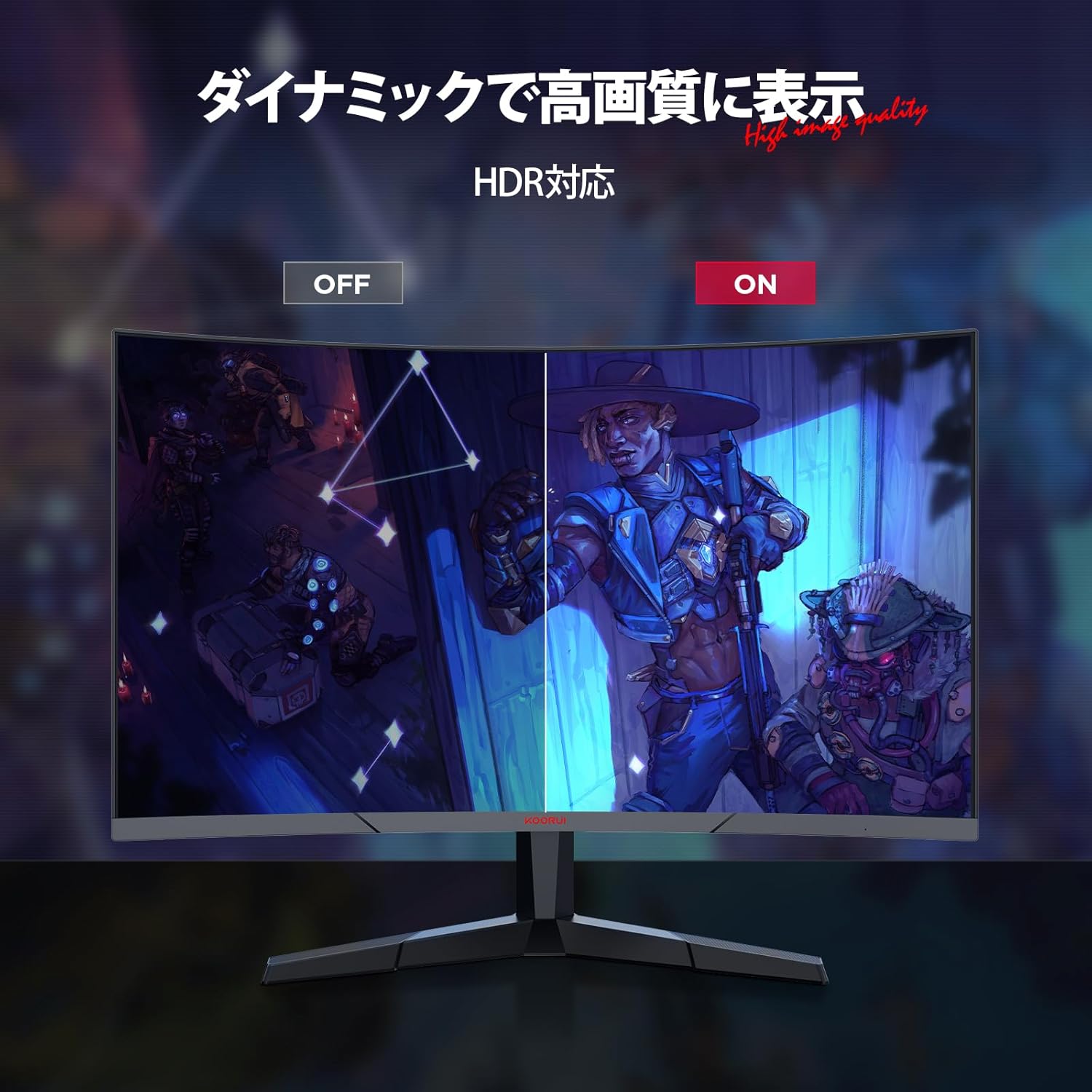
Image: KOORUI 24E6CA monitor displaying a game scene with a console controller, indicating support for Full HD at up to 180fps.
5.3 Adaptive Sync (G-Sync Compatible)
Adaptive Sync technology synchronizes the monitor's refresh rate with your GPU's frame rate, eliminating screen tearing and stuttering for a smoother gaming experience. This monitor is G-Sync compatible.

Image: Comparison showing Adaptive-Sync ON with smooth gameplay versus Adaptive-Sync OFF with screen tearing and stuttering.
5.4 HDR (Yüksek Dinamik Aralık)
HDR enhances the contrast and color range of images, providing more vibrant and realistic visuals. Enable HDR through your device settings and the monitor's OSD menu for compatible content.

Image: Comparison showing HDR OFF with muted colors and contrast versus HDR ON with enhanced, vibrant colors and deeper contrast.
6. Özellikler
6.1 High Refresh Rate and Rapid Response Time
Experience incredibly smooth visuals with a 180Hz refresh rate and a rapid 1ms (MPRT) response time. This combination minimizes motion blur and ghosting, providing a competitive edge in fast-paced games.

Image: Comparison of 75Hz refresh rate versus 180Hz refresh rate, showing significantly smoother motion at 180Hz.

Image: Comparison of 75Hz display with tearing and stuttering versus 180Hz 1ms display with smooth, clear motion.
6.2 1500R Curved Display
1500R kavis, sürükleyici bir deneyim sunar. viewing experience, wrapping the image around your field of vision. This design is particularly beneficial for gaming and multimedia content, enhancing depth perception and reducing eye strain.

Image: Illustration of the 1500R curved display providing a wide field of view for immersive viewIng.
6.3 Excellent Color Reproduction and Contrast
The VA panel delivers deep blacks and a high 3000:1 contrast ratio. With 99% sRGB color gamut and 72% NTSC wide color gamut, the monitor produces vivid and accurate colors. A 178° viewing angle ensures consistent color and contrast from various perspectives.

Image: Monitor's color capabilities with 72% NTSC and 99% sRGB color gamut for vibrant and clear images.
6.4 Göz Bakımı Özellikleri
The monitor includes anti-flicker technology and blue light reduction to minimize eye strain during extended use, promoting a more comfortable viewDeneyim.

Image: Comparison showing a display with blue light ON versus blue light OFF, indicating the monitor's eye care features.
6.5 Çerçevesiz Tasarım
The 3-sided frameless design maximizes screen space and enhances immersion, making it ideal for multi-monitor setups.

Image: Two KOORUI monitors in a multi-monitor setup, highlighting the 3-sided frameless design for increased immersion.
7. Bakım
Monitörünüzün uzun ömürlü ve en iyi performansı göstermesi için aşağıdaki bakım yönergelerini izleyin:
- Ekranı TemizlemeEkranı yumuşak, tüy bırakmayan bir bezle nazikçe silin. İnatçı lekeler için,ampBezi suyla veya özel bir ekran temizleyiciyle hafifçe silin. Asla sıvıyı doğrudan ekrana püskürtmeyin.
- C'yi Temizlemeasing: Use a soft, dry cloth to wipe the monitor casing. Aşındırıcı temizleyicilerden veya çözücülerden kaçının.
- Havalandırma: Ensure the ventilation openings are clear of dust and debris to prevent overheating.
- Güç Kapalı: Turn off the monitor and unplug it from the power outlet when not in use for extended periods.
8. Sorun Giderme
Monitörünüzde sorunlarla karşılaşırsanız, aşağıdaki genel sorun giderme adımlarına bakın:
| Sorun | Olası Çözüm |
|---|---|
| Ekranda görüntü yok | Check if the power cable is securely connected. Ensure the video cable (HDMI/DP) is properly connected to both the monitor and the source device. Select the correct input source via the OSD menu. |
| Görüntü bulanık veya bozuk | Check the display resolution settings on your computer. Ensure it matches the monitor's native resolution (1920x1080). Adjust the monitor's sharpness settings in the OSD menu. |
| Oyunlarda ekran yırtılması veya takılması | Ensure Adaptive Sync is enabled in both the monitor's OSD menu and your graphics card settings. Update your graphics card drivers. |
| No sound from headphones/external speakers | Verify that headphones or speakers are correctly plugged into the Audio Out port. Check audio output settings on your computer. Adjust volume levels on both the monitor (if available in OSD) and the source device. |
| Monitör açılmıyor | Confirm the power adapter is connected to a working power outlet and the monitor. Try a different power outlet. |
Bu adımları denedikten sonra sorun devam ederse lütfen müşteri desteğiyle iletişime geçin.
9. Özellikler
| Özellik | Tanım |
|---|---|
| Marka | KOORUI |
| Model Numarası | 24E6CA (HKCJD-24E6CA) |
| Ekran Boyutu | 24 inç |
| Panel Tipi | VA |
| Eğrilik | 1500R |
| Çözünürlük | Tam HD (1920 x 1080 piksel) |
| En Boy Oranı | 16:9 |
| Yenileme Hızı | 180Hz |
| Tepki Süresi | 1 ms (MPRT) |
| Kontrast Oranı | 3000:1 |
| Parlaklık | 250 nit |
| Renk Gamı | %99 sRGB, %72 NTSC |
| ViewAçı | 178° |
| Video Girişleri | 1x DisplayPort (1.2), 2x HDMI (2.0) |
| Ses Çıkışı | 1x Ses Jakı |
| VESA Uyumluluğu | 100x100mm |
| Ürün Boyutları (G x Y x D) | 59.8x39.2x13.4 cm |
| Ürün Ağırlığı | 4.27 kilo |
| Ekran Yüzeyi | Parlama yapmaz |
10. Garanti ve Destek
KOORUI is dedicated to providing high-quality and high-performance monitors. Your KOORUI 24E6CA monitor comes with a manufacturer warranty:
- Monitor Screen Warranty: 1 yıl
- Other Accessories Warranty: 3 yıl
For warranty claims or technical support, please contact KOORUI customer service. KOORUI monitors are also eligible for free collection and recycling.


