giriiş
This manual provides detailed instructions for the installation, operation, and maintenance of your QOZ V969 4K Mirror Dual Dash Camera. This device features a 4K front camera and a 1080P rear camera, offering comprehensive road coverage and advanced driving assistance systems. Please read this manual thoroughly before using the product to ensure optimal performance and safety.
Kutuda Neler Var?
Aşağıda listelenen tüm öğelerin paketinizde bulunduğunu doğrulayın:
- 10" 4K Rear View Mirror Camera and Car Charger (3.5M/11.5FT)
- 1080P Waterproof Rear Cam and Extending Cable (6M/20FT)
- 64GB Micro-SD Card and Car Reader
- Kurulum Aracı
- Kullanıcı Kılavuzu

Image: The package contents, including the mirror dash camera, front and rear cameras, cables, car charger, 64GB Micro-SD card, card reader, and installation tool.
Kurulum ve Yükleme
1. Prepare the Micro-SD Card
Insert the included 64GB Micro-SD card into the dash camera's TF card slot. It is recommended to format the Micro-SD card directly on the dash camera before first use to ensure compatibility and optimal recording performance. The device supports up to 512GB Micro-SD cards.
2. Araç İçi Kamerayı Aynaya Monte Edin
Securely attach the 10-inch mirror dash camera over your vehicle's existing rearview mirror using the provided straps. Ensure the front camera lens has a clear view Önümüzdeki yolun.

Image: The QOZ V969 4K Mirror Dual Dash Camera installed over a vehicle's existing rearview mirror, showing the front camera and the display.
3. Arka Kamerayı Takın
Mount the 1080P waterproof rear camera at the rear of your vehicle, typically above the license plate or on the rear window. Connect the rear camera to the main mirror unit using the extending cable. Route the cable discreetly along the vehicle's interior trim. Connect the red wire of the rear camera cable to your vehicle's reversing light positive lead for automatic reverse display functionality.

Image: An illustration detailing the connection points for the front dash camera, rear camera, and car charger, with cable routing suggestions.
4. Güç Bağlantısı
Connect the car charger to the mirror dash camera's Type-C port and plug the other end into your vehicle's 12V power outlet. The device will automatically power on and begin recording when the vehicle starts.
Kullanım Talimatları
1. 10-inch IPS Touch Screen
The 10-inch IPS touch screen provides a wide viewing angle and vivid display. Use touch gestures to navigate menus and settings. The smart split-screen display allows simultaneous viewing of road footage and control options.
2. Kayıt Modları
- Döngü Kaydı: The dash camera continuously records video in segments (1, 2, or 5 minutes). When the memory card is full, the oldest unlocked videos are automatically overwritten to ensure continuous recording.
- G-Sensörü: In the event of a sudden collision or vibration, the built-in G-sensor automatically detects the impact and locks the current video segment, preventing it from being overwritten. This footage is stored as critical evidence.

Image: A visual representation of the G-Sensor activating during a car collision, automatically locking the video footage to protect it from being overwritten.
3. WDR & Super Night Vision
The Wide Dynamic Range (WDR) technology and Super Night Vision enhance video clarity in various lighting conditions. This ensures clear capture of details like license plates, even in low-light environments or when balancing bright headlights and dark shadows.

Image: A comparison of dash camera footage in low light, highlighting the effectiveness of Super Night Vision and WDR in capturing clear details of license plates and road signs.
4. Smart Driving Guardian (ADAS)
The Advanced Driver Assistance Systems (ADAS) feature provides real-time road risk detection. This includes warnings and assistance for lane drifting (Lane Change Assist - LCA) and potential collisions (Blind Spot Detection - BSD), acting as an additional safety measure.

Image: A graphic illustrating how ADAS collision avoidance technology monitors and analyzes the vehicle's surroundings to help prevent accidents, showing detection of other vehicles and pedestrians.
5. Easier Reversing & Image Flip
When reversing, the rear view and guidelines are automatically displayed in full screen on the mirror. You can adjust the view angle by scrolling up and down on the touchscreen. The dash cam also allows vertical or horizontal flipping of the front/rear image, making it compatible with various vehicle types like pickups, RVs, and trucks.
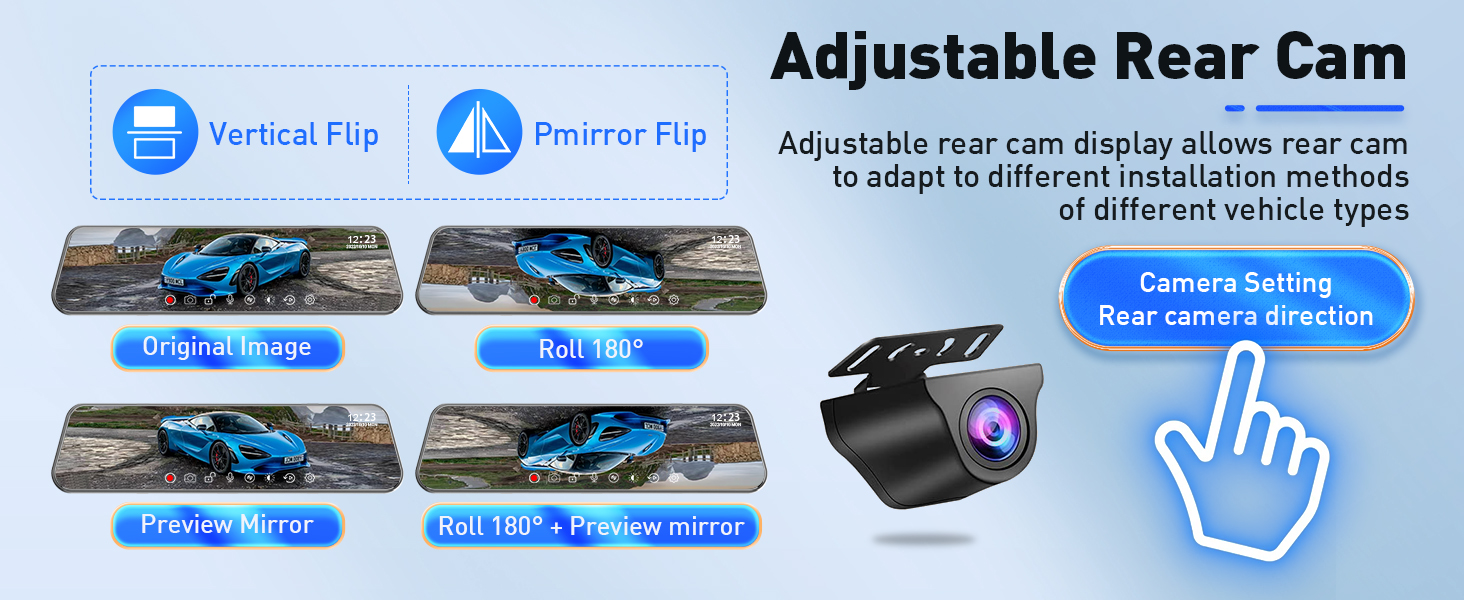
Image: A visual showing the Smart Reversing Aid with full-screen mode and panorama mode, illustrating how to adjust the viewing angle by sliding on the touchscreen.
6. Wi-Fi ve Uygulama Kontrolü
The built-in Wi-Fi allows for convenient remote access to footage. Yapabilirsiniz view, download, and share videos and images directly from your smartphone or laptop via the Viidure App (available on Google Play and App Store).

Image: A graphic demonstrating the Wi-Fi connectivity and app control features, showing a smartphone displaying dashcam footage and icons for social media sharing.
7. 24 Saat Park İzleme Sistemi
The dash camera includes a 24-hour parking monitor feature. It detects collisions, vandalism, or suspicious activity while parked and automatically saves critical clips to the memory card. Note: This function requires an additional hardware kit (ASIN: B0DCYYLL6T), which is sold separately.

Image: A visual showing the 24H Parking Monitor feature, with icons for G-sensor mode and time-lapse mode, and a note about the required hardware kit.
Bakım
- Temizlik: Fotoğraf makinesinin lenslerini ve ekranını temizlemek için yumuşak, kuru bir bez kullanın. Aşındırıcı temizleyiciler veya çözücüler kullanmaktan kaçının.
- Micro-SD Card Care: Regularly format your Micro-SD card (at least once a month) to maintain optimal performance and prevent data corruption. Replace the card if you notice frequent errors or reduced performance.
- Sıcaklık: Avoid exposing the dash camera to extreme temperatures for prolonged periods, as this can affect battery life and component integrity.
Sorun giderme
- Kamera açılmıyor: Ensure the car charger is securely connected to both the dash camera and the vehicle's 12V power outlet. Check the vehicle's fuse for the power outlet.
- "SD card full" error: Format the Micro-SD card through the camera's settings menu. If the issue persists, the card may be faulty and require replacement.
- Kötü video kalitesi: Clean the camera lenses. Ensure the protective film has been removed from the lenses. Check that the recording resolution is set to 4K (front) and 1080P (rear) in the settings.
- Arka kamera görüntü vermiyor: Verify that the rear camera cable is securely connected to the main unit and that the red wire is correctly connected to the reversing light positive lead.
- Wi-Fi bağlantı sorunları: Ensure the Viidure App is updated to the latest version. Restart both the dash camera and your smartphone/laptop.
Özellikler
| Özellik | Detay |
|---|---|
| Model Adı | V969 4K Rear View Ayna Kamera |
| Ön Kamera Çözünürlüğü | 4K (3840*2160) |
| Arka Kamera Çözünürlüğü | 1080P (1920 * 1080) |
| Görüntülemek | 10 inç IPS Dokunmatik Ekran |
| Alanı View | Front: 170 Degrees, Rear: 150 Degrees |
| Bağlantı | Wifi |
| Özel Özellikler | WDR Night Vision, App Control, Built-In WiFi, Dual Channel, 24H Parking Mode (requires hardware kit), G-Sensor, Loop Recording, ADAS, BSD, LCA |
| Dahil Edilen Hafıza Kartı | 64 GB Mikro SD Kart |
| Maksimum SD Kart Desteği | 512 GB |
| Güç Bağlantısı | C Tipi Araç Şarj Cihazı |
| Ürün Boyutları | 10 x 1 x 4 inç |
| Ürün Ağırlığı | 2.12 pound |
Garanti ve Müşteri Desteği
QOZ is committed to providing excellent customer service. For any setup assistance, technical questions, or troubleshooting, our support team is available to respond within 24 hours. We offer free 1-on-1 guidance via email. The product includes a 12-month replacement warranty and lifetime after-sales consultation and technical support.
- Yanıt Süresi: 24 saat içinde
- İade politikasi: 60 days no-worry return
- Yenisiyle değiştirme: Available within 12 months
- Destek: Lifetime after-sales consultation and technical support


