giriiş
Thank you for choosing the ESX Vision VMX700DAB Universal 2 DIN Multimedia Receiver. This device is designed to provide a comprehensive in-car entertainment and communication experience, featuring a 7-inch touchscreen, digital radio, smartphone integration, and versatile media playback options. This manual provides essential information for the proper installation, operation, and maintenance of your new multimedia receiver.
Temel Özellikler
- 7-inch (17.8 cm) Touchscreen Display
- Kablosuz Apple CarPlay ve Android Auto uyumluluğu
- DAB+ Digital Radio with included DAB antenna
- FM/AM Radio with RDS function
- Bluetooth Hands-free Function with audio streaming
- Front USB-C port for media and charging (1.5A)
- Rear USB-A port for Apple CarPlay/Android Auto and charging (1.5A)
- 4 x 80 W max. music power output
- 4V RCA pre-amplified outputs (FL/FR/RL/RR/SUB1/SUB2)
- RCA AUX inputs (L/R/VIDEO)
- RCA Camera inputs (Front/Rear)
- Internal and external microphone support
- Compatible with analog steering wheel remote control (learnable)
- Entegre GPS alıcısı
- Multimedia player for audio, video, and photos (AVI, FLV, MOV, MKV, WMV, WMA, MP3, FLAC, JPEG, PNG, BMP)
Kurmak
1. Paket İçeriği
Before beginning installation, ensure all components are present. The package typically includes:
- ESX VMX700DAB Multimedia Receiver
- Power and Speaker Wiring Harnesses
- Harici Mikrofon
- DAB+ Anteni
- GPS Alıcısı
- Mounting Hardware and Trim Frame
- RCA Cables for AUX and Camera Inputs
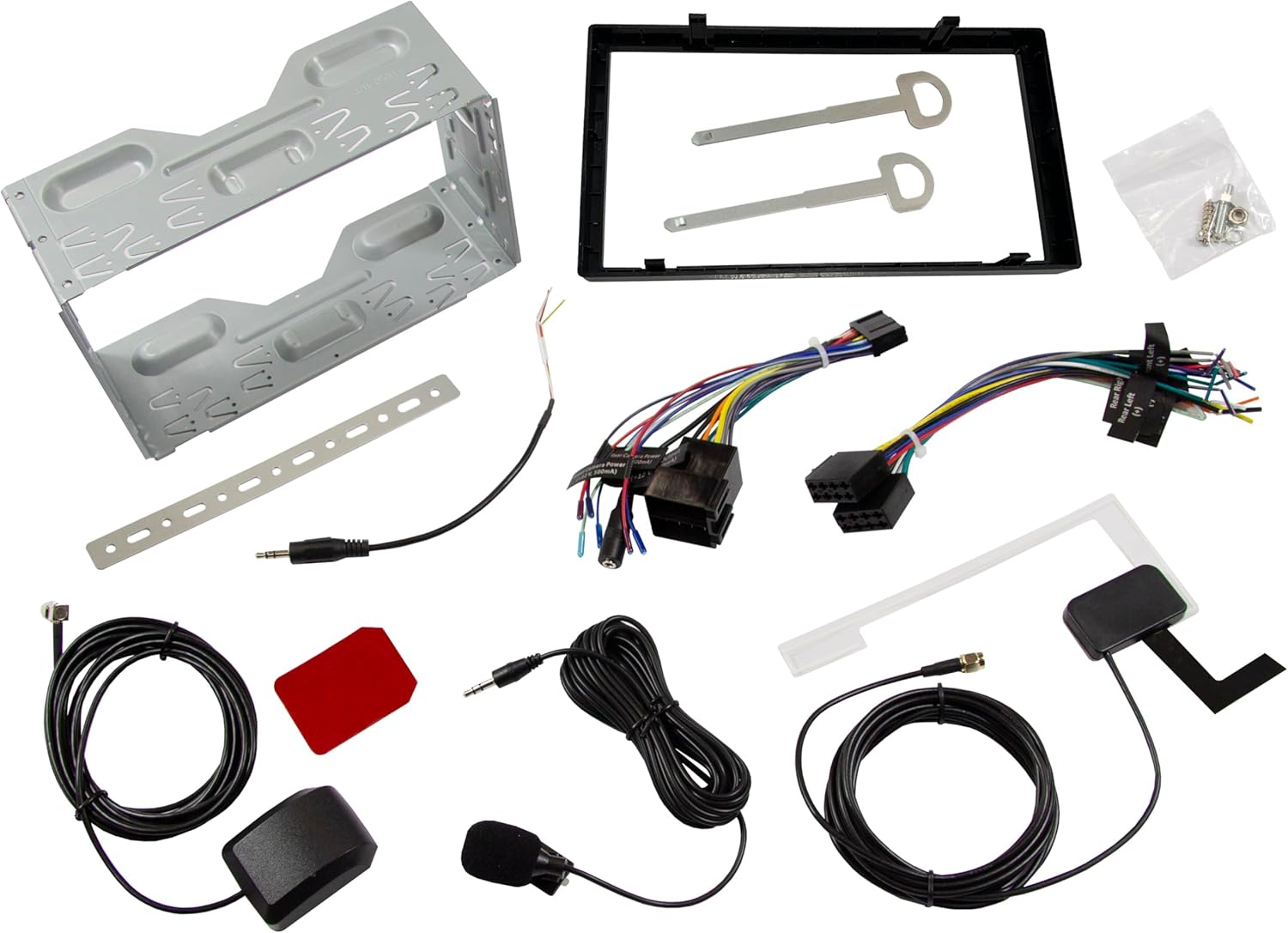
Resim: Üzeriview of all included accessories and cables for the ESX VMX700DAB multimedia receiver, including wiring harnesses, antennas, and mounting brackets.
2. Kurulum
Installation of the ESX VMX700DAB should ideally be performed by a qualified professional to ensure proper wiring and functionality. Incorrect installation can lead to damage to the unit or vehicle electrical system.
- Montaj: Secure the 2 DIN unit into your vehicle's dashboard opening using the provided mounting brackets and screws. Ensure it is firmly seated.
- Kablolama: Connect the main power harness, speaker wires, and other auxiliary connections (RCA pre-outs, AUX-in, camera inputs) as per your vehicle's wiring diagram and the receiver's connection ports.
- Antenler: Connect the DAB+ antenna and GPS receiver to their respective ports on the rear of the unit. Position the antennas for optimal signal reception.
- Harici Mikrofon: Connect the external microphone to the designated input for improved hands-free call quality.
- Direksiyon Kontrolü: If your vehicle supports analog steering wheel controls, connect the appropriate wires and configure the learning function in the unit's settings.
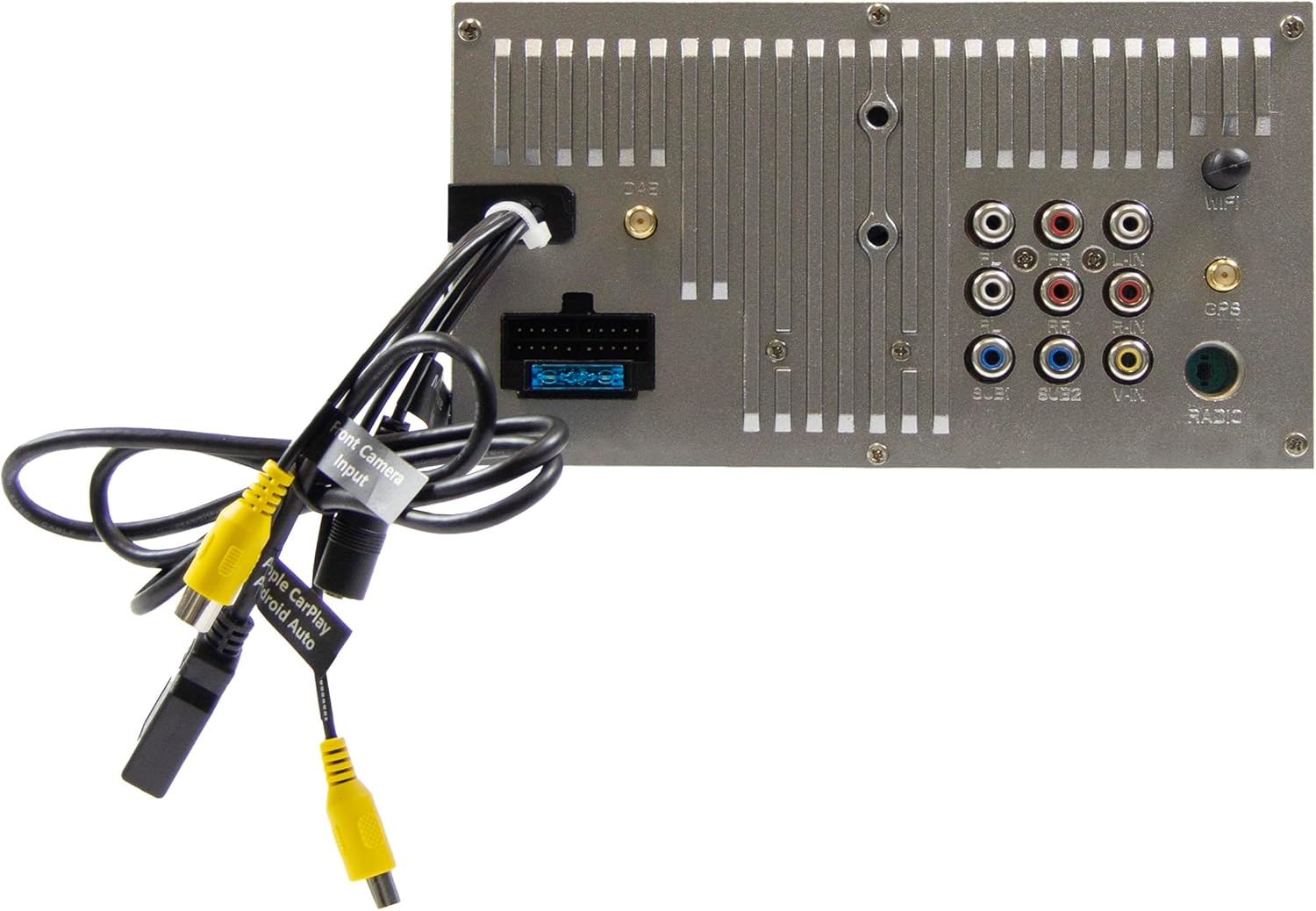
Image: Rear panel of the ESX VMX700DAB multimedia receiver, displaying the array of input and output ports including RCA, USB, and antenna connections for comprehensive system integration.

Resim: Yan view of the ESX VMX700DAB unit, highlighting its compact 2 DIN chassis design and the front panel layout with physical controls and USB-C port.

Resim: Ön view of the ESX VMX700DAB multimedia receiver, showcasing its 7-inch touchscreen display and the physical rotary knob and buttons on the left side for easy access to essential functions.
3. İlk Güç Açma
After installation, turn on your vehicle's ignition. The unit should power on automatically. Follow any on-screen prompts for initial setup, such as language selection or time zone settings.
Kullanım Talimatları
1. Temel Kontroller ve Arayüz
The VMX700DAB features a large rotary knob for volume control and three function keys on the left side of the control panel for quick access. The primary interface is the 7-inch touchscreen.

Image: The main home screen of the ESX VMX700DAB multimedia receiver, displaying various application icons for functions such as Apple CarPlay, Android Auto, Radio, Phone, Camera, Bluetooth Audio, USB, DAB, Equalizer, AUX, and Settings.
- Döner düğme: Turn to adjust volume. Press to mute/unmute or access specific menus depending on context.
- Fonksiyon Tuşları: These keys provide shortcuts to common functions. Refer to the on-screen labels for their specific actions.
- Dokunmatik ekran: Navigate through menus, select options, and control playback by touching the corresponding icons or areas on the display.
2. Radio Functions (FM/AM & DAB+)
Select the "Radio" or "DAB" icon from the home screen to access radio functions.
- FM/AM Radyo: Use the on-screen controls to scan for stations, save presets, and utilize RDS features for station information.
- DAB+ Radyo: The integrated DAB+ tuner provides access to digital radio broadcasts. Ensure the DAB antenna is properly connected for optimal reception. Scan for available DAB stations and save your favorites.
3. Bluetooth Bağlantısı
The built-in Bluetooth module supports hands-free calling and high-quality wireless music streaming.
- Eşleştirme: Go to the Bluetooth settings on the receiver and enable pairing mode. On your smartphone, search for available Bluetooth devices and select "ESX VMX700DAB" to connect.
- Eller Serbest Arama: Once paired, you can make and receive calls directly through the receiver. The 7-inch display shows your phonebook, allowing direct contact selection. The external microphone ensures clear voice quality.
- Ses akışı: Stream music wirelessly from your smartphone to the receiver. Control playback (play/pause, skip tracks) from the receiver's touchscreen.
4. Apple CarPlay & Android Auto (Wireless & USB)
The ESX VMX700DAB supports both wireless and wired connections for Apple CarPlay and Android Auto, mirroring your smartphone's compatible apps directly onto the receiver's screen.

Image: The Apple CarPlay interface displayed on the ESX VMX700DAB screen, showing common iOS applications like Phone, Music, Maps, Messages, and Now Playing, providing seamless smartphone integration.

Image: The ESX VMX700DAB multimedia receiver installed in a car dashboard, displaying music playback information on its screen while a smartphone is held nearby, illustrating the integrated media experience.
- Kablosuz Bağlantı: Ensure your smartphone's Wi-Fi and Bluetooth are enabled. Select the Apple CarPlay or Android Auto icon on the receiver's home screen and follow the on-screen instructions to establish a wireless connection.
- USB Bağlantısı: Connect your smartphone to the dedicated USB-A port (usually at the rear, or via the front USB-C if supported for data) using a certified USB cable. The system will automatically launch CarPlay or Android Auto.
- İşlevsellik: Access navigation (e.g., Google Maps with live traffic), music streaming services (e.g., Spotify), messaging, and other compatible apps directly from the receiver's touchscreen.
5. Medya Oynatma
The VMX700DAB supports various audio, video, and photo formats via its USB ports.
- USB Medya: Insert a USB drive into the front USB-C port or rear USB-A port. Select the "USB" icon to browse and play media files.
- Desteklenen Formatlar: AVI, FLV, MOV, MKV, WMV, WMA, MP3, FLAC, JPEG, PNG, BMP.
- AUX Girişi: Connect external audio/video devices to the RCA AUX inputs (L/R/VIDEO) at the rear of the unit. Select "AUX" from the source menu to play content.
6. Camera Inputs
The unit features two RCA camera inputs (Front/Rear) for connecting external cameras.
- Arka Kamera: When connected, the display will automatically switch to the rear camera view Araç geri vitese alındığında.
- Ön Kamera: Ön kamera view can typically be activated manually from the "Camera" icon on the home screen or through specific settings.
Bakım
- Ekranın Temizlenmesi: Dokunmatik ekranı nazikçe silmek için yumuşak, tiftiksiz bir bez kullanın. İnatçı lekeler için hafifçe silin.ampBezi su veya ekran temizleyicisiyle silin. Aşındırıcı malzemelerden veya sert kimyasallardan kaçının.
- Genel Temizlik: Cihazın toz ve kirden arındırılmış halde kalmasını sağlayın. Düğmelerin ve bağlantı noktalarının etrafını temizlemek için yumuşak bir fırça veya basınçlı hava kullanın.
- Yazılım Güncellemeleri: Periodically check the ESX website for any available firmware updates for your VMX700DAB model. Updates can improve performance, add features, or fix bugs. Follow the instructions provided with the update file dikkatlice.
Sorun giderme
If you encounter issues with your ESX VMX700DAB, refer to the following common problems and solutions:
| Sorun | Olası Neden | Çözüm |
|---|---|---|
| Güç yok | Blown fuse, incorrect wiring, vehicle ignition off. | Check vehicle fuses and the unit's fuse. Verify power wiring connections. Ensure vehicle ignition is on. |
| Ses yok | Ses seviyesi çok düşük, sessize alma etkinleştirilmiş, hoparlör kablolaması yanlış. amplifier sorunu. | Increase volume. Check if mute is active. Verify speaker connections. If using external ampAmplifikatörün güç kaynağını ve bağlantılarını kontrol edin. |
| Zayıf radyo sinyali (DAB/FM) | Anten bağlı değil, anten yerleşimi kötü, sinyal alanı zayıf. | Ensure antenna is securely connected. Reposition antenna for better signal. Try in an area with stronger signal. |
| Bluetooth bağlanmıyor | Device not in pairing mode, incorrect pairing process, interference. | Her iki cihazın da eşleştirme modunda olduğundan emin olun. Önceki eşleştirmeleri silin ve tekrar deneyin. Cihaza daha yaklaşın. |
| Apple CarPlay/Android Auto başlatılmıyor | Incorrect USB cable, phone settings, app issues, wireless connection problems. | Use a certified USB cable. Check phone settings for CarPlay/Android Auto. Restart phone and unit. For wireless, ensure Wi-Fi and Bluetooth are on and paired. |
| Dokunmatik ekran yanıt vermiyor | Sistem dondu, ekranda kir belirdi. | Perform a soft reset (refer to manual for specific reset button/procedure, often a small pinhole). Clean the screen. |
If the problem persists after trying these solutions, please contact ESX customer support or a qualified service technician.
Özellikler
| Özellik | Detay |
|---|---|
| Model Numarası | VMX700DAB |
| Görüntülemek | 7-inch (17.8 cm) Touchscreen |
| Bağlantı Teknolojisi | Bluetooth, USB (Type A, Type C), Auxiliary (RCA) |
| Özel Özellikler | Wireless Apple CarPlay, Wireless Android Auto, DAB+ Digital Radio, Hands-free Calling |
| Uyumlu Cihazlar | Akıllı telefon |
| Max Music Power Output | 4 x 80 W |
| Ön-ampGelişmiş Çıkışlar | 4V RCA (FL/FR/RL/RR/SUB1/SUB2) |
| Ses Giriş Modu | Stereo |
| Çevresel Ses Kanalı Yapılandırması | 4.2 |
| Video Encoding Formats | AVI, FLV, MOV, MKV, WMV |
| Audio Encoding Formats | WMA, MP3, FLAC |
| Görüntü Biçimleri | JPEG, PNG, BMP |
| Ürün Ağırlığı | 1.61 Kilogram |
Garanti ve Destek
For warranty information, please refer to the warranty card included with your product or visit the official ESX webSite. Satın alma belgenizi herhangi bir garanti talebi için saklayın.
For technical support, troubleshooting beyond this manual, or service inquiries, please contact ESX customer support through their official channels. Contact information can typically be found on the ESX webSitede veya ürün ambalajında.


