1. Giriş
The LAUNCH X431 PRO Star is an advanced automotive intelligent diagnostic tool designed for comprehensive vehicle analysis. This device features an 8-inch touch screen, runs on Android 10.0, and is powered by a 2.0GHz 4-Core processor with 4GB RAM and 64GB ROM. It includes a 6000mAh battery for extended operation. The PRO Star supports fault diagnosis for a wide range of vehicle models and systems, offering functions such as code reading, code clearing, data stream analysis, reset functions, action testing, coding, and matching.

Figure 1.1: LAUNCH X431 PRO Star Diagnostic Scanner with key features highlighted.
2. Kurulum ve İlk Kullanım
2.1 Kutudan Çıkarma ve Paket İçeriği
Carefully unpack all items from the carrying box. Verify that all components listed below are present.

Figure 2.1: Contents of the LAUNCH X431 PRO Star package.
- LAUNCH X-431 PRO STAR Tablet
- Taşıma Kutusu
- Diagnostic Cable (OBDII)
- C Tipi USB Kablosu
- AC Adaptörü
- US Plug, UK Plug, EU Plug
- Kullanıcı Kılavuzu
- Hızlı rehber
- Paket listesi
- PIN Envelope
2.2 Cihazın İlk Yapılandırması
- Cihazı Şarj Edin: Fully charge the LAUNCH X431 PRO Star tablet using the provided AC adapter and Type-C USB cable before first use.
- Güç Açık: Cihazı açmak için güç düğmesine basın ve basılı tutun.
- Language and Time Zone: Ekranda beliren yönergeleri izleyerek tercih ettiğiniz dili ve saat dilimini seçin.
- Wi-Fi'ye bağlanın: Connect the device to a stable Wi-Fi network (supports 2.4GHz and 5.0GHz). Internet access is required for registration and software updates.
- Hesap Kaydı: Register an account on the manufacturer's website using the serial number provided with your device.
- Yazılım Güncellemesi: After registration, you will be prompted to update the software. Perform all available updates to ensure optimal functionality and access to the latest vehicle data. This process may take some time.
3. Kullanım Talimatları
3.1 Bir Araca Bağlanma
- Aracın OBDII portunu bulun; bu port genellikle sürücü tarafındaki gösterge panelinin altında bulunur.
- Connect the diagnostic cable to the LAUNCH X431 PRO Star tablet.
- Connect the other end of the diagnostic cable to the vehicle's OBDII port.
- Turn the vehicle's ignition to the 'ON' position (do not start the engine).
3.2 Temel Tanılama Fonksiyonları
Once connected, the device will attempt to auto-detect the vehicle's VIN. If auto-detection fails, you can manually enter the vehicle information.
- Sağlık Raporu: After identifying the vehicle, the system can generate a comprehensive health report.
- Tam Sistem Taraması: Perform a complete scan of all available vehicle systems.
- Kodları Oku/Sil: View diagnostic trouble codes (DTCs) and clear them after repairs.
- Canlı veri: Monitor real-time data streams from various sensors and components.
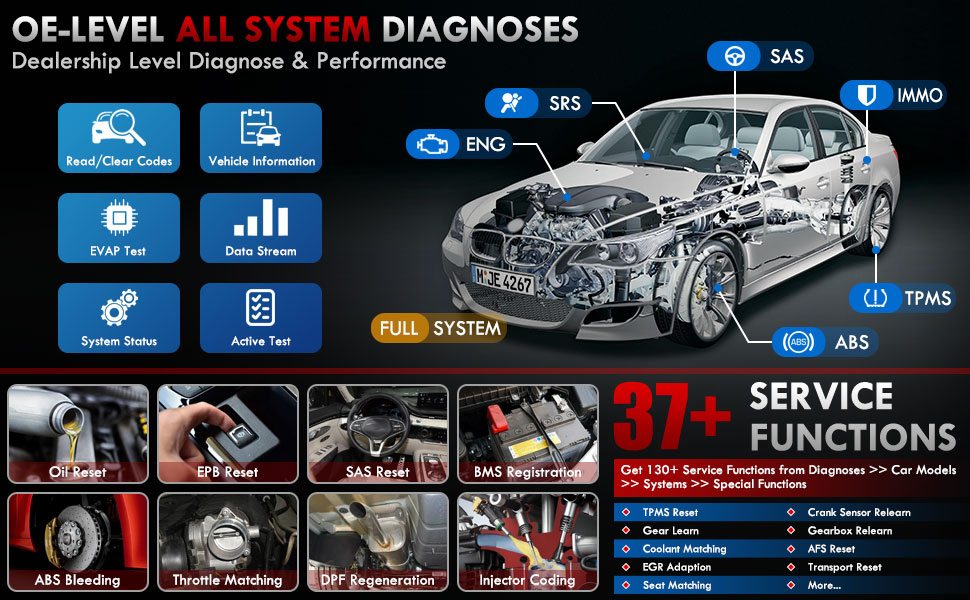
Şekil 3.1: Üzeriview of OE-level all system diagnostic capabilities.
3.3 Advanced Maintenance Services (37+)
The LAUNCH X431 PRO Star offers over 37 advanced maintenance and reset functions, with the potential to expand to over 130 types depending on the vehicle's make, model, and year. These services include:
- Yağ Sıfırlama
- ABS Kanaması
- Pil Kaydı
- EPB Sıfırlama (Elektronik Park Freni)
- DPF Rejenerasyonu (Dizel Partikül Filtresi)
- Enjektör Kodlaması
- SAS Sıfırlama (Direksiyon Açısı Sensörü)
- Gaz Eşleştirme
- TPMS Sıfırlama (Lastik Basıncı İzleme Sistemi)
- Şanzıman Sıfırlama
- Askıya Alma Sıfırlama
- AFS Başlığıamp Sıfırla

Şekil 3.2: Ör.amples of the 37+ maintenance service functions.
3.4 Çift Yönlü Kontrol (Aktif Test)
This feature allows the technician to send commands to vehicle systems and components to test their functionality. This helps in quickly identifying faulty components without manual disassembly. ExampBunlar şunları içerir:
- Turning the radiator fan on/off
- Kapı kilidi aktüatörlerinin test edilmesi
- Energizing injectors
- Ameliyat aynaları
- Pencereleri açma/kapatma

Figure 3.3: Illustration of bi-directional control capabilities.
3.5 ECU Kodlaması
ECU Coding enables the matching, relearning, and coding of newly installed ECU modules after repairs or replacements. It also allows for the activation of higher-level vehicle functions. This includes:
- Flash/Match/Calibration
- Recode and Relearn
- Alter Configuration
- Reprogram Adaptive Data
- Recognize New CPU
- Match Current Settings
- Customize Car Features (e.g., automatic lock, reverse rearview mirror down, windows close when rain)

Şekil 3.4: Ör.amples of ECU coding applications.
3.6 FCA SGW Vehicle Access & Quick Guided Functions
- FCA SGW: The X431 PRO Star is AutoAuth certified, allowing secure diagnosis of SGW (Security Gateway) vehicles without limitations.
- Quick Guided: Provides step-by-step guidance for Volkswagen group vehicles, simplifying complex diagnostic procedures.
3.7 Extension Modules
The device supports various optional add-on tools to expand its capabilities, including:
- Battery Tester (e.g., BST360)
- Videoscope (e.g., VSP-600)
- Oscilloscope (e.g., O2-2)
- TPMS Detector (e.g., TSGUN, i-TPMS)
- WiFi Thermal Printer (e.g., X-431)
- ADAS Kalibrasyon Aracı
- XPROG 3 (Immobilizer Programmer)

Figure 3.5: Various optional extension modules for the X431 PRO Star.
4. Bakım
4.1 Yazılım Güncellemeleri
The LAUNCH X431 PRO Star includes 2 years of free software updates. After this period, the device will continue to function, but new software releases and vehicle data updates will require a subscription. Regular updates ensure compatibility with new vehicle models and access to the latest diagnostic features.
4.2 Genel Bakım
- Cihazınızı temiz tutun, toz ve nemden uzak tutun.
- Cihazı kullanmadığınız zamanlarda koruyucu taşıma çantasında saklayın.
- Cihazı uzun süre aşırı sıcaklıklara veya doğrudan güneş ışığına maruz bırakmaktan kaçının.
- Use only the provided charging accessories to prevent damage.
5. Sorun Giderme
If you encounter issues with your LAUNCH X431 PRO Star, consider the following:
- Bağlantı Sorunları: Ensure the diagnostic cable is securely connected to both the scanner and the vehicle's OBDII port. Verify the vehicle's ignition is in the 'ON' position.
- Yazılım Arızaları: Ensure the device's software is up to date. A factory reset may resolve persistent software issues (note: this will erase user data).
- Araç Uyumluluğu: While the device covers over 99% of vehicles, specific advanced functions may vary by make, model, and year. Consult the vehicle coverage list or contact support for details.
- Cihaz Performansı: If the device is slow or unresponsive, try restarting it. Ensure sufficient battery charge.
6. Özellikler
| Özellik | Şartname |
|---|---|
| Örnek | LAUNCH X-431 PRO STAR |
| İşletim Sistemi | Android 10.0 |
| İşlemci | 2.0GHz 4 Çekirdekli |
| Veri deposu | 4 GB |
| ROM (Depolama) | 64 GB |
| Görüntülemek | 8 inç Dokunmatik Ekran (1280x800 çözünürlük) |
| Pil | 6000mAh |
| Bağlantı | Wi-Fi (2.4/5.0 GHz), CANFD, DoIP |
| Kamera | 8.0 MP Rear-facing |
| Ürün Ağırlığı | 8.4 pound |
| Paket Boyutları | 13.6 x 13.2 x 6.1 inç |
| Otomotiv Uyum Türü | Evrensel Uyum |
7. Garanti ve Destek
7.1 Garanti Bilgileri
The LAUNCH X431 PRO Star comes with a 2 yıllık garanti covering manufacturing defects and hardware malfunctions.
7.2 Teknik Destek
LAUNCH şunları sağlar: 7*24 technical support for any post-sales issues or technical assistance. For support, please refer to the contact information provided in your product packaging or visit the official LAUNCH webalan.


