Ürün Bittiview
The Thomson RC112A Android TV Remote Control is designed to provide seamless control over your Thomson Android TV. This official replacement remote offers a blend of sophisticated design and practical functionality, ensuring a comfortable and intuitive user experience. It features an ergonomic design, backlit buttons for low-light conditions, integrated voice control via Google Assistant, and a customizable favorite apps button.

Resim: Ön view of the Thomson Android TV Remote Control, showcasinŞık siyah tasarımı ve düğme düzeniyle dikkat çekiyor.
Kurulum ve İlk Kullanım
1. Pil Kurulumu
Uzaktan kumanda çalışması için iki (2) adet AAA pil gerektirir. Pilleri takarken doğru kutuplara dikkat edin.
- Uzaktan kumandanın arkasındaki pil bölmesi kapağını bulun.
- Kapağı açmak için aşağı doğru veya okla gösterilen yönde kaydırın.
- Pil yuvasının içindeki işaretlere uygun olarak iki adet AAA pil takın ve pozitif (+) ve negatif (-) kutupları birbirine gelecek şekilde yerleştirin.
- Pil bölmesi kapağını yerine takın ve yerine güvenli bir şekilde oturduğundan emin olun.
2. Pairing with your Android TV
This remote control connects to your Thomson Android TV via Bluetooth. The pairing process may vary slightly depending on your TV model. Generally, follow these steps:
- Ensure your Thomson Android TV is powered on.
- Televizyonunuzda şu adımları izleyin: Ayarlar > Uzaktan Kumandalar ve Aksesuarlar or Bluetooth Ayarları.
- Seçme Aksesuar ekle or Yeni cihazı eşleştir.
- On the Thomson remote control, press and hold the Ev düğme ve Geri button simultaneously for a few seconds until the LED indicator on the remote starts blinking, indicating it's in pairing mode.
- On your TV screen, select "Thomson RC112A" or a similar name from the list of available devices.
- Confirm the pairing on your TV if prompted. The LED on the remote will stop blinking and remain solid for a moment, indicating successful pairing.
If pairing fails, ensure the remote is close to the TV and repeat the steps. Refer to your TV's user manual for specific pairing instructions if needed.
Uzaktan Kumandayı Çalıştırma
The Thomson RC112A remote control features a comprehensive set of buttons for navigating your Android TV. Below are the primary functions:
- Güç düğmesi (●): Televizyonu açar veya kapatır.
- Sayısal Tuş Takımı (0-9): Doğrudan kanal seçimi veya girişi.
- Gezinme Paneli (Yukarı, Aşağı, Sol, Sağ, Tamam): Menüde gezinme ve seçim için.
- Geri butonu (←): Önceki ekrana veya menüye döner.
- Ana menü tuşu (⌂): Android TV ana ekranına erişir.
- Sesi Açma/Kapatma (V+/V-): TV'nin ses düzeyini ayarlar.
- Kanal Yukarı/Aşağı (P+/P-): TV kanallarını değiştirir.
- Sessiz Düğmesi (🔇): TV sesini kapatır veya açar.
- Google Assistant Button (🎤): Sesli kontrolü etkinleştirir. Komut vermek için basılı tutun.
- Favorite Apps Button (⭐): Customizable button to quickly launch your preferred application. Refer to your TV's settings to assign an app to this button.
- Dedicated App Buttons (e.g., YouTube, Netflix, Prime Video, Disney+, Google Play): Bu yayın hizmetlerine doğrudan erişim.
Özel Özellikler
Ergonomik Tasarım
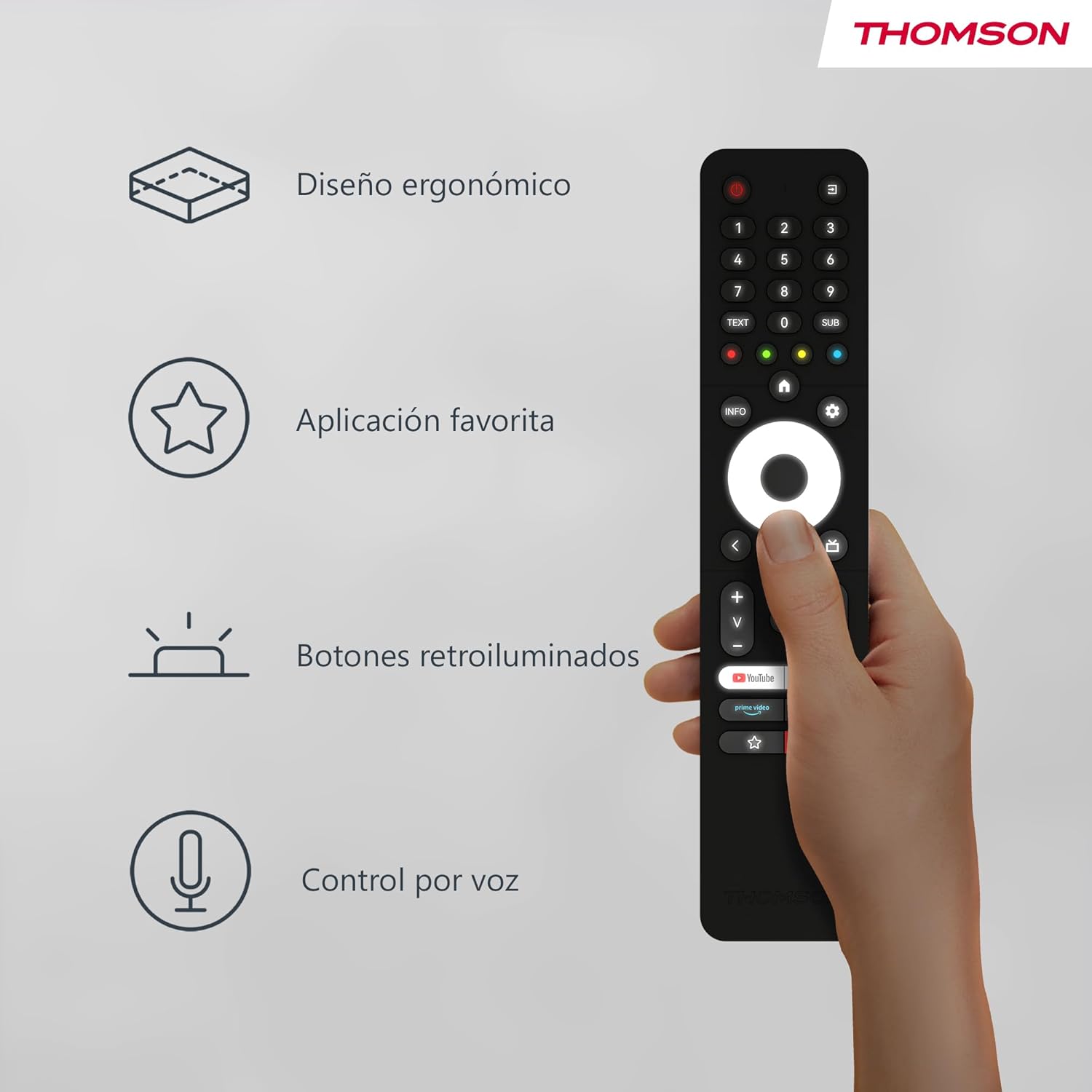
The remote control is designed to fit comfortably in your hand, making prolonged use easy and reducing fatigue. Its sleek profile and balanced weight contribute to a pleasant user experience.
Image: A hand holding the Thomson remote control, illustrating its comfortable ergonomic design and highlighting key features like voice control and favorite apps.
Arkadan Aydınlatmalı Düğmeler

The buttons on the remote control illuminate, making it easy to locate and press the correct buttons in dimly lit environments. This feature prevents accidental key presses and enhances usability during night-time viewIng.
Resim: İki views of the Thomson remote control side-by-side, one showing the buttons unlit and the other showing them illuminated, demonstrating the backlit feature for low-light use.
Voice Control (Google Assistant)
With the integrated Google Assistant, you can control your TV using voice commands. Press and hold the Google Assistant button, then speak clearly into the remote. You can:
- Adjust volume (e.g., "Volume up", "Set volume to 20").
- Arama content (e.g., "Find action movies", "Play [Movie Title]").
- Open applications (e.g., "Open Netflix", "Launch YouTube").
- Ask questions (e.g., "What's the weather like?").
- Uyumlu akıllı ev cihazlarını kontrol edin.
Bakım
Pil Değişimi
Replace batteries when the remote's performance degrades or if the LED indicator does not light up during use. Always replace both batteries simultaneously with new AAA alkaline batteries.
Temizlik
Uzaktan kumandayı temizlemek için yumuşak, kuru bir bez kullanın. İnatçı kirler için hafifçe kurulayın.ampen the cloth with water or a mild, non-abrasive cleaner. Do not use harsh chemicals or abrasive materials, as they may damage the remote's surface or internal components. Avoid getting moisture into the battery compartment or button crevices.
Depolamak
Uzaktan kumandayı serin, kuru ve doğrudan güneş ışığından, aşırı sıcaklıklardan ve yüksek nemden uzak bir yerde saklayın. Uzaktan kumanda uzun süre kullanılmayacaksa, sızıntıyı ve olası hasarı önlemek için pilleri çıkarmanız önerilir.
Sorun giderme
| Sorun | Olası Neden | Çözüm |
|---|---|---|
| Uzaktan kumanda yanıt vermiyor. | Low or dead batteries; Remote not paired; Obstruction between remote and TV. | Replace batteries; Re-pair the remote with the TV (see "Pairing" section); Ensure no objects are blocking the signal (though Bluetooth is less sensitive to this, direct line of sight can sometimes help with initial pairing). |
| Ses kontrolü çalışmıyor. | Microphone blocked; Remote not properly paired for voice; Internet connection issue on TV. | Ensure nothing is covering the microphone hole; Re-pair the remote; Check TV's internet connection. |
| Backlight not illuminating. | Batteries are low; Feature is disabled (if applicable, though usually automatic). | Replace batteries. The backlight feature is typically automatic and activates when the remote is moved or a button is pressed. |
| Favorite app button not launching desired app. | App not assigned or incorrectly assigned. | Go to your TV's settings and re-assign the desired application to the favorite app button. |
Özellikler
- Marka: Thomson
- Model Numarası: RC112A
- Renk: Siyah
- Özel Özellikler: Ergonomic, Backlit, Voice Search (Google Assistant)
- Uyumlu Cihazlar: Thomson Android TVs
- Pil Tipi: 2 x AAA pil (dahil değildir)
- Maksimum aralık: 10 Metre
- Bağlantı: Bluetooth
Garanti ve Destek
Warranty information for your Thomson RC112A remote control is typically provided with your purchase documentation or can be found on the official Thomson webLütfen garanti talepleriniz için satın alma belgenizi saklayın.
For technical support, troubleshooting assistance beyond this manual, or to inquire about replacement parts, please visit the official Thomson support website or contact their customer service. Contact details are usually available on the manufacturer's official websitenizde veya ürün ambalajınızda.
Not: Yedek parça bulunabilirliği bilgisi ürün detaylarında yer almamaktadır.


