giriiş
Bu kılavuz, VEKOOTO AHD 10.36 inç BSD Side için ayrıntılı talimatlar sunmaktadır. View Vertical Monitor and Right Car Camera System. This system is designed to enhance vehicle safety by offering a clear, wide-angle view of the right side of your truck or bus, featuring a touch screen display, loop recording capabilities, and a Blind Spot Detection (BSD) voice alarm. Please read this manual thoroughly before installation and operation to ensure proper use and optimal performance.
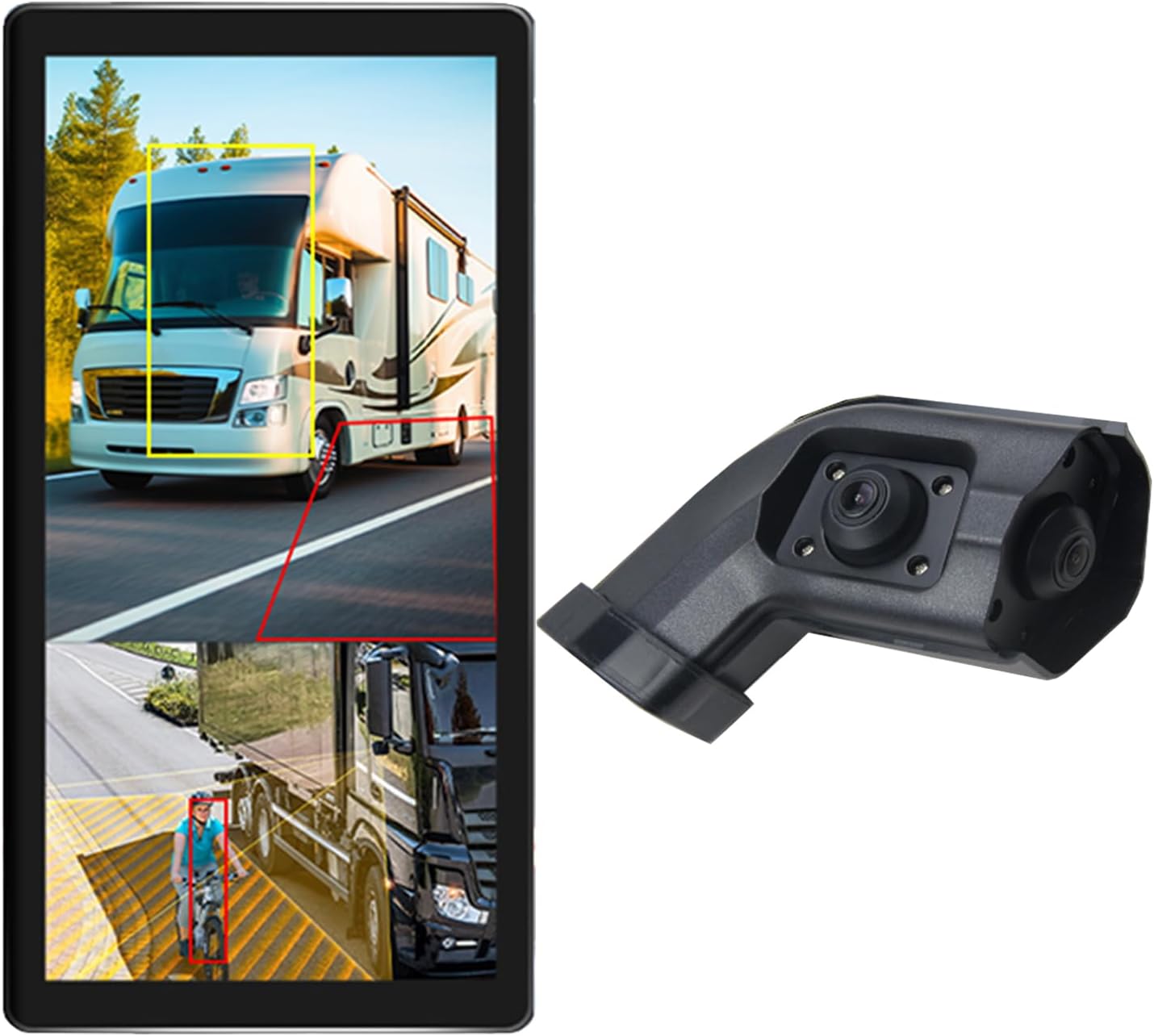
Image: The VEKOOTO 10.36-inch vertical monitor and the right side camera unit, illustrating the primary components of the system.
Kutuda Neler Var?
Paketi açtığınızda tüm bileşenlerin eksiksiz ve iyi durumda olduğunu doğrulayın:
- 10.36-inch Touch Screen Monitor
- Integrated dual camera (for right side view)
- Güç kablosu
- Kamera Kablosu
- Parantez
Temel Özellikler
- Görüntülemek: 10.36-inch IPS touch screen with 2-channel split screen display capability.
- Kamera Desteği: Compatible with AHD720P cameras, offering enhanced image clarity, advanced bright color separation, signal filtering, and 3D noise reduction technology.
- Kör Nokta Tespiti (BSD): Features a voice alarm system. The alarm area, volume, and sensitivity are adjustable.
- Görüntü Kontrolü: Supports camera image screen mirroring function for flexible viewIng.
- Ekran Özelleştirme: Allows adjustment of display time, date, brightness, and screen color.
- Güç Uyumluluğu: Geniş bir hacmi desteklertag9V-36V aralığı.
- Çoklu Dil Desteği: Available in English, Korean, Japanese, and Chinese.
- Kurulum: Designed for installation on the right side rearview aracın aynası.

Image: The monitor interface highlighting features such as image adjustment, BSD voice alarm, and customizable detection areas, shown with various driving scenarios including night, rain, and blind spots.
Kurulum ve Yükleme
Proper installation is crucial for the system's performance. It is recommended to have this system installed by a qualified professional.
1. Bileşen Yerleşimi
- Mount the 10.36-inch vertical monitor securely inside the vehicle, ensuring it does not obstruct the driver's view.
- Install the integrated dual camera unit on the right side rearview mirror of your vehicle. Ensure the camera has a clear, unobstructed view.

Image: The vertical monitor installed inside a vehicle, providing a clear view of the right side, simulating a truck's perspective.
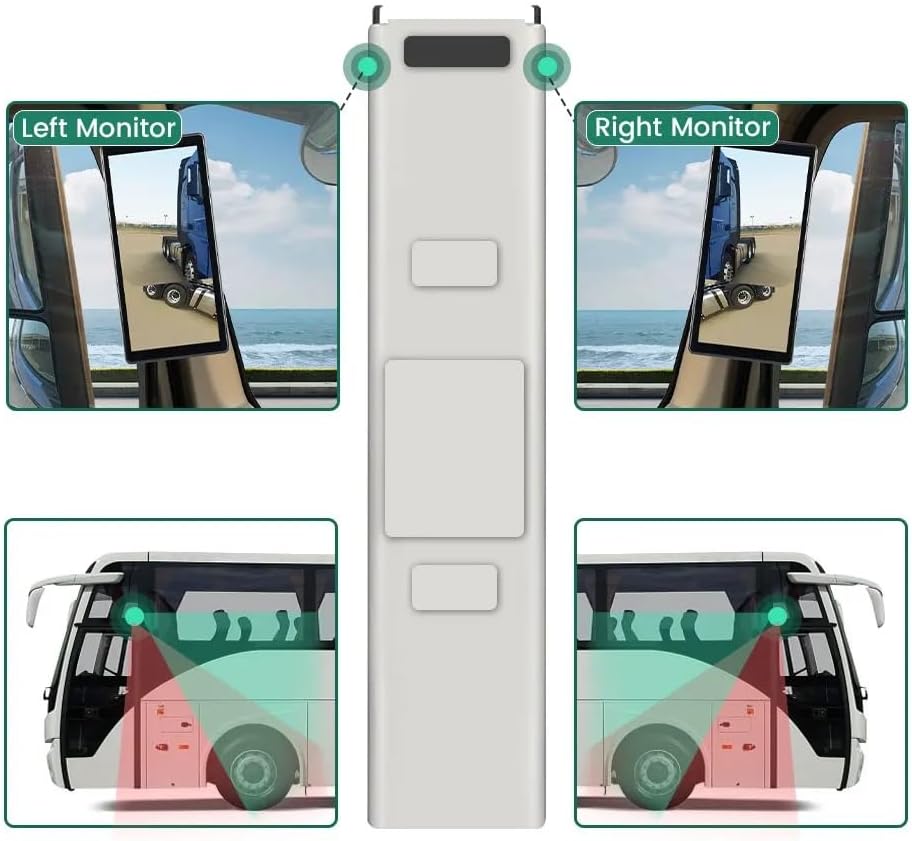
Image: A diagram illustrating the recommended placement of the right monitor and the camera's field of view for comprehensive side coverage on a bus.
2. Kablo Bağlantıları
Refer to the wiring diagram below for correct connections. The system supports 9V-36V wide voltage girişi.

Image: Detailed wiring diagram showing connections for the monitor, integrated dual camera, ACC power supply (+), Ground (-), and Battery Power (+3A). Channel 1 (CH1) and Channel 2 (CH2) inputs are indicated for the camera cables.
- Bağlan ACC Power Supply (+) wire (red) to a switched ignition source.
- Bağlan Zemin (-) wire (black) to a suitable chassis ground point.
- Bağlan Battery Power (+) (3A) wire (yellow) to a constant 12V/24V power source.
- Connect the camera cable(s) to the corresponding CH1 and CH2 inputs on the monitor.
- Kısa devreleri önlemek için tüm bağlantıların güvenli ve uygun şekilde yalıtıldığından emin olun.
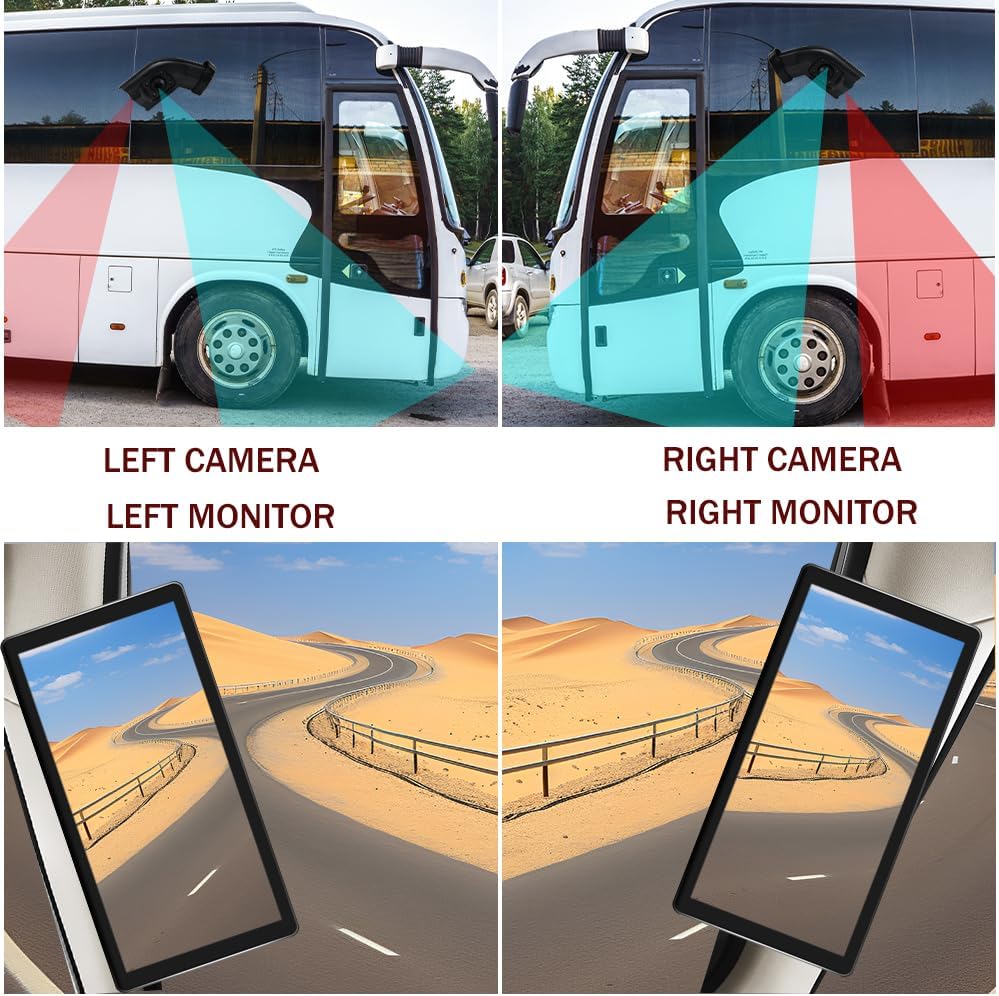
Image: A visual comparison demonstrating the coverage areas for left and right camera installations, along with the corresponding monitor views. This system is for the Right Camera/Monitor.
Kullanım Talimatları
1. Güç Açma/Kapatma
The monitor will power on automatically when the vehicle's ignition is turned on (if connected to ACC power) and power off when the ignition is turned off.
2. Dokunmatik Ekran Navigasyonu
Navigate through the monitor's menus and settings using the touch screen interface. Tap icons or options to select them.
3. Bölünmüş Ekran Görüntüleme
The monitor supports a 2-channel split screen display. Access the display settings to configure how the camera feeds are shown on the screen.
4. BSD Voice Alarm
- Access the BSD settings menu on the touch screen.
- Adjust Alarm Area: Define the specific zones where the BSD system will detect objects and trigger an alarm.
- Control Alarm Volume: Set the desired volume level for the voice alerts.
- Hassasiyeti Ayarla: Adjust the sensitivity of the detection system to suit your driving conditions and preferences.
5. Image Mirroring
If needed, enable the camera image mirroring function through the display settings to flip the camera view yatay olarak.
6. Ekran Ayarları
Customize the display by adjusting brightness, screen color, and setting the current time and date through the monitor's settings menu.
7. Döngü Kaydı
The system supports loop recording. Ensure a compatible memory card is inserted (if required, check product specifications for card type and capacity). The system will continuously record video, overwriting the oldest filehafıza kartı dolduğunda.

Image: The monitor screen showing a video playback interface, indicating support for video recording with a timeline illustrating different recording times throughout the day.
Bakım
- Monitörün Temizlenmesi: Use a soft, dry cloth to clean the monitor screen. For stubborn smudges, lightly dampBezi su veya ekran temizleyicisiyle silin. Sert kimyasallardan kaçının.
- Kameranın Temizlenmesi: Periodically check and clean the camera lens to ensure a clear view. Use a soft cloth and lens cleaner if necessary.
- Bağlantıları Kontrol Etme: Regularly inspect all wiring connections to ensure they are secure and free from corrosion or damage.
- Yazılım Güncellemeleri: Üreticinin kontrol edin website for any available firmware or software updates for your system.
Sorun giderme
| Sorun | Olası Neden | Çözüm |
|---|---|---|
| Monitörde görüntü yok |
|
|
| Distorted or unclear image |
|
|
| BSD alarm not working |
|
|
| Loop recording not functioning |
|
|
Özellikler
| Özellik | Detay |
|---|---|
| Ürün Boyutları | 10.3"L x 2"W x 8"H (Monitor) |
| Ürün Ağırlığı | 4.4 pound |
| Model Numarası | Sağ |
| Ekran Teknolojisi | LCD |
| Diğer Ekran Özellikleri | Kablosuz |
| Üretici | VEKOOTO |
| Marka | VEKOOTO |
| Ekran Boyutu | 10.36 inç |
| Uyumlu Cihazlar | İzlemek |
| Kurulum Türü | Yüzey Montajı |
| Cilttage | 9-36 Volts (Wide Voltage Support) |
| Optik Sensör Teknolojisi | CMOS |
| Lens Türü | Geniş Açı |
| Bağlayıcı Türü | Kablosuz |
| Optik Sensör Boyutu | 1/3 inç |

Image: Diagram illustrating the physical dimensions of the 10.36-inch vertical monitor (27cm/10.63inch height, 13cm/5.12inch width) and the camera unit (14.6cm/5.75inch height, 7.8cm/3.07inch width, 6.4cm/2.52inch depth).
Garanti ve Destek
For warranty information, please refer to the documentation included with your purchase or contact VEKOOTO customer support directly. Support contact details can typically be found on the manufacturer's official websitenizden veya satın alma noktanızdan.
Always ensure you are using genuine VEKOOTO parts and accessories for optimal performance and to maintain warranty validity.


