giriiş
The Kogan Table Top TV Stand is designed to provide a stable and versatile mounting solution for televisions ranging from 23 inches to 75 inches. This stand offers a modern aesthetic and helps create a clutter-free entertainment area. Key features include 2-level height adjustment for optimal viewing, anti-slip padded feet to protect surfaces, and robust construction capable of supporting up to 40kg.
Güvenlik Bilgileri
- Montajdan önce tüm bileşenlerin eksiksiz ve hasarsız olduğundan emin olun. Herhangi bir parça eksik veya kırıksa kullanmayın.
- Follow all assembly instructions carefully. Incorrect assembly can lead to product failure or injury.
- Maksimum ağırlık kapasitesi olan 40 kg'ı aşmayın.
- Ensure the TV stand is placed on a stable, level surface to prevent tipping.
- Çocukları ve evcil hayvanları toplanma alanından uzak tutun.
- Do not hang or climb on the TV stand.
- Tüm vidaların ve bağlantıların sıkı ve güvenli kaldığından emin olmak için düzenli olarak kontrol edin.
Paket İçeriği
Lütfen aşağıda listelenen tüm öğelerin paketinizde yer aldığından emin olun:
- 1 x Kogan Table Top TV Stand for 23" - 75" TVs
- 1 x Installation Kit (containing all necessary screws, washers, and tools)
- 1 x Kullanım Kılavuzu (bu belge)
- 1 x Garanti Kartı

Image: The Kogan Table Top TV Stand components shown alongside icons indicating key features such as compatibility with 23"-75" TVs, 40kg weight capacity, VESA mountability, 2-level height adjustment, and anti-skid pads.
Kurulum ve Yükleme
The Kogan Table Top TV Stand is designed for easy installation. Please follow these general steps. Refer to the detailed instructions in the included Installation Kit for specific screw types and assembly sequences.
- Bileşenleri Paketinden Çıkarın: Çizilmeleri önlemek için tüm parçaları ambalajından dikkatlice çıkarın ve yumuşak, temiz bir yüzeye serin.
- Assemble Base Legs: Attach the base legs to the vertical support columns using the provided screws and tools. Ensure they are securely fastened.
- Attach VESA Brackets to TV: Identify the VESA mounting holes on the back of your television. Select the appropriate screws and spacers from the Installation Kit and attach the vertical VESA brackets to your TV. Ensure the brackets are oriented correctly for height adjustment.
- Televizyonu sehpaya monte edin: Carefully lift your television and hook the VESA brackets onto the vertical support columns of the stand. Secure the TV to the stand using the locking mechanisms or screws as indicated in the installation guide.
- Yüksekliği Ayarlayın: The stand features 2-level height adjustment. Once the TV is mounted, you can adjust its vertical position by selecting different mounting points on the vertical columns. Ensure both sides are adjusted to the same level for stability.
- Position Stand: Place the assembled TV stand with the television on a sturdy, level surface. The anti-slip padded feet will help protect your furniture and prevent movement.
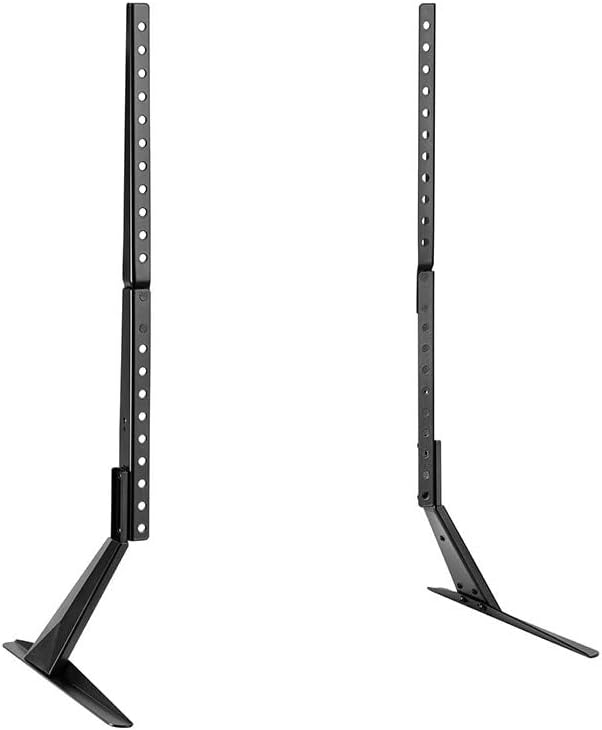
Resim: Bir ön yüz view of the Kogan Table Top TV Stand, disassembled into its main components: two vertical support columns and two base legs. This illustrates the primary parts involved in assembly.

Resim: Bir yan profesyonelfile view of the Kogan Table Top TV Stand, highlighting the angled base leg and the vertical support column with multiple adjustment holes for height customization.
Kullanım Talimatları
Once assembled and positioned, the Kogan Table Top TV Stand requires minimal operation. Its primary function is to securely hold your television at an optimal viewyükseklik.
- Yükseklik Ayarı: Değiştirmek için viewing height, you will need to carefully remove the TV from the stand, adjust the mounting position on the vertical columns, and then re-mount the TV. Always ensure the TV is securely re-attached before releasing o.
- Kararlılık: The anti-slip padded feet are designed to keep the stand stable and prevent scratches on your furniture. Avoid dragging the stand across surfaces; always lift it when repositioning.

Image: A Kogan Table Top TV Stand supporting a television, placed on a media console. This image shows the stand in a typical home environment, providing a clear, straight-on view of the setup.
Bakım
To ensure the longevity and appearance of your Kogan Table Top TV Stand, follow these simple maintenance guidelines:
- Temizlik: Standı yumuşak, kuru bir bezle silin. İnatçı lekeler için hafifçe kuru bir bez kullanın.amp Bez kullanılabilir ve hemen kurutulmalıdır. Aşındırıcı temizleyicilerden veya çözücülerden kaçının, çünkü bunlar yüzeye zarar verebilir.
- Denetimler: Periodically check all screws and connections to ensure they are tight. If any looseness is detected, re-tighten them immediately.
- Çevre: Avoid exposing the stand to extreme temperatures or high humidity, which could affect its material integrity.
Sorun giderme
If you encounter any issues with your Kogan Table Top TV Stand, please refer to the following common problems and solutions:
| Sorun | Olası Neden | Çözüm |
|---|---|---|
| Ayaklık dengesiz veya sallanıyor gibi görünüyor. | Screws are loose; stand is on an uneven surface; TV weight exceeds capacity. | Ensure all assembly screws are tightened. Move the stand to a flat, level surface. Verify your TV's weight does not exceed 40kg. |
| TV is not level on the stand. | One side of the VESA bracket is mounted higher than the other; stand is on an uneven surface. | Re-check the VESA bracket attachment to ensure both sides are at the same height. Adjust the stand's position on the surface. |
| Scratches on furniture surface. | Anti-slip pads are missing or damaged; stand was dragged. | Ensure all anti-slip pads are correctly attached to the base legs. Always lift the stand when moving it, do not drag. |
Özellikler
| Marka | Kogan |
| Örnek | KATVLTS75LA |
| Uyumlu TV Boyutları | 23" - 75" |
| Maksimum Ağırlık Kapasitesi | 40 kilo |
| Yükseklik Ayarı | 2 seviyesi |
| Özellikler | Anti-slip padded feet, VESA mountable |
| Paket Boyutları | 40x17x5 cm |
| Ürün Ağırlığı | 2.55 kilo |
Garanti ve Destek
Your Kogan Table Top TV Stand comes with a Warranty Card. Please refer to this card for detailed information regarding warranty terms, conditions, and duration.
For technical support, troubleshooting assistance beyond what is provided in this manual, or to inquire about replacement parts, please visit the official Kogan support website or contact their customer service department. Keep your purchase receipt and warranty card handy for any warranty claims.
Genellikle destek bilgilerini üreticinin resmi web sitesinde bulabilirsiniz. webalan: Kogan Desteği


