1. Giriş
This manual provides detailed instructions for the safe and effective use of your Streamlight Wedge Everyday Carry Flashlight. The Wedge is designed for reliable performance and durability, suitable for daily use, professional tasks, and outdoor activities.

Resim 1.1: Ön view of the Streamlight Wedge Flashlight.
2. Paket İçeriği
Paketinizde tüm öğelerin mevcut olduğundan emin olun:
- Streamlight Wedge Flashlight (with integrated Lithium Polymer battery)
- USB-C Kablosu
- Cep klipsi (önceden takılı veya dahil)
- bilek İpi
- Kullanım Kılavuzu (bu belge)
3. Temel Özellikler
- Dual-Mode Brightness: Offers a standard 300 Lumens constant-on mode and a 1,000-Lumen THRO (Temporarily Heightened Regulated Output) burst mode for quick, intense illumination.
- Slim EDC Design: Ergonomic profile for comfortable handling and discreet pocket carry. Includes a deep-carry pocket clip that can be attached to either side.
- Intuitive Thumb-Rotary Control: Seamless, one-handed operation with a tactile rotary switch for mode selection and battery-level feedback.
- USB-C Şarj Edilebilir: Integrated battery recharges via USB-C in approximately 3 hours. An LED indicator shows charging status.
- Dayanıklı Yapı: Made from rugged Type II MIL-Spec anodized aluminum housing with a polycarbonate lens. IPX7-rated for waterproofing (up to 1 meter) and drop-tested to 1 meter.

Image 3.1: The intuitive rotating thumb switch provides tactile control over light modes.
4. Kurulum: İlk Şarj İşlemi
Before first use, fully charge your Streamlight Wedge flashlight.
- Locate the USB-C charging port on the end of the flashlight.
- Verilen USB-C kablosunu el fenerinin şarj portuna bağlayın.
- USB-C kablosunun diğer ucunu uyumlu bir USB güç kaynağına (örneğin duvar adaptörü, bilgisayar USB portu) bağlayın.
- LED göstergesini gözlemleyin:
- Sabit Kırmızı: Pilin şarj olduğunu gösterir.
- Yeşil: Pilin tamamen şarj olduğunu gösterir.
- Kırmızı Yanıp Sönüyor: Indicates low battery and requires charging soon.
- Tam şarj genellikle yaklaşık 3 saat sürer.

Image 4.1: LED indicator for battery status during charging.

Image 4.2: The USB-C charging port for convenient recharging.
5. Kullanım Talimatları
5.1 Güç Açma/Kapatma ve Mod Seçimi
The Streamlight Wedge features a thumb-rotary switch for easy operation.
- Standard Mode (300 Lumens): Rotate the thumb switch forward to the first detent. The flashlight will activate in standard mode, providing 300 lumens of constant illumination.
- THRO Mode (1,000 Lumens Burst): From the off position, rotate and hold the thumb switch fully forward past the first detent. The flashlight will activate in THRO mode, providing a temporary burst of 1,000 lumens. Release the switch to return to the off position. This mode is designed for short, intense illumination needs.
- Kapatma: Rotate the thumb switch backward to the off position.
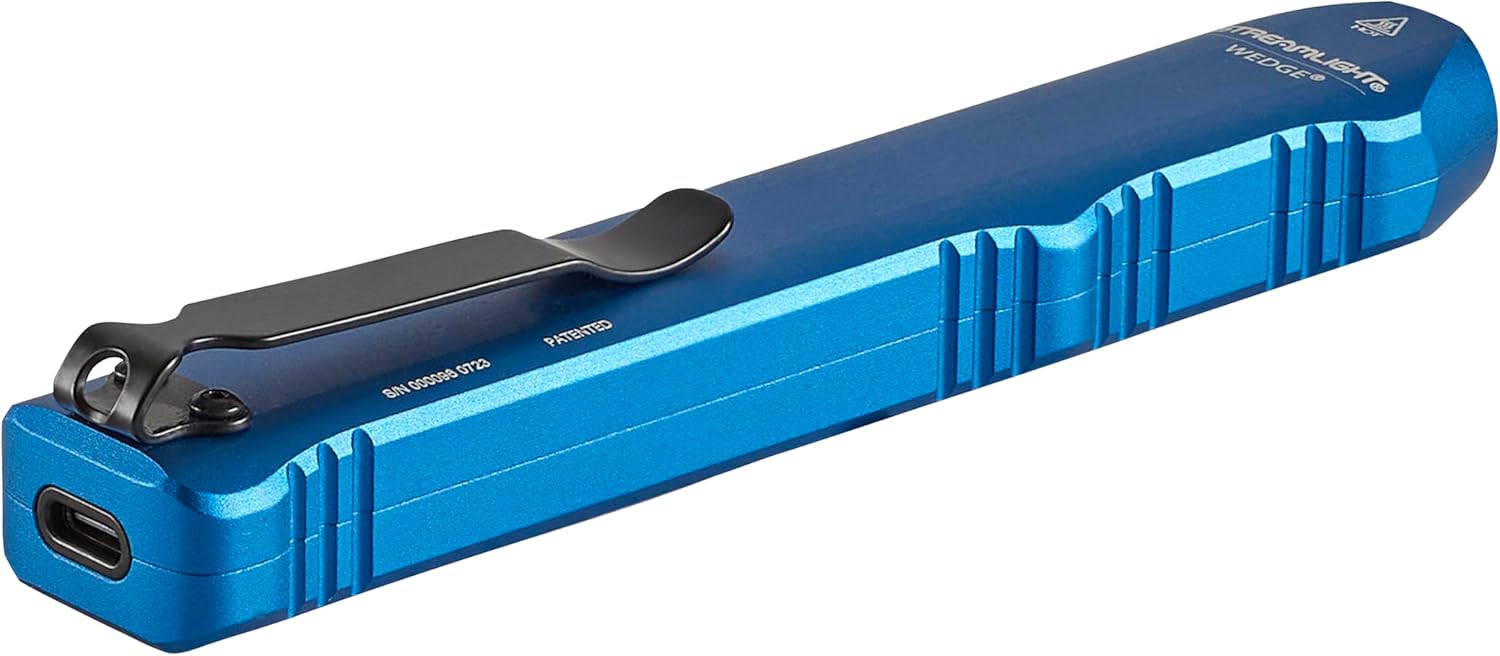
Image 5.1: Operating the flashlight with a single hand.

Image 5.2: Activating THRO (Temporarily Heightened Regulated Output) mode for 1000 lumens.
5.2 Pocket Clip Installation
The deep-carry pocket clip can be reversed to suit your preferred carry method.
- Using a small Phillips head screwdriver, carefully remove the two screws securing the pocket clip.
- Cep klipsini çıkarın.
- Align the pocket clip on the opposite side of the flashlight.
- Re-insert and tighten the two screws to secure the clip. Do not overtighten.

Image 5.3: The strong pocket clip allows for secure carry in a pocket or attached to gear.
6. Bakım
- Temizlik: El fenerinin gövdesini yumuşak bir bezle silin.amp bezle silin. Aşındırıcı temizleyiciler veya çözücüler kullanmayın.
- Lens Bakımı: Clean the polycarbonate lens with a soft, lint-free cloth. For stubborn dirt, use a small amount of mild soap and water.
- Şarj Portu: USB-C şarj portunu pisliklerden uzak tutun.
- Depolamak: Store the flashlight in a cool, dry place when not in use for extended periods. Recharge the battery periodically to maintain its health.
7. Sorun Giderme
- El feneri açılmıyor:
- Ensure the battery is charged. Connect the flashlight to a USB-C power source and check the LED indicator.
- Verify the thumb switch is fully rotated to the desired mode (Standard or THRO).
- Işık çıkışı zayıf:
- Pil zayıflamış olabilir. El fenerini şarj edin.
- Lensin temiz ve engelsiz olduğundan emin olun.
- El feneri şarj olmuyor:
- Check the USB-C cable for damage and ensure it is securely connected to both the flashlight and the power source.
- Farklı bir USB-C kablosu veya güç adaptörü deneyin.
- Ensure the charging port on the flashlight is clean.
8. Özellikler
| Özellik | Detay |
|---|---|
| Model Numarası | 88817 |
| Işık kaynağı | NEDEN OLMUŞ |
| Parlaklık (Standart) | 300 Lümen |
| Brightness (THRO Burst) | 1000 Lümen |
| Beam Distance (Standard) | 69 Metre |
| Şamdan | 1200 Candela |
| Güç Kaynağı | Integrated Lithium Polymer Battery |
| Şarj Süresi | Yaklaşık 3 saat (USB-C üzerinden) |
| Çalışma Süresi (Standart) | 3 Saat |
| Malzeme | Eloksallı Alüminyum |
| Suya Dayanıklılık | IPX7 (1 metreye kadar su geçirmez) |
| Darbe Direnci | 1 metreye kadar düşme testinden geçmiştir. |
| Boyutlar | 5.46"D x 0.6"G x 1"Y |
| Ürün Ağırlığı | 3.2 ons |
| Sertifikalar | ANSI FL1, CE, IPX7 |
9. Garanti ve Destek
9.1 Garanti Bilgileri
The Streamlight Wedge Flashlight is covered by a Sınırlı Ömür Boyu Garanti. For specific details regarding warranty coverage and claims, please refer to the official Streamlight websitesine gidin veya müşteri hizmetleriyle iletişime geçin.
9.2 Müşteri Desteği
For technical assistance, service, or further inquiries, please visit the Akış ışığı webalan or contact their customer support department.