giriiş
This manual provides comprehensive instructions for the installation, operation, and maintenance of your Podofo 10.1 Inch Android 13 Double Din Car Stereo. This advanced car stereo system features a 10.1-inch 1280x720P IPS touch screen, an 8-core processor with 4GB RAM and 64GB ROM, wireless CarPlay and Android Auto, built-in GPS and WiFi, 32-band DSP audio, and includes an HD backup camera and external microphone.
Please read this manual thoroughly before using the product to ensure proper operation and to maximize your user experience. Keep this manual for future reference.

Image: The Podofo 10.1 Inch Android 13 Double Din Car Stereo unit, accompanied by its included accessories: a wireless CarPlay/Android Auto module, an external microphone, and an HD backup camera.
Güvenlik Bilgileri
Always prioritize safety when operating your vehicle. Improper installation or use of this device can lead to accidents or injury. Adhere to the following safety guidelines:
- Do not attempt to operate the unit or view videos while driving. Distracted driving is dangerous and illegal.
- Kısa devreleri ve elektrik tehlikelerini önlemek için tüm kabloların doğru şekilde bağlandığından ve yalıtıldığından emin olun.
- Herhangi bir adımda emin değilseniz, kurulum için bir uzmana danışın.
- Cihazı sudan ve aşırı nemden uzak tutun.
- Do not disassemble or modify the unit. This may void the warranty and cause damage.
- Sadece belirtilen güç kaynaklarını ve aksesuarları kullanın.
Paket İçeriği
Kurulum işlemine başlamadan önce pakette tüm öğelerin mevcut olduğundan emin olun:
- Podofo 10.1 Inch Android 13 Double Din Car Stereo Unit
- Güç kablosu
- RCA Giriş/Çıkış Kabloları
- USB Cables (Dual USB ports)
- GPS Anteni
- Radyo Anteni
- Harici Mikrofon
- HD Yedekleme Kamerası
- Montaj Braketleri
- Kullanım Kılavuzu (bu belge)

Image: A visual representation of the package contents, including the main unit, power cable, RCA cables, USB cables, GPS antenna, radio antenna, external microphone, HD backup camera, mounting brackets, and user manual.
Kurulum ve Yükleme
1. Kurulum Öncesi Kontrol
- Herhangi bir elektrik işine başlamadan önce aracın akünün negatif kutbunu ayırın.
- Ensure you have the correct dash kit for your vehicle model if required.
2. Kablo Bağlantıları
Belirli bağlantılar için ünitenizle birlikte verilen kablo şemasına bakın. Genel bağlantılar şunlardır:
- Güç kablosu: Connect ACC, B+, and GND wires to the vehicle's corresponding power sources.
- Hoparlör Kabloları: Connect to your vehicle's speaker outputs (ensure correct polarity).
- RCA Kabloları: Dış için ampAmplifikatörler, subwoofer'lar veya video çıkışı.
- USB Kabloları: Route to a convenient location for connecting USB devices.
- GPS Anteni: Güneş ışığı almayan bir yere monte edin. view gökyüzüne ait (örneğin, gösterge paneli).
- Radyo Anteni: Aracın mevcut radyo antenine bağlayın.
- Harici Mikrofon: Daha iyi arama kalitesi için bağlantı kurun.
- Geri Görüş Kamerası: Connect the video signal and power wires. The reverse trigger wire should be connected to the vehicle's reverse light positive.
Image: A detailed diagram illustrating the wiring connections for the Podofo car stereo, including the reverse camera wiring. This image is part of the "Package List" image, but also contains the wiring diagram.
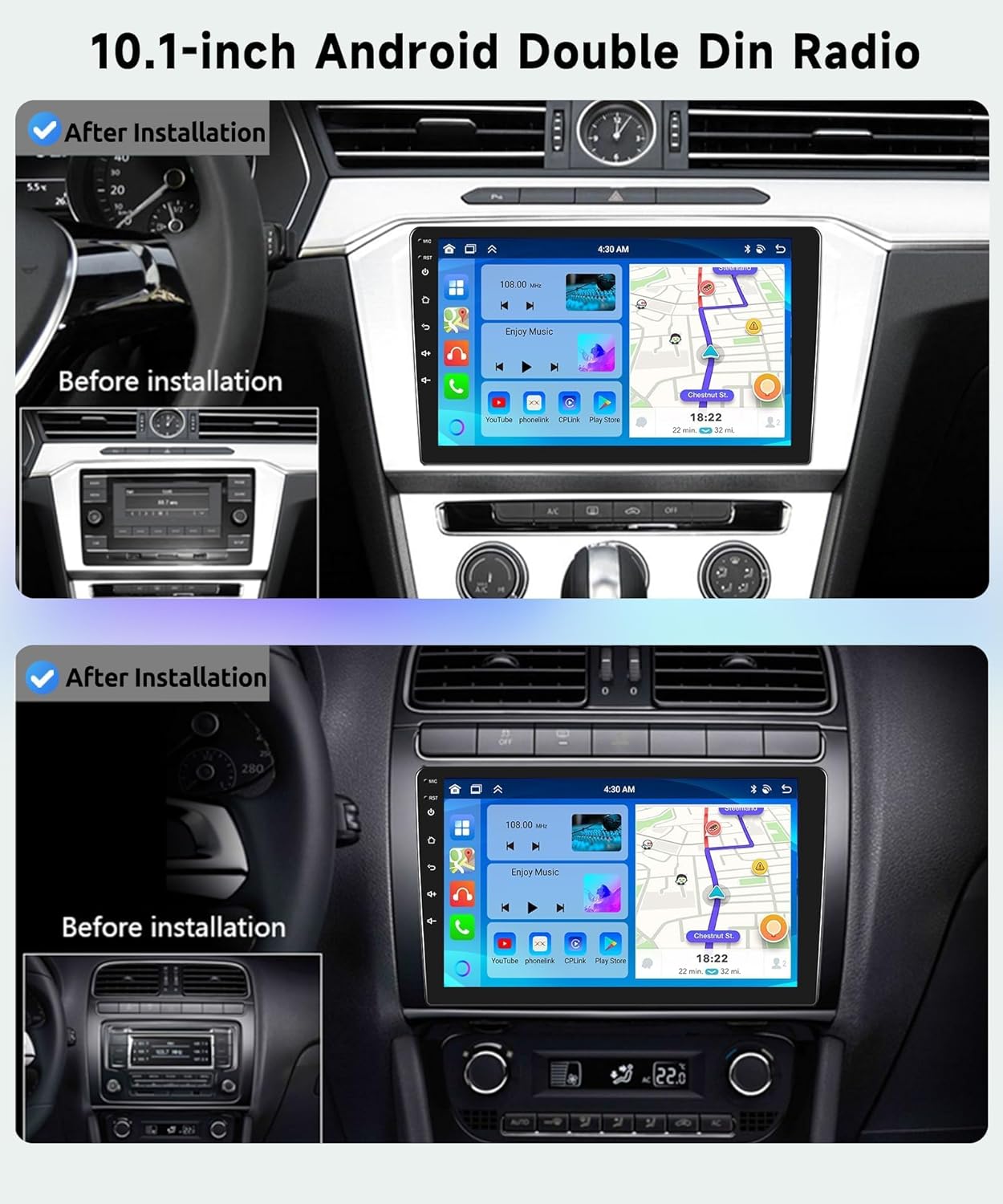
Image: A visual comparison showing the car dashboard before and after the installation of the Podofo 10.1-inch Android Double Din Radio, highlighting the integrated appearance.
3. İlk Güç Açma
After all connections are secure, reconnect the vehicle's battery. The unit should power on automatically when the ignition is turned on. Follow the on-screen prompts for initial setup.
4. Ağ Bağlantısı (WiFi)
To access online features, connect the unit to a WiFi hotspot (e.g., from your smartphone):
- Git Ayarlar > Ağ ve İnternet > Wifi.
- Wi-Fi'yi açın ve istediğiniz ağı seçin.
- İstenirse şifreyi girin.

Image: The car stereo display showing active GPS navigation and a WiFi connection, indicating successful network setup.
5. GPS Kurulumu
The unit comes with built-in GPS. For offline navigation, ensure map data is downloaded. For real-time navigation, connect to WiFi.
- GPS anteninin düzgün bir şekilde takıldığından ve net bir görüş alanına sahip olduğundan emin olun view gökyüzünün.
- Open the pre-installed navigation app or download your preferred app from the app store.
Kullanım Talimatları
1. Touch Screen and User Interface
The 10.1-inch IPS touch screen provides intuitive control. Swipe gestures and taps are used for navigation. The unit supports multiple wallpaper and UI options for personalization.

Image: A visual breakdown of the IPS HD screen technology, highlighting its 1280x720 resolution, 2.5D curved glass, touch functionality, and the ability to use split-screen mode.

Image: A collage displaying 59 different user interface themes available for customization on the car stereo, allowing users to personalize the look and feel.
2. Kablosuz CarPlay / Android Auto
Connect your smartphone wirelessly for seamless integration of navigation, music, calls, and messaging.
- Telefonunuzda ve araç müzik sisteminizde Bluetooth ve Wi-Fi'nin etkinleştirildiğinden emin olun.
- Araç müzik sisteminde CarPlay veya Android Auto uygulamasını açın.
- Telefonunuzu eşleştirmek için ekrandaki yönergeleri izleyin.

Image: An illustration detailing the various connectivity methods for CarPlay (Android System), Android Auto (iOS System), and Mirror Link (Android/iOS System), indicating support for both Bluetooth and USB cable connections.

Image: Displays the user interfaces for both Wireless CarPlay and Android Auto as they appear on the car stereo screen, showcasing app integration and functionality.
3. Bluetooth Bağlantısı
Eller serbest görüşme ve ses akışı için:
- Git Bluetooth settings on the stereo.
- Bluetooth'u etkinleştirin ve cihazları arayın.
- Listeden telefonunuzu seçin ve eşleştirin.

Image: The car stereo display showing the Bluetooth interface for hands-free calling and music streaming, alongside the FM/RDS radio tuner with frequency selection.
4. FM/RDS Radyo
Access the radio function to listen to FM stations. RDS (Radio Data System) provides station information where available.
- Seçin Radyo Ana menüden uygulamayı açın.
- Mevcut istasyonları bulmak için tarama işlevini kullanın veya manuel olarak bir frekansa ayarlayın.

Görüntü: Birleşik view of the car stereo's Bluetooth interface for hands-free calls and music, and the FM/RDS radio interface for tuning into stations.
5. DSP Audio Adjustment
The 32-band DSP (Digital Sound Processor) allows for precise audio customization.
- Şuraya gidin: DSP or Ekolayzer Ayarlar.
- Adjust frequency bands, balance, fader, and sound field settings to optimize audio output.

Image: The car stereo display showing the 32-band DSP (Digital Sound Processor) adjustment interface, allowing users to fine-tune audio settings for an enhanced listening experience.
6. Direksiyon Kontrolü (SWC)
Program your vehicle's steering wheel buttons to control the stereo functions.
- Git Ayarlar > Direksiyon Kontrolü.
- Follow the on-screen instructions to map each button to its desired function (e.g., volume up/down, track skip, answer call).

Image: A visual guide demonstrating how to set up and utilize the Steering Wheel Control feature on the car stereo, showing the on-screen mapping interface and a steering wheel with highlighted control buttons.
7. Ayna Bağlantısı
Akıllı telefonunuzun ekranını doğrudan araç müzik sisteminin ekranına yansıtın.
- Açın Ayna Bağlantısı application on the stereo.
- Follow the instructions to connect your Android or iOS device via Bluetooth or USB cable.

Image: An illustration demonstrating the Mirror Link feature, where a smartphone screen (Android or iOS) is duplicated onto the car stereo display, allowing for content sharing.
8. Ses Kontrolü
Utilize voice commands for hands-free operation of various functions.
- Activate the voice assistant (e.g., "Hey Podofo" or "Hey Google").
- Issue commands for navigation, music playback, calls, and app control.

Image: Displays the voice control interfaces for both Siri Assistant and Google Assistant on the car stereo, illustrating how users can interact with the system using voice commands.

Image: A visual representation of the voice control feature, showing examples of commands like "Play Michael Jackson's Love Yourself," "Call 911," "Open Google," and "Close Play Store," with a friendly robot icon.
9. Bölünmüş Ekran İşlevi
Ekranda aynı anda iki uygulama çalıştırın.
- Long-press the home button or use the split-screen icon (if available) to activate.
- Select the two applications you wish to display.

Image: An illustration of the screen partitioning feature, showing the car stereo display split into two sections, for example, displaying FM radio and music on one side and GPS navigation on the other, along with a selection of commonly used apps.
10. Geri Görüş Kamerası Çalıştırma
When the vehicle is shifted into reverse, the display will automatically switch to the backup camera view.
- Ensure the backup camera is correctly wired to the reverse trigger.
- The HD night vision camera provides a 170-degree ultra-wide viewaçı.
Image: The car stereo display showing the AHD 1080P reverse camera view, complete with parking guidelines, demonstrating its functionality for safe backing up.
11. USB Ports Usage
The unit features dual USB ports for various functions:
- Medya Oynatma: Connect USB drives for music, video, or photo playback.
- Şarj: Charge compatible devices.
- Veri Transferi: For certain applications or system updates.
Bakım
To ensure the longevity and optimal performance of your Podofo car stereo, follow these maintenance guidelines:
- Ekranın Temizlenmesi: Dokunmatik ekranı nazikçe silmek için yumuşak, tiftiksiz bir bez kullanın. İnatçı lekeler için hafifçe silin.ampBezi su veya ekran temizleyicisiyle silin. Aşındırıcı malzemelerden veya sert kimyasallardan kaçının.
- Genel Temizlik: Keep the unit and surrounding dashboard area free from dust and debris. Use a soft brush or compressed air for vents and crevices.
- Yazılım Güncellemeleri: Sistemin verimli çalışmasını ve en yeni özelliklere ve güvenlik yamalarına sahip olmasını sağlamak için üreticiden düzenli olarak yazılım güncellemelerini kontrol edin.
- Sıcaklık Kontrolü: Avoid exposing the unit to extreme temperatures for prolonged periods. High heat or extreme cold can affect performance and lifespan.
- Kablo yönetimi: Tüm kabloların güvenli bir şekilde bağlı olduğundan ve sıkışmadığından veya aşırı aşınmaya maruz kalmadığından emin olun.
Sorun giderme
If you encounter issues with your Podofo car stereo, refer to the following common problems and solutions:
| Sorun | Olası Neden | Çözüm |
|---|---|---|
| Ünite açılmıyor. | Gevşek güç bağlantısı, atmış sigorta, araç aküsü sorunu. | Check power cable connections (ACC, B+, GND). Inspect vehicle fuses. Ensure battery is charged. |
| Hoparlörlerden ses gelmiyor. | Incorrect speaker wiring, volume too low, mute activated, DSP settings. | Verify speaker connections and polarity. Increase volume. Check if mute is on. Adjust DSP settings. |
| GPS sinyali zayıf veya doğru değil. | GPS anteni yanlış monte edilmiş veya engellenmiş. | Ensure GPS antenna is mounted in a clear, unobstructed location (e.g., dashboard). |
| CarPlay/Android Auto bağlantısı kurulmuyor. | Bluetooth/Wi-Fi off, phone compatibility, incorrect pairing steps. | Ensure Bluetooth and Wi-Fi are on for both devices. Re-attempt pairing. Check phone compatibility. |
| Geri görüş kamerası görüntü vermiyor. | Incorrect wiring of video signal or reverse trigger. | Verify backup camera video input and reverse trigger wire connection. |
| Dokunmatik ekran çalışmıyor. | Sistem donması, geçici yazılım hatası. | Perform a soft reset (refer to manual for specific reset button location, usually a small pinhole). If persistent, contact support. |
If the problem persists after trying these solutions, please contact Podofo technical support.
Özellikler
| Özellik | Detay |
|---|---|
| Ekran Boyutu | 10.1 inç |
| Çözünürlük | 1280 x 720P IPS |
| İşletim Sistemi | Android 13 |
| İşlemci | 8-Çekirdek |
| Veri deposu | 4 GB |
| ROM (Dahili Depolama) | 64 GB |
| Bağlantı | Wireless CarPlay, Wireless Android Auto, Bluetooth 5.0, Wi-Fi, USB |
| Ses Özellikleri | 32-Band DSP, Subwoofer Output |
| Dahil Bileşenler | External Microphone, HD Backup Camera |
| Montaj Tipi | Dashboard Mount (Double Din) |
| Ürün Ağırlığı | 3.09 pound |
| Paket Boyutları | 11.8 x 7 x 3.3 inç |

Image: A graphic illustrating the high-performance processor and large memory configuration of the Podofo unit, comparing its 8-core, 4GB RAM, and 64GB ROM specifications against a typical 4-core, 1GB RAM, and 16GB ROM setup.
Garanti ve Destek
Garanti Bilgileri
Your Podofo 10.1 Inch Android 13 Double Din Car Stereo comes with a 2 Yıllık Garanti from the date of purchase. This warranty covers manufacturing defects and ensures the product meets its specified performance standards. Please retain your proof of purchase for warranty claims.
Teknik Destek
Podofo specializes in car electronics and provides professional technical support. If you have any questions regarding compatibility, installation, operation, or troubleshooting that are not covered in this manual, please contact our customer support team.
You can typically find support contact information through the seller's page on the platform where you purchased the product. Look for options like "Ask a question" or "Contact Seller."

Image: Instructions on how to access 24/7 technical support by navigating to the seller's page and clicking "Ask a question."

Image: A graphic emphasizing Podofo's global presence (available in over 100 countries), the 2-year warranty, and the availability of 24/7 expert customer support.