1. Giriş
Thank you for choosing the johgee 3-Zone Watering Timer. This device is designed to automate your garden, lawn, or greenhouse irrigation, providing precise and efficient watering. With three independent outlets, you can customize watering schedules for different areas without interference. This manual provides detailed instructions for installation, programming, operation, and maintenance to ensure optimal performance and longevity of your watering timer.
The johgee 3-Zone Watering Timer is ideal for various applications including drip irrigation systems, sprinkler controllers, and pond filling. Its robust design features a brass material interface and IPX5 waterproofing for durability and reliability in outdoor environments.
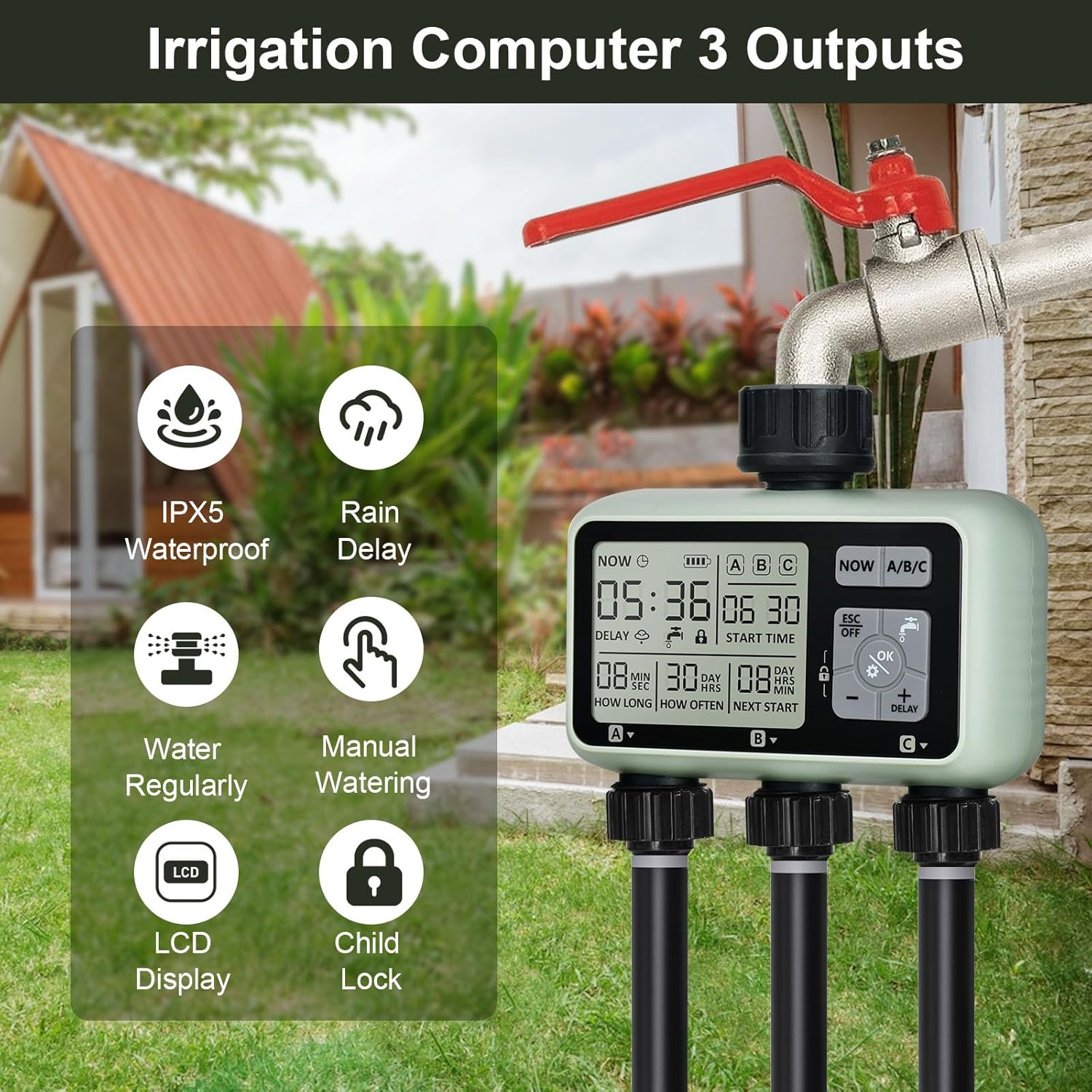
Resim: Üzeriview of the johgee 3-Zone Watering Timer highlighting its key features such as IPX5 waterproofing, rain delay, regular watering, manual watering, LCD display, and child lock function.
2. Güvenlik Bilgileri
- Pil Güvenliği: Use only two 1.5V alkaline batteries (AA size). Do not use lithium batteries. Ensure correct polarity when inserting batteries. Remove batteries if the timer will not be used for an extended period.
- Su Basıncı: The timer is designed to withstand water pressure between 0.05-0.8 Mpa. Do not exceed recommended pressure.
- Sıcaklık: Do not expose the timer to freezing temperatures. Drain water and store indoors during winter months to prevent damage.
- Çocuk Güvenliği: The timer includes a child-lock mode to prevent accidental operation. Keep the device out of reach of small children when not in use.
- Kurulum: Ensure all connections are secure to prevent leaks. Do not overtighten connections.
3. Paket İçeriği
Lütfen paket içeriğini kontrol ederek tüm öğelerin mevcut olduğundan emin olun:
- johgee 3-Zone Watering Timer (1 unit)
- Kullanım Kılavuzu (bu belge)
Note: 1.5V AA alkaline batteries are not included and must be purchased separately.
4. Ürün Bittiview
The johgee 3-Zone Watering Timer features a clear LCD display and intuitive controls for easy programming. Below is a diagram illustrating the main components and display elements.

Image: Labeled diagram of the timer's display, indicating the positions of Current Time, Irrigation Start Time, Irrigation Duration, Irrigation Frequency, Duration to Next Irrigation, and the three independent zones (Zone 1, Zone 2, Zone 3).
Ekran Öğeleri:
- ŞİMDİ: Geçerli saati görüntüler.
- Pil Göstergesi: Kalan pil gücünü gösterir.
- ABC: Indicates the currently selected watering zone.
- BAŞLANGIÇ SAATİ: The programmed time for irrigation to begin.
- NE KADARDIR: The duration of each watering cycle (1 second to 360 minutes).
- NE SIKLIKTA: The frequency of watering (1 hour to 15 days).
- SONRAKİ BAŞLANGIÇ: Countdown to the next scheduled watering cycle.
- GECİKME: Yağmur nedeniyle gecikme yaşandığını gösterir.
- Çocuk Kilidi Simgesi: Indicates child lock mode is active.
Kontrol Düğmeleri:
- ŞİMDİ: Geçerli saati ayarlamak için kullanılır.
- ABC: Selects the watering zone (Zone 1, Zone 2, or Zone 3) for programming.
- ESC/KAPALI: Exits current setting mode or turns off the timer.
- OK/Gear Icon: Confirms settings or enters programming mode.
- Water Faucet Icon: Activates or deactivates manual watering.
- Eksi (-): Değerleri azaltır veya geriye doğru gider.
- Plus (+)/DELAY: Increases values or activates rain delay.
- Kilit Simgesi: Activates or deactivates child lock.
5. Kurulum
Follow these steps to install your johgee 3-Zone Watering Timer:
- Pilleri Takın: Open the battery compartment cover on the back of the timer. Insert two new 1.5V AA alkaline batteries, ensuring correct polarity. Close the cover securely to maintain the IPX5 waterproof rating.
- Musluğa Bağlan: Screw the timer's inlet connector onto your outdoor hose faucet. The brass material interface ensures a secure and leak-proof connection. The 360-degree rotatable connector allows for flexible positioning.
- Hortumları bağlayın: Attach your garden hoses or irrigation lines to the three independent outlets at the bottom of the timer. Ensure all connections are tight to prevent leaks.

Image: The battery compartment with two AA batteries inserted, demonstrating the correct battery placement.

Resim: Ayrıntılı view of the 360-degree rotatable brass connection, emphasizing its durability and ease of installation.

Image: A visual guide showing the three main steps for setting up the watering timer: battery insertion, timer programming, and connecting to the water source and irrigation lines.
6. Kurulum ve Programlama
The timer allows for individual programming of each of its three zones (A, B, C).
6.1. Güncel Saati Ayarlama
- Basın ŞİMDİ düğmesine basın. Zaman göstergesi yanıp sönecektir.
- Kullanın + Ve - Saati ayarlamak için düğmeler.
- Basmak OK Saati onaylamak ve dakikaya geçmek için.
- Kullanın + Ve - Dakikaları ayarlamak için düğmeler.
- Basmak OK to save the current time.
6.2. Programming Watering Schedules (for each Zone A, B, C)
Each zone can be programmed independently. Repeat these steps for Zone A, Zone B, and Zone C.
- Bölge Seçin: Basın ABC button to cycle through and select the desired zone (A, B, or C) you wish to program. The selected zone will be highlighted on the display.
- Programlama Moduna Girin: Basın OK button (with the gear icon). The 'START TIME' will begin to flash.
- Başlangıç Zamanını Ayarlayın: Kullanın + Ve - buttons to set the desired start time for watering. Press OK to confirm and move to 'HOW LONG'.
- Sulama Süresini Ayarlayın: Kullanın + Ve - buttons to set the duration of watering (from 1 second to 360 minutes). Press OK to confirm and move to 'HOW OFTEN'.
- Set Watering Frequency: Kullanın + Ve - buttons to set how often the watering occurs (from 1 hour to 15 days). Press OK onaylamak için.
- Ayarları Kaydet: Basmak ESC to exit the programming mode and save the settings for the selected zone.

Image: The timer's display illustrating how different watering durations and frequencies can be set for each of the three zones independently.
7. Çalışma Modları
7.1. Automatic Watering
Once programmed, the timer will automatically activate the selected zones according to their set start times, durations, and frequencies. Ensure the faucet is open for water flow.
7.2. Manuel Sulama
Manual mode allows for immediate watering without affecting the programmed schedule. This is useful for quick tasks like filling a bucket or spot watering.
- Basın Su Musluk Simgesi düğme.
- The display will show 'ON' and water will begin to flow from the currently selected zone.
- Manuel sulamayı durdurmak için düğmeye basın. Su Musluk Simgesi button again. The display will show 'OFF'.

Image: A hand interacting with the timer's control panel, specifically pressing the manual watering button, while a hose sprays water, demonstrating the manual watering feature.
7.3. Yağmur Geciktirme Modu
The rain delay function temporarily suspends the watering schedule to prevent overwatering during rainy periods, conserving water and protecting plants.
- Basın + DELAY düğme.
- The 'DELAY' icon will appear on the screen, and the next start time will be updated to reflect the delay.
- To cancel the rain delay, press the + DELAY button again until the 'DELAY' icon disappears.
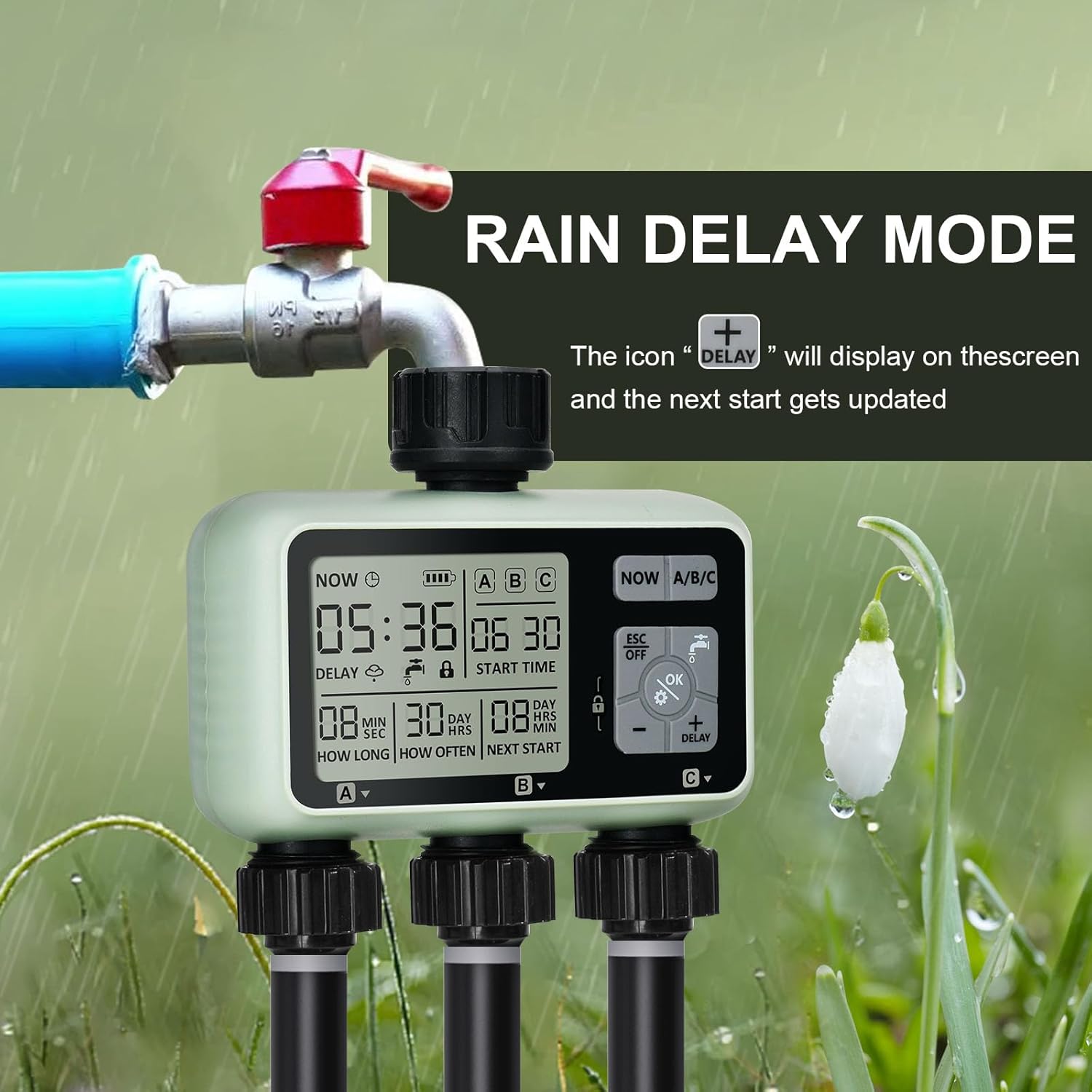
Image: The watering timer connected to a faucet, with the display showing the 'DELAY' icon, signifying that the rain delay function is active and the next watering cycle is postponed.
7.4. Child-Lock Mode
The child-lock mode prevents accidental changes to programming or activation by children or pets.
- Etkinleştirmek için tuşuna basın ve basılı tutun. Kilit Simgesi button for 3 seconds. The lock icon will appear on the display.
- Devre dışı bırakmak için, tuşunu basılı tutun Kilit Simgesi button for 3 seconds again. The lock icon will disappear.
8. Bakım
- Pil Değişimi: The intelligent power supply system will detect low battery and turn off the timer before the battery is completely empty. Replace batteries when the battery indicator on the display shows low power. Always use two new 1.5V AA alkaline batteries.
- Temizlik: Zamanlayıcının dış yüzeyini yumuşak bir bezle temizleyin.amp bezle silin. Aşındırıcı temizleyiciler veya çözücüler kullanmayın.
- Filtre Temizleme: Periodically check the aluminum filter inside the inlet connection for debris. Clean if necessary to ensure proper water flow and prevent blockages.
- Kış Deposu: Before the first frost, disconnect the timer from the faucet. Drain all water from the timer and store it indoors in a dry, frost-free location. Removing batteries during storage is recommended.

Image: A composite image highlighting the durable construction of the timer, including the brass hose connection, the clear and easy-to-use control panel, and the sealed battery cover designed to isolate moisture.
9. Sorun Giderme
| Sorun | Olası Neden | Çözüm |
|---|---|---|
| Zamanlayıcı, planlanan zamanda sulama yapmıyor. |
|
|
| Bağlantı yerlerinden su sızıyor. |
|
|
| Ekran boş veya karanlık. |
|
|
| Manual watering not working. |
|
|
10. Özellikler
| Marka | joe gee |
| Model Numarası | 378 |
| Renk | 3 Bölge |
| Ürün Boyutları | 13x13.5x6.4 cm |
| Ürün Ağırlığı | 640 gr |
| Malzeme | Brass (interface), Reinforced Nylon (connector) |
| Su Geçirmezlik Derecesi | IPX5 |
| Su Basınç Aralığı | 0.05-0.8 Mpa |
| Güç Kaynağı | 2 adet 1.5V AA alkalin pil (dahil değildir) |
| Sulama Süresi | 1 saniyeden 360 dakikaya kadar |
| Sulama Sıklığı | 1 hour to 15 days |
| Ayar Sayısı | 9 |
11. Garanti ve Destek
For warranty information and customer support, please refer to the purchase platform or contact johgee customer service directly. Keep your purchase receipt as proof of purchase for any warranty claims.
Üretici: joe gee
İş Yeri: joe gee
For further assistance, please visit the official johgee store on Amazon or contact their support channels.


