1. Giriş
Thank you for choosing the Yesido KM15 Dual Dash Camera. This manual provides detailed instructions for the installation, operation, and maintenance of your device. The KM15 offers high-resolution 4K front recording and 1080P rear recording, ensuring comprehensive coverage of your journeys. Its advanced features include 24-hour parking monitoring, loop recording, and Wi-Fi connectivity for easy access to your footage.
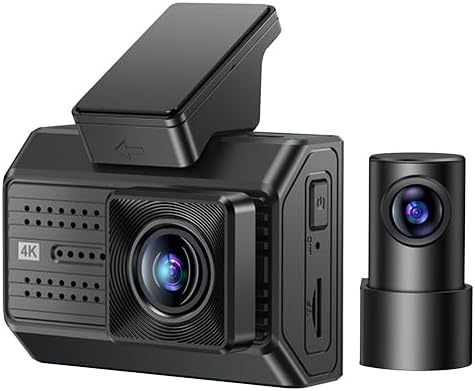
Figure 1.1: Yesido KM15 Dual Dash Camera (Front and Rear Units)
The KM15 is designed for reliability and ease of use, providing crucial evidence in case of incidents and peace of mind during parking. Please read this manual thoroughly before using the product to ensure proper operation and to maximize its lifespan.
2. Paket İçeriği
Lütfen paketinizde aşağıdaki tüm öğelerin bulunduğundan emin olun:
- Front Camera Unit (Host)
- Rear Camera Unit with Cable
- ACC Power Cord
- 32GB TF Kartı
- Static Stickers for Mounting
- Kullanım Kılavuzu (bu belge)
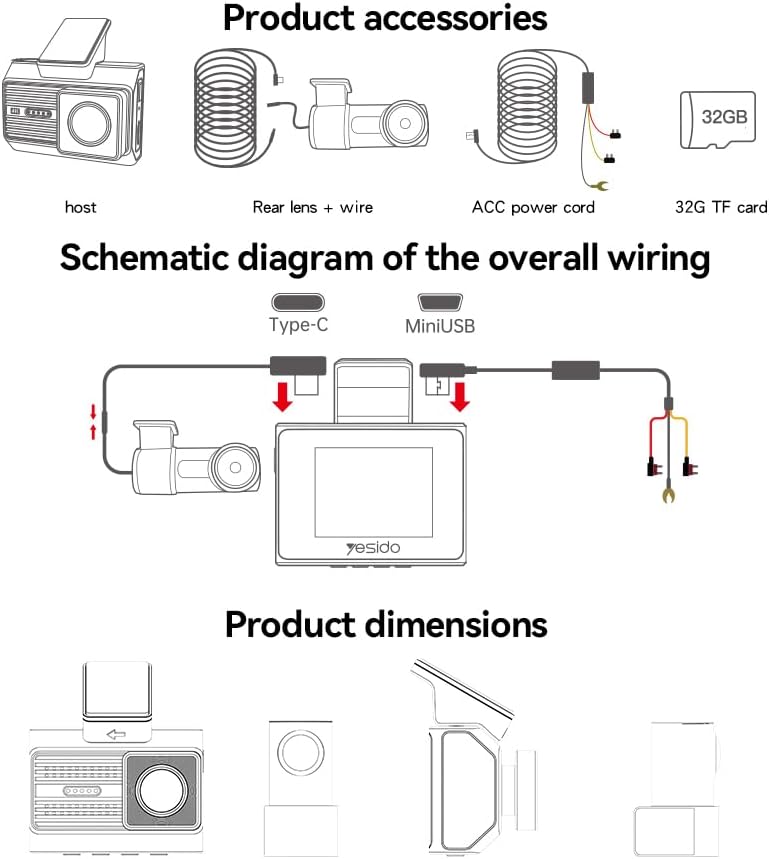
Figure 2.1: Product Accessories and Wiring Diagram
Herhangi bir öğenin eksik veya hasarlı olması durumunda lütfen derhal müşteri desteğiyle iletişime geçin.
3. Ürün Özellikleri
The Yesido KM15 Dual Dash Camera features advanced components for optimal performance:
| Özellik | Şartname |
|---|---|
| Ön Kamera Çözünürlüğü | 3840x2160P (4K) @ 30fps |
| Arka Kamera Çözünürlüğü | 1920x1080P @ 30fps |
| Görüntü Sensörü | 1/2.7-inch CMOS (Front) |
| Geniş Açılı Lens | 135° |
| Ekran Boyutu | 2 inç IPS Ekran |
| Yonga seti | NT96670 |
| Depolama Desteği | Up to 256GB TF card (Class 10 or higher recommended) |
| İşletim Belleği | 900MHz, DDR3, 2GB |
| Dahili Flaş | 32MB SPI Flaşı |
| Bağlantı | Wi-Fi (2.4G), USB 2.0 |
| Uyumlu Uygulama | FinalCamX1 |
| Malzemeler | Bilgisayar + ABS |
| Ürün Boyutları | 19x5.6x14 cm |
| Ürün Ağırlığı | 327 gram |

Figure 3.1: Internal Components and Key Features
4. Kurulum ve Kurulum
En iyi performans için doğru kurulum çok önemlidir. Lütfen şu adımları dikkatlice izleyin:
4.1 Ön Kamera Montajı
- Clean the windshield area where you intend to mount the dash camera. Ensure it is free of dust and grease.
- Attach the static sticker to the cleaned area on the windshield. This helps in easy removal and prevents residue.
- Mount the front camera unit onto the static sticker, ensuring it is securely attached and does not obstruct your view. Position it centrally, ideally behind the rearview ayna.
- Adjust the lens angle to capture the road ahead clearly.
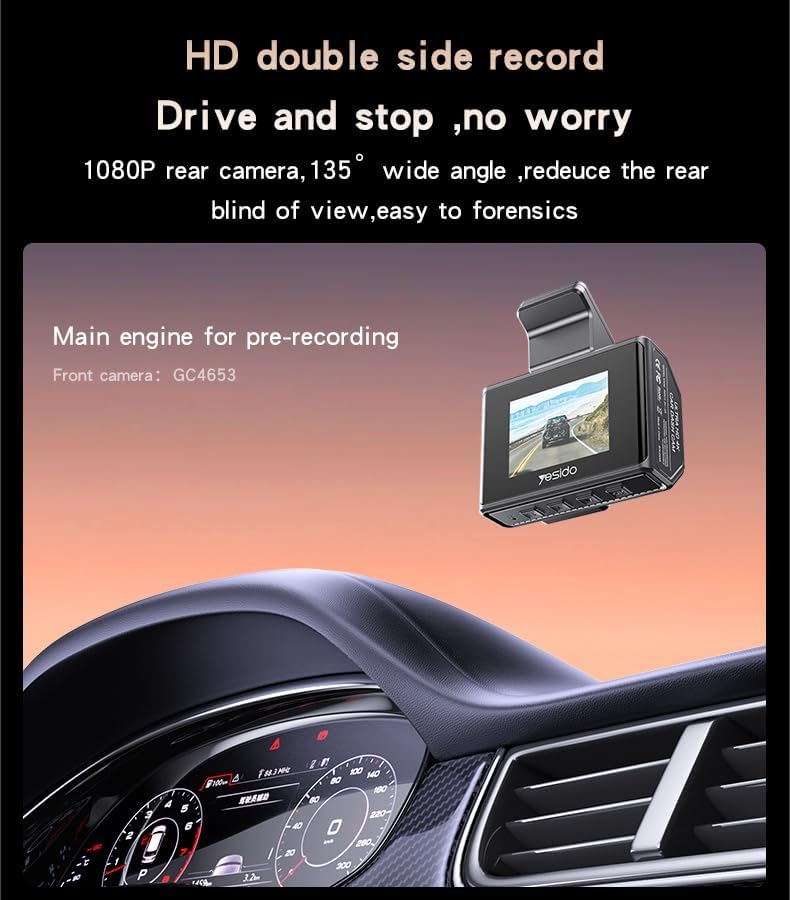
Figure 4.1: Front Camera Mounted on Windshield
4.2 Arka Kamera Kurulumu
- Identify a suitable location on your rear windshield for the rear camera. It should have a clear view and not be obstructed by the defroster lines or wiper blades.
- Seçilen alanı iyice temizleyin.
- Attach the rear camera using the provided adhesive or mounting bracket.
- Route the rear camera cable neatly along the car's headliner and A-pillars to the front camera unit. Use cable clips if necessary to secure the cable.

Figure 4.2: Rear Camera Mounted on Rear Windshield
4.3 Power Connection and Wiring
- Connect the ACC power cord to the front camera unit.
- For continuous power and parking monitoring, connect the ACC power cord to your car's fuse box. Consult a professional if you are unsure about this step. A voltage reduction line is required for low voltage detection during parking monitoring.
- Ensure all cables are tucked away neatly to avoid obstructing the driver's view veya araç kontrollerine müdahale etmek.
Figure 4.3: Overall Wiring Schematic
4.4 TF Kartının Takılması
Insert the provided 32GB TF card (Class 10 or higher) into the designated slot on the side of the front camera unit. Ensure it clicks into place. The device supports up to 256GB TF cards.
5. Kullanım Talimatları
Familiarize yourself with the key functions of your dash camera:
5.1 Güç Açma/Kapatma
The dash camera will automatically power on and begin recording when your vehicle's ignition is turned on. It will power off automatically when the ignition is turned off.
5.2 Döngü Kaydı
The KM15 features automatic loop recording. When the TF card is full, the oldest unlocked files will be automatically overwritten by new recordings. This ensures continuous recording without manual intervention. It is recommended to format the TF card periodically to maintain optimal performance.
5.3 24 Saat Park İzleme
With the ACC power cord properly installed and connected to a constant power source, the dash camera can monitor your vehicle 24 hours a day. If a vibration or collision is detected while the car is parked, the G-sensor will trigger the camera to immediately start recording. This feature requires a voltage reduction line for low voltage detection to protect your car battery.

Şekil 5.1: 24 Saatlik Park İzleme
5.4 Wi-Fi Connectivity and App (FinalCamX1)
The KM15 supports 2.4G Wi-Fi connectivity, allowing you to connect your smartphone to the dash camera via the FinalCamX1 app. Through the app, you can:
- View canlı footaghem ön hem de arka kameralardan gelen görüntüler.
- Kaydedilen videoları doğrudan telefonunuzdan oynatın.
- Download recorded videos to your phone's storage.
- Kamera ayarlarını yapın.
Download the FinalCamX1 app from your smartphone's app store. Follow the in-app instructions to connect to your dash camera's Wi-Fi network.
6. Bakım
To ensure the longevity and optimal performance of your Yesido KM15 Dash Camera, follow these maintenance guidelines:
- Temizlik: Regularly wipe the camera lenses with a soft, lint-free cloth to ensure clear recordings. Do not use abrasive cleaners or solvents.
- Sıcaklık: Avoid exposing the dash camera to extreme temperatures for prolonged periods. While designed for automotive environments, excessive heat or cold can affect performance and lifespan.
- TF Kartı: Format the TF card once a month to prevent data corruption and ensure smooth loop recording. Back up any important footagBiçimlendirmeden önce e.
- Donanım Yazılımı Güncellemeleri: Check the official Yesido website or the FinalCamX1 app periodically for any available firmware updates. Keeping your device updated can improve performance and add new features.
- Güvenli Montaj: Periodically check that the camera units are securely mounted and that cables are not loose or interfering with driving.
7. Sorun Giderme
If you encounter any issues with your dash camera, please refer to the following common problems and solutions:
- Kamera açılmıyor:
– Ensure the power cable is securely connected to both the camera and the car's power source.
– Check the car's ignition and fuse box for any issues. - Kayıt duruyor veya footage bozulmuş:
– Ensure you are using a Class 10 or higher TF card.
– Format the TF card regularly (monthly is recommended).
– The TF card might be faulty; try replacing it with a new, high-quality card. - Kötü video kalitesi:
– Clean the camera lenses. Dust or smudges can significantly affect video clarity.
– Ensure the protective film has been removed from the lens.
– Check the resolution settings in the app; ensure it's set to 4K for the front camera and 1080P for the rear. - Wi-Fi bağlantı sorunları:
– Ensure the camera's Wi-Fi is enabled.
– Restart both the camera and your smartphone.
– Make sure you are within close proximity to the camera.
– Reinstall the FinalCamX1 app if necessary. - Park yeri izleme sistemi çalışmıyor:
– Ensure the ACC power cord is correctly installed and connected to a constant power source.
– Hacmin doğrulandığını doğrulayıntage reduction line is properly connected for low voltage algılama.
– Check the G-sensor sensitivity settings in the app.
If the problem persists after trying these solutions, please contact Yesido customer support for further assistance.
8. Garanti ve Destek
Yesido products are manufactured to high-quality standards. For specific warranty information, please refer to the warranty card included with your product or visit the official Yesido webSite. Satın alma fişinizi, garanti talepleriniz için satın alma belgeniz olarak saklayın.
For technical support, product inquiries, or warranty service, please contact Yesido customer support through the contact information provided on their official website or within the FinalCamX1 app.