1. Giriş
Thank you for choosing the SMATAR Universal Remote Control. This remote is designed to provide seamless control for a wide range of smart televisions, including popular brands such as Samsung, Sony, LG, Sanyo, Hisense, Panasonic, Insignia, Sharp, Toshiba, Seiki, Magnavox, and TCL. It features backlit buttons for enhanced visibility in low-light conditions. This manual provides detailed instructions for setup, operation, and troubleshooting to ensure optimal performance.
2. Ürün Bittiview
The SMATAR Universal Remote Control is engineered for ease of use and broad compatibility. Its ergonomic design and intuitive button layout make navigating your TV's functions straightforward.
2.1 Temel Özellikler
- Evrensel Uyumluluk: Works with numerous TV brands.
- Arkadan Aydınlatmalı Düğmeler: Illuminates buttons for visibility in dark environments.
- Direct Use: Ready to use with many popular TV brands without initial setup.
- Kolay Programlama: Simple brand setting method for other TV models.
2.2 Uzaktan Kumanda Düzeni
Below are images illustrating the remote control's design and its backlit feature, along with examples of compatible televisions and brands.

Resim 1: Ön view of the SMATAR Universal Remote Control, demonstrating the appearance of buttons when unlit and when illuminated by the backlight.

Resim 2: The universal remote control displayed next to a selection of smart TVs, illustrating its broad compatibility with different television brands.

Resim 3: The remote control positioned next to a graphic listing many compatible TV brands, including Samsung, Sony, LG, Hisense, and others.
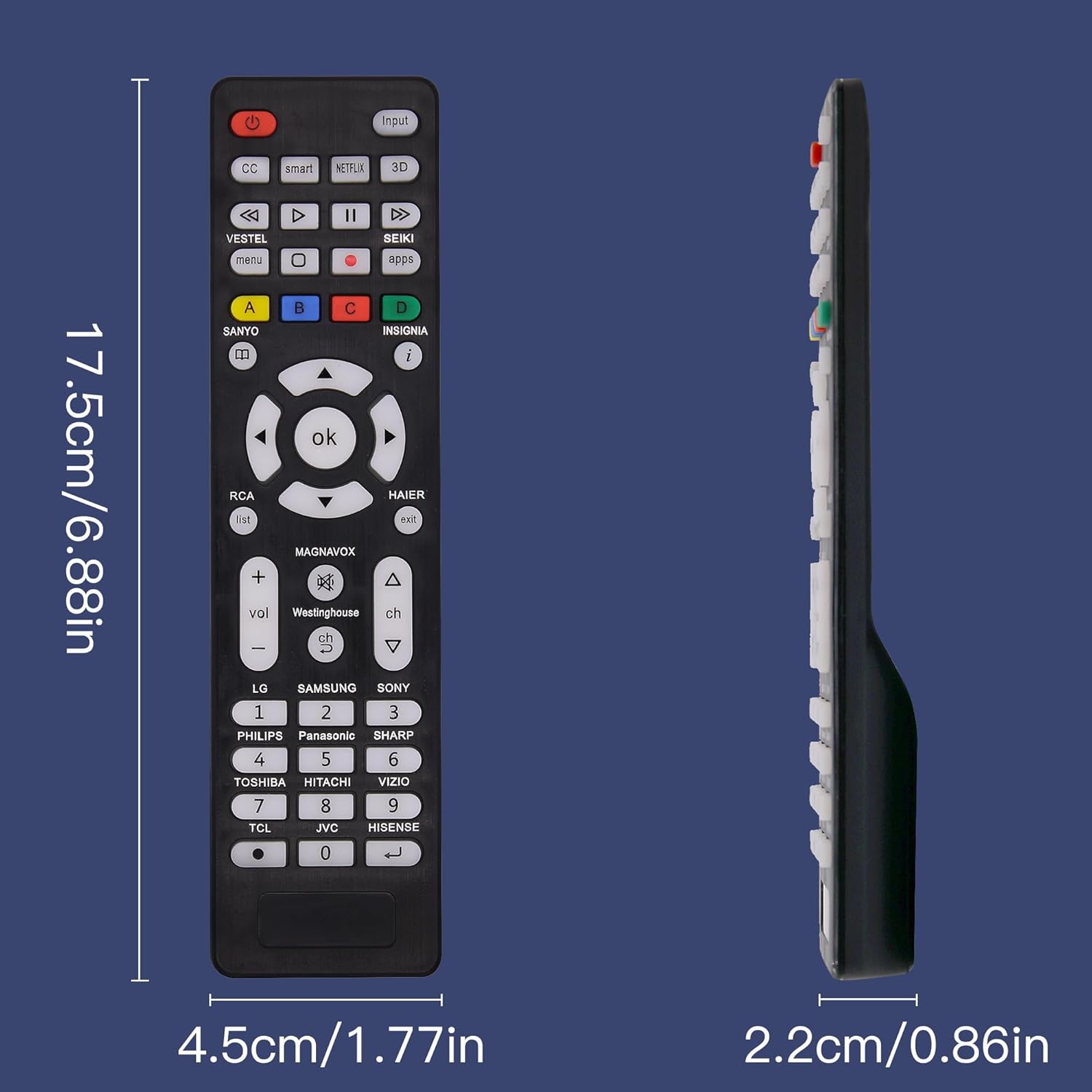
Resim 4: A diagram showing the physical dimensions of the remote control, indicating its length (17.5cm/6.88in), width (4.5cm/1.77in), and thickness (2.2cm/0.86in).
3. Kurulum
3.1 Pil Kurulumu
Uzaktan kumanda iki adet AAA pil gerektirir (dahil değildir).
- Uzaktan kumandanın arkasındaki pil bölmesi kapağını açın.
- İki adet AAA pili, doğru kutuplara (+ ve -) dikkat ederek takın.
- Pil bölmesi kapağını sıkıca kapatın.

Resim 5: Yakın çekim view of the remote control's battery compartment, showing the correct orientation for inserting AAA batteries.
3.2 Initial Use (Direct Compatibility)
For many popular TV brands, the SMATAR Universal Remote Control can be used directly without any programming. This includes TVs from LG, SONY, SAMSUNG, PANASONIC, PHILIP, Ve KESKİN. Simply insert the batteries and begin using the remote.
4. Kullanım Talimatları
4.1 Brand Setting Method (For Other Brands)
If your TV brand is not among those directly compatible, or if the remote does not function correctly, follow these steps to program it:
- Point the remote control directly at your television.
- Press and hold the button corresponding to your TV's brand (e.g., VESTEL, SANYO, RCA, HAIER, MAGNAVOX, WESTINGHOUSE, TCL, HISENSE, JVC, HITACHI, TOSHIBA, PHILIPS, PANASONIC, SHARP, SONY, SAMSUNG, LG) for approximately 5 seconds.
- Continue holding the button until your TV turns off. The LED indicator on the remote will flash three times to confirm the setting is complete.
- Release the button. The remote is now programmed for your TV.

Resim 6: A visual guide detailing the brand setting method, showing the remote and instructions to press and hold the corresponding brand button until the TV turns off.
4.2 Restoring to Initial Setting
To reset the remote control to its factory default settings, follow these steps:
- Basılı tutun [TAMAM] düğme ve [0] button simultaneously for approximately 3 seconds.
- The LED indicator on the remote will blink four times, confirming that the remote has been restored to its initial settings.
4.3 Arka Aydınlatma Fonksiyonu
The remote control is equipped with backlit buttons to assist with operation in dimly lit environments. Simply press any button on the remote control, and the buttons will illuminate, making them easy to see.

Resim 7: A hand holding the remote control, demonstrating the backlit buttons glowing in a dark setting, enhancing visibility.
5. Sorun Giderme
If you encounter issues with your SMATAR Universal Remote Control, please refer to the following common solutions:
- Uzaktan Kumanda Yanıt Vermiyor:
- Pillerin doğru kutuplara dikkat edilerek düzgün şekilde takıldığından emin olun.
- Eski veya bitmiş pilleri yeni AAA pillerle değiştirin.
- Ensure there are no obstructions between the remote and the TV's infrared receiver.
- Remote Not Controlling TV:
- If your TV is not one of the directly compatible brands (LG, SONY, SAMSUNG, PANASONIC, PHILIP, SHARP), perform the Brand Setting Method (Section 4.1).
- If the remote was previously working but stopped, try performing the Brand Setting Method again.
- Consider restoring the remote to its initial settings (Section 4.2) and then re-programming it.
- Buttons Performing Incorrectly (e.g., double input):
- This can sometimes occur with universal remotes. Try resetting the remote to initial settings (Section 4.2) and then re-programming it.
- For specific issues like navigation buttons (e.g., back button) not working on certain LG TVs, some users have reported success by pressing and holding the Sesini kapatmak Ve Güç buttons for 3-4 seconds, then entering the code 023 using the number buttons. This may vary by TV model.
- Arka Işık Çalışmıyor:
- The backlight activates when any button is pressed. Ensure batteries have sufficient power.
6. Özellikler
| Özellik | Detay |
|---|---|
| Model Numarası | SM* |
| Paket Boyutları | 6.97 x 1.73 x 0.87 inç |
| Ürün Ağırlığı | 1.76 ons |
| Özel Özellik | Arkadan Aydınlatmalı Düğmeler |
| Renk | Siyah |
| Maksimum Desteklenen Cihaz Sayısı | 1 |
| Uyumlu Cihazlar | Televizyon |
7. Garanti ve Destek
The SMATAR Universal Remote Control comes with a FIVE YEAR free quality warranty. If you experience any quality-related issues with your product, please contact our customer support team. We are committed to providing a satisfactory solution and ensuring your peace of mind.
For support, please refer to the contact information provided with your purchase or visit the SMATAR official webalan.