1. Giriş
This manual provides detailed instructions for the installation, operation, and maintenance of the Intellinet 48-Port L3 Managed Gigabit PoE+ Switch, Model 562041. This device is designed for enterprise networks requiring efficient and scalable routing solutions with high-powered Power over Ethernet (PoE) capabilities.
2. Güvenlik Bilgileri
Observe the following safety precautions to prevent damage to the device and injury to personnel:
- Cihazın uygun şekilde topraklandığından emin olun.
- Do not expose the switch to water or excessive humidity.
- Cihazı belirtilen sıcaklık ve nem aralıklarında çalıştırın.
- Use only the power cable provided or a compatible replacement.
- c şalterini açmayın.asing; Servis işlemlerini yetkili personele yaptırın.
- Ensure adequate ventilation around the switch to prevent overheating.
3. Paket İçeriği
Paketin içinde tüm öğelerin mevcut olduğundan emin olun:
- Intellinet 48-Port L3 Managed Gigabit PoE+ Switch (Model 562041)
- Güç kablosu
- 19" rackmount brackets
- Kauçuk ayaklar
- Talimatlar (bu kılavuz)
4. Ürün Bittiview
The Intellinet 562041 is a robust Layer 3 managed switch featuring 48 Gigabit PoE+ ports and six 10G SFP+ uplink slots. It supports a total power budget of 850 watts for PoE devices.
4.1 Ön Panel
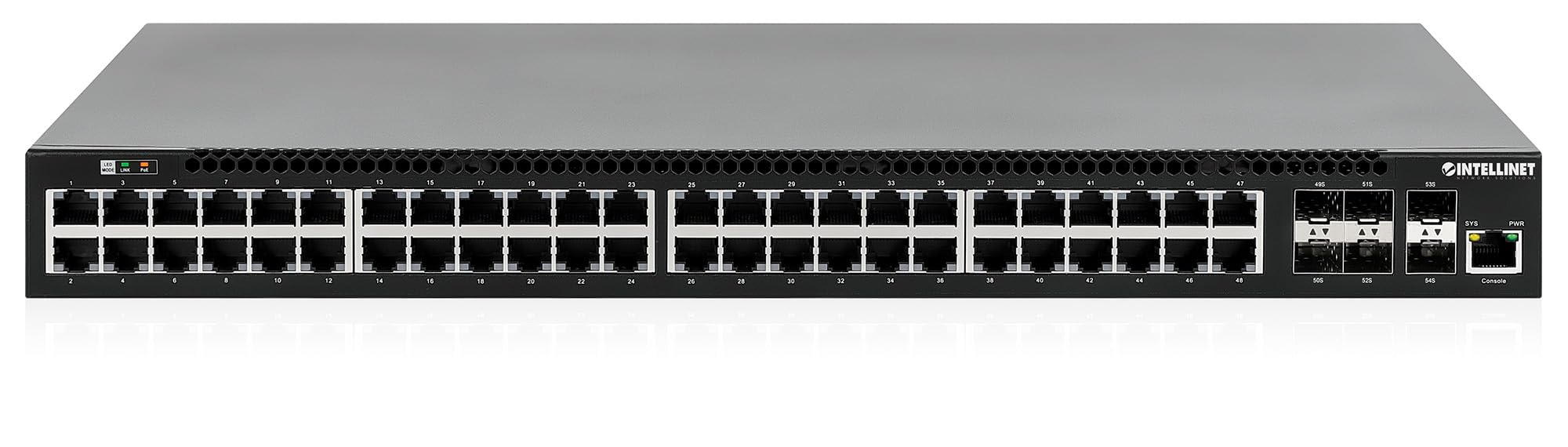
Ön panelde şunlar bulunur:
- 48 x 10/100/1000 Mbps RJ45 Ports: These ports support Power over Ethernet Plus (PoE+) for connecting compatible devices.
- 6 x 10 Gigabit SFP+ Slots: For high-speed uplink connections to other network devices.
- LED Göstergeleri: Provide status information for power, system, link activity, and PoE status.
- Konsol Bağlantı Noktası: Yerel yönetim ve yapılandırma için.


4.2 Arka Panel

The rear panel typically includes the AC power input and cooling fans for heat dissipation.

5. Kurulum
5.1 Fiziksel Kurulum
Bu switch, standart 19 inçlik bir ekipman rafına monte edilebilir veya masaüstüne yerleştirilebilir.
- Raf Montajı Kurulumu: Attach the provided rackmount brackets to the sides of the switch using the included screws. Secure the switch into a standard 19-inch rack.
- Masaüstü Kurulumu: Attach the provided rubber feet to the bottom of the switch to prevent scratching and ensure stability. Place the switch on a flat, stable surface.
5.2 Güç Bağlantısı
Connect the provided power cable to the AC power input on the rear panel of the switch and then to a grounded electrical outlet. Ensure the power switch is in the OFF position before connecting the power cable.
5.3 Ağ Bağlantıları
- PoE Cihazları: Connect PoE-compatible devices (e.g., IP cameras, VoIP phones, wireless access points) to any of the 48 Gigabit RJ45 ports. The switch will automatically detect and provide power to these devices.
- Yukarı Bağlantı Bağlantıları: Insert compatible SFP+ transceivers into the 10 Gigabit SFP+ slots and connect them to your core network or other high-speed devices using appropriate fiber optic cables.
- Konsol Bağlantısı: For initial configuration or direct management, connect a console cable from your computer to the console port on the switch.
5.4 İlk Yapılandırma
Refer to the separate software configuration guide for detailed instructions on accessing the switch's management interface (web-based GUI or command-line interface via console port) and performing initial setup, including IP address assignment, user accounts, and basic network settings.
6. Kullanım Talimatları
6.1 Layer 3 Routing
This switch offers dynamic Layer 3 IP routing capabilities, including OSPF (Open Shortest Path First), RIP (Routing Information Protocol), and VRRP (Virtual Router Redundancy Protocol). These protocols enable efficient and scalable routing within complex network environments.

6.2 Ethernet Üzerinden Güç (PoE+)
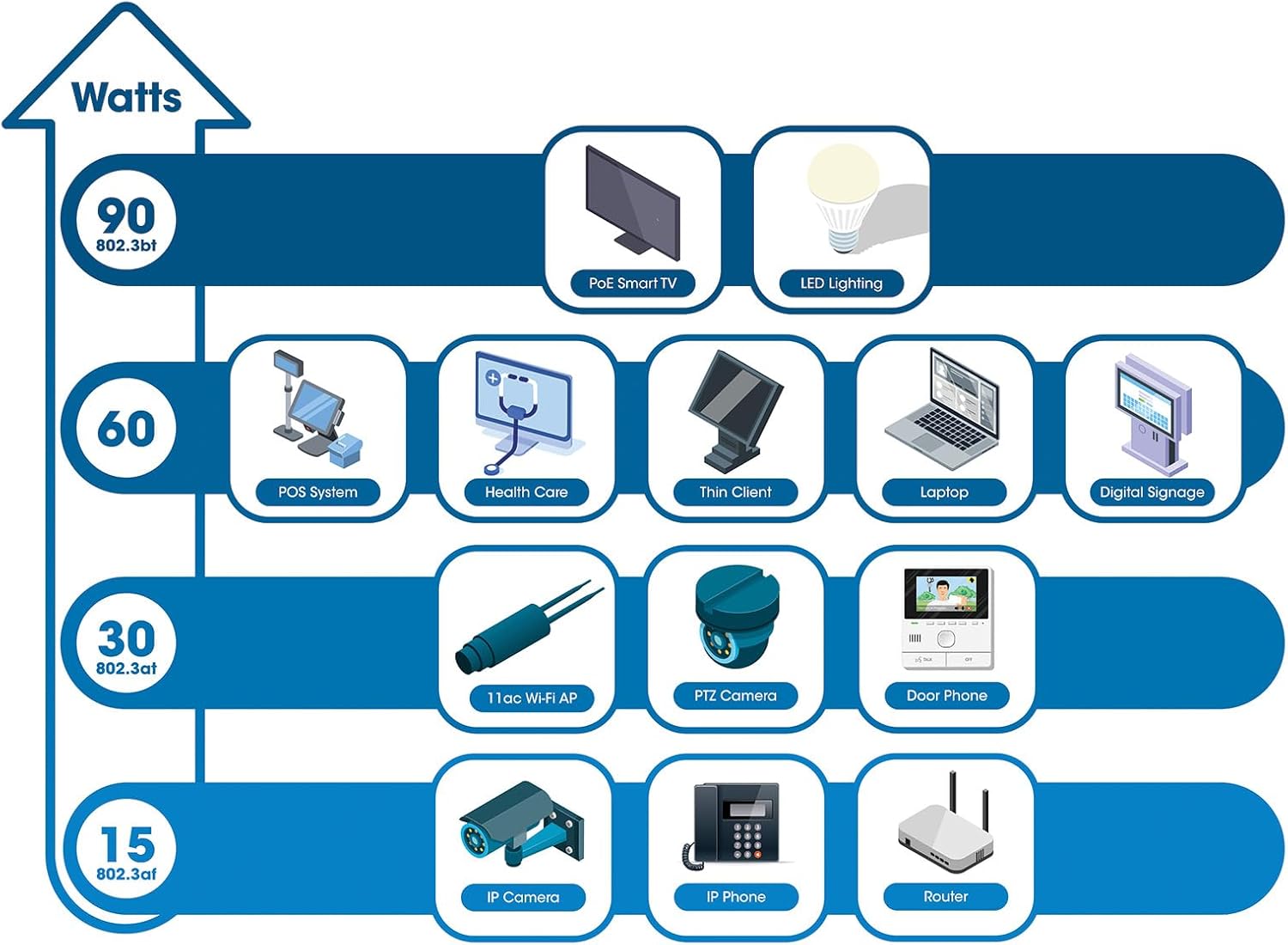
The switch provides up to 30 watts of power per port across its 48 PoE+ ports, with a total power budget of 850 watts. This allows for seamless integration of various PoE devices without the need for separate power adapters.
6.3 PoE Scheduling
The switch supports PoE scheduling, allowing administrators to define specific times for powering on, powering off, or rebooting connected PoE devices. This feature can optimize power consumption and enhance network security.


6.4 Self-Healing Functionality (PDM)
The Powered Device Monitor (PDM) feature enables the switch to proactively monitor the status of connected PoE devices. If a device becomes unresponsive, the PDM can automatically restart the PoE port to restore functionality, minimizing downtime and maintaining network integrity.
6.5 Bulut Yönetimi
The switch supports cloud management capabilities, allowing for remote configuration, monitoring, and troubleshooting of the device from a centralized platform. Refer to the cloud management documentation for setup and usage details.
7. Bakım
7.1 Firmware Güncellemesi
Regularly check the Intellinet Network Solutions website for the latest firmware updates. Applying firmware updates can improve performance, add new features, and address security vulnerabilities. Follow the instructions provided with the firmware update package carefully.
7.2 Temizlik
To clean the switch, power it off and disconnect all cables. Use a soft, dry cloth to wipe the exterior. Do not use liquid or aerosol cleaners. Ensure ventilation openings are free from dust and debris.
7.3 Çevresel Hususlar
Ensure the switch operates within its specified temperature and humidity ranges. Avoid placing the switch in direct sunlight, near heat sources, or in areas with high dust accumulation.
8. Sorun Giderme
Bu bölümde, geçiş işlemi sırasında karşılaşabileceğiniz yaygın sorunlar ele alınmaktadır.
8.1 Güç Yok
- Verify the power cable is securely connected to both the switch and a working electrical outlet.
- Arka paneldeki güç düğmesinin AÇIK konumda olduğundan emin olun.
- Prizin çalışır durumda olduğunu doğrulamak için başka bir cihazla kontrol edin.
8.2 Bir Port Üzerinde Bağlantı Yok
- Ethernet kablosunun her iki ucunun bağlantısını kontrol edin. Güvenli bir şekilde takıldığından emin olun.
- Kablo hasarlı olup olmadığını kontrol edin. Farklı bir kablo deneyin.
- Bağlı cihazın açık olduğundan ve düzgün çalıştığından emin olun.
- Anahtarın yönetim arayüzünden port durumunu kontrol edin.
8.3 PoE Aygıtı Güç Almıyor
- Confirm the connected device is a PoE-compatible device.
- Belirtilen port için PoE durum LED'ini kontrol edin.
- Verify the total PoE power budget (850W) is not exceeded by all connected devices.
- Utilize the Powered Device Monitor (PDM) feature to automatically restart the port if the device is unresponsive.
- Check PoE settings in the switch's management interface.
9. Özellikler
| Özellik | Şartname |
|---|---|
| Model Numarası | 562041 |
| Marka | INTELLINET AĞ ÇÖZÜMLERİ |
| Port Sayısı | 54 (48 x Gigabit PoE+, 6 x 10G SFP+) |
| Arayüz Türü | PoE, SFP |
| Maksimum Güç (PoE Bütçesi) | 850 Watt |
| Veri Aktarım Hızı | 10 Gigabits Per Second (SFP+ uplinks) |
| Ürün Ağırlığı | 6.2 Kilogram (13.64 pound) |
| Ürün Boyutları (U x G x Y) | 13.78 x 17.32 x 1.73 inç |
| Üst Sıcaklık Derecesi | 104 Fahrenheit derece (40°C) |
| Düşük Sıcaklık Derecesi | 32 Fahrenheit derece (0°C) |
| Uyumlu Cihazlar | Desktop, Router, PoE devices (IP cameras, VoIP phones, WAPs) |
| Dahil Bileşenler | 19" rackmount brackets, Instructions, Rubber feet, power cable |
| UPC | 766623562041 |
10. Garanti ve Destek
10.1 Garanti Bilgileri
This Intellinet Network Solutions product is covered by a 3 Yıllık Üretici GarantisiLütfen garanti talepleriniz için satın alma belgenizi saklayın. Garanti, normal kullanım koşullarında malzeme ve işçilik kusurlarını kapsar.
10.2 Teknik Destek
For technical assistance, product documentation, or to register your product, please visit the official Intellinet Network Solutions webÜreticinin web sitesinden veya müşteri destek hattından bilgi alabilirsiniz. İletişim bilgileri genellikle üreticinin web sitesinde bulunabilir. webSitede veya ürün ambalajında.


