giriiş
Thank you for choosing the RAINPOINT Sprinkler Timer. This programmable water timer is designed to simplify your garden and lawn watering, offering automatic, manual, and rain delay modes. With its easy-to-read LCD screen and intuitive controls, managing your irrigation has never been easier. This manual provides detailed instructions for setting up, operating, and maintaining your new sprinkler timers.

Image: Two RAINPOINT Sprinkler Timers, highlighting their compact design and digital displays.
Güvenlik Bilgileri
- Do not immerse the timer in water. It is designed to be water-resistant (IP54), not submersible.
- Use only 2 AAA alkaline batteries (not included). Do not mix old and new batteries or different battery types.
- Sızıntıları önlemek için tüm bağlantıların sıkı olduğundan emin olun.
- Do not expose the timer to freezing temperatures. Remove from faucet and store indoors during winter.
- Çocukların erişemeyeceği yerde saklayınız.
Paket İçeriği
- RAINPOINT Sprinkler Timer (x2)
- Kullanıcı Kılavuzu (x1)
Not: 2 AAA alkaline batteries are required for each timer and are not included in the package.
Kurmak
1. Pil Kurulumu
- Zamanlayıcının arka tarafında bulunan pil bölmesini bulun.
- Slide the battery tray out.
- İki adet yeni AAA alkalin pili, doğru kutuplara (+/-) dikkat ederek takın.
- Pil tepsisini güvenli bir şekilde tık sesi gelene kadar bölmeye geri kaydırın.
2. Zamanlayıcının Musluğa Takılması
- Musluğun temiz ve tıkanıklıklardan arındırılmış olduğundan emin olun.
- Screw the timer's inlet (top connector) onto your outdoor faucet or hose bib. Hand-tighten only. Do not overtighten.
- The timer features an upgraded anti-leakage design with increased thread engagement for a tighter fit.
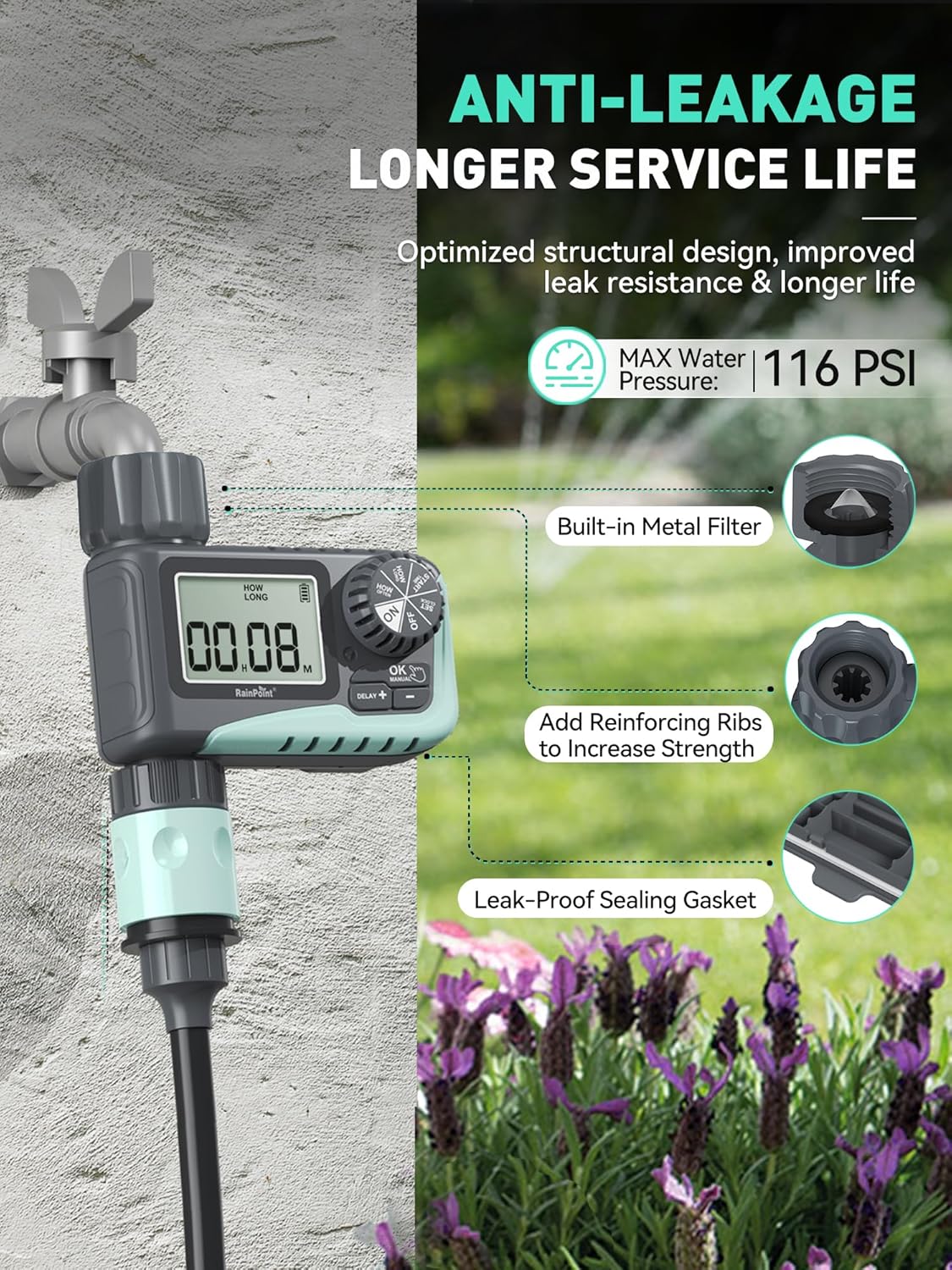
Image: The sprinkler timer connected to a faucet, illustrating its anti-leakage design and built-in metal filter for debris prevention.
3. Hortumun Bağlanması
- Screw your garden hose onto the timer's outlet (bottom connector). Hand-tighten only.
- The timer is designed to withstand up to 116 PSI water pressure.
Kullanım Talimatları
The RAINPOINT Sprinkler Timer features a large LCD screen and a rotary dial for easy programming. The dial allows you to select different modes, and the buttons below the screen are used for adjustments.

Resim: Yakın çekim view of the timer's large LCD display and user-friendly rotary dial, emphasizing ease of setup and reading.
1. Saati Ayarlama
- Kadranı "SAAT AYARLA" konumuna çevirin.
- Geçerli saati ayarlamak için "+" ve "-" düğmelerini kullanın.
- Onaylamak ve bir sonraki ayara geçmek için "Tamam" düğmesine basın.
2. Programming Automatic Watering
This mode allows you to set a customized watering schedule.
- Turn the dial to "START TIME". Use "+" and "-" to set the desired start time for watering. Press "OK".
- Turn the dial to "HOW LONG". Set the watering duration from 1 minute to 3 hours 59 minutes. Press "OK".
- Turn the dial to "HOW OFTEN". Choose the watering frequency:
- Every 1h to 12h (e.g., every 6 hours)
- Every 1 day to 7 days (e.g., every 2 days)
- Turn the dial to "ON" to activate the programmed schedule.

Image: The timer's display showing options for setting watering duration and frequency, including hourly and daily cycles.
3. Manuel Sulama Modu
Use this mode for immediate, on-demand watering without affecting your programmed schedule.
- Turn the dial to "ON".
- Press the "MANUAL" button.
- Use "+" and "-" to set the desired manual watering duration (1 minute to 8 hours).
- Press "OK" to start manual watering. The timer will automatically return to its programmed schedule after the manual watering is complete.
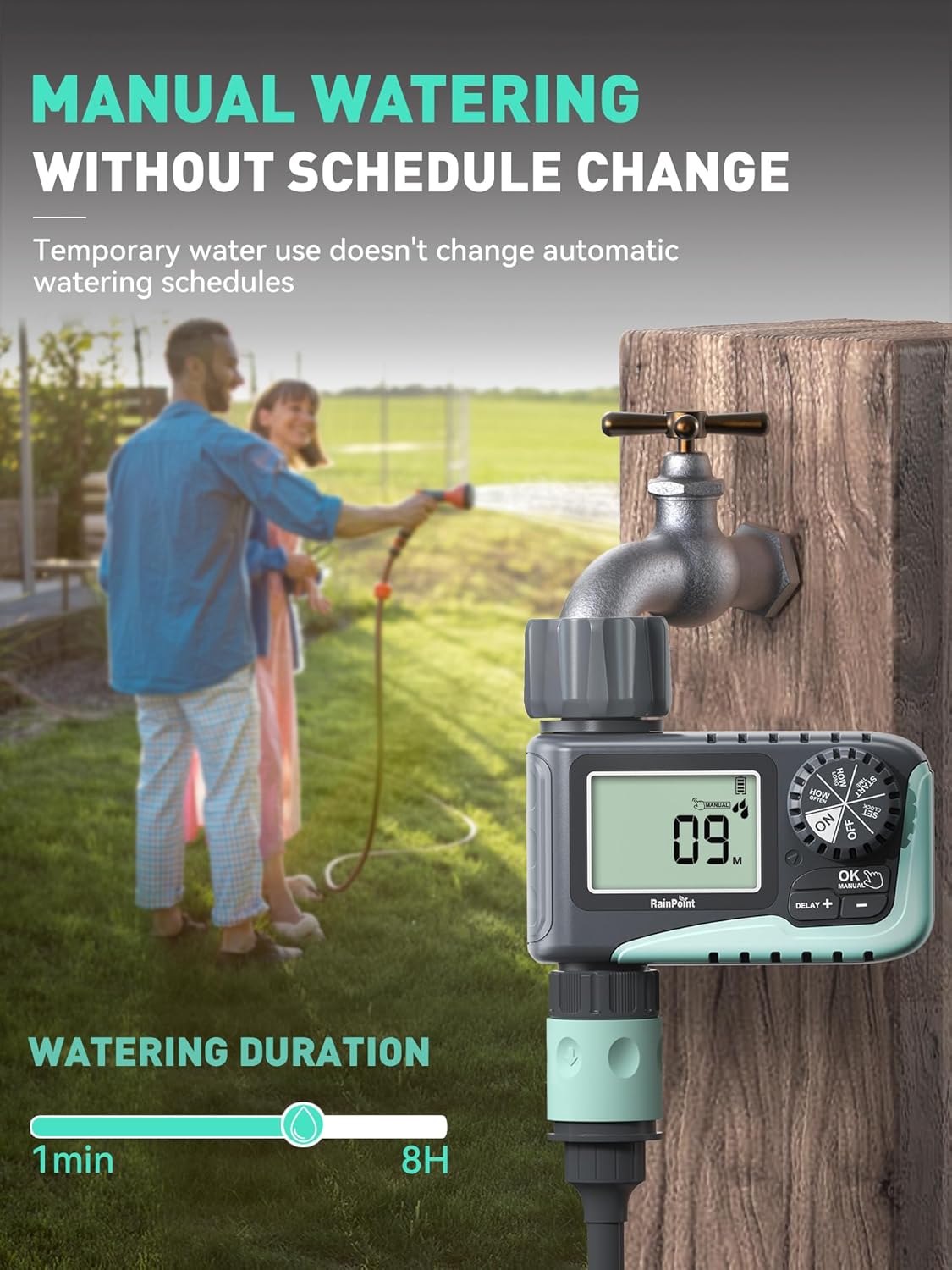
Image: A person manually watering a garden using the RAINPOINT Sprinkler Timer, demonstrating the manual mode functionality.
4. Yağmur Geciktirme Modu
This feature allows you to pause your watering schedule during rainy periods to conserve water and prevent overwatering.
- Turn the dial to "ON".
- Press the "DELAY +" button.
- Each press will increase the delay by 24 hours (options: 24h, 48h, 72h).
- Seçilen gecikme süresinin ardından zamanlayıcı otomatik olarak programlanmış programına geri dönecektir.

Image: The sprinkler timer displaying a rain delay countdown, set against a backdrop of a rainy garden, illustrating its water-saving feature.
5. Zamanlayıcıyı Kapatma
- Turn the dial to "OFF". This will stop all watering programs.
Bakım
Pil Ömrü ve Değiştirme
- The timer is designed for long battery life (up to 365 days).
- The LCD screen will display a low power indicator when batteries need replacement.
- When the battery is low, the valve will automatically close to prevent flooding and water waste.
- Replace batteries promptly when the low power indicator appears. Your programmed settings will be saved during battery replacement.

Image: The timer's display indicating low battery, with an icon showing the valve automatically closing to prevent flooding, emphasizing its low power auto-shutoff feature.
Filtreyi Temizleme
- The timer has a built-in metal filter at the inlet to prevent debris from entering the irrigation system.
- Periodically check and clean the filter to ensure optimal water flow and prevent blockages.
- Unscrew the timer from the faucet, remove the filter, rinse it under running water, and reinsert.
Kış Depolama
- Before the first frost, remove the timer from the faucet.
- Drain any remaining water from the timer.
- Store the timer indoors in a dry, frost-free location.
Sorun giderme
| Sorun | Olası Neden | Çözüm |
|---|---|---|
| Timer not turning on/display blank. | Piller bitmiş veya yanlış takılmış. | Replace with new AAA alkaline batteries, ensuring correct polarity. |
| Su akışı yok. | Faucet is off; low water pressure; clogged filter; incorrect programming. | Ensure faucet is fully open. Check water pressure. Clean the inlet filter. Verify programming settings. |
| Zamanlayıcı sızdırıyor. | Loose connection; damaged washer; cracked housing. | Ensure connections are hand-tight. Check rubber washer for damage and replace if necessary. If housing is cracked, contact support. |
| Watering schedule not starting. | Timer is in "OFF" or "MANUAL" mode; incorrect start time/frequency. | Turn the dial to "ON". Recheck and adjust your programmed start time and frequency. |
Özellikler
- Marka: YAĞMUR NOKTASI
- Modeli: ITV 107 (Based on video information)
- Malzeme: Plastik
- Renk: Yeşil
- Ürün Ölçüleri: 5"D x 4"G x 4.8"Y
- Ürün Ağırlığı: 1.3 pounds (for the pack, likely)
- Güç Kaynağı: 2 adet AAA alkalin pil (dahil değildir)
- Sulama Süresi: 1 minute to 3 hours 59 minutes (Automatic), 1 minute to 8 hours (Manual)
- Sulama Sıklığı: Her 1-12 saatte bir veya Her 1-7 günde bir
- Yağmur Nedeniyle Maçın Ertelenmesi Seçenekleri: 24h, 48h, 72h
- Maksimum Su Basıncı: 116 PSI
- Suya Dayanıklılık: IP54
Garanti ve Destek
RAINPOINT products are designed for quality and reliability. For any questions, technical support, or warranty claims, please contact RAINPOINT customer service. Refer to the contact information provided in your product packaging or visit the official RAINPOINT webyardım için site.
Ayrıca ziyaret edebilirsiniz RAINPOINT Store on Amazon Daha fazla bilgi ve destek kaynakları için.


