1. Giriş
Satın aldığınız için teşekkür ederizasing the ELECTROPRIME HOCO BS59 Pearlescent Wireless Karaoke Bluetooth Speaker. This manual provides essential information for setting up, operating, and maintaining your device. Please read it carefully before use and retain it for future reference.
2. Güvenlik Bilgileri
- ifşa etme the device to extreme temperatures, humidity, or direct sunlight.
- Düşürmekten kaçının veya cihazı şiddetli darbelere maruz bırakmak.
- Sökmeyin or attempt to repair the device yourself. Contact qualified service personnel.
- Erişemeyeceği yerlerde saklayın çocukların.
- Sadece kullan the provided or recommended charging cables and adapters.
- Uygun havalandırmayı sağlayın when operating the speaker.
3. Paket İçeriği
Lütfen paketinizde tüm öğelerin mevcut olduğundan emin olun:
- 1 x HOCO BS59 Karaoke Bluetooth Speaker
- 2 x Kablosuz Mikrofon
- 1 x Şarj Kablosu (USB-C)
- 1 x Kullanım Kılavuzu
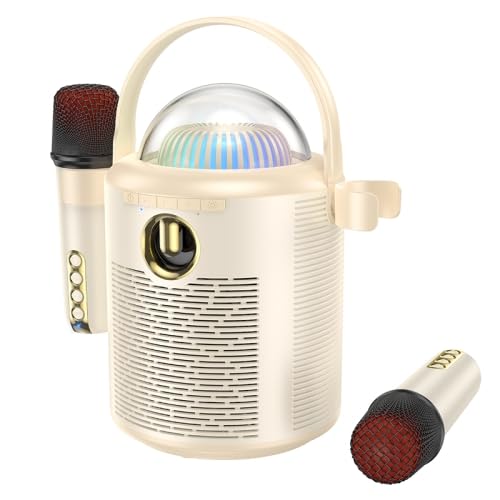
Image: The main unit of the HOCO BS59 speaker in beige, featuring a transparent dome with colorful lights, a handle, and two wireless microphones attached to its sides. Another microphone is shown separately at the bottom right.
4. Ürün Bittiview
Familiarize yourself with the main components of your karaoke speaker system.
- Main Speaker Unit: Houses the 8W full-range speaker and 2W tweeter, control buttons, and light dome.
- Wireless Microphones (x2): For vocal input during karaoke.
- Kontrol Paneli: Buttons for power, mode, volume, and light effects.
- Işık Kubbesi: Provides colorful light effects.
- Şarj Bağlantı Noktaları: For speaker and microphones.
- AUX Girişi: Kablolu ses bağlantısı için.
- TF Kart Girişi: Müziği doğrudan hafıza kartından çalmak için.
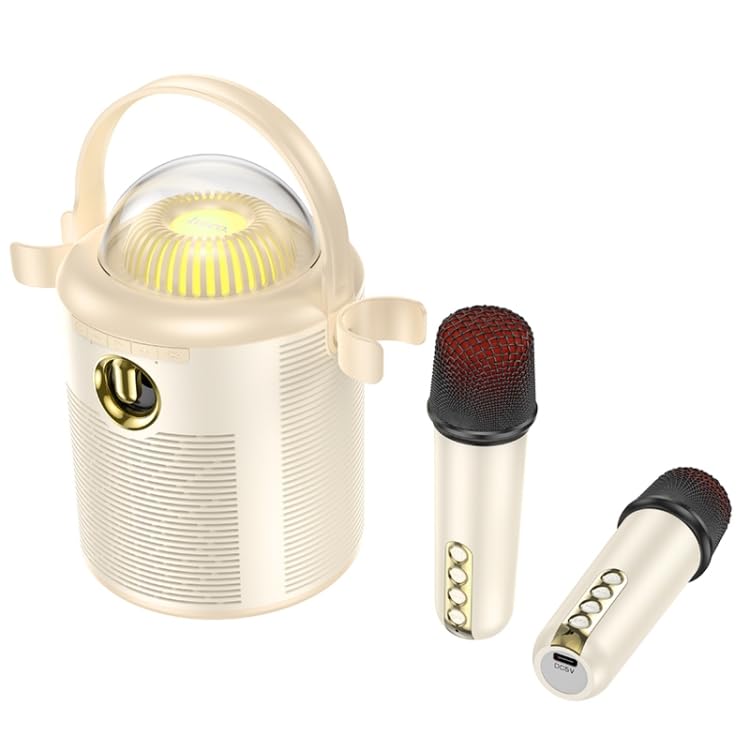
Resim: Ayrıntılı view of the HOCO BS59 speaker and its two wireless microphones. The speaker's front panel with controls and the transparent light dome are clearly visible. One microphone is shown attached to the speaker, and the other is lying separately, showcasing its buttons and charging port.
5. Kurulum
5.1. Cihazın Şarj Edilmesi
İlk kullanımdan önce hoparlörü ve her iki mikrofonu da tamamen şarj edin.
- Konuşmacı: Connect the charging cable to the speaker's charging port and a suitable USB power adapter (not included). The charging indicator will show charging status. Full charge takes approximately 3 hours.
- Mikrofonlar: Connect the charging cable to each microphone's charging port. Full charge takes approximately 2 hours per microphone.
5.2. Açma/Kapama
- Konuşmacı: Press and hold the Power button on the speaker for a few seconds to turn it on or off.
- Mikrofonlar: Press and hold the Power button on each microphone to turn it on or off.
5.3. Bluetooth Eşleştirme
- Ensure the speaker is powered on and in Bluetooth mode (indicated by a voice prompt or LED).
- Akıllı telefonunuzda, tabletinizde veya diğer ses cihazınızda Bluetooth'u etkinleştirin.
- Arama "HOCO BS59" or similar in your device's Bluetooth list.
- Select "HOCO BS59" to pair. A confirmation sound will indicate successful pairing.
- The microphones will automatically connect to the speaker when both are powered on.
5.4. AUX Girişi Üzerinden Bağlantı
Use a 3.5mm audio cable (not included) to connect an external audio source to the speaker's AUX port. The speaker will automatically switch to AUX mode or you may need to press the Mode button.
5.5. Playing from TF Card
MP3 ses içeren bir TF (microSD) kartı takın fileTF kartını belirtilen yuvaya yerleştirin. Hoparlör otomatik olarak TF kart moduna geçecek ve oynatmaya başlayacaktır.
6. Kullanım Talimatları
6.1. Müzik Çalma
- Oynat/Duraklat: Hoparlördeki Oynat/Duraklat düğmesine basın.
- Ses Kontrolü: Hoparlörünüzdeki veya bağlı cihazınızdaki ses düğmelerini kullanın.
- Sonraki / Önceki Parça: Use the track skip buttons on the speaker.
6.2. Karaoke Fonksiyonu
Once your music source is playing and microphones are connected:
- Mikrofon Ses Seviyesi: Adjust the volume on the microphones directly.
- One-Click Original Sound Cancellation: Press the dedicated button on the speaker or microphone (refer to device markings) to remove vocals from a song, allowing you to sing along. Press again to restore original vocals.
- Echo/Reverb: Some microphones may have controls for echo effects.
6.3. Renkli Işıklar
The speaker features colorful lights. Press the Light button on the speaker to cycle through different light modes or turn them off.
7. Bakım
- Temizlik: Hoparlörü ve mikrofonları yumuşak, kuru bir bezle silin. Aşındırıcı temizleyiciler veya çözücüler kullanmayın.
- Depolamak: Cihazı uzun süre kullanılmadığı zamanlarda serin, kuru ve doğrudan güneş ışığından uzak bir yerde saklayın.
- Pil Bakım: To prolong battery life, avoid fully discharging the device frequently. Charge regularly, even if not in use.
8. Sorun Giderme
| Sorun | Olası Neden | Çözüm |
|---|---|---|
| Güç yok | Pil bitmiş | Charge the speaker/microphones fully. |
| Ses yok | Volume too low; Not paired; Incorrect mode | Increase volume; Ensure successful Bluetooth pairing; Switch to correct input mode (Bluetooth, AUX, TF). |
| Mikrofon çalışmıyor | Microphone off; Battery low; Not paired with speaker | Turn on microphone; Charge microphone; Ensure speaker and microphone are both on and within range. |
| Bluetooth bağlantısı kararsız | Too far from device; Interference | Move speaker closer to the paired device; Avoid obstacles and other wireless devices. |
9. Özellikler
| Özellik | Detay |
|---|---|
| Örnek | EDA006048701A |
| Bluetooth Sürümü | 5.1 (Chip: JL AC6965E4) |
| Hoparlör Pil Kapasitesi | 1800mAh |
| Mikrofon Pil Kapasitesi | 500mAh |
| Hoparlör Şarj Süresi | Yaklaşık 3 saat |
| Microphone Charging Time | Yaklaşık 2 saat |
| Speaker Usage Time | Yaklaşık 5 saat |
| Microphone Usage Time | Yaklaşık 16 saat |
| Hoparlör Ünitesi | 8W full-range speaker + 2W tweeter |
| Toplam Güç Çıkışı | 10W |
| Boyutlar (Hoparlör) | 190 x 120 x 215 mm |
| Weight (Speaker) | 774 gr |
| Desteklenen Modlar | Bluetooth, TF kart, AUX |
| Özel Özellikler | Dual wireless microphones, One-click original sound cancellation, Colorful lights |
10. Garanti ve Destek
This product comes with a standard manufacturer's warranty. Please refer to the warranty card included in your package for specific terms and conditions. For technical support, troubleshooting assistance, or warranty claims, please contact ELECTROPRIME customer service through your retailer or the official brand webalan.
Daha fazla bilgi için şu adresi ziyaret edebilirsiniz: ELECTROPRIME brand store.