giriiş
The Amazon Fire TV Soundbar Plus is a 3.1 channel all-in-one soundbar designed to enhance your home audio experience. It features integrated bass, clear dialogue, and supports advanced audio formats like Dolby Atmos and DTS:X, providing immersive sound for movies, music, and more. This manual provides detailed instructions for setting up, operating, maintaining, and troubleshooting your Fire TV Soundbar Plus.

Şekil 1: Ön view of the Fire TV Soundbar Plus, highlighting its key audio technologies.
Kurmak
Paket İçeriği
Başlamadan önce, kutudaki tüm malzemelerin eksiksiz olduğundan emin olun:
- Fire TV Soundbar Plus
- Uzaktan kumanda
- HDMI 2.0 kablosu
- AC güç kablosu
- 2 adet AAA pil
- Duvara montaj kiti
- Hızlı Başlangıç Kılavuzu

Figure 2: Contents included in the Fire TV Soundbar Plus package and product dimensions.
Fiziksel Yerleştirme
The soundbar measures approximately 6.4 cm (height) x 94 cm (width) x 13.2 cm (depth) and weighs 4 kg. For optimal audio performance, place the soundbar centrally in front of your television. Ensure there are no obstructions in front of the soundbar. The included wall mount kit allows for wall installation if preferred.
Soundbar'ı bağlama
Follow these steps to connect your Fire TV Soundbar Plus to your television:
- HDMI (eARC/ARC) Connection: Connect one end of the included HDMI 2.0 cable to the HDMI (eARC/ARC) port on the back of the soundbar. Connect the other end to the HDMI eARC/ARC port on your television. This connection ensures optimal audio quality and allows your TV remote to control the soundbar's volume.
- Güç Bağlantısı: Connect the AC power cable to the Power port on the soundbar and then plug it into a wall outlet.
- Optical Connection (Optional): If your TV does not have an HDMI eARC/ARC port, you can use an optical cable (not included) to connect the soundbar to your TV's optical audio output.
- USB-A Bağlantı Noktası: The USB-A port is typically used for service or firmware updates and is not for general user connection.

Şekil 3: Arka view of the soundbar displaying available connection ports.
İlk Güç Açık
Once connected, the soundbar will typically power on automatically with your TV if using the HDMI eARC/ARC connection. If not, press the Power button on the included remote control.
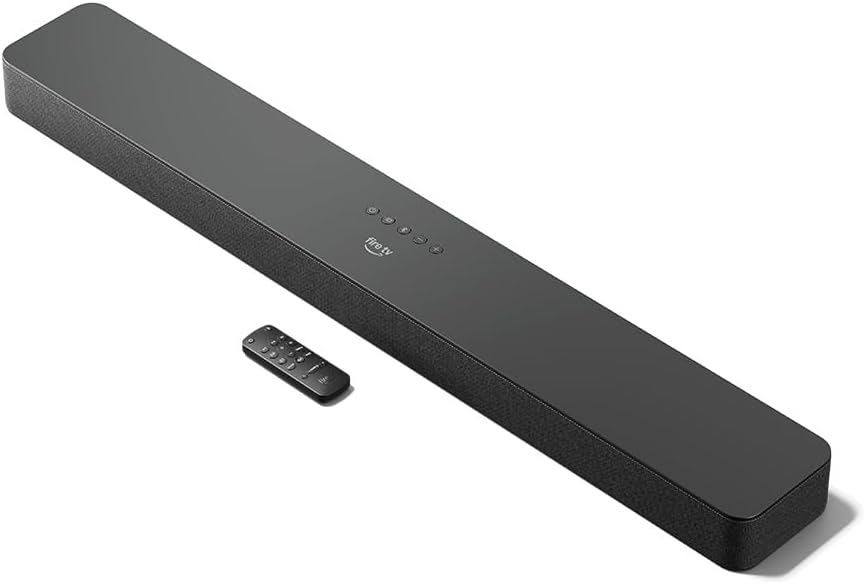
Figure 4: The Fire TV Soundbar Plus and its compact remote control.
Soundbar'ı Çalıştırma
Temel Kontroller
Use the included remote control to manage your soundbar's functions:
- Güç Düğmesi: Soundbar'ı açar veya kapatır.
- Sesi Aç/Kapat: Ana ses seviyesini ayarlar.
- Sessiz tuşu: Sesi kapatır veya açar.
- Giriş Seçimi: Switches between HDMI, Optical, and Bluetooth inputs.
- Ses Modları: Cycles through optimized audio presets.
Ses Modları
The Fire TV Soundbar Plus offers several equalizer modes to optimize audio for different content types:
- Film Modu: Enhances cinematic soundscapes with dynamic range and surround effects.
- Müzik Modu: Provides balanced audio for music playback, emphasizing clarity and bass.
- Spor Modu: Optimizes audio for sports broadcasts, often enhancing commentary and crowd noise.
- Gece Modu: Ani yüksek sesleri önlemek için dinamik aralığı azaltır, özellikle gece geç saatlerde kullanım için idealdir. viewIng.
The soundbar features a dedicated central channel for dialogue, ensuring clear conversations in all modes, especially beneficial for movies and TV shows.

Figure 5: Internal components illustrating the integrated speakers, tweeters, and subwoofer for rich sound.

Figure 6: The soundbar delivering immersive audio with Dolby Atmos and DTS:X in a home environment.
Bluetooth Akışı
You can stream audio from your phone or tablet to the Fire TV Soundbar Plus via Bluetooth. To connect:
- Press the Bluetooth button on the remote control or select Bluetooth input.
- On your mobile device, go to Bluetooth settings and select "Fire TV Soundbar Plus" from the list of available devices.
- Eşleştirme tamamlandıktan sonra, cihazınızdan gelen sesler ses çubuğundan çalınacaktır.

Figure 7: Connecting a mobile device via Bluetooth to stream music or podcasts.
Fire TV Integration
For seamless integration with Fire TV devices (sold separately), you can control both your TV and the soundbar with a single remote. Audio settings can be customized directly within the Fire TV interface on selected models.
Bakım
To ensure the longevity and optimal performance of your Fire TV Soundbar Plus, follow these maintenance guidelines:
- Temizlik: Ses çubuğunun yüzeyini temizlemek için yumuşak, kuru bir bez kullanın. Sıvı temizleyiciler veya aşındırıcı malzemeler kullanmayın, çünkü bunlar yüzeye zarar verebilir.
- Havalandırma: Aşırı ısınmayı önlemek için ses çubuğunun havalandırma deliklerinin tıkalı olmadığından emin olun.
- Yazılım Güncellemeleri: Periodically check for firmware updates to ensure your soundbar has the latest features and performance improvements. Updates are typically delivered automatically when connected to a Fire TV device or can be performed via USB if available.
Sorun giderme
Fire TV Soundbar Plus'ınızla ilgili sorunlarla karşılaşırsanız, aşağıdaki yaygın sorunlar ve çözümlere göz atın:
| Sorun | Olası Neden | Çözüm |
|---|---|---|
| Soundbar'dan ses gelmiyor. |
|
|
| Ses bozuk veya net değil. |
|
|
| Uzaktan kumanda çalışmıyor. |
|
|
| Bluetooth eşleştirme sorunları. |
|
|
Özellikler
| Özellik | Detay |
|---|---|
| Soundbar Dimensions (LxWxH) | 94 cm x 13.2 cm x 6.4 cm |
| Soundbar Ağırlığı | 4 kg (Actual dimensions and weight may vary based on configuration and manufacturing process) |
| Hoparlör Kanalları | 3.1 (integrated subwoofer) |
| Ekolayzır Modları | Movie, Music, Sport, Night |
| Çevresel Ses Desteği | Dolby Atmos, DTS:X |
| Limanlar | HDMI (eARC/ARC), Optical, AC Power, USB-A |
| Bluetooth Desteği | Evet |
| Uyumluluk | Akıllı TV'ler ve medya oynatıcılı TV'ler |
| Kutunun İçeriği | Fire TV Soundbar Plus, remote control, HDMI 2.0 cable, 1 AC power cable, 2 AAA batteries, wall mount kit, Quick Start Guide |
Garanti ve Destek
The Fire TV Soundbar Plus comes with a one-year limited warranty provided by the manufacturer. This limited warranty is in addition to, and does not compromise, consumer rights. Consumers may have additional rights provided by law even after the limited warranty expires. Use of the Fire TV Soundbar Plus is subject to the terms indicated by Amazon.
For further assistance, please refer to the official Amazon support channels or the Quick Start Guide included with your product.


