CHUWI GemiBook Plus Dizüstü Bilgisayar Kullanım Kılavuzu
Model: CHUWI GemiBook Plus (HEROBOOK)
15.6 inch Laptop Computer, 8GB LPDDR5 256GB SSD, Intel N100, Windows 11
1. Giriş
This manual provides essential information for the proper setup, operation, maintenance, and troubleshooting of your CHUWI GemiBook Plus laptop. Please read this manual thoroughly before using your device to ensure optimal performance and longevity.

Resim 1.1: Ön view of the CHUWI GemiBook Plus laptop, showcasing its 15.6-inch display with system specifications like 8GB DDR5 RAM, 256GB SSD, Intel N100 processor, and Windows 11 Home operating system.
2. Kutuda Neler Var?
Paketin içinde tüm öğelerin mevcut olduğundan emin olun:
- CHUWI GemiBook Plus Laptop
- Charger set (Power Adapter and Cable)
- Çok dilli kılavuz
- Uygunluk sertifikası
3. Ürün Bittiview
3.1 Temel Özellikler
- İşlemci: 12th Gen Intel Alder Lake N100 CPU (up to 3.4GHz)
- Hafıza: 8 GB LPDDR5 RAM (4800 MHz)
- Depolamak: 256GB SSD (expandable up to 1TB via M.2 2280 SSD slot)
- Görüntülemek: 15.6-inch FHD IPS screen (1920 × 1080p, 16:9 aspect ratio)
- Grafikler: 12. Nesil Intel İşlemciler için Intel UHD Grafikler
- İşletim Sistemi: Windows 11 Ev
- Bağlantı: Wi-Fi 6, Bluetooth 5.2, HDMI, USB 3.0, Type-C, RJ45 Ethernet
- Pil: 38Wh for 6 to 8 hours of usage
- Tasarım: Lightweight (1.74kg) and thin (19mm) with 180° opening hinge
- Güvenlik: Physical camera switch for privacy

Resim 3.1: Bir aşırıview of the CHUWI GemiBook Plus's key features, including its 15.6-inch IPS screen, 12th Gen Intel Alder Lake-N100 processor, 38Wh Li-ion battery, FHD resolution, 12th Gen Intel UHD Graphics, 8GB LPDDR5 RAM, 256GB M.2 SSD, and WiFi6+BT5.2 connectivity.
3.2 Bağlantı Noktaları ve Konektörler
Familiarize yourself with the various ports and connectors on your laptop:

Image 3.2: Diagram illustrating the various ports on the CHUWI GemiBook Plus laptop. On one side, it shows the charging port, HDMI port, USB-A 3.0 port, Type-C port, and Audio Jack. On the other side, it displays another Type-C port, USB-A 2.0 port, USB-A 3.0 port, RJ45 LAN Port, and a lock slot.
- Şarj Portu: Güç adaptörünü buraya bağlayın.
- HDMI Bağlantı Noktası: Harici ekranlara bağlanmak için.
- USB-A 3.0 Bağlantı Noktaları: Uyumlu cihazlarla yüksek hızlı veri aktarımı için.
- USB-A 2.0 Bağlantı Noktası: Standart USB aygıtları için.
- C Tipi Bağlantı Noktaları: Versatile ports for data, display, and power delivery (check specific functionality).
- Ses jakı: Kulaklık veya harici hoparlörler için.
- RJ45 LAN Bağlantı Noktası: Kablolu ağ bağlantısı için.
- Kilit Yuvası: For security cable locks.
4. Başlangıç (Kurulum)
4.1 İlk Güç Açma
- Connect the charger to the laptop's charging port and a power outlet.
- Dizüstü bilgisayarın kapağını açın.
- Press the power button, usually located on the keyboard deck.
- Dil seçimi, ağ bağlantısı ve kullanıcı hesabı oluşturma dahil olmak üzere Windows 11 kurulum sürecini tamamlamak için ekrandaki talimatları izleyin.
4.2 Wi-Fi'ye Bağlanma
- During Windows setup, you will be prompted to connect to a network. Select your Wi-Fi network from the list.
- Gerekirse Wi-Fi şifresini girin.
- Daha sonra kurulum yapacaksanız, görev çubuğundaki Wi-Fi simgesine tıklayın, ağınızı seçin ve bağlanın.
5. Kullanım Talimatları
5.1 Klavye ve Dokunmatik Yüzey
The GemiBook Plus features a full-size keyboard and a large touchpad for comfortable interaction.

Resim 5.1: Yakın çekim view of the CHUWI GemiBook Plus laptop's full-size keyboard and large touchpad, highlighting its ergonomic design for comfortable typing.
- Klavye: Use for typing and system commands. Function keys (Fn) combined with F1-F12 keys provide additional shortcuts (e.g., volume, brightness).
- Dokunmatik yüzey: Gezinme, kaydırma ve yakınlaştırma için çoklu dokunmatik hareketleri destekler.
5.2 Ekran
The 15.6-inch FHD IPS screen offers vibrant visuals. The laptop supports a 180° opening angle for flexible viewIng.
5.3 WebKamera ve Gizlilik
The laptop includes a webcam for video calls and conferencing. A physical camera switch is provided to block the camera lens, ensuring privacy when not in use.
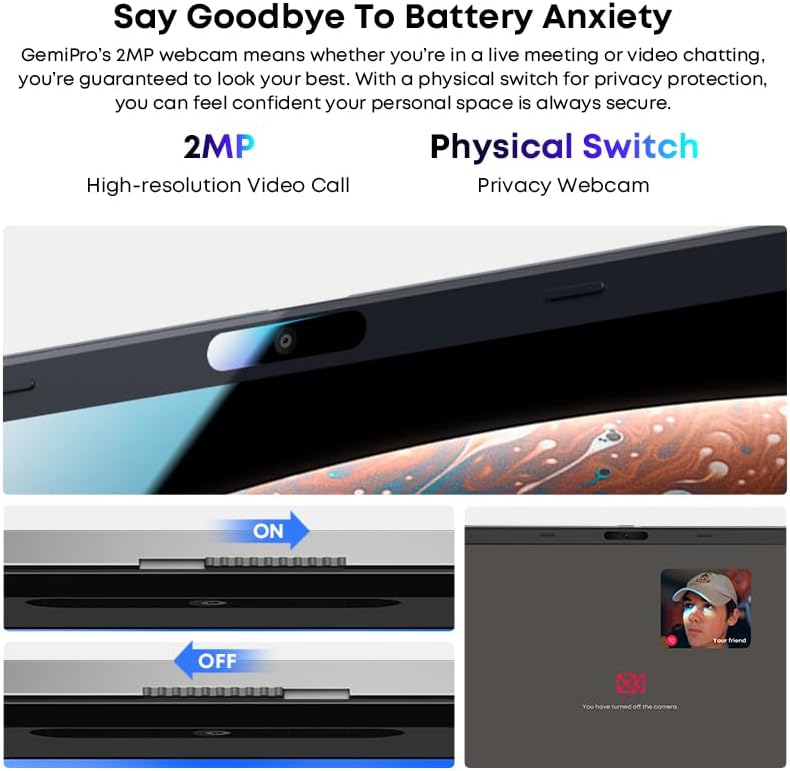
Image 5.2: Close-up of the CHUWI GemiBook Plus webcam with a physical privacy switch. The image shows the switch in both 'ON' (camera exposed) and 'OFF' (camera covered) positions, demonstrating how to physically block the camera lens for enhanced privacy.
5.4 Kablosuz Bağlantı
The GemiBook Plus supports Wi-Fi 6 and Bluetooth 5.2 for fast and stable wireless connections.

Image 5.3: A visual representation of the CHUWI GemiBook Plus's seamless wireless experience, highlighting Wi-Fi 6, Bluetooth 5.2, Ethernet RJ45, and HD Camera features. A user is shown participating in a video call on the laptop.
- Kablosuz 6: Provides faster internet speeds and improved network efficiency compared to previous Wi-Fi standards.
- Bluetooth 5.2: Kulaklık, fare ve klavye gibi kablosuz çevre birimlerini bağlamak için kullanılır.
6. Pil Yönetimi
The laptop is equipped with a 38Wh battery, providing approximately 6 to 8 hours of usage on a full charge. A full recharge typically takes about 3 hours.
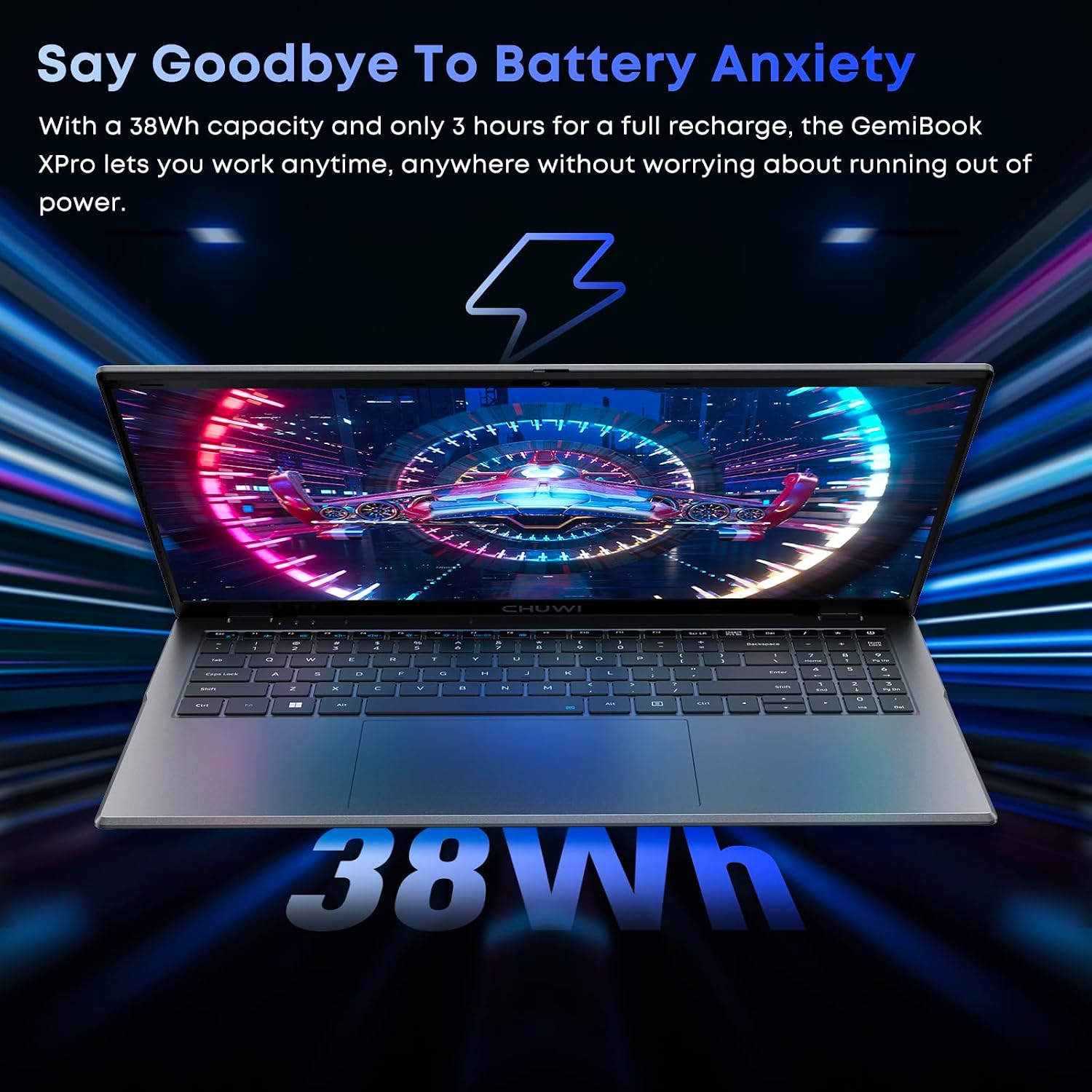
Image 6.1: The CHUWI GemiBook Plus laptop displayed with a visual representation of its 38Wh battery capacity, emphasizing its ability to provide extended usage without frequent recharging.
- Şarj: Connect the provided charger to the laptop and a power outlet. The charging indicator light will typically show the charging status.
- Pil Bakım: To prolong battery life, avoid fully discharging the battery frequently. Store the laptop in a cool, dry place when not in use for extended periods.
7. Bakım ve Özen
- Temizlik: Ekranı ve dış yüzeyi temizlemek için yumuşak, tiftiksiz bir bez kullanın. İnatçı lekeler için hafifçe silin.ampBezi su veya ekran temizleyici ile silin. Sert kimyasallardan kaçının.
- Depolamak: When not in use, store the laptop in a protective sleeve or bag to prevent scratches and dust accumulation.
- Sıcaklık: Operate the laptop within recommended temperature ranges. Avoid exposing it to extreme heat or cold.
- Havalandırma: Aşırı ısınmayı önlemek için havalandırma açıklıklarının engellenmediğinden emin olun.
8. Sorun Giderme
8.1 Yaygın Sorunlar ve Çözümler
| Sorun | Olası Çözüm |
|---|---|
| Dizüstü bilgisayar açılmıyor | Ensure the power adapter is securely connected and the outlet is working. Try a different power outlet. If the battery is completely drained, it may take a few minutes to respond after connecting the charger. |
| Wi-Fi bağlantısı yok | Check if Wi-Fi is enabled in Windows settings. Restart your router and modem. Ensure you are entering the correct Wi-Fi password. |
| Yavaş performans | Close unnecessary applications. Check for background processes consuming resources. Ensure Windows is updated. Consider running a disk cleanup. |
| Ekran boş veya titriyor. | Adjust screen brightness. Connect to an external monitor to check if the issue is with the laptop screen. Restart the laptop. |
| Webkamera çalışmıyor | Ensure the physical camera switch is in the 'ON' position. Check privacy settings in Windows to allow apps access to the camera. Update camera drivers. |
9. Teknik Özellikler
| Özellik | Şartname |
|---|---|
| Ayakta ekran boyutu | 15.6 inç |
| Ekran Çözünürlüğü | 1920 x 1080 piksel (FHD) |
| İşlemci | Intel Alder Lake N100 (up to 3.4 GHz) |
| Veri deposu | 8 GB LPDDR5 |
| Sabit Sürücü | 256 GB SSD (M.2 2280, expandable to 1TB) |
| Grafik Eş İşlemcisi | Intel UHD Grafikler |
| İşletim Sistemi | Windows 11 |
| Kablosuz Tip | Wi-Fi 6, Bluetooth 5.2 |
| USB 3.0 Port Sayısı | 2 |
| Ortalama Pil Ömrü | 6 Saat (38 Wh) |
| Ürün Ağırlığı | 3.7 pound (yaklaşık 1.74 kg) |
| Ürün Boyutları | 14 x 0.78 x 9.5 inç (yaklaşık 35.5 x 1.98 x 24.1 cm) |
| Renk | Gümüş |
10. Garanti ve Destek
10.1 Garanti Süresi
The CHUWI GemiBook Plus laptop comes with a 1 yıllık garanti, valid immediately after purchase.
10.2 Müşteri Desteği
CHUWI offers lifetime factory professional support and 24-hour online support. For any issues or inquiries, please contact CHUWI customer service. They aim to provide professional and timely assistance.


