giriiş
Thank you for choosing the Spigen ArcField 3-in-1 Wireless Charging Station. This device is designed to efficiently charge your compatible iPhone, Apple Watch, and AirPods simultaneously. Please read this manual carefully to ensure proper use and to maximize the performance of your charging station.
Paket İçeriği
Paketinizde tüm öğelerin mevcut olduğundan emin olun:
- Spigen ArcField 3-in-1 Wireless Charging Station
- 30W USB-C Duvar Şarj Cihazı
- 6.6 metrelik USB-C - USB-C kablosu

Image: The Spigen ArcField 3-in-1 Wireless Charging Station shown with its 30W USB-C wall charger and 6.6ft USB-C to USB-C cable.
Kurulum Kılavuzu
- Güç Adaptörünü bağlayın: Plug the provided 30W USB-C Wall Charger into a power outlet.
- USB-C Kablosunu Bağlayın: Insert one end of the 6.6ft USB-C to USB-C cable into the wall charger and the other end into the USB-C port on the back of the Spigen ArcField charging station.
- Atama: Place the charging station on a flat, stable surface. The anti-slip rubber feet on the base will help keep it secure.
The charging station is now ready for use. An indicator light on the front will illuminate to confirm it is powered on.
Video: Animasyonlu bir üstview demonstrating the Spigen ArcField Wireless Charger's features and functionality.
Kullanım Talimatları
The Spigen ArcField charging station allows for simultaneous charging of up to three devices:
1. Charging Your iPhone (MagSafe)
- Place your MagSafe-compatible iPhone (iPhone 12 series or newer) onto the vertical charging pad. The magnetic connection will securely hold your device in place.
- The station delivers up to 15W fast wireless charging for your iPhone.
- Your iPhone can be charged in both portrait and landscape orientations, allowing for features like Nightstand Mode.

Image: An iPhone magnetically attached to the vertical charging pad, displaying a charging indicator.
2. Apple Watch'unuzu Şarj Etme
- Drape your Apple Watch over the dedicated Apple Watch charging puck on the side.
- The station provides up to 5W charging for your Apple Watch.
3. Charging Your AirPods (Qi)
- Place your AirPods (with wireless charging case) or any other Qi-compatible earbuds onto the horizontal charging pad at the base of the station.
- This pad delivers up to 5W wireless charging.
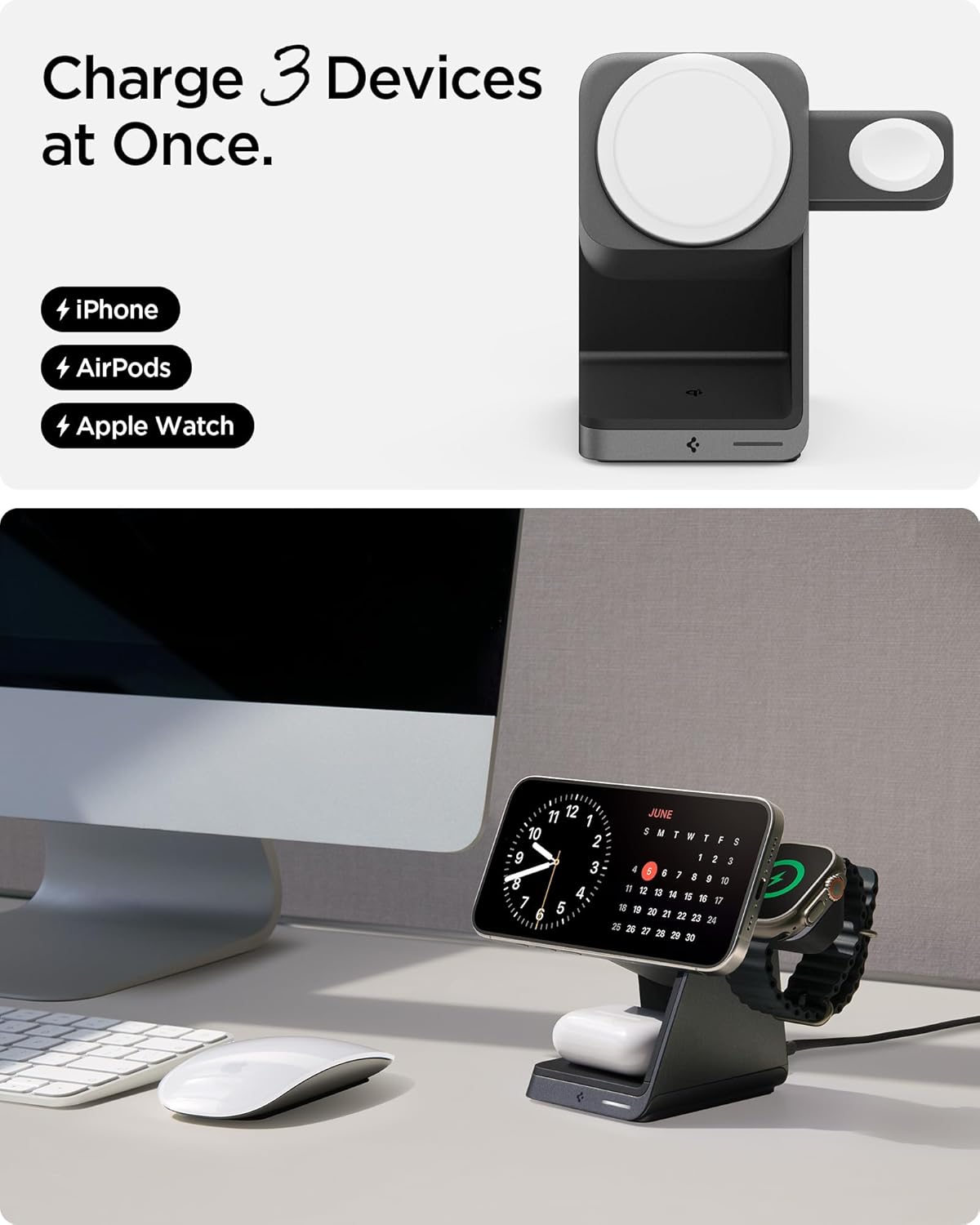
Image: An Apple Watch charging on its dedicated puck and AirPods charging on the base pad.
Eşzamanlı Şarj
All three devices can be charged simultaneously without compromising charging speed for each device, thanks to the included 30W power adapter.

Image: The charging station with an iPhone, Apple Watch, and AirPods all actively charging.
MagFit Plus Accessory Storage
The Spigen ArcField features MagFit Plus, a dedicated magnetic area on the back of the vertical charging pad for securely storing MagSafe accessories like wallets or card holders. This area does not provide charging functionality.

Image: The charging station with a MagSafe wallet attached to the MagFit Plus area on the back.
Güvenlik Özellikleri
The Spigen ArcField 3-in-1 Wireless Charging Station incorporates advanced safety features to protect your devices:
- AirBoost: Optimizes wireless power delivery to ensure efficient charging.
- Aşırı Isınma Koruması: Prevents the charging station and your devices from overheating during charging.
- Intelligent Safety: Automatically adjusts current based on device demand, ensuring safe and stable charging.
Bakım
Şarj istasyonunuzun uzun ömürlü ve optimum performans göstermesini sağlamak için:
- Keep the charging surfaces clean and free of dust or debris. Use a soft, dry cloth for cleaning.
- Cihazınızı aşırı sıcaklıklara veya neme maruz bırakmaktan kaçının.
- Şarj istasyonunu kendiniz sökmeyin veya tamir etmeye çalışmayın.
Sorun giderme
- Cihaz şarj olmuyor:
- Ensure the charging station is properly connected to a working power outlet using the provided adapter and cable.
- Verify that your device is correctly aligned on the charging pad. For MagSafe, ensure a secure magnetic connection.
- Remove any thick cases or metallic objects from your device that might interfere with wireless charging.
- Confirm your device is wireless charging compatible.
- Yavaş şarj oluyor:
- Ensure you are using the original 30W USB-C Wall Charger and cable provided with the product.
- Cihazınızın şarj pedi üzerinde doğru şekilde hizalandığından emin olun.
- Background apps or heavy usage during charging can affect speed.
- Indicator light not on:
- Check all cable connections and ensure the power adapter is securely plugged into the outlet.
- Başka bir elektrik prizini deneyin.
Özellikler
| Özellik | Detay |
|---|---|
| Model Numarası | PF2203 |
| Giriş Voltage | 240 Volt |
| Toplam USB Bağlantı Noktaları | 1 (USB Tip C) |
| Netage | 30 watts (total output) |
| iPhone Charging Output | Up to 15W (MagSafe) |
| Apple Watch Charging Output | 5W'a kadar |
| AirPods/Qi Charging Output | 5W'a kadar |
| Uyumlu Cihazlar | iPhone 12-17 Series, AirPods Pro (3rd/4th gen), AirPods Pro, Apple Watch Ultra/10/9/8/7/6/SE series, MagSafe Accessories |
| Dahil Bileşenler | 30W USB-C Wall Charger, 6.6ft USB-C to USB-C Cable |
| Özel Özellikler | Charging Indicator, Magnetic, MagSafe Compatible, Travel, Wireless Charging |
| Ürün Ağırlığı | 1.41 pound |
| Paket Boyutları | 5.39 x 5.16 x 4.02 inç |
Garanti Bilgileri
Spigen offers a 24-month hassle-free warranty for the ArcField 3-in-1 Wireless Charging Station. Please retain your proof of purchase for warranty claims. For detailed warranty terms and conditions, please visit the official Spigen website veya müşteri desteği ile iletişime geçin.
Müşteri Desteği
If you encounter any issues or have questions regarding your Spigen ArcField 3-in-1 Wireless Charging Station, please contact Spigen customer support through their official website veya ürün ambalajınızda yer alan iletişim bilgileri.


