1. Önemli Güvenlik Talimatları
Lütfen bu ürünü kullanmadan önce tüm güvenlik bilgilerini okuyun ve anlayın. Bu talimatlara uyulmaması elektrik çarpmasına, yangına veya ciddi yaralanmaya neden olabilir.
- Elektriksel Güvenlik: Always ensure the charger is disconnected from the power outlet before making or breaking connections to the battery. Do not expose the charger to rain or wet conditions.
- Pil Güvenliği: Piller patlayıcı gazlar üretebilir. Şarj sırasında yeterli havalandırma sağlayın. Göz koruyucu ve koruyucu giysi giyin. Pilin yakınında kıvılcım veya alevden kaçının.
- OBD2 Scanner Safety: Do not attempt to connect or disconnect the scanner while the vehicle's ignition is on or the engine is running. This could damage the vehicle's electronic system or the scanner.
- Genel Önlemler: Keep out of reach of children. Do not operate if the product or cables are damaged. Use only as intended.
2. Ürün Bittiview
2.1 MOTOPOWER MP00205B 12V Battery Charger/Maintainer
The MOTOPOWER MP00205B is an automatic 12-volt battery charger and maintainer designed for lead-acid, flooded, or sealed maintenance-free batteries (AGM and gel cell). It features a compact and durable design, utilizing pulse charging technology to optimize battery performance and extend life. The charger incorporates multiple safety protections, including spark-free technology and automatic shut-off to prevent overcharging.

Figure 1: MOTOPOWER MP00205B 12V Battery Charger Maintainer in use.
2.2 MOTOPOWER MP69040 OBD2 Diagnostic Scanner
The MOTOPOWER MP69040 is an OBD2 diagnostic scanner designed to support all OBDII protocols, including KWP2000, J1850 VPW, ISO9141, J1850 PWM, and CAN. It is compatible with most 1996 US-based, 2003 EU-based, and 2008 Asian-based vehicles, as well as newer OBD2 and CAN vehicles. The scanner features a 2.8-inch TFT color screen and a user-friendly interface for efficient vehicle diagnostics.
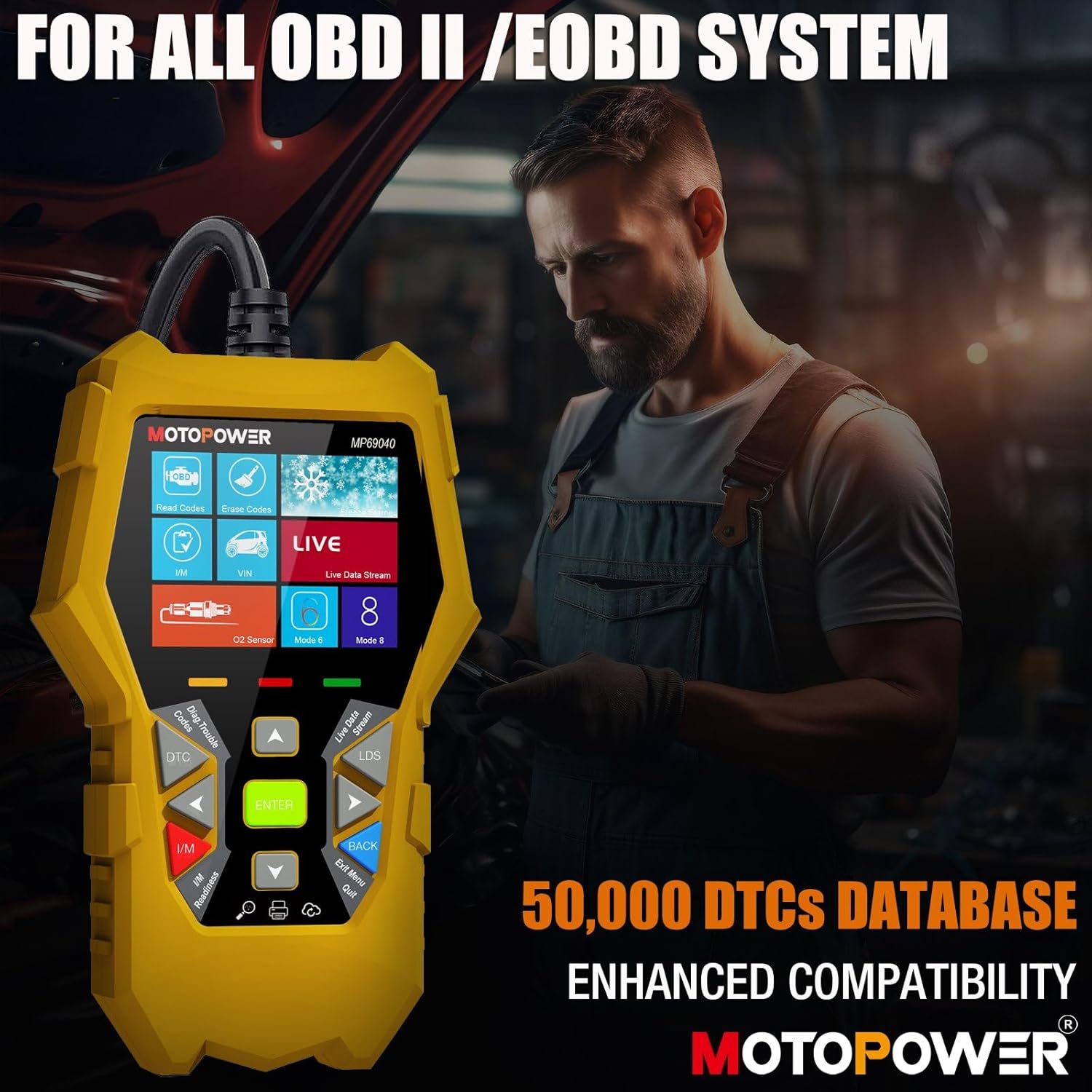
Figure 2: MOTOPOWER MP69040 OBD2 Diagnostic Scanner.
3. Paket İçeriği
Paketin içinde tüm öğelerin mevcut olduğundan emin olun:
- MOTOPOWER MP00205B 12V Battery Charger/Maintainer
- Timsah Clamp Harness (50amp)
- Ring Terminal Harness (7.5amp fuse protected)
- MOTOPOWER MP69040 OBD2 Diagnostic Scanner

Figure 3: MP00205B Charger and its accessories.
4. MOTOPOWER MP00205B Charger/Maintainer Setup and Operation
4.1 Şarj Cihazının Bağlanması
- Şarj cihazının AC güç prizinden çıkarılmış olduğundan emin olun.
- Uygun konektörü seçin:
- Timsah Clamps: Kırmızı cl'yi bağlayınamp pozitif (+) akü terminaline ve siyah cl'yeamp eksi (-) akü terminaline.
- Halka Terminalleri: If permanently installing, connect the red ring terminal to the positive (+) battery post and the black ring terminal to the negative (-) battery post.
- Connect the SAE quick-release connector from the chosen harness to the charger's output cable.
- Plug the charger into a standard 120V AC power outlet.
4.2 Şarj İşlemi
The MP00205B operates automatically. Once connected and powered, it will begin its multi-stagşarj işlemi:
- Desulfating: If the battery is deeply discharged or sulfated, the charger may enter a desulfation stage to recover the battery.
- Şarj: The charger delivers a steady current to bring the battery to a full charge.
- Emilim: The charger switches to a constant voltage, gradually reducing current as the battery approaches full capacity. This stage includes pulse charging technology to maximize battery performance.
- Charged/Maintain: Once fully charged, the charger automatically switches to maintenance mode, providing a float charge at 13.6V to keep the battery at optimal levels indefinitely without overcharging.
The LED indicators on the charger will show the current charging stage. The device features spark-free technology for enhanced safety during connection and disconnection.

Figure 4: Charger indicating Pulse Boost Technology and charging stagee.

Figure 5: Charger displaying automatic operation and safety protections.
5. MOTOPOWER MP69040 OBD2 Scanner Setup and Operation
5.1 Tarayıcının Bağlanması
- Locate the vehicle's 16-pin Data Link Connector (DLC), typically under the dashboard on the driver's side.
- Aracın kontak anahtarının KAPALI olduğundan emin olun.
- Plug the scanner's OBD2 cable into the vehicle's DLC.
- Turn the vehicle's ignition to the ON position (engine can be off). The scanner will power on automatically.
5.2 Temel Fonksiyonlar
The MP69040 scanner provides various diagnostic functions through its user-friendly interface:
- Kodları Okuyun: Araç bilgisayarından Arıza Teşhis Kodlarını (DTC'ler) alır.
- Kodları Sil: Araç bilgisayarındaki arıza kodlarını siler. Not: Hata kodlarını silmek, altta yatan sorunu çözmez.
- Canlı veri: Displays real-time data streams from the vehicle's sensors, such as Engine RPM, Fuel Pressure, and more.
- I/M Hazırlık: Araç emisyon testine hazır olup olmadığını belirlemek için emisyonla ilgili monitörlerin durumunu kontrol eder.
- Vehicle Identification (VIN): Reads the Vehicle Identification Number and other vehicle information.
- DTC Kütüphanesi: Genel ve üreticiye özgü kodlar için tanımlar sağlar.
- Güncelleme: Supports lifetime free online updates for the latest functions and vehicle compatibility.

Figure 6: MP69040 Scanner user interface.

Figure 7: Key features of the MP69040 Scanner.

Figure 8: Live Data display on the MP69040 Scanner.
6. Bakım
- Temizlik: Cihazları yumuşak, kuru bir bezle silin. Aşındırıcı temizleyiciler veya çözücüler kullanmayın.
- Depolamak: Store both the charger and scanner in a cool, dry place away from direct sunlight and extreme temperatures. Ensure cables are neatly coiled to prevent damage.
- Kablo Denetimi: Regularly inspect all cables and connectors for any signs of damage, fraying, or corrosion. Replace if necessary.
7. Sorun Giderme
7.1 MP00205B Charger/Maintainer
- Şarj cihazı açılmıyor: Check the AC power connection. Ensure the outlet is functional. Verify the battery connections are secure.
- Charging indicator not lighting up: Pil hacmini onaylayıntage is above 2V. If the battery is severely discharged, it might take a few minutes for the charger to detect it. Ensure proper polarity.
- Charger not maintaining charge: Ensure the charger remains connected to both the AC outlet and the battery. Check for any loose connections.
7.2 MP69040 OBD2 Scanner
- Tarayıcı açılmıyor: Ensure the OBD2 cable is securely connected to the vehicle's DLC. Verify the vehicle's ignition is in the ON position.
- İletişim hatası: Check the vehicle's ignition status. Ensure the OBD2 cable is not damaged. Try connecting to a different vehicle (if available) to rule out a vehicle-specific issue. Verify the vehicle is OBDII compliant.
- Ekran dondu: Tarayıcıyı araçtan ayırın, birkaç saniye bekleyin ve tekrar bağlayın.
8. Özellikler
8.1 MOTOPOWER MP00205B Charger/Maintainer
| Şartname | Değer |
|---|---|
| Giriş Voltage | 120V AC (Standart) |
| Çıkış Hacmitage | 12 Volt Doğru Akım |
| Çıkış Akımı | 1000mA (1A) |
| Kablo Uzunluğu | Up to 8.5FT (18AWG UL standard) |
| Güvenlik Özellikleri | Spark-free, Overcharge Protection |
| Sertifikalar | CE, FCC, UL |
8.2 MOTOPOWER MP69040 OBD2 Scanner
| Şartname | Değer |
|---|---|
| Görüntülemek | 2.8 inç TFT Renkli Ekran |
| Desteklenen Protokoller | KWP2000, J1850 VPW, ISO9141, J1850 PWM, CAN |
| Araç Uyumluluğu | 1996 US-based, 2003 EU-based, 2008 Asian-based and newer OBD2/CAN vehicles (excluding new energy/hybrid) |
| DTC Veritabanı | 50,000'den fazla kod |
| Diller | 10 yerleşik dil |
9. Garanti ve Destek
MOTOPOWER products are designed for reliability and performance. For warranty information, technical support, or service inquiries, please contact MOTOPOWER customer support through their official webDestek ekibiyle iletişime geçerken lütfen ürün model numaranızı ve satın alma tarihinizi yanınızda bulundurun.