1. Kurulum
This section guides you through the initial setup of your DOOGEE U10 tablet.
1.1 Paket İçeriği
Kutunun içinde tüm öğelerin mevcut olduğundan emin olun:
- DOOGEE U10 Tablet
- USB C Tipi Kablo
- Güç Adaptörü
- SIM Eject Tool (if applicable)
- Hızlı Başlangıç Kılavuzu
- Garanti Kartı
1.2 Cihaz Düzeni
Tabletinizin fiziksel özelliklerini iyice öğrenin.
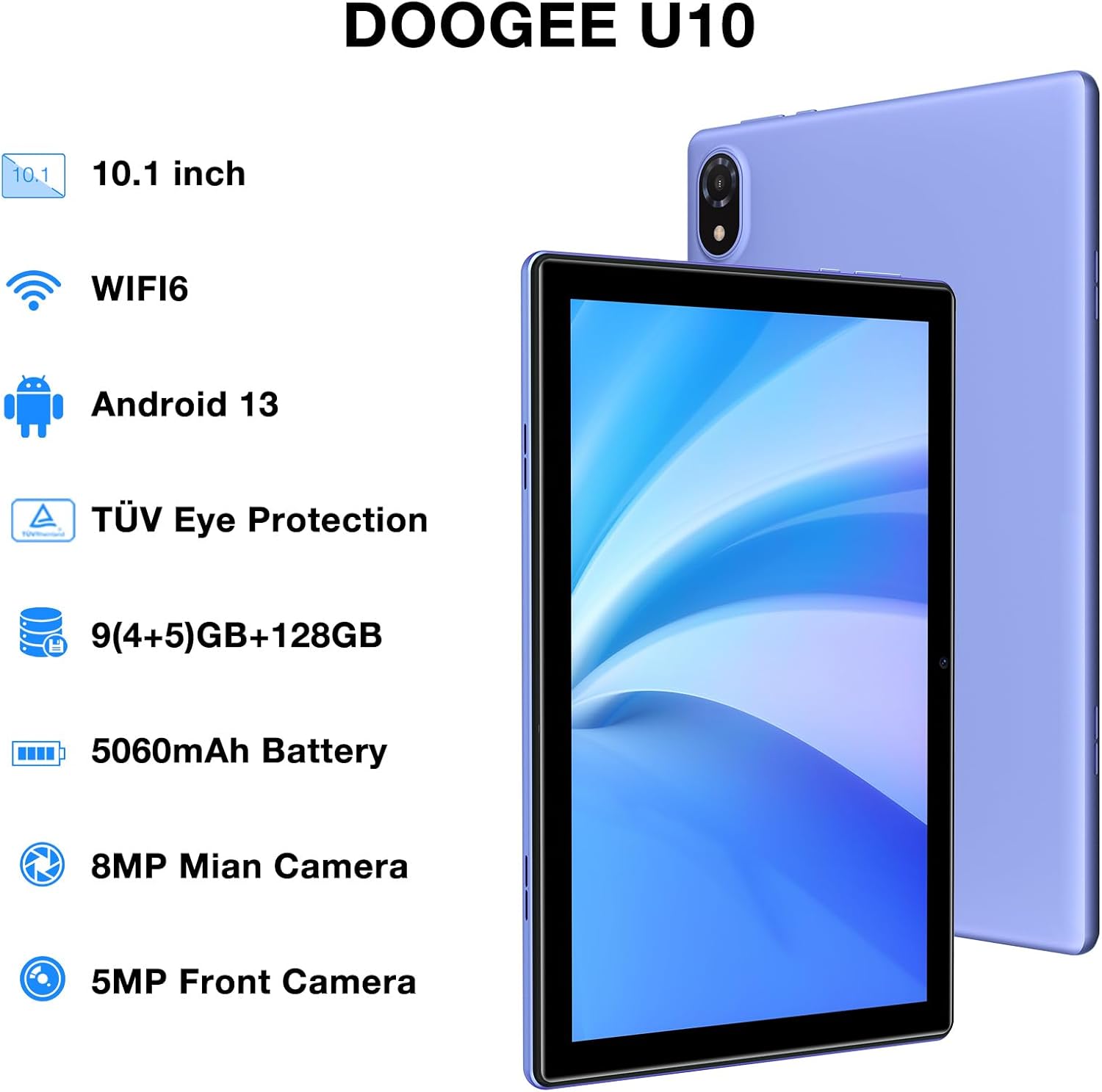
Figure 1: DOOGEE U10 Tablet Overview. This image highlights the tablet's 10.1-inch display, WiFi 6 capability, Android 13 operating system, TÜV Eye Protection, 9GB RAM, 128GB ROM, 5060mAh battery, 8MP main camera, and 5MP front camera.
- Güç Düğmesi: Yan tarafta bulunan düğmeye basılı tutarak cihazı açabilir/kapatabilir veya yeniden başlatabilirsiniz.
- Ses Düğmeleri: Medya ses seviyesini ve bildirim seslerini ayarlayın.
- USB Tip-C Bağlantı Noktası: Şarj ve veri aktarımı için.
- 3.5 mm Kulaklık Girişi: Kablolu kulaklıkları bağlayın.
- Ön Kamera: Görüntülü görüşmeler ve selfieler için.
- Arka Kamera: Fotoğraf ve video çekimi için.
- Konuşmacılar: Dual stereo speakers for audio output.
1.3 İlk Güç Açma ve Şarj Etme
Before first use, fully charge your tablet. Connect the USB Type-C cable to the tablet and the power adapter to a wall outlet. The battery indicator will show charging status.
- Press and hold the Power Button until the DOOGEE logo appears.
- Ekranda beliren yönergeleri izleyerek dilinizi seçin, Wi-Fi'ye bağlanın ve Google hesabınızı kurun.
2. Tabletinizi Çalıştırma
Learn how to navigate and use the core features of your DOOGEE U10 tablet.
2.1 Görüntüleme ve Gezinme
The DOOGEE U10 features a 10.1-inch IPS HD display with a resolution of 1280x800 pixels, providing clear visuals for various tasks.

Figure 2: Vivid IPS HD Display. This image illustrates the tablet's 10.1-inch screen with 800x1280 HD+ resolution, ideal for media consumption.
- Dokunma Hareketleri: Seçmek için dokunun, kaydırmak için kaydırın, yakınlaştırmak için sıkıştırın.
- Ana Ekran: Widget'lar ve uygulama kısayollarıyla özelleştirin.
- Bildirimler: Bildirimlere ve hızlı ayarlara erişmek için yukarıdan aşağıya doğru kaydırın.
- Yüz tanıma: Unlock your tablet using facial recognition for convenience.
2.2 Performans ve Depolama
The tablet is powered by a Quad-Core RK3562 processor clocked at up to 2.0GHz, ensuring smooth performance. It comes with 9GB RAM (5GB physical + 4GB expansion) and 128GB internal storage, expandable up to 1TB via a microSD card.

Figure 3: Powerful Processor and Memory. This image details the tablet's Rockchip RK3562 Quad-Core processor, 9GB RAM, 128GB ROM, and support for 1TB TF card expansion.
2.3 Bağlantı
- Kablosuz 6: Connect to high-speed Wi-Fi networks for faster browsing and streaming. Go to Settings > Network & internet > Wi-Fi.
- Bluetooth 5.0: Pair with wireless headphones, speakers, or other Bluetooth devices. Go to Settings > Connected devices > Bluetooth.
- OTG (Hareket Halindeyken): Connect USB peripherals like flash drives or keyboards using an OTG adapter (sold separately).
2.4 Kamera Fonksiyonları
The tablet is equipped with an 8MP main camera and a 5MP front camera for photos and video calls.

Figure 4: Dual Camera System. This image showcases the tablet's 8MP main camera and 5MP front camera, suitable for capturing moments and video conferencing.
- Ana ekrandan veya uygulama çekmecesinden Kamera uygulamasını açın.
- Fotoğraf çekmek için deklanşöre dokunun.
- Kamera simgesini kullanarak ön ve arka kameralar arasında geçiş yapın.
2.5 Pil Yönetimi
The 5060mAh battery provides extended usage. To optimize battery life, adjust screen brightness, close unused apps, and enable power-saving modes.

Figure 5: Large Capacity Battery. This image highlights the 5060mAh battery, Type-C charging, 5V2A fast charging, and 3.5mm headphone jack, along with estimated usage times for gaming, movies, and music.
2.6 Multimedya Deneyimi
Enjoy an immersive audio experience with dual stereo speakers. The tablet supports Widevine L1, allowing for high-quality streaming from various video platforms.

Figure 6: Immersive Audio and DRM L1. This image illustrates the tablet's support for WiFi 6, Bluetooth 5.0, dual speakers, and DRM L1 for enhanced multimedia playback.
2.7 Göz Koruma Modu
The DOOGEE U10 is TÜV SÜD blue light certified, reducing harmful blue light emissions to protect your eyes during prolonged use.

Figure 7: TÜV Certified Eye Protection. This image shows the TÜV Rheinland certification, indicating the tablet's low blue light feature for eye comfort.
2.8 Resmi Ürün Videoları
DOOGEE U10 Tablet Showcase
Bu video genel bir bakış sağlarview and showcase of the DOOGEE U10 tablet's features and design.
DOOGEE U10 Fantastic Experience for Kids
This video demonstrates how the DOOGEE U10 tablet can be used by children, highlighting its suitability for educational and entertainment purposes for younger users.
3. Bakım
Proper care ensures the longevity and optimal performance of your tablet.
3.1 Tabletinizi Temizleme
- Ekranı ve gövdeyi temizlemek için yumuşak, tiftiksiz bir bez kullanın.
- Sert kimyasallar, aşındırıcı temizleyiciler veya aerosol spreyler kullanmaktan kaçının.
- İnatçı lekeler için hafifçeampBezi suyla veya elektronik cihazlar için tasarlanmış bir ekran temizleyiciyle silin.
3.2 Yazılım Güncellemeleri
Regularly check for and install software updates to enhance performance, security, and add new features.
- Ayarlar > Sistem > Sistem güncellemesi'ne gidin.
- Güncellemeleri indirmeden önce istikrarlı bir Wi-Fi ağına bağlanın.
4. Sorun Giderme
Bu bölümde, DOOGEE U10 tabletinizle karşılaşabileceğiniz yaygın sorunlar ele alınmaktadır.
4.1 Cihaz Açılmıyor
- Pilinin dolu olduğundan emin olun. Tableti en az 30 dakika şarj cihazına bağlayın.
- Press and hold the Power Button for 10-15 seconds to force a restart.
4.2 Bağlantı Sorunları (Wi-Fi/Bluetooth)
- Toggle Wi-Fi or Bluetooth off and on in Quick Settings or Settings menu.
- Restart your tablet and the router/Bluetooth device.
- Ağı/cihazı unutun ve yeniden bağlanın.
4.3 Uygulamaların Çökmesi veya Donması
- Sorunlu uygulamayı kapatıp tekrar açın.
- Clear the app's cache: Settings > Apps > [App Name] > Storage & cache > Clear cache.
- Uygulamanın en son sürüme güncellendiğinden emin olun.
- Sorun devam ederse uygulamayı kaldırıp yeniden yüklemeyi düşünün.
5. Teknik Özellikler
Key technical details of the DOOGEE U10 tablet.
| Özellik | Şartname |
|---|---|
| Model Adı | U10 |
| İşletim Sistemi | Android 13 |
| Ekran Boyutu | 10.1 inç |
| Ekran Çözünürlüğü | 1280 x 800 piksel (HD+) |
| İşlemci | Quad-Core (Rockchip RK3562, up to 2.0GHz) |
| Veri deposu | 9 GB (5 GB fiziksel + 4 GB genişletme) |
| Dahili Depolama | 128 GB |
| Genişletilebilir Depolama | Up to 1TB (microSD/TF card) |
| Ana Kamera | 8 MP |
| Ön Kamera | 5 MP |
| Pil Kapasitesi | 5060mAh |
| Bağlantı | Wi-Fi 6, Bluetooth 5.0, OTG |
| Boyutlar (UxGxY) | 9.6 x 6.4 x 0.4 inç |
| Ağırlık | Yaklaşık 1.13 lbs (427g) |
| Göz Koruması | TÜV SÜD Low Bluelight Certified |
| DRM Desteği | Widevine L1 |
6. Garanti ve Destek
Ürününüzün garantisi ve destek alma yöntemleri hakkında bilgi.
6.1 Sınırlı Garanti
The DOOGEE U10 tablet typically comes with a 2-year limited warranty. This warranty covers manufacturing defects and workmanship under normal use. Please refer to the warranty card included in your package for specific terms and conditions, including coverage details and exclusions.
Garanti talepleri için satın alma belgenizi saklayın.
6.2 Müşteri Desteği
If you encounter any issues not covered in the troubleshooting section or require further assistance, please contact DOOGEE customer support.
- Çevrimiçi destek: DOOGEE'nin resmi sitesini ziyaret edin. website for FAQs, support resources, and contact options.
- E-posta Desteği: Refer to your warranty card or quick start guide for specific email addresses.
- Servis Merkezleri: Information on authorized service centers may be available on the DOOGEE webalan.
When contacting support, please have your tablet's model number (U10) and purchase information ready.


