1. Giriş
Satın aldığınız için teşekkür ederizasing the Coolfire Vibrating Alarm Clock Wristband, Model 1685B. This device is designed to provide a discreet and effective silent alarm experience through gentle vibrations on your wrist. This manual provides detailed instructions for setup, operation, and maintenance to ensure optimal performance and longevity of your device.
2. Ürün Bittiview
The Coolfire Vibrating Alarm Clock is a wristband-style watch featuring a digital display and a silent vibration alarm. It is suitable for individuals who need to wake up without disturbing others, or for those with hearing or visual impairments. The device includes a rechargeable battery and a washable sweatband for comfort and hygiene.
Temel Özellikler:
- Silent vibration alarm on the wrist.
- Large, bright LCD digital display.
- Up to 6 daily alarms.
- Three adjustable vibration strengths (Low, Medium, High).
- Integrated 24-hour precision 1/100 seconds digital stopwatch.
- Rechargeable lithium battery via USB.
- Soft, washable sweatband.

Şekil 1: Ön view of the Coolfire Vibrating Alarm Clock Wristband, showing the digital display and control buttons.
3. Kurulum
3.1 Cihazı Şarj Etme
Before initial use, fully charge the device. A full charge takes approximately 4 hours and provides 4-6 weeks of operation.
- Locate the USB charging cable provided with your device.
- Connect the USB cable to any standard USB adapter (not included).
- Release the locking ring from the back of the watch unit and gently push out the watch module from the sweatband.
- Plug the small end of the USB cable into the charging socket located on the back of the watch module.
- Cihazın 4 saat şarj olmasına izin verin.
- Once charged, disconnect the cable and reinsert the watch module into the sweatband, securing it with the locking ring.
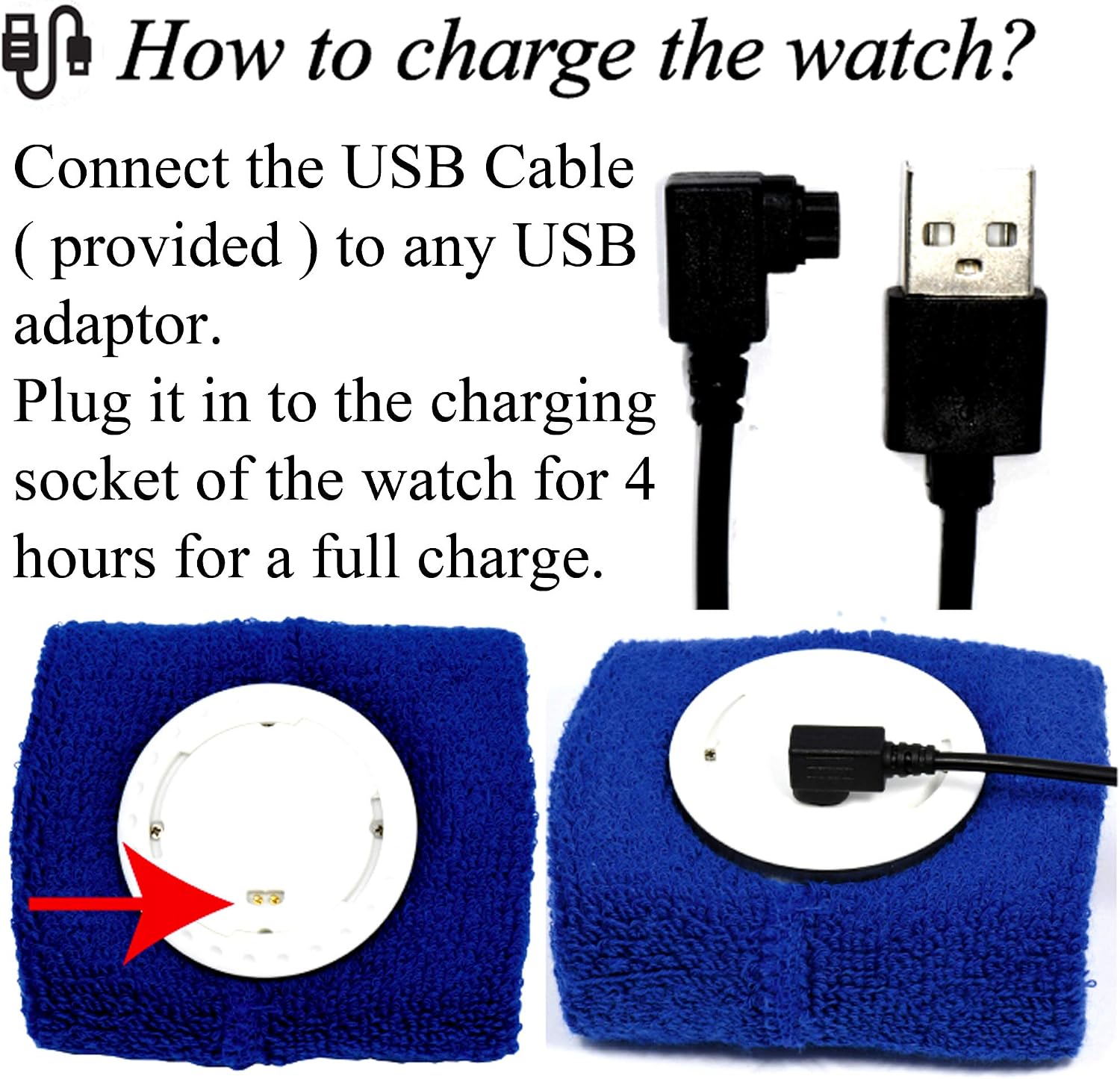
Figure 2: Illustration of connecting the USB cable to the watch module for charging.
3.2 Wearing the Wristband
The wristband is designed for comfortable wear. Ensure the watch module is securely placed within the sweatband.
- The sweatband is adjustable and fits wrist sizes from 6.7 inches (170mm) to 8.5 inches (215mm).
- Wear the wristband snugly enough to ensure good contact for vibration, but not so tight as to be uncomfortable.

Şekil 3: Ör.ample of the Coolfire Vibrating Alarm Clock Wristband worn on a wrist, indicating suitable wrist sizes.
4. Kullanım Talimatları
The Coolfire alarm clock features a simple digital display and user-friendly buttons for setting time, alarms, and other functions.
4.1 Düğme Fonksiyonları
The watch module has three primary buttons:
- LIGHT/STW: Activates backlight; in stopwatch mode, starts/stops the stopwatch.
- AYARLAMAK: Enters setting mode for time and alarms.
- TIME/ALARM: Toggles between time display and alarm display; in setting mode, adjusts values.
4.2 Saat ve Tarihin Ayarlanması
- Ana zaman göstergesinden basılı tutun. AYARLAMAK Zaman rakamları yanıp sönmeye başlayana kadar düğmeye basın.
- Basın ZAMAN/ALARM Yanıp sönme değerini ayarlamak için kullanılan düğme (örneğin, saat, dakika).
- Basın AYARLAMAK button again to move to the next setting (e.g., minutes, year, month, day).
- Tüm saat ve tarih ayarları doğru olana kadar 2. ve 3. adımları tekrarlayın.
- Basın AYARLAMAK button one last time to exit setting mode.
4.3 Alarmları Ayarlama
The device supports up to 6 daily alarms.
- Ana zaman göstergesinden, tuşuna basın. ZAMAN/ALARM button repeatedly until "ALARM" is displayed and you see an alarm number (e.g., AL1).
- Basılı tutun AYARLAMAK button until the alarm time digits begin to flash.
- Basın ZAMAN/ALARM button to adjust the flashing hour.
- Basın AYARLAMAK button to move to the minutes.
- Basın ZAMAN/ALARM button to adjust the flashing minutes.
- Basın AYARLAMAK button to enable/disable the alarm (an alarm icon will appear when enabled).
- Basın AYARLAMAK button again to save the alarm setting and exit.
- To set additional alarms, repeat steps 1-7, cycling through AL2, AL3, etc., using the ZAMAN/ALARM düğme.
4.4 Titreşim Gücünün Ayarlanması
The device offers three vibration strengths: Low, Medium, and High. The method for adjusting this setting is typically found within the alarm settings or a dedicated mode. Refer to the on-screen prompts or experiment with the AYARLAMAK Ve ZAMAN/ALARM buttons while in alarm setting mode to locate this option.
4.5 Kronometrenin Kullanımı
- Ana zaman göstergesinden, tuşuna basın. ZAMAN/ALARM button repeatedly until "STW" (Stopwatch) is displayed.
- Basın LIGHT/STW Kronometreyi başlatmak için düğmeye basın.
- Basın LIGHT/STW Kronometreyi duraklatmak için tekrar düğmeye basın.
- To reset the stopwatch, while paused, press and hold the AYARLAMAK düğme.
- Basın ZAMAN/ALARM button to return to the main time display.
5. Bakım
5.1 Washing the Sweatband
The sweatband is washable, but the watch module is suya dayanıklı değil. Always remove the watch module before washing the sweatband.
- To detach the watch module, release the locking ring from the back of the watch.
- Gently push the watch module out from the sweatband.
- Machine wash the sweatband as needed, following standard fabric care instructions.
- Ensure the sweatband is completely dry before reinserting the watch module.
- Reinsert the watch module and secure it with the locking ring.
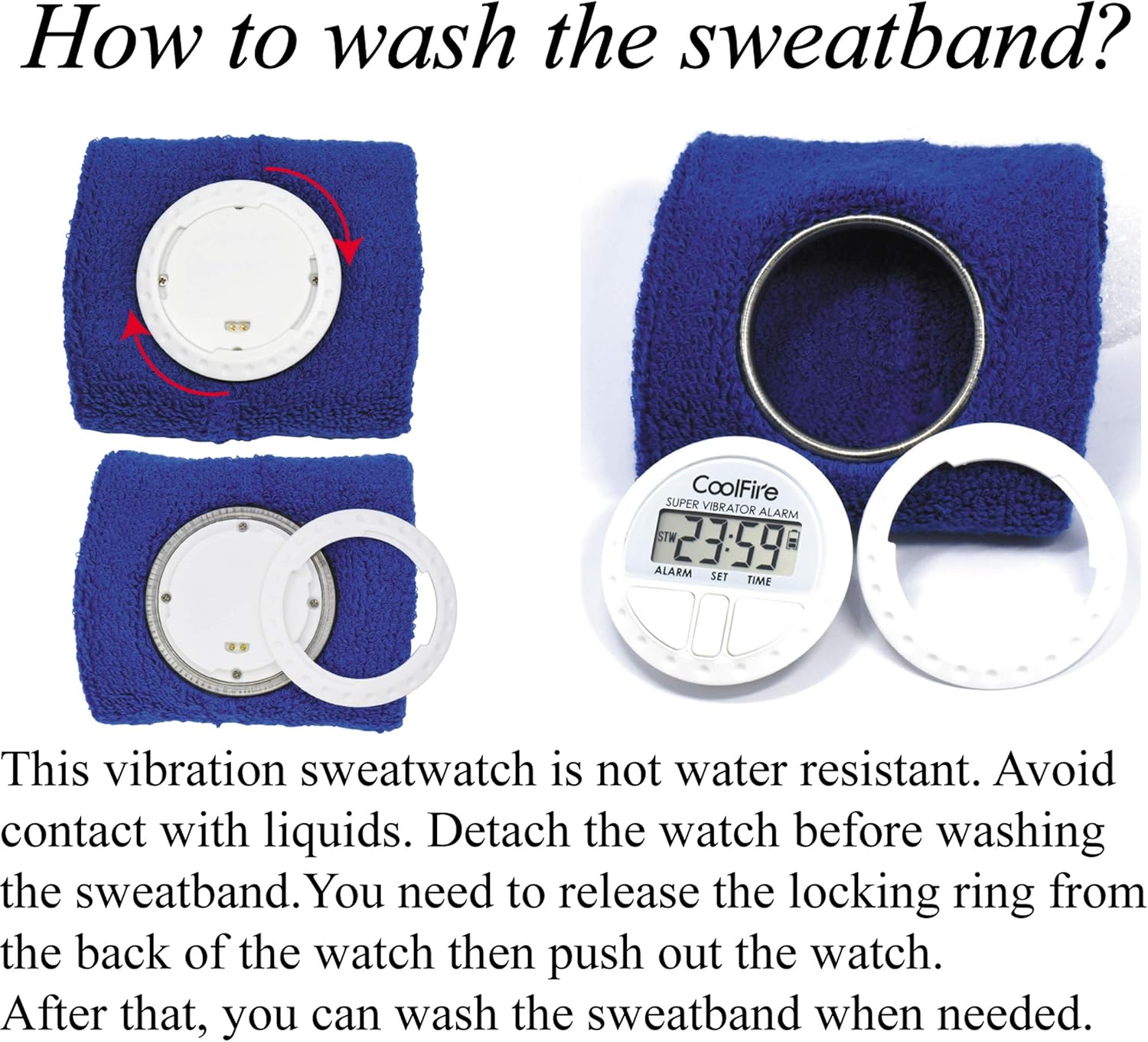
Figure 4: Steps for removing the watch module from the sweatband for cleaning.
6. Sorun Giderme
| Sorun | Olası Neden | Çözüm |
|---|---|---|
| Cihaz açılmıyor veya ekran boş. | Pil bitmiş. | Cihazı, kutuda bulunan USB kablosunu kullanarak 4 saat şarj edin. |
| Vibration alarm is too weak or not felt. | Vibration strength set to Low; wristband is too loose. | Adjust vibration strength to Medium or High. Ensure the wristband is worn snugly. |
| Alarm does not activate. | Alarm is not enabled or set incorrectly. | Verify alarm settings and ensure the alarm icon is displayed, indicating it is active. |
| Ekranın okunması zor. | No backlight activated. | Basın LIGHT/STW Arka ışığı etkinleştirmek için düğmeye basın. |
7. Özellikler
- Marka: Serin ateş
- Model Numarası: 1685B
- Renk: Siyah (diğer renkler mevcut olabilir)
- Ürün Ölçüleri: 8.89 x 3.81 x 8.89 cm (watch module)
- Ürün Ağırlığı: 10 g (watch module)
- Malzeme: Plastic (watch module), Fabric (sweatband)
- Görüntüleme Türü: Dijital lcd
- Güç Kaynağı: Şarj edilebilir Lityum Pil
- Şarj Süresi: Yaklaşık 4 saat
- Pil Ömrü: 4-6 weeks on a full charge
- Özel Özellikler: Silent Clock, Vibrating Alarm, Stopwatch
- Wristband Fit: 6.7" (170 mm) ila 8.5" (215 mm)
8. Garanti ve Destek
For warranty information and customer support, please refer to the documentation included with your purchase or contact your retailer. Keep your purchase receipt as proof of purchase.
For further assistance, you may visit the official Coolfire webSitelerini ziyaret edebilir veya müşteri hizmetleri departmanıyla iletişime geçebilirsiniz. İletişim bilgileri genellikle ürün ambalajında veya markanın resmi çevrimiçi platformunda bulunur.