1. Giriş ve Üzeriview
The Amazon Fire TV Soundbar Plus is an all-in-one 3.1 channel soundbar designed to enhance your home entertainment audio experience. It features a built-in subwoofer for rich bass, a dedicated center channel for crystal-clear dialogue, and supports advanced audio formats like Dolby Atmos and DTS:X for immersive sound. This manual provides essential information for setting up, operating, and maintaining your soundbar.

Resim: Ön view of the Amazon Fire TV Soundbar Plus, showcasing its sleek, compact design. The soundbar is black with a fabric grille covering the speakers.
The Fire TV Soundbar Plus integrates seamlessly with Fire TV devices, allowing for simplified control with a single remote and customizable audio settings. It also offers Bluetooth connectivity for streaming audio from your mobile devices.
2. Başlarken: Kurulum
2.1 Kutuda Neler Var?
Başlamadan önce, ambalajda tüm bileşenlerin eksiksiz olduğundan emin olun:
- Fire TV Soundbar Plus
- Uzak
- HDMI 2.0 Kablosu
- AC Kablosu
- 2 AAA Pil
- Duvara montaj kiti
- Hızlı Başlangıç Kılavuzu

Image: A visual representation of the soundbar's dimensions (37.0 in x 2.5 in x 5.2 in) and a list of items included in the box, confirming the presence of the soundbar, remote, cables, batteries, wall mount kit, and quick start guide.
2.2 Connecting Your Soundbar
Follow these steps to connect your Fire TV Soundbar Plus to your television:
- Position the Soundbar: Place the soundbar on a flat, stable surface in front of your TV, or mount it on the wall using the included kit. Ensure there are no obstructions in front of the soundbar.
- HDMI Kablosunu Bağlayın: Connect one end of the included HDMI 2.0 cable to the HDMI eARC/ARC port on your TV. Connect the other end to the HDMI (eARC/ARC) port on the back of your Fire TV Soundbar Plus.
- Gücü bağlayın: Plug the AC cord into the power port on the soundbar, then plug the other end into a wall outlet.
- Opsiyonel Bağlantılar:
- Optik: If your TV does not have an HDMI eARC/ARC port, you can use an optical cable (not included) to connect the soundbar to your TV's optical audio output.
- USB-A: The USB-A port is for service and diagnostics only.
- Güç Açık: The soundbar will power on automatically once connected to power.
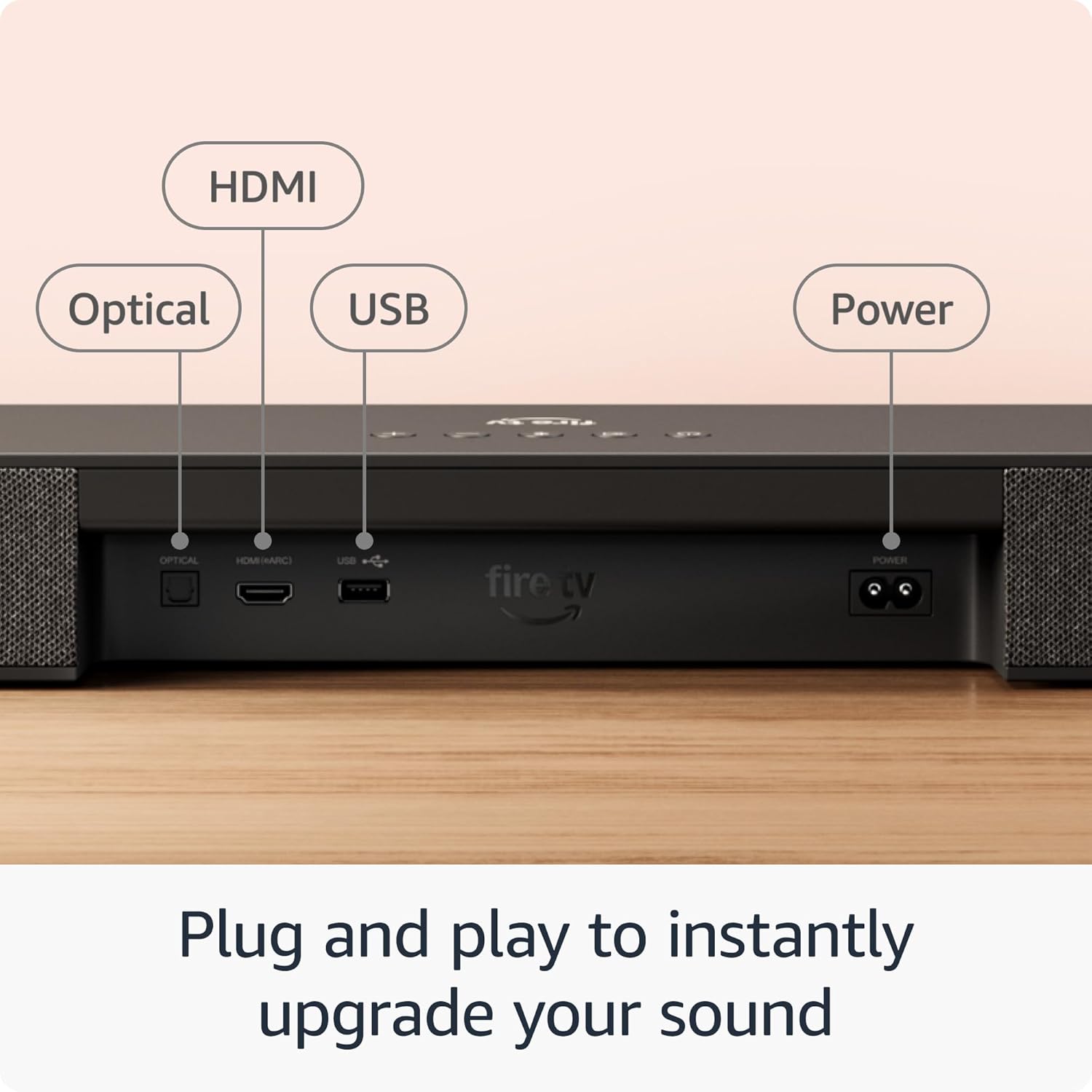
Resim: Yakın çekim view of the rear panel of the Fire TV Soundbar Plus, clearly labeling the HDMI (eARC/ARC), Optical, USB, and Power input ports for easy connection identification.
Ensure your TV's audio output settings are configured to output sound through the connected HDMI eARC/ARC or Optical port.
3. Kullanım Talimatları
3.1 Güç Açma/Kapatma
The soundbar typically powers on automatically when connected to a power source. To turn it off or on, use the power button on the included remote control or the power button on the soundbar itself.
3.2 Audio Modes (EQ Modes)
The Fire TV Soundbar Plus offers optimized audio modes to suit different content types. Use the remote to switch between these modes:
- Film Modu: Enhances cinematic soundscapes, making explosions more impactful and dialogue clearer.
- Müzik Modu: Optimizes audio for music playback, providing a balanced and rich sound profile.
- Spor Modu: Boosts crowd noise and commentary for an immersive sports viewDeneyim.
- Gece Modu: Reduces dynamic range to prevent sudden loud sounds, ideal for late-night listening without disturbing others.
3.3 Bluetooth Ses Akışı
You can stream audio wirelessly from your smartphone, tablet, or other Bluetooth-enabled devices to the soundbar.
- Bluetooth'u etkinleştir: On the soundbar remote, press the Bluetooth button to put the soundbar into pairing mode. The indicator light on the soundbar will flash.
- Eşleştirme Cihazı: On your mobile device, go to Bluetooth settings and select "Fire TV Soundbar Plus" from the list of available devices.
- Yayını Başlat: Once paired, you can play audio from your device, and it will output through the soundbar.

Image: The Fire TV Soundbar Plus positioned below a television, with a smartphone displaying a music streaming application in the foreground, illustrating the soundbar's Bluetooth audio streaming capability.
3.4 Fire TV Entegrasyonu
For select models, the Fire TV Soundbar Plus is designed to work seamlessly with your Fire TV device. This allows you to:
- Control with One Remote: Use your Fire TV remote to control both your TV and the soundbar's volume and power.
- Sesi Özelleştir: Adjust sound settings directly within the Fire TV audio settings menu for a personalized listening experience.
4. Gelişmiş Ses Özellikleri
The Fire TV Soundbar Plus delivers a premium audio experience through its advanced technologies:
- Dolby Atmos: Experience three-dimensional sound that moves around you, creating an incredibly immersive audio environment. This technology adds height to the soundstage, making you feel like you're inside the action.
- DTS:X: Provides multi-dimensional audio, delivering lifelike sound that adapts to your speaker layout, enhancing realism and immersion.
- Net Diyalog: A dedicated center dialogue channel ensures that conversations are sharp and distinct, preventing important lines from being lost amidst background effects.

Image: The Fire TV Soundbar Plus integrated into a modern living room setup, with visual representations of sound waves expanding from the soundbar, emphasizing its immersive audio capabilities with Dolby Atmos and DTS:X support.
The soundbar's 3.1 channel configuration, including a built-in subwoofer, provides a balanced audio profile with powerful bass and clear highs, suitable for a wide range of content.

Image: A comparative chart illustrating different Fire TV Soundbar Plus Series configurations, highlighting the 3.1 channel all-in-one audio solution of this model, alongside options for rumbling bass and full home theater setups.
5. Bakım ve Onarım
To ensure the longevity and optimal performance of your Fire TV Soundbar Plus, follow these simple maintenance guidelines:
- Temizlik: Use a soft, dry, lint-free cloth to clean the exterior of the soundbar. Do not use liquid cleaners, aerosols, or abrasive solvents, as they may damage the finish or internal components.
- Havalandırma: Ensure the soundbar's vents are not blocked to prevent overheating. Do not place the soundbar in an enclosed space without adequate airflow.
- Atama: Avoid placing the soundbar in direct sunlight, near heat sources, or in areas with high humidity or extreme temperatures.
- İşleme: Ses çubuğunu dikkatli kullanın. Düşürmekten veya şiddetli darbelere maruz bırakmaktan kaçının.
6. Sorun Giderme Kılavuzu
If you encounter issues with your Fire TV Soundbar Plus, refer to the following common problems and their solutions:
| Sorun | Olası Çözüm |
|---|---|
| Soundbar'dan ses gelmiyor. |
|
| Ses bozuk veya net değil. |
|
| Uzaktan kumanda çalışmıyor. |
|
| Bluetooth cihazı eşleşmiyor. |
|
Bu çözümleri denedikten sonra sorun devam ederse, daha fazla yardım için lütfen Garanti ve Destek bölümüne bakın.
7. Teknik Özellikler
Detailed specifications for the Amazon Fire TV Soundbar Plus:
| Özellik | Detay |
|---|---|
| Soundbar Boyutu (UxGxY) | 37” x 5.2” x 2.5” |
| Soundbar Ağırlığı | 8.8 kilo |
| Hoparlör Kanalları | 3.1 (dahili subwoofer) |
| EQ Modları | Film, Müzik, Spor, Gece |
| Çevresel Ses Desteklenir | Dolby Atmos, DTS:X |
| Limanlar | HDMI (eARC/ARC), Optical, AC, USB-A (for service) |
| Bluetooth Desteği | Evet |
| Uyumluluk | Akıllı TV'ler ve medya oynatıcılı TV'ler |
Image: A clear depiction of the Fire TV Soundbar Plus with its key dimensions labeled: 37.0 inches in length, 2.5 inches in height, and 5.2 inches in depth.
8. Garanti ve Destek
8.1 Sınırlı Garanti
The Amazon Fire TV Soundbar Plus comes with a 1 yıllık sınırlı garanti. This warranty covers defects in materials and workmanship under normal use. For full terms and conditions, please refer to the warranty information provided with your product or visit the official Amazon support webalan.
Optional 1-Year, 2-Year, and 3-Year extended warranties may be available for U.S. customers and are sold separately.
8.2 Müşteri Desteği
For further assistance, technical support, or warranty claims, please contact Amazon Customer Service. You can find contact information and additional resources on the official Amazon support webLütfen destek ekibiyle iletişime geçerken ürün modelinizi ve seri numaranızı hazır bulundurun.
En güncel bilgi ve destek kaynakları için lütfen şu adresi ziyaret edin: www.amazon.com/devicesupport


