1. Giriş
This manual provides detailed instructions for the proper setup, operation, and maintenance of your Topping A50 III Headphone Amplifier. Please read this manual thoroughly before using the device to ensure optimal performance and safety. The Topping A50 III is a high-performance desktop headphone amplifier designed to deliver clear and powerful audio to a wide range of headphones.
2. Ürün Bittiview
2.1 Temel Özellikler
- NFCA Modules: Incorporates Nested Feedback Composite Amplifier (NFCA) modules, utilizing a voltage-current hybrid feedback architecture and Ultra-High Gain Feedback (UHGF) technology for enhanced DC and AC performance. This design supports driving low impedance headphones effectively.
- Çok Yönlü Bağlantı: Features both 6.35mm single-ended and 4.4mm balanced headphone output jacks. Input options include RCA single-ended and 6.35mm TRS balanced inputs, allowing for various audio source connections.
- Kulaklık Uyumluluğu: Offers three gain selections (High, Medium, Low) to accommodate different headphone sensitivities. A low noise floor of 0.3uVrms ensures minimal interference, particularly for sensitive In-Ear Monitors (IEMs).
- Yüksek Çıkış Gücü: Delivers a maximum output of 3500mW x 2, capable of driving most headphones to their full potential while maintaining a low distortion rate of less than 0.1% at high power levels.
- 12V Tetik: Equipped with a 12V Trigger input, enabling synchronized power on/off with other compatible audio devices.
- Tasarım Entegrasyonu: Shares a consistent design aesthetic with the Topping D50 III, allowing for a cohesive setup when paired together. The 12V Trigger functionality facilitates synchronized operation between these units.
2.2 Paket İçeriği

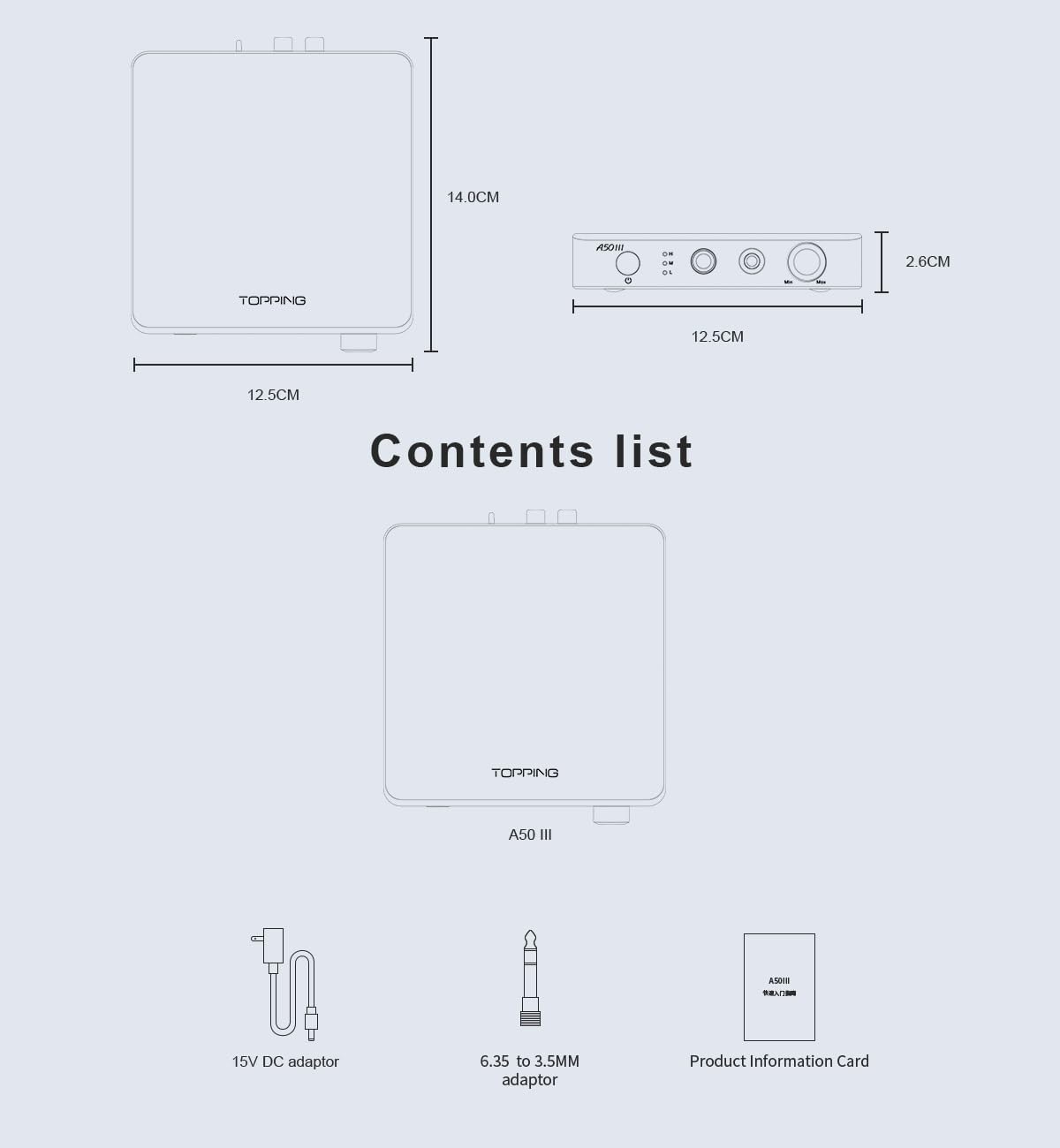
Şekil 1: Paket İçeriği ve Boyutları
The Topping A50 III package includes the following items:
- Topping A50 III Kulaklık Amplifer Ünitesi
- 15V DC Güç Adaptörü
- 6.35 mm - 3.5 mm Adaptör
- Ürün Bilgi Kartı
2.3 Bileşen Tanımlama
Şekil 2: Ön ve Arka Panel Düzeni
This diagram provides a detailed labeling of all controls and ports on the Topping A50 III. The front panel labels include:
- Power switch & Gain switch button: Press to power on/off. Press and hold to cycle through gain settings (H, M, L).
- Gain indicator: LEDs indicating High (H), Medium (M), or Low (L) gain.
- 6.35mm headphone output jack: For single-ended headphone connections.
- 4.4mm headphone output jack: Dengeli kulaklık bağlantıları için.
- Ses düğmesi: Çıkış sesini ayarlar.
The rear panel labels include:
- Balanced 6.35mm TRS input (R, L): For balanced audio input from a source device.
- Single-ended RCA input (R, L): For single-ended audio input from a source device.
- Input channel switching (BAL/SE): Toggle switch to select between balanced (BAL) and single-ended (SE) inputs.
- Firmware upgrade interface (FW): Yazılım güncellemeleri için USB portu.
- 12V Trigger In: Input for synchronized power control with other compatible devices.
- Power input (DC15V): Connect the provided 15V DC power adaptor here.
3. Güvenlik Talimatları
- Bu cihazı yağmura, neme veya aşırı sıcaklıklara maruz bırakmayın.
- Aşırı ısınmayı önlemek için ünite çevresinde uygun havalandırma olduğundan emin olun.
- Use only the provided 15V DC power adaptor. Using an incorrect adaptor may damage the device.
- Cihazı dengesiz yüzeylere koymaktan kaçının.
- Üniteyi sökmeye veya değiştirmeye çalışmayın. Tüm bakım işlemlerini yetkili personele yaptırın.
- Cihazı güçlü manyetik alanlardan uzak tutun.
- Always lower the volume before connecting or disconnecting headphones to prevent sudden loud sounds.
4. Kurulum
4.1 Ses Kaynaklarını Bağlama
The A50 III supports both balanced and single-ended audio inputs.
- Dengeli Giriş: Connect your audio source (e.g., DAC with balanced outputs) to the 6.35mm TRS (Tip-Ring-Sleeve) input jacks on the rear panel. Ensure the left (L) and right (R) channels are connected correctly.
- Single-Ended Input: Connect your audio source (e.g., DAC with RCA outputs) to the RCA input jacks on the rear panel. Ensure the left (L) and right (R) channels are connected correctly.
4.2 Kulaklık Bağlama
The A50 III provides both balanced and single-ended headphone outputs.
- Dengeli Çıkış: For headphones with a 4.4mm balanced connector, plug them into the 4.4mm headphone output jack on the front panel.
- Tek Uçlu Çıkış: For headphones with a 6.35mm single-ended connector, plug them into the 6.35mm headphone output jack on the front panel. If your headphones use a 3.5mm connector, use the provided 6.35mm to 3.5mm adaptor.
4.3 Güç Bağlantısı
Connect the provided 15V DC power adaptor to the DC15V power input on the rear panel of the A50 III. Then, plug the adaptor into a suitable power outlet.
4.4 12V Tetikleme Bağlantısı (İsteğe Bağlı)

Figure 3: 12V Trigger Connection Example
If you have another audio device with a 12V Trigger output, you can connect it to the 12V Trigger In port on the A50 III using a compatible cable. This allows the A50 III to power on and off synchronously with the connected device.
5. Kullanım Talimatları
5.1 Güç Açma/Kapatma
Press the power switch button on the front panel to turn the A50 III on or off. The gain indicator LEDs will illuminate when the unit is powered on.
5.2 Giriş Seçimi
Use the input channel switching toggle switch on the rear panel to select between Balanced (BAL) and Single-Ended (SE) audio inputs. Ensure the switch matches the type of input you are using.
5.3 Ses Kontrolü
Rotate the volume knob on the front panel clockwise to increase the volume and counter-clockwise to decrease it. Always start with the volume at a low level before playing audio to prevent hearing damage.
5.4 Kazanç Ayarı
The A50 III offers three gain levels: High (H), Medium (M), and Low (L). To change the gain setting, press and hold the power switch button on the front panel. The corresponding LED (H, M, or L) will light up to indicate the selected gain. Choose a gain setting appropriate for your headphones:
- Düşük (L): Recommended for highly sensitive headphones or In-Ear Monitors (IEMs).
- Orta (M): Suitable for most standard headphones.
- Yüksek (H): For less sensitive or high-impedance headphones that require more power.
6. Bakım
- Temizlik: Cihazın dış yüzeyini temizlemek için yumuşak, kuru bir bez kullanın. Sıvı temizleyiciler veya aşındırıcı malzemeler kullanmayın.
- Depolamak: Uzun süre kullanılmadığı zamanlarda cihazı serin, kuru bir yerde, doğrudan güneş ışığından ve tozdan uzak tutarak saklayın.
- Havalandırma: Ensure that the ventilation openings are not blocked to prevent heat buildup.
7. Sorun Giderme
- Ses Yok:
- Check if the power adaptor is securely connected and the unit is powered on.
- Verify that the audio source is properly connected to the correct input (RCA or TRS).
- Ensure the input channel switch (BAL/SE) on the rear panel matches your audio source.
- Confirm that headphones are securely plugged into the correct output jack (6.35mm or 4.4mm).
- Increase the volume level on the A50 III and your audio source.
- Test with different headphones and audio sources to isolate the issue.
- Bozuk Ses:
- Reduce the volume level on both the A50 III and your audio source.
- Try a lower gain setting (L or M) if using sensitive headphones.
- Tüm kabloların sağlam bir şekilde bağlı olduğundan ve hasar görmediğinden emin olun.
- Ses kaynağında bozulma olup olmadığını kontrol edin.
- Ünite Açılmıyor:
- Verify the power adaptor is correctly connected to the unit and a working power outlet.
- If using the 12V Trigger, ensure the connected device is powered on and the trigger cable is functional.
8. Özellikler

Şekil 4: Detaylı Teknik Özellikler
The following table outlines the key technical specifications of the Topping A50 III Headphone Ampkaldırıcı:
| Şartname | Değer |
|---|---|
| Model Adı | A50III |
| Kulaklık Girişi | 6.35 mm Kriko, 4.4 mm Kriko |
| Bağlantı Teknolojisi | Kablolu |
| Kablosuz İletişim Teknolojisi | Desteklenmiyor |
| Dahil Bileşenler | Cable (likely power cable and adaptors) |
| Uyumlu Cihazlar | Desktops, Laptops, Headphones, Audio Devices |
| Kontrol Yöntemi | Düğme, Topuz |
| Öğe Sayısı | 1 (ana ünite) |
| Üretici | LEAUDIO CO. |
| Ürün Ağırlığı | 2 pound (yaklaşık 0.91 kg) |
| Paket Boyutları | 6.8 x 6.5 x 5.8 inç (yaklaşık 17.3 x 16.5 x 14.7 cm) |
| Ürün Model Numarası | LE-TP-A50III |
| Renk | Siyah |
| Gürültü Kontrolü | Hiçbiri |
9. Garanti ve Destek
For warranty information and technical support, please refer to the documentation included with your product or contact the manufacturer, LEAUDIO CO., or your authorized dealer. Keep your purchase receipt as proof of purchase for warranty claims.


