1. Giriş
This manual provides essential information for the safe and effective operation of your DALY Smart 13S BMS 48V 60A. Please read these instructions carefully before installation and use to ensure optimal performance and longevity of your battery system. This Battery Management System (BMS) is designed to protect and manage 13-series Li-ion lithium battery packs, offering advanced monitoring and communication capabilities.
2. Temel Özellikler
- Çoklu Koruma: Includes overcharge, overdischarge, overcurrent, short circuit, and temperature protection, along with waterproof protection.
- Gelişmiş Tasarım: Features a smaller size, parallel protection, pre-charging function, 100mA passive equalization current, low temperature rise, working condition indicator, and consistent charge/discharge current.
- Akıllı İzleme: Integrated WiFi module allows remote monitoring of lithium batteries via the Internet. The smartphone app provides alerts for any detected abnormalities.
- Çok Yönlü İletişim: Equipped with CAN, RS485, and dual UART communication interfaces for rich expansion applications.
3. Özellikler
The following table details the key specifications for the DALY Smart 13S BMS 48V 60A.

Image: Detailed specifications for the DALY Smart 13S 60A BMS, including discharge current, overcharge/overdischarge parameters, and physical dimensions.
| Şartname | Değer |
|---|---|
| Ürün Boyutları | 4.84 x 2.56 x 0.55 inç (123 x 65 x 14 mm) |
| Ürün Ağırlığı | 12.3 ounces (170-210g) |
| Ürün Model Numarası | 13S BMS 48V 60A |
| Giriş Voltage | 48 Volt |
| Çıkış Hacmitage | 12 Volts (for auxiliary functions) |
| Deşarj Akımı | 60A |
| Overdischarge Current | 90 ± 1.8A |
| Şarj Akımı | 60A |
| Overcharge Current | 90 ± 1.8A |
| Aşırı Şarj Hacmitage | 4.25 ± 0.05V (Can be set) |
| Aşırı Deşarj Hacmitage | 2.7 ± 0.05V (Can be set) |
| Şarj Hacmitage | 54.6V |
| Çıkış Kablosu | 10 AWG/100 mm |
| Kablo | 24 AWG/450 mm |
4. Kurulum ve Kablolama
Proper installation and wiring are crucial for the safe and correct operation of the BMS. The following steps outline the process, using the K series 60A BMS as an exampley.

Image: A detailed wiring diagram illustrating the connection points for the DALY Smart BMS to a battery pack, load, and charger.
- Step 1: Solder Sampling Cables. The first black cable in the sampling cable set connects to the negative terminal of the battery (B-). Subsequent red cables connect to the positive terminal of the first string, then the second string, and so on, until all cell positive terminals are connected.
- Step 2: Check Cables. After connecting the cables, use a multimeter to measure the voltage between two adjacent cells, starting from the header. Ensure there are no wrong connections or missing connections.
- Step 3: Connect Output Wires. Connect the B- wire of the BMS to the total negative terminal of the battery pack. Then, plug the sampling cable to the BMS. After activating the BMS, verify that the voltage (pil hacmitage) between B+ & B- and the voltage between P+ & P- are consistent.
Important: Incorrect wiring can damage the BMS and/or the battery pack. If you are unsure, seek professional assistance.
5. Smart APP Usage
The DALY Smart BMS features a dedicated mobile application for convenient monitoring and parameter adjustment. With the WiFi module, you can remotely access your battery's data.
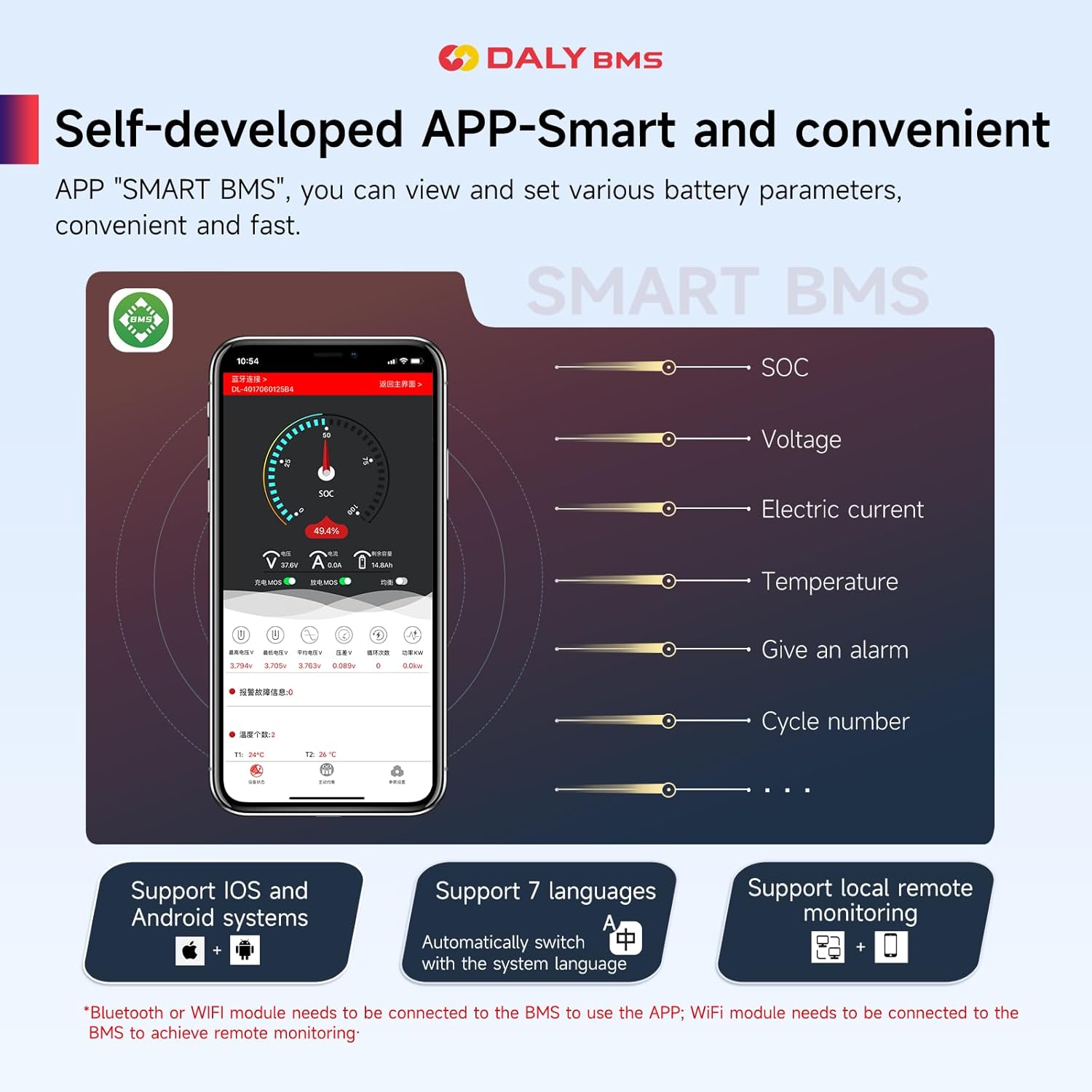
Image: A screenshot of the DALY Smart BMS mobile application, displaying battery State of Charge (SOC), voltage, current, temperature, alarm status, and cycle number. The app supports iOS and Android, multiple languages, and remote monitoring via WiFi.
The "SMART BMS" app allows you to view and set various battery parameters quickly and easily. When the BMS detects any abnormality in the battery pack, it will send an alert directly to your smartphone app, enabling proactive management of your battery system.
- Uzaktan İzleme: Monitor your lithium batteries from anywhere via the Internet using the WiFi module.
- Gerçek Zamanlı Veriler: View critical parameters such as State of Charge (SOC), voltage, elektrik akımı ve sıcaklık.
- Uyarılar: Receive immediate notifications on your smartphone if any abnormalities are detected.
- Uyumluluk: Supports both iOS and Android operating systems.
6. Uygulama Senaryoları
The DALY Smart BMS is suitable for various lithium battery applications, providing reliable protection and management.

Image: An illustration showing the DALY BMS integrated into different battery pack configurations, including large cell, cylindrical cell, and soft-packed cell battery systems, highlighting its versatility.
This BMS can be integrated into diverse battery systems, including those for electric vehicles, energy storage, and other high-power applications requiring precise battery management.
7. Paket İçeriği
Upon receiving your DALY Smart 13S BMS, please verify that all items listed below are included in the package.

Image: A visual representation of the DALY BMS package contents, including the BMS unit, manual, output line, WiFi module, cables, NTC temperature sensor, and CAN/485 5-pin connector.
| Öğe | Miktar |
|---|---|
| K series BMS | 1 |
| Manuel | 1 |
| B-P- Output line | 1 |
| WiFi Modülü | 1 |
| Kablolar | 1 takım |
| NTC Sıcaklık Sensörü | 1 |
| CAN/485 5pin Connector | 1 |
8. Güvenlik Bilgileri
Always adhere to safety precautions when working with battery management systems and high-voltage pil paketleri.
- Ensure all connections are secure and correctly polarized before applying power.
- Akü terminallerini veya BMS bağlantılarını kısa devre yapmayın.
- Avoid exposing the BMS to extreme temperatures, moisture, or corrosive environments.
- Only use the BMS with compatible battery chemistries and cell counts as specified.
- In case of smoke, unusual odors, or excessive heat, immediately disconnect the power source and consult a professional.
- Çocukların erişemeyeceği yerde saklayınız.
9. Çalıştırma Yönergeleri
To ensure proper operation of your DALY Smart BMS, follow these guidelines:
- İlk Güçlendirme: After wiring, connect the main battery terminals. The BMS should power on automatically. If not, check all connections.
- İzleme: Regularly check battery parameters via the smartphone app or connected display. Pay attention to cell voltages, temperatures, and overall pack voltage.
- Şarj: Use a charger compatible with your Li-ion battery pack's voltage and current requirements. The BMS will manage overcharge protection.
- Boşaltma: Ensure your load does not exceed the continuous discharge current rating of the BMS. The BMS will provide overcurrent and overdischarge protection.
- Eşitleme: The BMS performs passive equalization to balance cell voltages. Allow sufficient time for balancing, especially after deep cycles.
10. Bakım
Minimal maintenance is required for the DALY Smart BMS. However, periodic checks are recommended:
- Görsel Muayene: BMS'yi ve tüm kabloları periyodik olarak hasar, korozyon veya gevşek bağlantı belirtileri açısından kontrol edin.
- Yazılım Güncellemeleri: Keep the smartphone app updated to the latest version to benefit from new features and bug fixes.
- Temizlik: Gerekirse, BMS'nin dış yüzeyini kuru, yumuşak bir bezle nazikçe temizleyin. Sıvı veya aşındırıcı temizleyiciler kullanmayın.
- Sıcaklık: Ensure the BMS operates within its specified temperature range to prevent overheating.
11. Sorun Giderme
If you encounter issues with your DALY Smart BMS, consider the following common troubleshooting steps:
- BMS Çalışmıyor: Check all main power connections (B- and P-) and the balance lead connections. Ensure the battery pack voltage, BMS'nin çalışma aralığı içindedir.
- Uygulama Bağlantı Sorunları: Verify the WiFi module is correctly installed and powered. Ensure your smartphone's WiFi is enabled and connected to the correct network, or that Bluetooth is active if using a Bluetooth module. Restart the app and/or the BMS.
- Aşırı Şarj/Aşırı Deşarj Koruması Devreye Girdi: This indicates that a cell or the entire pack has reached its voltage limit. Check individual cell voltages. Ensure your charger/load settings are appropriate for your battery type.
- Aşırı Akım Koruması Tetiklendi: The load current exceeded the BMS's limit. Reduce the load or ensure the BMS current rating matches your application.
- Temperature Protection Triggered: The battery or BMS temperature is outside the safe operating range. Allow the system to cool down and ensure adequate ventilation.
- Dengesiz Hücreler: Eğer hücre hacmitages are significantly different, ensure the balance leads are correctly connected. The passive balancing function will work to equalize cells over time, especially during charging.
For persistent issues, refer to the detailed troubleshooting section in the full product manual or contact DALY customer support.
12. Resmi Ürün Videosu
Bu videoyu bir süre izleyinview of the DALY K-series Smart BMS features and capabilities.
Video: An official DALY BMS video showcasing the K-series Smart BMS, highlighting its smart features, comprehensive protection, and various applications.
13. Garanti ve Destek
DALY provides a quality guarantee for its products. We offer 24-hour one-on-one customer service and technical support. All products are ISO/FCC/RoHS/PSE/CE approved.
If you have any questions or require assistance, please do not hesitate to contact DALY customer service. Please have your product model number (13S BMS 48V 60A) and purchase details ready when contacting support.


