1. Giriş
Bu kılavuz, CZE cihazınızın kurulumu, çalıştırılması ve bakımı için ayrıntılı talimatlar içermektedir.view ZY-D1 Babyphone. Please read this manual thoroughly before using the device to ensure proper functionality and safety. The CZEview ZY-D1 is designed to help you monitor your baby with advanced features such as 2K Ultra HD video, AI-powered detection, two-way audio, and environmental monitoring.
2. Paket İçeriği
- Çek Cumhuriyetiview ZY-D1 Babyphone Camera
- Güç Adaptörü ve Kablosu
- Mounting Accessories (for wall mounting)
- Kullanım Kılavuzu (bu belge)
3. Ürün Bittiview ve Özellikler
Çek Cumhuriyetiview ZY-D1 Babyphone offers a comprehensive monitoring solution with the following key features:
- 2K Ultra HD Video: Provides clear and detailed video surveillance.
- 360° AI Tracking: Intelligent AI technology tracks movements, ensuring no blind spots with 355° horizontal and 90° vertical rotation.
- Anlık Bildirimler: Receive immediate alerts for detected motion, noise, or crying.
- İki Yönlü Ses: Communicate with your baby remotely using the built-in microphone and speaker.
- Stable Dual-Band Wi-Fi: Compatible with both 2.4 GHz and 5 GHz Wi-Fi networks for reliable connectivity.
- Kızılötesi Gece Görüşü: Clear monitoring even in low-light or dark conditions.
- Comfort Night Light & Lullabies: Features a looping night light and 14 pre-installed lullabies to soothe your baby.
- Sıcaklık ve Nem İzleme: Keep track of the nursery environment.
- Uyku Analizi: Monitor and analyze your baby's sleep patterns.
- Alexa Entegrasyonu: Seamlessly integrates with Amazon Alexa for voice control and viewIng.

Resim 1: Çek Cumhuriyetiview ZY-D1 Babyphone camera, featuring a white body and colorful ears, designed for monitoring infants.
4. Kurulum
4.1 Açma
- Connect the provided power cable to the camera's power port.
- Güç adaptörünü standart bir elektrik prizine takın.
- Kamera açılacak ve bir gösterge ışığı durumunu gösterecektir.
4.2 Uygulama Kurulumu
- Scan the QR code provided on the product packaging or in the quick start guide to download the official CZEview uygulama.
- Uygulamayı akıllı telefonunuza veya tabletinize yükleyin.
- Yeni bir hesap için kaydolun veya zaten bir hesabınız varsa giriş yapın.
4.3 Wi-Fi Bağlantısı
- CZE'yi açınview app and follow the on-screen instructions to add a new device.
- Select your Wi-Fi network (supports both 2.4 GHz and 5 GHz).
- Wi-Fi şifrenizi girin.
- The app will guide you through pairing the camera with your network. This usually involves scanning a QR code displayed on your phone with the camera lens.
- Once connected, the camera's indicator light will change, and you will see the live feed in the app.

Resim 2: Illustration of the CZEview Babyphone's compatibility with both 5GHz and 2.4GHz dual-band Wi-Fi for a stable connection.
4.4 Kamerayı Monte Etme
Çek Cumhuriyetiview ZY-D1 Babyphone can be placed on a flat surface or mounted to a wall. If wall mounting, use the provided accessories and ensure the camera is securely fastened at a safe distance from the crib, out of reach of children.
5. Kullanım Talimatları
5.1 Canlı View ve Pan/Tilt Kontrolü
- CZE'yi açınview app and select your camera to view canlı yayın.
- Use the on-screen controls to pan (355° horizontal) and tilt (90° vertical) the camera lens to adjust the viewaçı.
- The automatic tracking feature will detect and follow moving objects within its field of view.
5.2 İki Yönlü Ses

Resim 3: A parent using the CZEview app on a smartphone to engage in two-way communication with a baby in a crib.
- canlı iken viewUygulamada mikrofon simgesine dokunun.
- Telefonunuzun mikrofonuna konuşarak sesinizi kameranın hoparlöründen iletebilirsiniz.
- Release the microphone icon to listen to your baby.
5.3 Yapay Zeka Tespiti ve Bildirimleri

Resim 4: Çek Cumhuriyetiview Babyphone camera positioned near a baby in a crib, highlighting its intelligent AI detection capabilities for motion, noise, and crying.
- Access the detection settings in the app.
- Enable Motion Detection, Noise Detection, and Cry Detection as needed.
- Yanlış alarmları en aza indirmek için hassasiyet seviyelerini ayarlayın.
- You will receive instant push notifications on your smartphone when an event is detected.
5.4 Night Vision and Lullabies

Resim 5: Çek Cumhuriyetiview Babyphone emitting a soft glow as a night light, with musical notes floating around a sleeping baby, illustrating its infrared night vision and lullaby features.
- Gece görüşü, düşük ışık koşullarında otomatik olarak devreye girer.
- To play lullabies or activate the night light, navigate to the respective controls in the app.
- Select from the 14 available lullabies to soothe your baby.
5.5 Sıcaklık ve Nem İzleme
The app displays real-time temperature and humidity readings from the camera's environment. You can set alerts for specific temperature or humidity ranges.
5.6 Sleep Analysis

Resim 6: A visual representation of a sleep analysis timeline on a smartphone screen, showing snapshots of a baby at different times during sleep.
Çek Cumhuriyetiview app provides a timeline view of your baby's activity, which can be used to analyze sleep patterns. Review recorded events and snapshots to understand sleep duration and disturbances.
5.7 Amazon Alexa Entegrasyonu
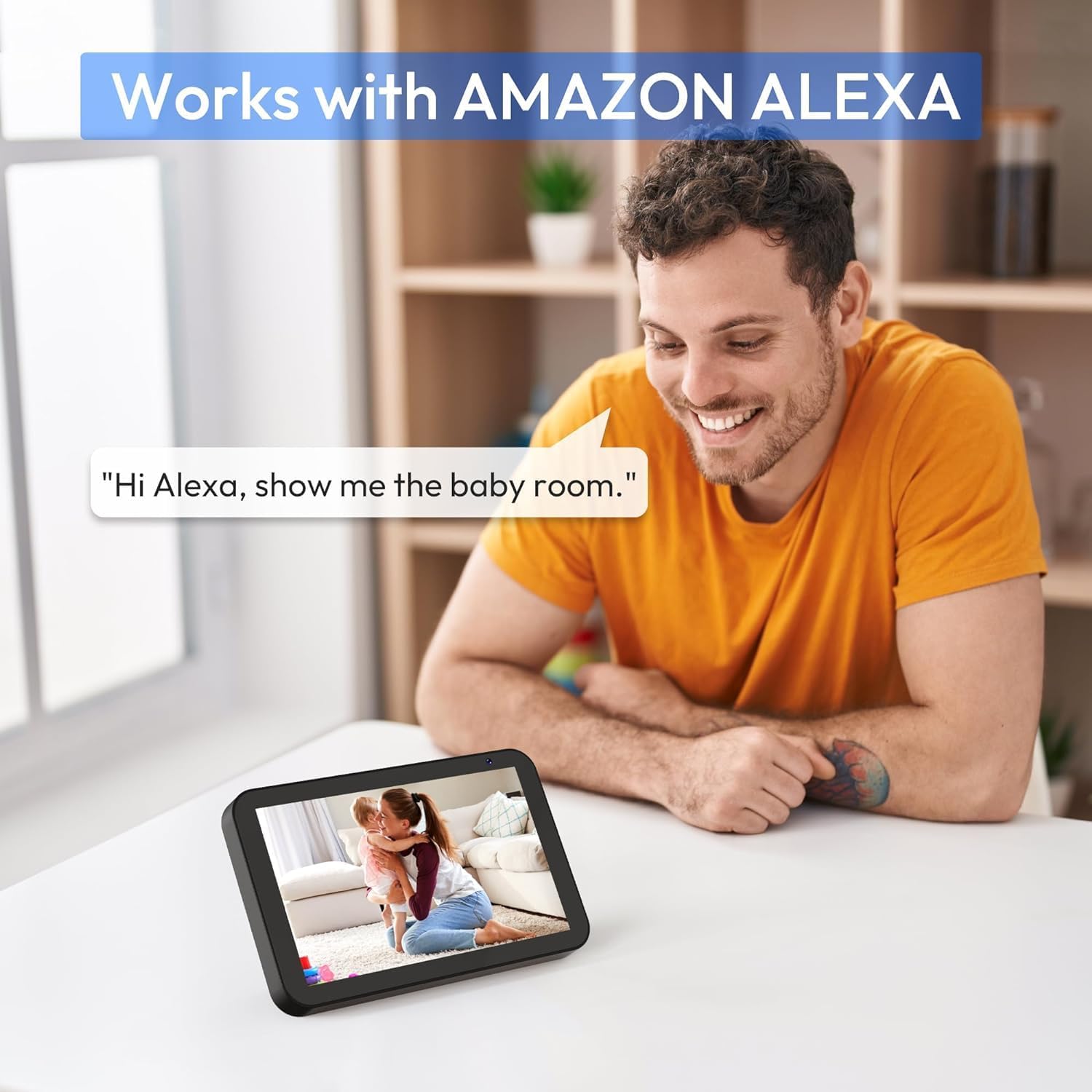
Resim 7: A person interacting with an Amazon Echo Show device, displaying the live feed from the CZEview Babyphone, demonstrating Alexa integration.
- Enable the CZEview skill in your Amazon Alexa app.
- Link your CZEview account with Alexa.
- Use voice commands such as "Alexa, show me the baby room" to view the camera feed on compatible Alexa devices.
5.8 Multi-User Access and SD Card Recording
- Aile Paylaşımı: You can invite family members to view the camera feed through the app. Invited users may have limited control functions compared to the primary account holder.
- Yerel Depolama: Insert an SD card (not included) into the camera's designated slot for local video recording and to enable certain features like playing lullabies directly from the camera.
6. Bakım
- Temizlik: Fotoğraf makinesinin objektifini ve gövdesini temizlemek için yumuşak, kuru bir bez kullanın. Sıvı temizleyiciler veya aerosoller kullanmayın.
- Donanım Yazılımı Güncellemeleri: Uygulamanın en iyi şekilde çalışması ve güvenliğinin sağlanması için düzenli olarak uygulama içi yazılım güncellemelerini kontrol edin.
- Atama: Ensure the camera is placed in a well-ventilated area and not exposed to extreme temperatures or direct sunlight.
7. Sorun Giderme
- Güç Yok: Ensure the power cable is securely connected to both the camera and the power outlet. Try a different outlet.
- Wi-Fi Bağlantı Sorunları: Verify your Wi-Fi password. Ensure the camera is within range of your router. Restart your router and the camera. Confirm your network is 2.4 GHz or 5 GHz compatible.
- Kötü Görüntü Kalitesi: Check your internet connection speed. Ensure the camera lens is clean and free from obstructions. Adjust the video quality settings in the app if available.
- Kötü Ses Kalitesi: Ensure there are no obstructions near the camera's microphone or speaker. Check the volume settings in the app.
- Alınmayan Bildirimler: Check app notification settings on your phone and within the CZEview app. Ensure the camera is connected to Wi-Fi.
- Kamera Yanıt Vermiyor: Unplug the camera, wait 10 seconds, and plug it back in to restart.
8. Özellikler
| Özellik | Şartname |
|---|---|
| Model Numarası | ZY-D1 |
| Kablosuz İletişim Teknolojisi | Wi-Fi (2.4 GHz ve 5 GHz) |
| ViewAçı | 360 Derece (yatayda 355°, dikeyde 90°) |
| Malzeme | Plastik |
| Ürün Boyutları (U x G x Y) | 12.7x7.62x7.62 cm |
| Bağlantı Protokolü | Wifi |
| Denetleyici Türü | Amazon Alexa |
| Montaj Tipi | Duvara Montaj |
| Renk | Beyaz |
| Bileşenler Dahil | Kablo |
| Önerilen Kullanımlar | Babyphone, Baby Monitoring, Night Vision |
9. Güvenlik Bilgileri
- Keep the camera and all accessories out of reach of children.
- Do not place the camera or its power cord within 1 meter (3 feet) of the crib or playpen to prevent strangulation hazards.
- Yalnızca ürünle birlikte verilen güç adaptörünü kullanın. Yetkisiz adaptörlerin kullanılması cihaza zarar verebilir ve garantiyi geçersiz kılabilir.
- Cihazı suya, neme veya aşırı sıcaklıklara maruz bırakmayın.
- Cihazı kendiniz açmaya veya onarmaya çalışmayın. Yardım için müşteri desteğiyle iletişime geçin.
10. Garanti ve Destek
For warranty information and customer support, please refer to the warranty card included in your product packaging or visit the official CZEview website. If you encounter any issues not covered in this manual, please contact CZEview yardım için müşteri hizmetleri.


