giriiş
Thank you for choosing the MangoKit MD1 Portable DAB+ / FM Radio. This manual provides essential information for setting up, operating, and maintaining your radio. Please read it thoroughly before use to ensure optimal performance and safety.
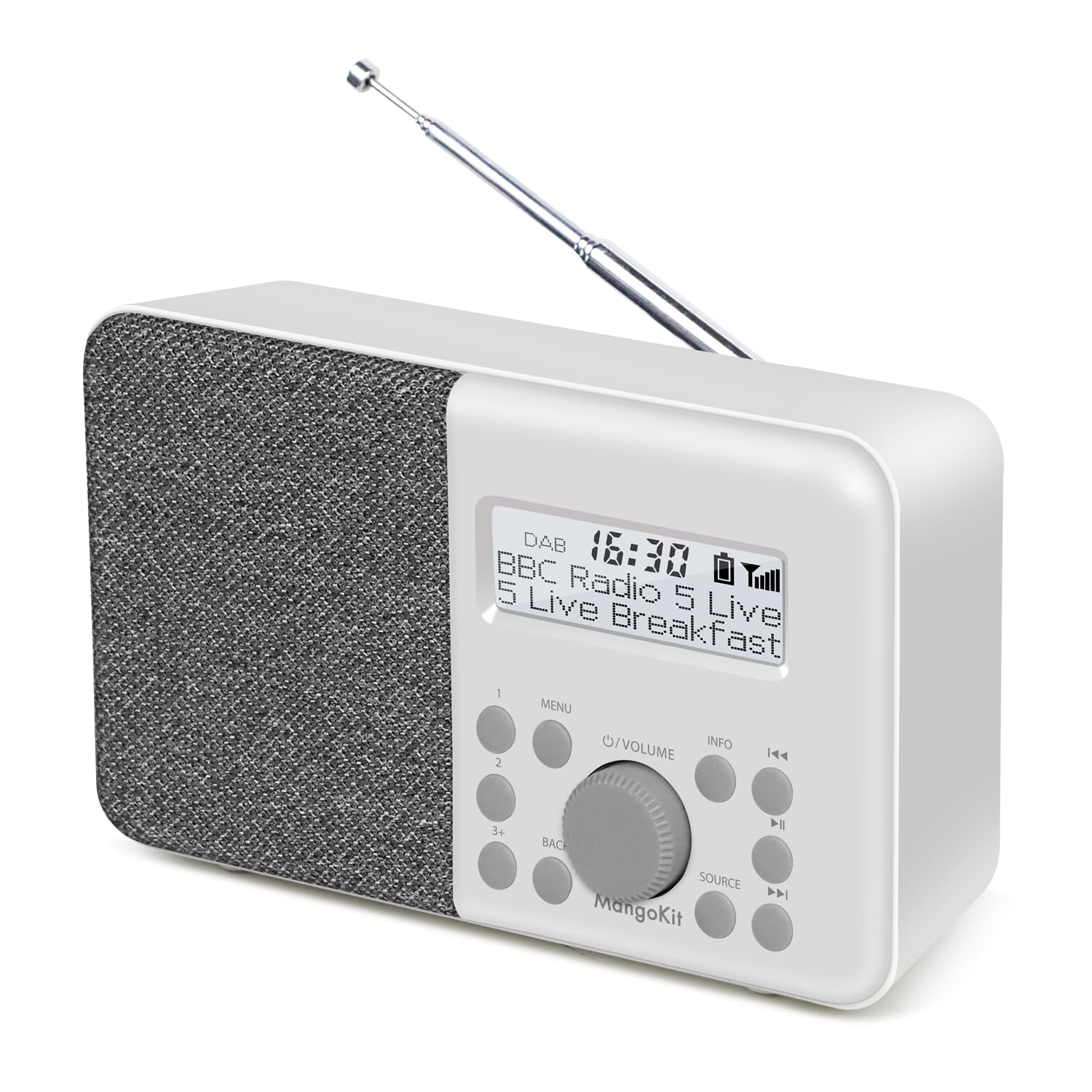
Image: The MangoKit MD1 radio positioned on a kitchen counter, showcasinkompakt tasarımı ve ekranı sayesinde.
Kutuda Neler Var?
Paketi açtığınızda lütfen aşağıdaki tüm öğelerin mevcut olduğundan emin olun:
- 1 x MangoKit MD1 Radio
- 1 x USB-C Güç Kablosu
- 1 x AC Güç Adaptörü
- 1 x Çok Dilli Kullanım Kılavuzu (bu belge)
Ürün Bittiview
Radyonun bileşenlerini ve kontrollerini iyice öğrenin.

Resim: Yakın çekim view of the MangoKit MD1 radio's front panel, highlighting the display, speaker grille, and control buttons.
Kontroller ve Ekran:
- Ekran Görüntüsü: İstasyon bilgilerini, saatini ve menü seçeneklerini gösterir.
- Güç Düğmesi: Radyoyu açar veya kapatır.
- Ses Düğmesi: Ses seviyesini ayarlar.
- Menü Düğmesi: Radyo ayarları menüsüne erişim sağlar.
- Geri Düğmesi: Önceki menüye veya ekrana döner.
- Kaynak Düğmesi: DAB/DAB+ ve FM modları arasında geçiş yapar.
- Preset Buttons (1, 2, 3+): Quickly access saved radio stations.
- Tune/Select Buttons (<<, >>): İstasyonlar veya menü seçenekleri arasında gezinmeyi sağlar.
- Bilgi Düğmesi: Yayınlanan mevcut yayınla ilgili ek bilgiler görüntüler.
- Kulaklık girişi: Özel dinleme için.
- USB-C Bağlantı Noktası: Güç girişi için.
- Teleskopik Anten: For optimal radio signal reception.
Kurmak
Radyoya Güç Verme:
The MD1 radio can be powered by either the included AC adapter or 4x AA batteries (not included).
- Şebeke Gücü:
- Connect the USB-C power cable to the USB-C port on the back of the radio.
- Connect the other end of the USB-C cable to the AC power adapter.
- AC güç adaptörünü standart bir duvar prizine takın.
- Pil Gücü:
- Radyonun arkasındaki pil bölmesi kapağını açın.
- Insert 4x AA batteries (not included), ensuring correct polarity (+/-).
- Pil bölmesi kapağını sıkıca kapatın.

Image: The MangoKit MD1 radio placed on an outdoor table, demonstrating its portability with battery power.
İlk Güç Açma:
- En iyi sinyal alımı için teleskopik anteni uzatın.
- Basın Güç radyoyu açmak için düğmeye basın.
- The radio will typically perform an automatic scan for DAB/DAB+ stations upon first use.
Kullanım Talimatları
Switching Modes (DAB/DAB+ / FM):
Basın Kaynak button to switch between DAB/DAB+ and FM radio modes.
DAB/DAB+ Radio Operation:
- Ensure the radio is in DAB/DAB+ mode.
- If it's the first time or if you've moved locations, perform a full scan:
- Basın Menü düğme.
- Kullanın Ayarlamak buttons (<<, >>) to navigate to "Full Scan" and press the Volume/Select onaylamak için düğmeye basın.
- The radio will scan for available DAB/DAB+ stations.
- To browse stations, use the Ayarlamak buttons (<<, >>).
- Basın Bilgi button to cycle through different display information (e.g., program type, signal strength, time).

Image: The MangoKit MD1 radio displaying a DAB+ station, illustrating the clear digital signal.
FM Radyo Kullanımı:
- Ensure the radio is in FM mode.
- Bir sonraki müsait istasyonu otomatik olarak taramak için, düğmeye basılı tutun. Ayarlamak buttons (<<, >>).
- Manuel olarak ayarlamak için, tuşuna basın. Ayarlamak buttons (<<, >>) briefly to adjust the frequency in small increments.
- Basın Bilgi button to cycle through different display information (e.g., RDS text, frequency).
Ön Ayarları Kaydetme ve Geri Çağırma:
The radio supports up to 40 presets for your favorite DAB+ and FM stations.
- Bir Ön Ayarı Kaydetmek İçin:
- İstediğiniz istasyonu ayarlayın.
- Şunlardan birine basın ve basılı tutun: Ön ayar buttons (1, 2, or 3+).
- If you pressed 3+, use the Ayarlamak buttons to select a preset number (e.g., P03-P40) and press the Volume/Select onaylamak için düğmeye basın.
- The display will confirm the station has been saved.
- Bir Ön Ayarı Geri Çağırmak İçin:
- Şunlardan birine basın: Ön ayar buttons (1, 2, or 3+) briefly.
- If you pressed 3+, use the Ayarlamak buttons to select the desired preset number and press the Volume/Select onaylamak için düğmeye basın.
Alarmların Ayarlanması:
The MD1 features two independent alarms with weekday/weekend modes.

Image: The MangoKit MD1 radio on a nightstand, showing the display set to "Dual Alarm 6:30".
- Basın Menü düğme.
- Navigate to "Alarm" and press the Volume/Select topuz.
- Select "Alarm 1" or "Alarm 2".
- Configure the following settings using the Ayarlamak düğmeler ve Volume/Select düğme:
- Zaman: İstediğiniz alarm saatini ayarlayın.
- Mod: Choose "Daily", "Weekdays", "Weekends", or "Once".
- Kaynak: Select "DAB", "FM", or "Buzzer".
- Hacim: Set the alarm volume.
- Etkinleştir/Devre Dışı Bırak: Turn the alarm on or off.
- Basın Menü or Geri Çıkış butonu.
Erteleme İşlevi:
When an alarm sounds, press any button (except Power) to activate the snooze function. The alarm will pause for a set period (usually 9 minutes) and then sound again.
Uyku Zamanlayıcısı:
Uyku zamanlayıcısı, radyonun belirli bir süre boyunca çalmasına ve ardından otomatik olarak kapanmasına olanak tanır.
- Basın Menü düğme.
- Navigate to "Sleep" and press the Volume/Select topuz.
- Kullanın Ayarlamak buttons to select the desired sleep duration (e.g., 15, 30, 45, 60, 90 minutes, or Off).
- Basın Volume/Select onaylamak için düğmeye basın.
Kulaklık Kullanımı:
For private listening, plug standard 3.5mm headphones into the headphone jack on the side of the radio. The internal speaker will automatically mute.

Image: A close-up of the MangoKit MD1 radio, showing a headphone jack with headphones connected, indicating private listening.
EQ Ayarları:
Adjust the audio equalization to suit your preferences.
- Basın Menü düğme.
- Navigate to "EQ" and press the Volume/Select topuz.
- Select from available presets like "Music" or "Voice", or a custom setting if available.
- Basın Volume/Select onaylamak için düğmeye basın.
Bakım
- Temizlik: Radyonun yüzeyini temizlemek için yumuşak, kuru bir bez kullanın. Aşındırıcı temizleyiciler veya çözücüler kullanmayın.
- Anten: Teleskopik anteni hasar görmemesi için dikkatli bir şekilde kullanın.
- Depolamak: Radyoyu uzun süre saklayacaksanız, sızıntıyı önlemek için pilleri çıkarın.
- Çevre: Radyoyu doğrudan güneş ışığından, ısı kaynaklarından ve nemden uzak tutun.
Sorun giderme
| Sorun | Olası Neden | Çözüm |
|---|---|---|
| Güç yok | Batteries are flat or incorrectly inserted; AC adapter not connected or faulty. | Replace batteries, check polarity. Ensure AC adapter is securely connected and working. |
| Zayıf DAB/FM alımı | Anten uzatılmamış; zayıf sinyal alanı; parazit. | Fully extend the antenna. Reposition the radio. Perform a full scan in DAB mode. |
| Ses yok | Ses seviyesi çok düşük; kulaklık bağlı; sessize alma etkinleştirildi. | Increase volume. Disconnect headphones. Check if mute is active. |
| Alarm çalmıyor | Alarm not enabled; incorrect time/day setting; volume too low. | Verify alarm settings (time, mode, source, volume, enable status). |
Özellikler
- Modeli: MD1
- Marka: Mango Kiti
- Radyo Bantları: DAB/DAB+, FM
- Bağlantı: Kulaklık Jakı (3.5 mm)
- Güç Kaynağı: AC Power Adapter (USB-C), 4x AA Batteries (not included)
- Pil Ömrü: Up to 10 hours (with suitable batteries)
- Ön ayarlar: 40 (DAB/DAB+ and FM combined)
- Özel Özellikler: Dual Alarms, Snooze, Sleep Timer, EQ Settings
- Ürün Ölçüleri: 17.5 cm (L) x 10.5 cm (H) x 5.4 cm (D)
- Ağırlık: 450 gr
- Renk: Taş Grisi
- Menşei: Çin
Garanti ve Destek
MangoKit products are designed for reliability and performance. For warranty information or technical support, please refer to the contact details provided with your purchase or visit the official MangoKit webLütfen garanti talepleriniz için satın alma belgenizi saklayın.
Not: Spare parts availability information is not provided by the manufacturer. Software updates are not applicable or information is not available.


