giriiş
Thank you for choosing the FLEXISPOT Lite Electric Standing Desk. This manual provides essential information for the safe and efficient assembly, operation, and maintenance of your new desk. Please read this manual thoroughly before use and retain it for future reference.
The FLEXISPOT Lite Electric Standing Desk is designed to promote a healthier working environment by allowing seamless transitions between sitting and standing positions. Its robust construction and intuitive controls ensure a comfortable and productive workspace.
Güvenlik Talimatları
- Montajdan önce tüm bileşenlerin eksiksiz ve hasarsız olduğundan emin olun. Herhangi bir parça eksik veya kırıksa kullanmayın.
- Yaralanmaları önlemek için çalışma sırasında çocukları ve evcil hayvanları masadan uzak tutun.
- Do not place hands or other objects near the moving parts of the desk frame during height adjustment.
- Güç kablosunun düzgün şekilde takılı olduğundan ve hasar görmediğinden emin olun. Hasarlı bir kablo veya fişle masayı çalıştırmayın.
- Do not overload the desk. Refer to the specifications section for maximum weight capacity.
- Only use the desk on a level surface to ensure stability.
- Temizlik veya herhangi bir bakım yapmadan önce elektrik bağlantısını kesin.
Paket İçeriği
Lütfen paketinizde aşağıdaki bileşenlerin tamamının bulunduğunu doğrulayın:
- Desktop (160 x 75 cm, White+Maple)
- Desk Legs/Frame (Alloy Steel)
- Elektrik Motoru ve Kontrol Kutusu
- Kontrol Paneli
- Güç Adaptörü ve Kablosu
- Bardak tutucu
- Depolama Kancası
- Cable Management Accessories (Cable ties, Bundle Clamp)
- Assembly Hardware (Screws, Allen wrenches, etc.)
- Kullanıcı Kılavuzu
Resim 1: Üzerindeview of desk components, including the desktop, frame, and control panel, ready for assembly.
Kurulum ve Montaj
Follow these steps to assemble your FLEXISPOT Lite Electric Standing Desk. It is recommended to have two people for assembly, especially when handling the desktop.
- Bileşenleri Paketinden Çıkarın: Carefully remove all parts from the packaging and lay them out on a clean, soft surface to prevent scratches. Refer to the "Package Contents" section to ensure all parts are present.
- Attach Lifting Columns to Feet: Secure the lifting columns to the desk feet using the provided screws and tools. Ensure they are firmly attached.
- Çapraz Bağlantı Çubuğu: Attach the crossbar between the two lifting columns. This forms the main frame of the desk.
- Install Control Box and Motor: Mount the control box and motor onto the designated areas of the desk frame. Connect the motor cables to the control box.
- Masaüstünü Ekle: Carefully place the desktop upside down on a soft surface. Position the assembled frame onto the desktop, aligning the pre-drilled holes. Secure the frame to the desktop using the provided screws.
- Denetim Masası'nı yükleyin: Mount the control panel to the underside of the desktop in an easily accessible location. Connect its cable to the control box.
- Aksesuarları Takın: Install the cup holder and storage hook to the desired locations on the desktop edge.
- Kablo yönetimi: Use the provided cable management accessories to organize and secure all cables, including the power cord.
- Pozisyon Masası: With assistance, carefully flip the desk upright and place it in its desired location. Ensure it is on a stable, level surface.
- Gücü bağlayın: Plug the power adapter into the control box, then plug the power cord into a wall outlet.
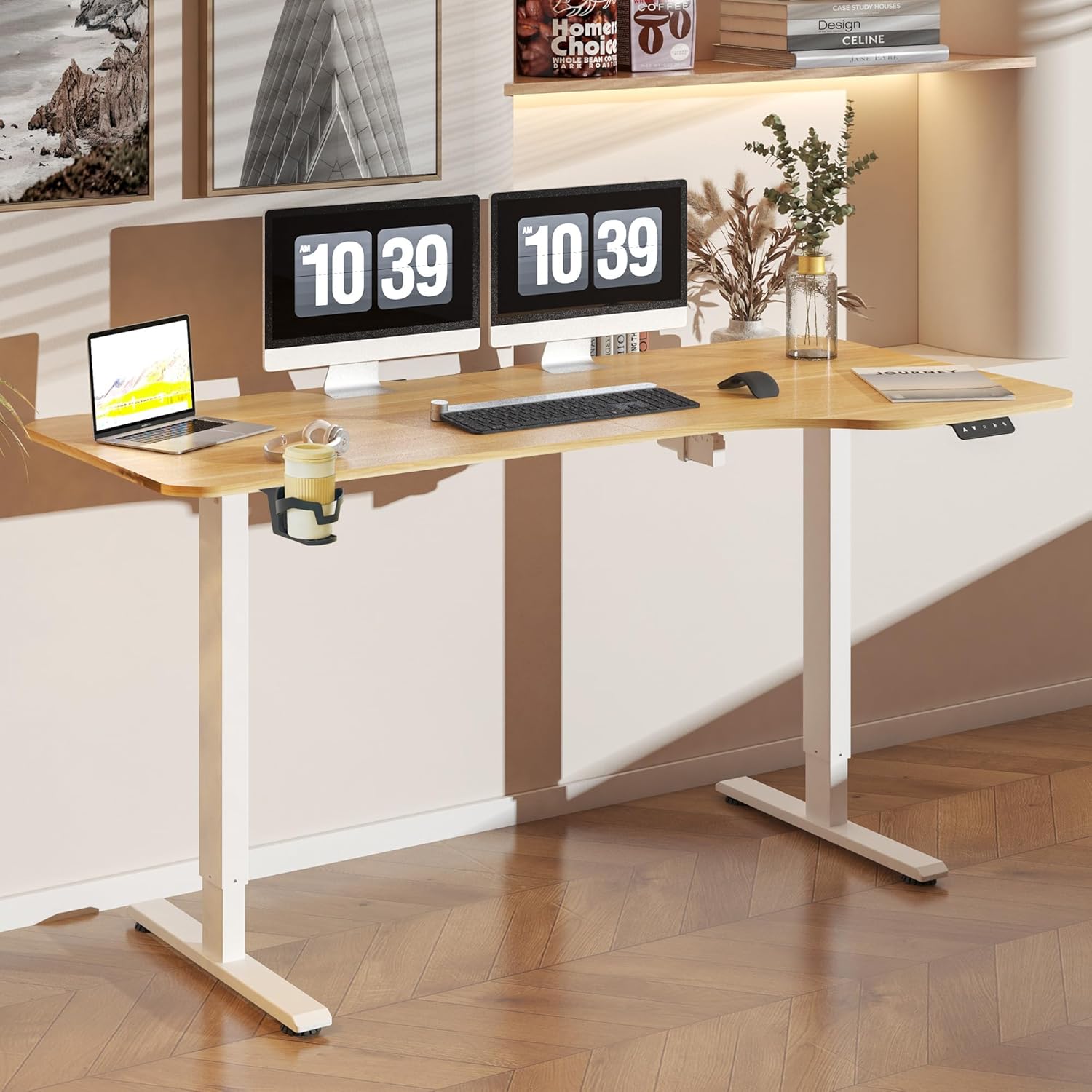
Resim 2: The FLEXISPOT Lite Electric Standing Desk fully assembled and set up in a modern home office environment.
Kullanım Talimatları
Kontrol Paneli Bittiview

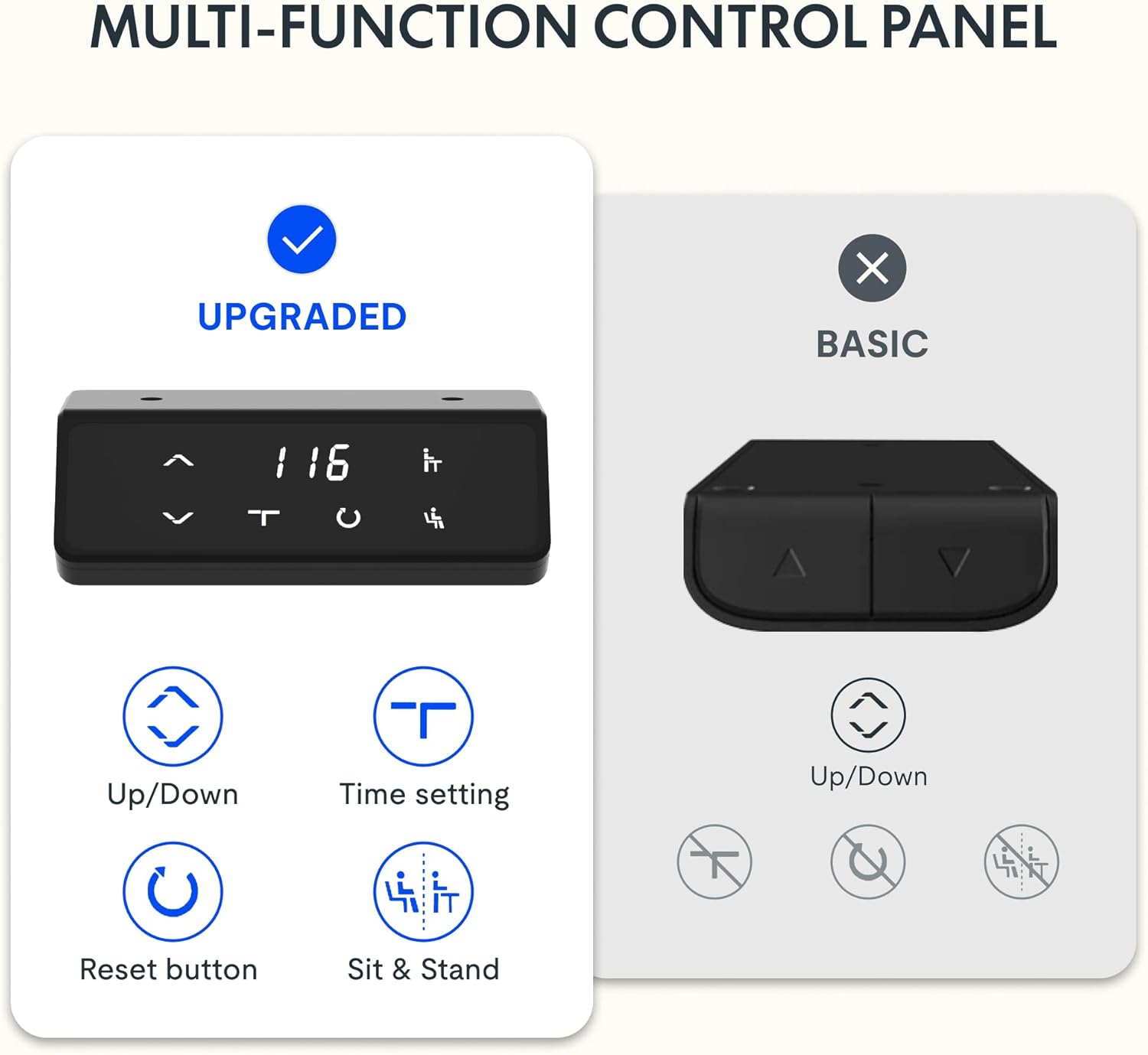
Resim 3: Ayrıntılı view of the desk's control panel, showing buttons for Up/Down adjustment, Time Setting, Reset, and Sit & Stand memory presets.
Your FLEXISPOT Lite Electric Standing Desk features an intuitive control panel for easy height adjustment and memory functions.
- Up/Down Buttons (⌃ / ⌄): Press and hold these buttons to manually adjust the desk height upwards or downwards. Release the button to stop at the desired height.
- Bellek Ön Ayarları: The control panel allows you to save and recall preferred height settings.
- Adjust the desk to your desired height (e.g., a comfortable sitting or standing position) using the Up/Down buttons.
- Press and hold the 'Sit & Stand' button (person icon) for approximately 3-5 seconds until the display flashes or beeps, indicating the height is saved.
- To recall a saved height, simply press the 'Sit & Stand' button. The desk will automatically move to the last saved height. (If your model supports multiple presets, consult the full product manual for specific instructions on saving and recalling each position.)
- Reset Button (R): If the desk encounters an error or does not respond correctly, a reset may be required.
- Press and hold the 'R' button (often indicated by a circle icon or 'Reset' text).
- The desk will move to its lowest position, then slightly rise. Release the button once this sequence is complete. The desk is now reset.
- Time Setting (T): This button, often labeled with a clock icon, may be used to set a timer for sit/stand reminders, if available on your model. Consult the full product manual for detailed instructions on using this feature.

Resim 4: The FLEXISPOT Lite Electric Standing Desk in use, highlighting the accessible placement of the control panel for easy height adjustments.
Özellikler
Yükseklik Ayar Aralığı
The desk offers a wide range of height adjustment to accommodate various user preferences and activities, from a minimum of 71 cm to a maximum of 117 cm.

Resim 5: Visual representation of the desk's height adjustment capabilities, illustrating the minimum and maximum heights.
Entegre Aksesuarlar
- Bardaklık: A convenient cup holder is included to keep your beverages secure and prevent spills on your workspace.
- Storage Hook: A practical hook is provided for hanging headphones, bags, or other items, helping to keep your desktop clear and organized.

Resim 6: Ayrıntılı view of the integrated cup holder and storage hook, designed for convenience and organization.
Kablo Yönetimi
The desk includes features to help manage and organize your cables, ensuring a tidy and safe workspace.
- Cable Management Tray/Clips: Utilize the provided cable management solutions to route and secure power cords and peripheral cables.
- Bundle Clamp/Grommet: The desktop features a grommet hole and clamp for neatly passing cables through the desk surface.

Resim 7: Examples of the desk's cable management features, including a cable routing system and a desktop grommet for organized wiring.
Bakım
- Temizlik: Masanın yüzeyini ve çerçevesini yumuşak bir bezle silin.amp Kumaşı aşındırmayın. Cilaya zarar verebilecek aşındırıcı temizleyicilerden veya sert kimyasallardan kaçının.
- Denetleme: Tüm vidaları ve bağlantıları düzenli olarak kontrol ederek sıkı olduklarından emin olun. Gerekirse tekrar sıkın.
- Kablo yönetimi: Özellikle yükseklik ayarlamaları sırasında kabloların sıkışmamasına veya dolaşmamasına dikkat edin.
- Motor Bakımı: The electric motor is designed for maintenance-free operation. Do not attempt to open or service the motor or control box.
Sorun giderme
| Sorun | Olası Neden | Çözüm |
|---|---|---|
| Masa hareket etmiyor. | Power cord disconnected; motor cable loose; overload. | Check power connections. Ensure motor cables are securely plugged in. Reduce weight on the desk. Perform a reset. |
| Masa düzensiz bir şekilde hareket ediyor veya alışılmadık sesler çıkarıyor. | Gevşek bağlantılar; tıkanıklık; dengesiz yük. | Check all assembly screws. Ensure no objects are obstructing the lifting columns. Distribute weight evenly on the desktop. Perform a reset. |
| Kontrol panelinde hata kodu görüntülendi. | Belirli bir sistem hatası. | Refer to the specific error code in the full product manual (if available) or contact customer support. Often, a reset can resolve minor errors. |
| Bellek ön ayarları çalışmıyor. | Presets not saved correctly; system glitch. | Re-save your desired height presets. Perform a reset if the issue persists. |
Özellikler
| Özellik | Detay |
|---|---|
| Model Numarası | QS1M-1675-IE |
| Masaüstü Boyutu | 160x75 cm |
| Masaüstü Malzemesi | Odun |
| Çerçeve Malzemesi | Alaşımlı Çelik |
| Renk | White+Maple |
| Minimum Yükseklik | 71 cm |
| Maksimum Yükseklik | 117 cm |
| Maksimum Ağırlık Kapasitesi | 150 Pound (yaklaşık 68 kg) |
| Motor Gürültü Seviyesi | 50 dB'den az |
| Montaj Gerekli | Evet |
Garanti ve Destek
FLEXISPOT stands behind the quality of its products. Your FLEXISPOT Lite Electric Standing Desk comes with the following warranty:
- 5 Yıllık Garanti: Masa çerçevesine uygulanır.
- 3 Yıllık Garanti: Applies to controllers and motors.
For warranty claims, technical support, or any questions regarding your product, please contact FLEXISPOT customer service. Please have your model number (QS1M-1675-IE) and proof of purchase ready.

Resim 8: Official FLEXISPOT warranty details, outlining coverage for the desk frame, controllers, and motors.


