Ürün Bittiview
The SUNOL H08 Mecha Bluetooth Wireless Headset offers a unique transparent design combined with advanced audio technology. Engineered for comfort and convenience, these headphones provide clear sound quality, low latency, and extended battery life, making them suitable for various activities from daily listening to gaming and calls.
Key features include Bluetooth 5.3 for stable connectivity, environmental noise reduction for clear calls, and a robust charging case with an LED display.
Kutuda Neler Var?
- H08 Mecha Bluetooth Wireless Headset (Left and Right Earbuds)
- Şarj Kutusu
- Şarj kablosu
- Multiple Sizes of Ear Tips (for comfortable fit)
Kurulum Kılavuzu
1. İlk Şarj
Before first use, fully charge the headset and charging case. Place the earbuds into the charging case. Connect the charging cable to the case and a USB power source. The LED display on the charging case will indicate the charging status and battery level.
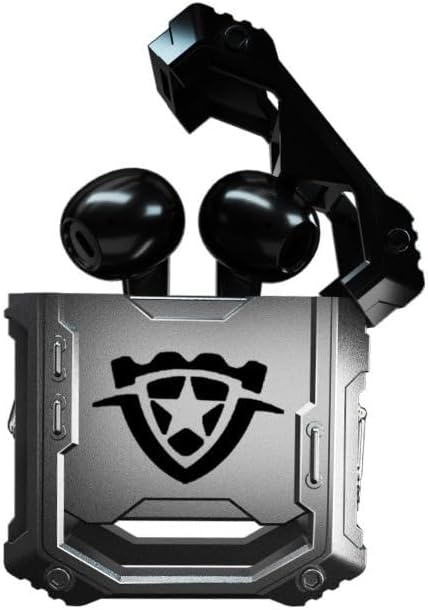
Image: The H08 Mecha Bluetooth Wireless Headset, showing both earbuds securely placed within their open charging case. The case features a distinctive, rugged design with a central emblem.
2. Bir Cihazla Eşleştirme
- Kulaklıkların şarjlı olduğundan ve şarj kutusuna yerleştirildiğinden emin olun.
- Şarj kutusunu açın. Kulaklıklar otomatik olarak eşleştirme moduna geçecektir.
- Cihazınızda (akıllı telefon, tablet, bilgisayar) Bluetooth ayarlarına gidin ve Bluetooth'u açın.
- Arama available devices and select "H08" from the list.
- Once connected, a voice prompt will confirm successful pairing. The effective connection distance is up to 10 meters.

Image: The H08 Mecha Bluetooth Wireless Headset charging case in a closed position, showcasing its metallic, rugged exterior. The image highlights the zinc alloy material and suggests a long battery life.
3. Kulaklıkların Takılması
Select the ear tips that provide the most comfortable and secure fit for your ears. Gently insert each earbud into your ear canal and twist slightly to ensure a snug fit. A proper fit enhances sound quality and noise isolation.
Kullanım Talimatları
Güç Açık/Kapalı
- Güç Açık: Şarj kutusunu açın, kulaklıklar otomatik olarak açılacaktır.
- Kapat: Kulaklıkları şarj kutusuna geri yerleştirin ve kapağı kapatın. Kulaklıklar otomatik olarak kapanacak ve şarj olmaya başlayacaktır.
Müzik Çalma Kontrolü
- Oynat/Duraklat: Kulaklıklardan birinin dokunmatik kontrol alanına tek dokunuşla dokunun.
- Sonraki Parça: Sağ kulaklığa iki kez dokunun.
- Önceki parça: Sol kulaklığa iki kez dokunun.
Yönetim Çağrı
- Çağrıyı Cevapla/Sonlandır: Single tap the touch control area on either earbud during an incoming call.
- Çağrıyı Reddet: Press and hold the touch control area on either earbud for 2 seconds during an incoming call.
The built-in environmental noise reduction (ENC) chip ensures clear sound quality during calls by filtering out ambient noise.

Image: A close-up of the H08 Mecha Bluetooth Wireless Headset earbuds, highlighting their sleek design. The background features a graphic representation of sound waves, illustrating the intelligent noise reduction technology for clear audio.
Düşük Gecikme Modu (Oyun)
The headset features a low latency mode, significantly improving Bluetooth transmission speed for a more synchronized audio experience, especially beneficial for gaming. This ensures that sound effects and dialogue are heard with minimal delay.
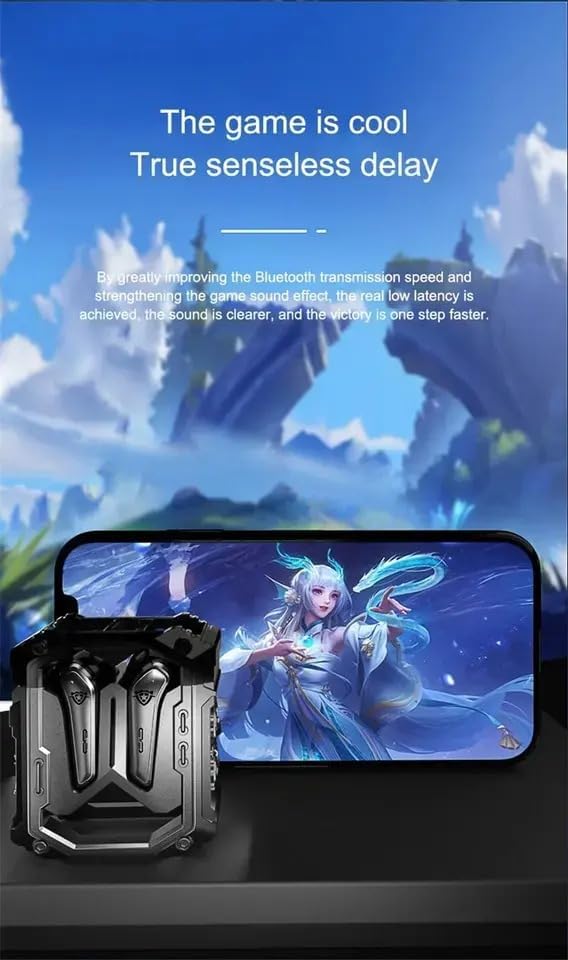
Image: The H08 Mecha Bluetooth Wireless Headset charging case positioned next to a smartphone displaying a vibrant game scene. This image emphasizes the headset's low latency feature, ideal for an immersive gaming experience.
Bakım
Charging the Headset and Case
- The charging case has a built-in 600mAh battery, capable of charging the earbuds approximately four times, providing up to 48 hours of total playtime.
- The LED display on the charging case shows the battery level of both the case and the earbuds.
- Use the provided charging cable to charge the case.

Image: The H08 Mecha Bluetooth Wireless Headset with its charging case open, revealing the earbuds inside. The image highlights the "mechanical metal technology" and the robust design of the charging compartment, emphasizing its durability and environmental noise filtering capabilities.
Temizlik
Regularly clean the earbuds and charging case with a soft, dry, lint-free cloth. Avoid using abrasive materials or harsh chemicals. Ensure charging contacts on both the earbuds and case are clean and dry.
Depolamak
Kullanılmadığı zamanlarda, kulaklığı tozdan ve hasardan korumak için şarj kutusunda saklayın. Serin, kuru ve aşırı sıcaklıklardan uzak bir yerde muhafaza edin.
Sorun giderme
- Eşleştirilemiyor:
- Cihazınızda Bluetooth'un etkin olduğundan emin olun.
- Make sure the earbuds are charged and in pairing mode (open the case).
- Kulaklıkları cihazınıza daha yakın tutun.
- Forget "H08" from your device's Bluetooth list and try pairing again.
- Bir Kulaklıktan Ses Gelmiyor:
- Her iki kulaklığı da şarj kutusuna geri yerleştirin, kapağı kapatın, birkaç saniye bekleyin ve ardından tekrar açın.
- Her iki kulaklığın da şarjlı olduğundan emin olun.
- Şarj Sorunları:
- Şarj kablosunun hem kasaya hem de güç kaynağına güvenli bir şekilde bağlandığından emin olun.
- Kulaklıkların ve kutunun içindeki şarj kontaklarının temiz olduğundan emin olun.
- Farklı bir şarj kablosu veya güç adaptörü deneyin.
- Kötü Arama Kalitesi:
- Mikrofonun engellenmediğinden emin olun.
- Move to a quieter environment if environmental noise is excessive.
- Cihazınızın arama ses seviyesi ayarlarını kontrol edin.
Özellikler
| Özellik | Detay |
|---|---|
| Model Adı | H08 |
| Bağlantı Teknolojisi | Kablosuz (Bluetooth) |
| Kablosuz İletişim Teknolojisi | Bluetooth 5.3 |
| Bluetooth Menzili | 10 metreye (33 feet) kadar |
| Ses Gecikmesi | 60 Milisaniye |
| Pil Ömrü (Kulaklıklar) | 18 saate kadar (tek şarj) |
| Toplam Oynatma Süresi (Şarj Kutusuyla) | Yaklaşık 48 Saat |
| Şarj Kutusu Pil Kapasitesi | 600mAh |
| Ses Sürücüsü Türü | 14mm Dynamic Bass Unit |
| Gürültü Kontrolü | Environmental Noise Reduction (ENC) for calls |
| Kontrol Türü | Media Control, Call Control (Touch/Remote) |
| Malzeme | Plastik (Kulaklıklar), Çinko Alaşımı (Şarj Kutusu) |
| Ağırlık | 6.4 ons (toplam paket) |
| Renk | Siyah |
| Kulak Yerleşimi | Kulakta |
| Üretici | SWISSES |
Garanti ve Destek
For warranty information and detailed support, please refer to the documentation included with your purchase or visit the official SUNOL website. You may also contact the seller, SWISSES, through the platform where the product was purchased for assistance.
Herhangi bir garanti talebiniz için lütfen satın alma belgenizi saklayın.


