giriiş
This manual provides instructions for the TIME TIMER 8-inch 60-Minute Visual Timer and the TIME TIMER PLUS 20-Minute Visual Timer. These devices are designed to visually represent the passage of time, aiding in time management, task completion, and focus for various activities in educational, professional, and home environments.
Ürün Bittiview
This package includes two distinct visual timers:
- TIME TIMER Original 8-inch 60-Minute Visual Timer: Features a large display with a red disk that disappears as time elapses. It includes a dry-erase activity card slot and magnetic backing.
- TIME TIMER PLUS 20-Minute Visual Timer: A portable timer with a handle, featuring a blue disk for a 20-minute countdown.
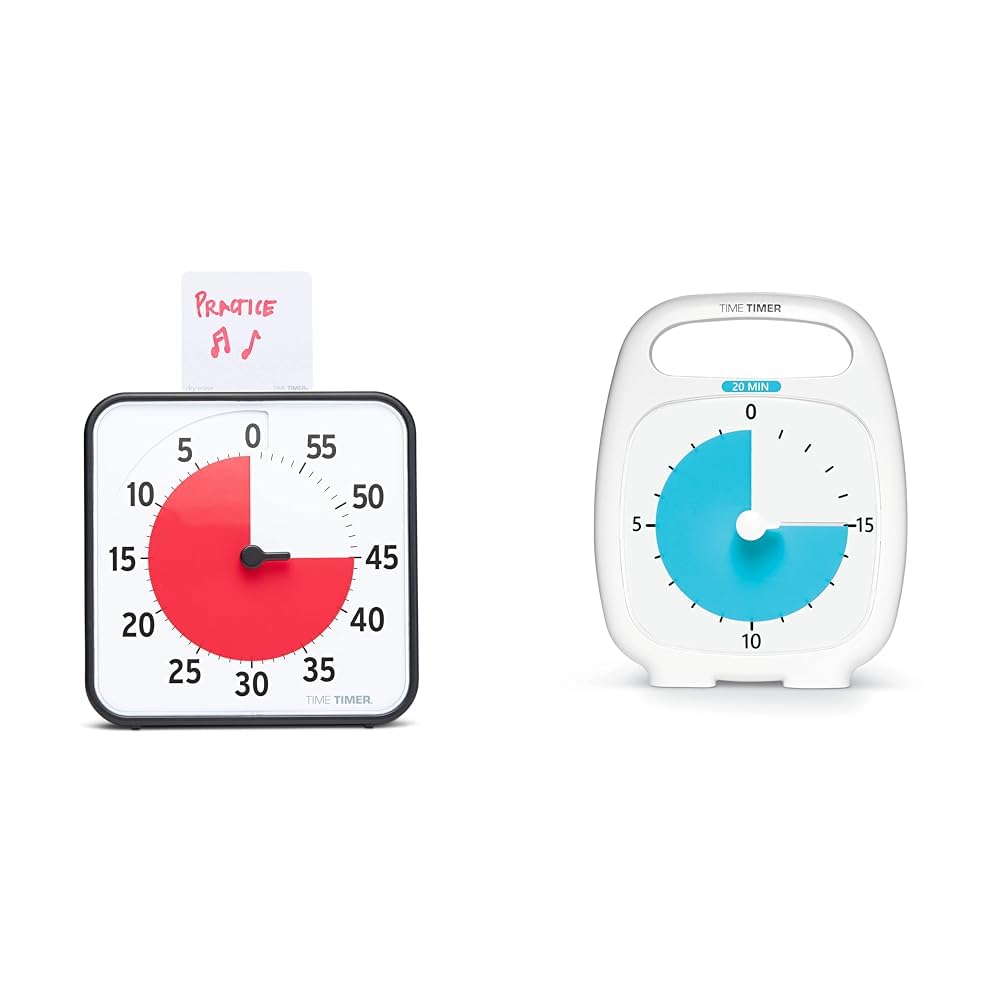
Image: The 8-inch 60-minute visual timer (left) and the 20-minute visual timer (right).
Kurmak
TIME TIMER Original 8-inch 60-Minute Visual Timer
- Pil Montajı: Locate the battery compartment on the back of the timer. Insert 2 AA batteries (not included), ensuring correct polarity.
- Atama:
- Masa Kullanımı: Extend the two foldable feet on the back to stand the timer on a flat surface.
- Manyetik Montaj: The timer features a magnetic back, allowing it to be attached to magnetic whiteboards or other metallic surfaces.
- Duvara Montaj: The timer can also be hung on a wall using a suitable hook (not included).
- Activity Card: If desired, write or draw the task on the included dry-erase activity card and place it in the top slot of the timer.

Image: The 8-inch 60-minute visual timer with an activity card in its slot.
TIME TIMER PLUS 20-Minute Visual Timer
- Pil Montajı: Locate the battery compartment on the back. Insert 1 AA battery (not included), observing polarity.
- Atama: This portable timer can be placed on any flat surface. Its integrated handle allows for easy transport.

Image: The TIME TIMER PLUS 20-Minute Visual Timer, white with a blue disk.
Kullanım Talimatları
Setting the TIME TIMER Original 8-inch 60-Minute Visual Timer
- Zaman Ayarı: Turn the center knob counter-clockwise to move the red disk to your desired duration, up to 60 minutes.
- Geri sayım: The red disk will begin to disappear clockwise as time elapses. The timer operates silently, without a ticking sound.
- İsteğe bağlı Uyarı: An on/off switch on the back of the timer controls an audible alert that sounds when the timing cycle is complete. Adjust this setting based on your environment and preference.

Image: The 8-inch 60-minute visual timer in use on a whiteboard, demonstrating its magnetic capability.
Setting the TIME TIMER PLUS 20-Minute Visual Timer
- Zaman Ayarı: Use the center set knob to move the colored disk to the desired time, up to 20 minutes.
- Geri sayım: The colored disk will recede as time passes. This timer also features silent operation.
- İsteğe bağlı Uyarı: An optional alarm feature is available for this timer, providing an audible signal upon completion of the countdown.

Image: A child interacting with the 20-minute visual timer, demonstrating its ease of use.
Özellikler ve Avantajlar
- Görsel Zaman Yönetimi: The disappearing colored disk provides a clear, intuitive representation of remaining time, reducing anxiety and improving focus.
- Sessiz Çalışma: Both timers operate without a ticking sound, making them suitable for sound-sensitive environments such as classrooms, libraries, or quiet study areas.
- Versatile Placement (8-inch model): Can be used on a desk with foldable feet, magnetically attached to surfaces, or hung on a wall.
- Dry-Erase Activity Card (8-inch model): Allows users to write or draw tasks directly on the card, providing a visual reminder of the activity associated with the timed period.
- Portability (20-minute model): Features an integrated handle and protective lens for easy transport and durability.
- Support for Special Needs: The visual nature of the timers aids individuals with autism, ADHD, or other learning disabilities in understanding time transitions and managing tasks.
Bakım
- Temizlik: Wipe the timers with a soft, dry cloth. Avoid using abrasive cleaners or solvents.
- Pil Değişimi: Replace batteries when the timer's functionality diminishes or ceases. Dispose of used batteries responsibly.
- Depolamak: Store timers in a cool, dry place when not in use.
Sorun giderme
- Timer Not Moving:
- Pillerin doğru şekilde takıldığından ve boşalmadığından emin olun.
- Check that the center knob is turned sufficiently to set the red/blue disk.
- Audible Alert Not Sounding (8-inch model):
- Verify that the alert switch on the back of the timer is in the "on" position.
- Pil seviyelerini kontrol edin.
- Dry-Erase Card Issues:
- Use only dry-erase markers on the activity card.
- Clean with a dry-erase board eraser or a soft cloth.
Özellikler
| Marka | ZAMAN ZAMANLAYICI |
| Örnek | Original 8-inch 60-Minute Visual Timer |
| Boyutlar (yaklaşık) | 7.5"G x 7.5"Y x 1.25"D |
| Güç Kaynağı | 2 adet AA pil (dahil değildir) |
| Maksimum Süre Ayarı | 60 dakikadır. |
| Özellikler | Magnetic back, foldable feet, dry-erase activity card slot, optional audible alert |
| Marka | ZAMAN ZAMANLAYICI |
| Örnek | PLUS 20-Minute Visual Timer |
| Güç Kaynağı | 1 AA pil (dahil değildir) |
| Maksimum Süre Ayarı | 20 dakikadır. |
| Özellikler | Portable handle, protective lens, silent operation, optional audible alert |
Güvenlik Bilgileri
- Pilleri küçük çocukların erişemeyeceği yerlerde saklayın.
- Eski ve yeni pilleri veya farklı pil türlerini karıştırmayın.
- Do not expose the timers to extreme temperatures or moisture.
- Bu ürün oyuncak değildir. Küçük çocukların yetişkin gözetiminde kullanılması önerilir.
Garanti ve Destek
Garanti bilgileri veya teknik destek için lütfen üreticinin resmi web sitesine başvurun. webSite üzerinden satın alabilir veya müşteri hizmetleri departmanıyla iletişime geçebilirsiniz. Garanti talepleriniz için satın alma fişinizi saklayın.


