giriiş
Welcome to the GOBOULT UFO True Wireless Earbuds user manual. These earbuds are designed to provide a superior audio experience with features like extended playtime, low latency gaming, advanced noise cancellation, and robust bass drivers. Please read this manual carefully to ensure proper use and optimal performance of your device.
Kutuda Neler Var?
- GOBOULT UFO True Wireless Earbuds
- Kablosuz Şarj Kutusu
- Type-C Hızlı Şarj Kablosu
- Ekstra Çift Kulaklık Uçları
- Kullanıcı Kılavuzu
- Garanti Kartı
Ürün Bittiview
The GOBOULT UFO earbuds feature a distinctive design with integrated breathing LEDs on both the earbuds and the charging case. They are equipped with 13mm drivers for rich bass and Quad Mic ENC for clear calls.

Image: GOBOULT UFO Earbuds and Charging Case. This image highlights key features such as Bluetooth 5.3 connectivity, 48 hours of playtime, Quad Mic ENC, 13mm drivers, 45ms low latency, and Type-C fast charging.
Solunum LED'leri
The breathing LEDs on the case and earbuds provide visual feedback for various actions, including opening/closing the case, charging, and when buds are connected.

Image: The GOBOULT UFO charging case and earbuds displaying their distinctive breathing LED lights, which indicate various operational states.
Ses Kalitesi
Experience high-fidelity sound with precision-tuned 13mm drivers, ensuring clear audio across all frequencies and rich bass. The Quad Mic ENC (Environmental Noise Cancellation) system ensures crystal-clear, interference-free calls.
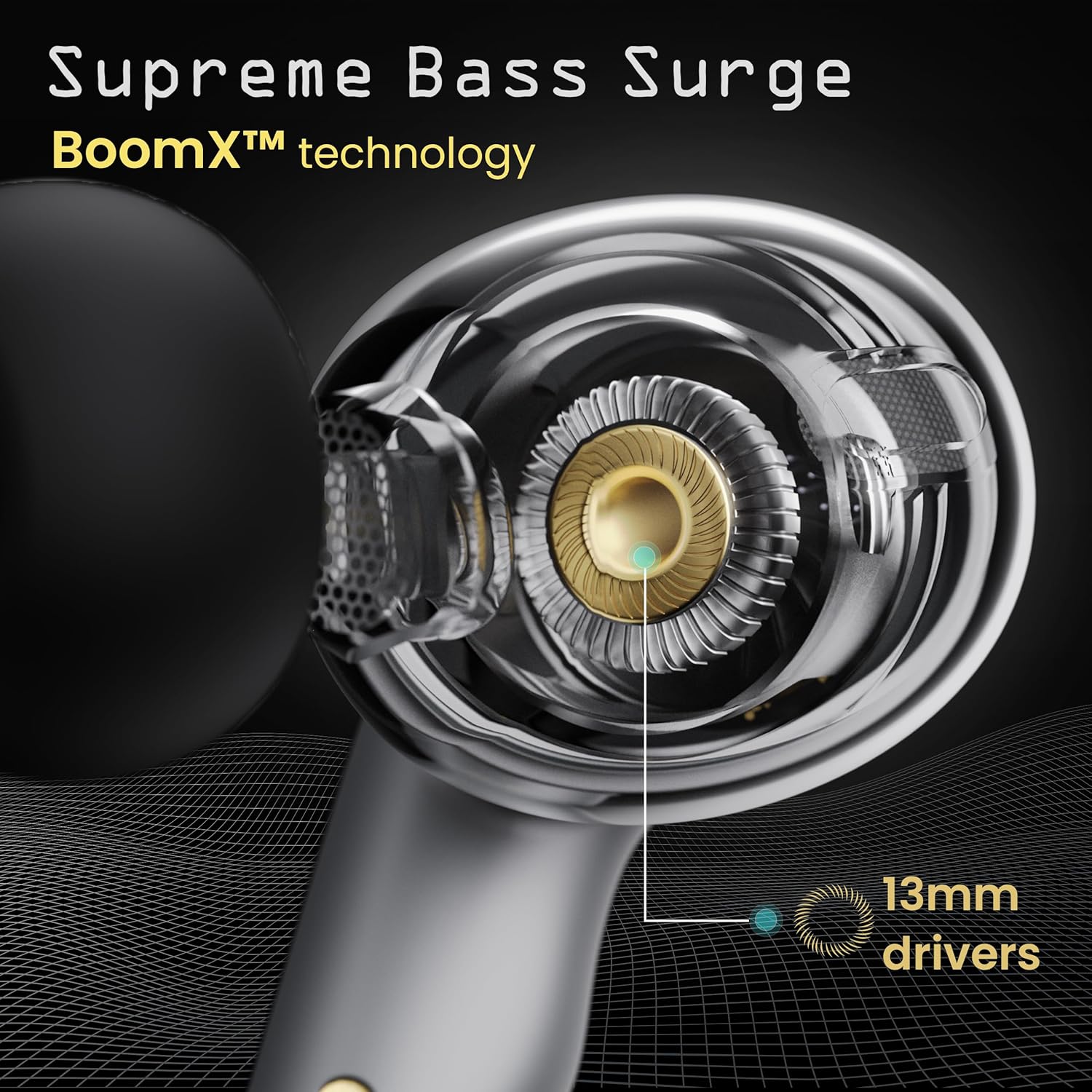
Image: A close-up of a GOBOULT UFO earbud, highlighting the 13mm drivers responsible for supreme bass surge.

Resim: Ayrıntılı view of a GOBOULT UFO earbud, showcasing the AI-powered Quad Mic AI-ENC technology for high-definition call clarity and Zen™ mode for silence.
Kurmak
İlk Eşleştirme
- Şarj kutusunu açın. Kulaklıklar otomatik olarak eşleştirme moduna geçecektir.
- Cihazınızda (akıllı telefon, tablet vb.) Bluetooth’u etkinleştirin.
- Arama "GOBOULT UFO" in the list of available Bluetooth devices and select it to connect.
- Once connected, you will hear an audio prompt, and the LED indicators on the earbuds will change.
The earbuds utilize Bluetooth 5.3 for stable and efficient connection, featuring Blink & Pair™ technology for fast pairing.

Image: GOBOULT UFO Earbuds illustrating stable connectivity with Bluetooth 5.3 and fast pairing technology.
Uygulama Desteği
Enhance your experience by downloading the dedicated GOBOULT app. The app allows you to:
- Switch between 6 Equalizer Modes.
- Dokunmatik kontrolleri özelleştirin.
- Kulaklıklarınızın adını değiştirin.
- Access additional settings and features.
Kullanım Talimatları
Dokunmatik Kontroller
The GOBOULT UFO earbuds feature intuitive touch controls on each earbud.
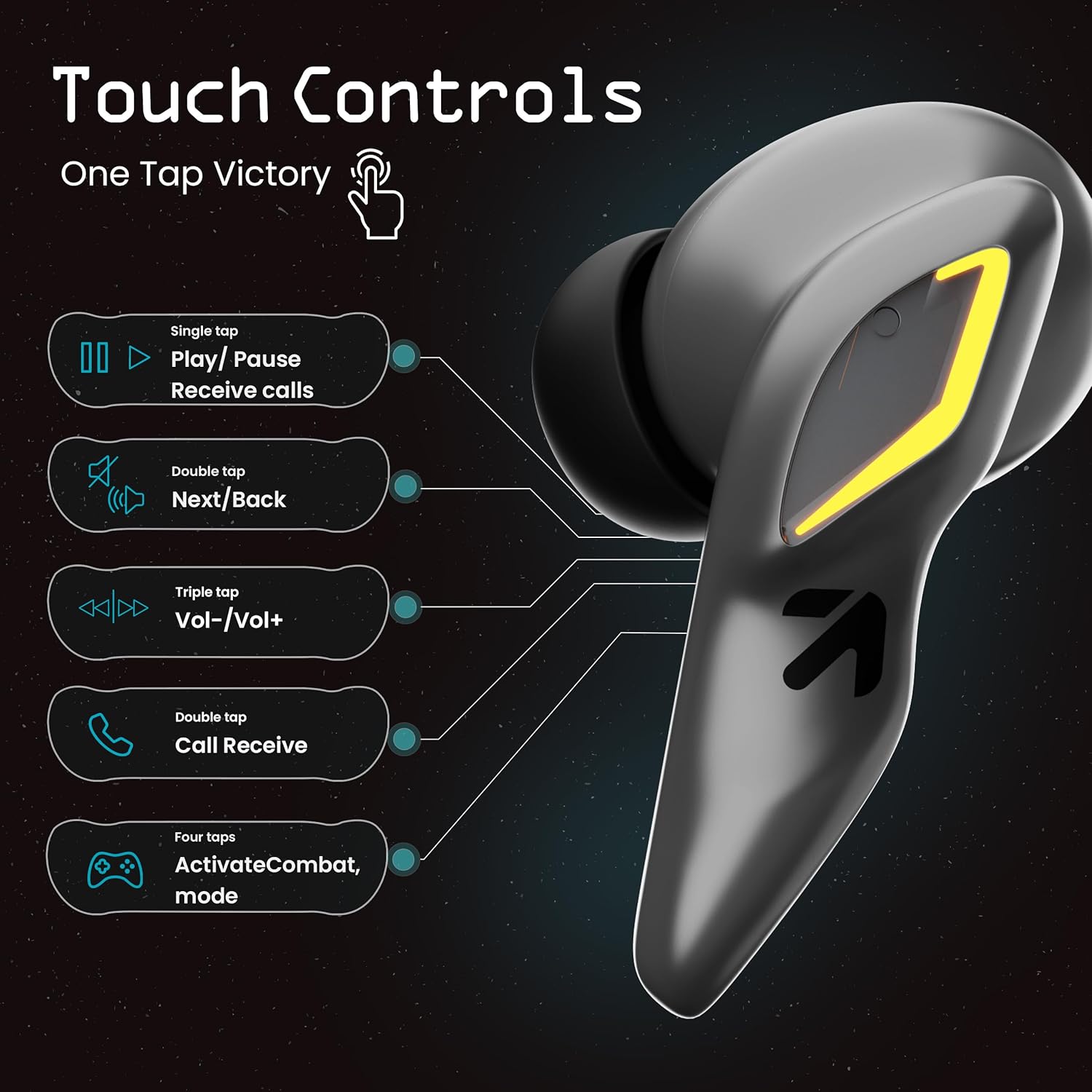
Image: A visual guide to the touch controls on the GOBOULT UFO Earbuds, detailing single, double, triple, and four-tap functions.
- Tek Dokunuş: Play/Pause music, Receive calls.
- Çift Dokunma: Next/Back track.
- Üçlü Dokunma: Sesi Artırma/Azaltma.
- Dört Musluk: Activate Combat Mode (Gaming Mode).
- Uzun basma: Sesli Asistanı (Google Asistan, Siri) etkinleştirin.
Gaming Mode (Combat Mode)
Activate Combat Mode for an ultra-low latency experience of 45ms, ideal for gaming. Tap the earbud four times to toggle this mode.

Image: The GOBOULT UFO Earbuds case open, highlighting the Combat Gaming Mode with 45ms ultra-low latency, activated by four taps.
Sesli asistan
Long press the touch control area on either earbud to activate your device's voice assistant (e.g., Google Assistant, Siri).

Image: GOBOULT UFO Earbuds demonstrating the long-press gesture to activate the voice assistant feature.
Şarj etme
The GOBOULT UFO earbuds offer up to 48 hours of total playtime with the charging case.
Kasa ve Kulaklıkları Şarj Etme
- Kulaklıkları şarj kutusuna yerleştirin. Yerlerine tam oturduğundan emin olun.
- Connect the Type-C fast charging cable to the charging port on the case and to a power source.
- Kasadaki LED göstergeler şarj durumunu gösterecektir.
- A full charge for the earbuds and case takes approximately 100 minutes.
- With Type-C fast charging, a 10-minute charge can provide up to 1.5 hours of playtime.
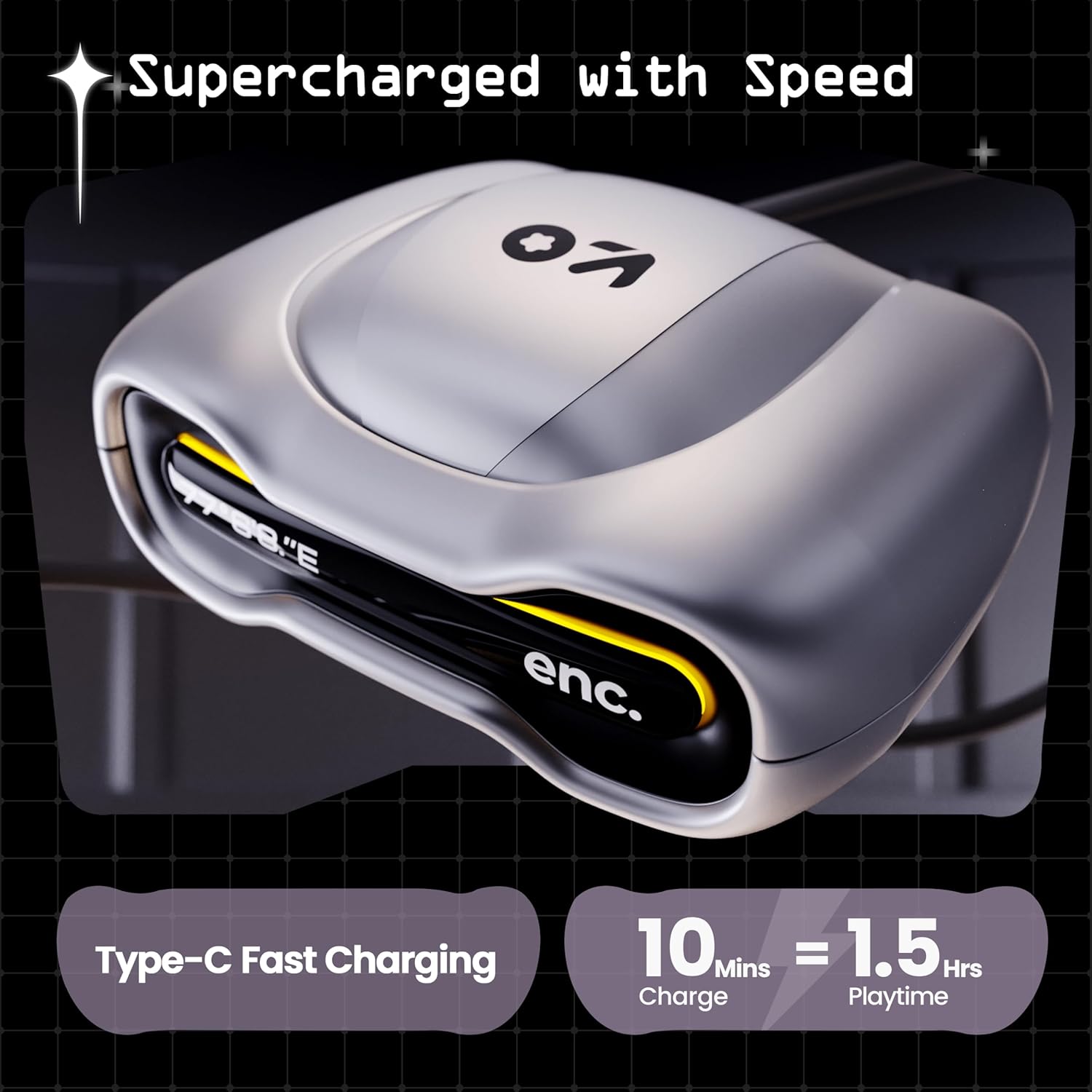
Image: The GOBOULT UFO charging case, illustrating its Type-C fast charging capability, providing 1.5 hours of playtime from a 10-minute charge.
Bakım
Suya Dayanıklılık
The GOBOULT UFO earbuds are IPX5 water-resistant, making them sweatproof, rainproof, and splashproof. This protection allows for use during workouts or in light rain.

Image: GOBOULT UFO Earbuds on a metallic surface, indicating their IPX5 water resistance, making them suitable for sweat, rain, and splashes.
Temizlik
En iyi performansı ve hijyeni korumak için kulaklıklarınızı ve şarj kutunuzu düzenli olarak temizleyin.
- Kulaklıkları ve kutusunu yumuşak, kuru ve tüy bırakmayan bir bezle silin.
- İnatçı kirler için hafifçeampBezi suyla yıkayın. Sert kimyasallar veya aşındırıcı malzemeler kullanmaktan kaçının.
- Kulaklıkların ve şarj kutusunun şarj temas noktalarının temiz ve tozdan arındırılmış olduğundan emin olun.
- Allow all components to dry completely before placing earbuds back in the case or charging.
Sorun giderme
If you encounter any issues with your GOBOULT UFO earbuds, please refer to the following common solutions:
- Ses Yok: Ensure earbuds are charged and properly connected to your device. Check device volume.
- Eşleştirme Sorunları: Cihazınızda Bluetooth'un etkinleştirildiğinden emin olun. Bluetooth ayarlarınızdan cihazı unutup yeniden eşleştirmeyi deneyin. Kulaklıkların tamamen şarj olduğundan emin olun.
- Bir Kulaklık Çalışmıyor: Place both earbuds back in the case, close it, and then open it again. This often resets the connection.
- Kötü Arama Kalitesi: Ensure microphones are clean. Check for strong Bluetooth connection.
- Yanıt Vermeyen Dokunmatik Kontroller: Parmaklarınızın temiz ve kuru olduğundan emin olun. Kulaklıkları kutusuna koyup tekrar çıkararak yeniden başlatmayı deneyin.
For further assistance, please contact GOBOULT customer support.
Özellikler
| Özellik | Detay |
|---|---|
| Model Adı | UFO (Airbass Earbuds) |
| Bluetooth Sürümü | 5.3 |
| Oyun zamanı | 48 Saate Kadar (şarj kutusu ile) |
| Ses Gecikmesi | 45 Milisaniye (Oyun Modu) |
| Sürücüler | 13mm Dinamik Sürücüler |
| Mikrofonlar | Quad Mic ENC (Environmental Noise Cancellation) |
| Suya Dayanıklılık | IPX5 (Sweatproof, Rainproof, Splashproof) |
| Şarj Portu | Type-C Hızlı Şarj |
| Şarj Süresi | Yaklaşık. 100 dakika |
| Bluetooth Menzili | 10 Metre |
| Frekans Tepkisi | 20 Hz |
| Hassasiyet | 115 dB |
| Empedans | 32 Ohm |
| Ürün Ağırlığı | 60 Gram |
| Ürün Boyutları | 4.7x9x10 cm |
| Malzeme | Metal |
Garanti ve Destek
Garanti Bilgileri
The GOBOULT UFO True Wireless Earbuds come with a 1 Yıl Üretici Garantisi from the date of purchase. Please retain your proof of purchase for warranty claims. The warranty covers manufacturing defects. It does not cover damage caused by misuse, accidents, or unauthorized modifications.
Müşteri Desteği
For any questions, technical support, or warranty claims, please contact GOBOULT customer service.
Üretici: Exotic Mile Pvt. Ltd.
Adres: B67 Wazirpur Industrial Area, New Delhi 110052, India.
Please refer to the warranty card included in your product packaging for specific contact details and procedures.