giriiş
Thank you for choosing the ACS APG8201 PINhandy 1 OTP Generator. This device is designed to provide secure One-Time Passwords (OTPs) for enhanced authentication in various applications. This manual provides essential information for the proper setup, operation, and maintenance of your OTP generator. Please read this manual thoroughly before using the device to ensure optimal performance and safety.
Güvenlik Bilgileri
- Cihazınızı sudan ve aşırı nemden uzak tutunuz.
- Cihazı aşırı sıcaklıklara veya doğrudan güneş ışığına maruz bırakmayın.
- Cihazı düşürmekten veya güçlü darbelere maruz bırakmaktan kaçının.
- Cihazı kendiniz sökmeye veya onarmaya çalışmayın. Yetkili servis personeline başvurun.
- Cihazı ve pilini yerel yönetmeliklere uygun şekilde imha edin.
Paket İçeriği
Lütfen paketi açtıktan sonra içeriğini kontrol edin. Herhangi bir ürün eksik veya hasarlıysa, derhal satıcınızla iletişime geçin.
- 1 x ACS APG8201 PINhandy 1 OTP Generator
- 1 x USB Cable (for power/connection)
- 1 x Quick Start Guide (this document serves as the full manual)
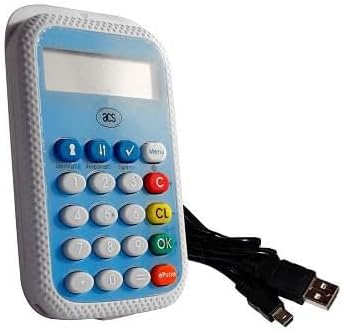
Image: The ACS APG8201 PINhandy 1 OTP Generator, a compact device featuring a display screen, a numeric keypad, and function buttons. A USB cable is shown connected to the device.
Kurmak
İlk Güçlendirme
- Connect the provided USB cable to the micro-USB port on the OTP generator.
- USB kablosunun diğer ucunu bir bilgisayardaki veya USB duvar adaptöründeki güç verilmiş bir USB portuna bağlayın.
- The device display should light up, indicating it is receiving power.
Driver Installation (if applicable)
For certain applications, a driver may be required for the device to communicate with your computer. Refer to the software documentation provided by your service provider for driver installation instructions. Typically, modern operating systems may automatically install necessary drivers.
Kullanım Talimatları
Generating an OTP
- Cihazın açık olduğundan emin olun.
- Press the designated OTP generation button (often labeled "OK" or a specific function key, refer to your service provider's instructions for the exact button).
- If prompted, enter your PIN using the numeric keypad. Press "OK" to confirm.
- The display will show the generated One-Time Password.
- Enter this OTP into the required application or website within the specified time limit.
PIN Yönetimi
PIN management functions (e.g., changing PIN) are typically initiated through the service provider's application or website, which then interacts with the device. Follow the on-screen prompts from your service provider.
Bakım
Cihazın Temizlenmesi
- Cihazın dışını temizlemek için yumuşak, kuru ve tiftiksiz bir bez kullanın.
- Aşındırıcı temizleyiciler, çözücüler veya aerosol spreyler kullanmayın.
- Herhangi bir açıklıktan içeriye nem girmesini önleyin.
Depolamak
Kullanılmadığı zamanlarda cihazı serin, kuru bir yerde, doğrudan güneş ışığından ve aşırı sıcaklıklardan uzakta saklayın.
Sorun giderme
| Sorun | Olası Neden | Çözüm |
|---|---|---|
| Cihaz açılmıyor. | Güç kaynağı yok veya USB kablosu arızalı. | Ensure USB cable is securely connected to a powered USB port. Try a different USB port or cable. |
| OTP not accepted. | Incorrect PIN, time synchronization issue, or expired OTP. | Verify the PIN entered. Ensure your system's time is synchronized. Generate a new OTP. Contact your service provider for time synchronization issues. |
| Ekran boş veya okunaksız. | Device malfunction or low power. | Ensure adequate power supply. If problem persists, contact support. |
Özellikler
| Özellik | Detay |
|---|---|
| Örnek | APG8201-CAC |
| Marka | ACS |
| Bağlantı | USB |
| İşlev | One-Time Password (OTP) Generation |
| Boyutlar | (Refer to product packaging or official ACS website for exact dimensions) |
| Çalışma Sıcaklığı | (Refer to product packaging or official ACS webSite) |
Garanti ve Destek
ACS products typically come with a standard manufacturer's warranty. For specific warranty terms and conditions, please refer to the warranty card included with your product or visit the official ACS website. For technical support, product inquiries, or warranty claims, please contact your point of purchase or visit the official ACS support portal.
Official ACS Webalan: www.acs.com.tr
Note: Support contact information may vary by region.


