1. Giriş
The STRONG Leap-S3+ Google TV Box is a powerful media streaming adapter designed to enhance your entertainment experience. It provides easy access to applications, games, and streaming services via Google Play, transforming your television into a comprehensive entertainment hub. This device supports advanced audio and video technologies, ensuring a high-quality viewdinleme ve dinleme deneyimi.
2. Paket İçeriği
Paketin içinde tüm öğelerin mevcut olduğundan emin olun:
- STRONG Leap-S3+ Android TV Box
- Remote Control (with 2 AA batteries included)
- Güç Adaptörü (DC 12V/1A)
- HDMI Kablosu
- Kullanım Kılavuzu (bu belge)

Image: The retail packaging of the STRONG Leap-S3+ Android TV Box, showing the device, remote control, and branding.
3. Kurulum Kılavuzu
- Televizyona bağlanın: Connect one end of the HDMI cable to the HDMI port on the STRONG Leap-S3+ box and the other end to an available HDMI input on your television.
- Gücü bağlayın: Plug the power adapter into the DC 12V/1A port on the box and then into a power outlet.
- Ağ Bağlantısı (Opsiyonel): For a wired connection, connect an Ethernet cable from your router to the LAN port on the box. For Wi-Fi, you will configure this during the initial setup on screen.
- Pilleri Takın: Open the battery compartment of the remote control and insert the two AA batteries, ensuring correct polarity.
- Güç Açık: Turn on your television and select the correct HDMI input source using your TV remote. The STRONG Leap-S3+ box should power on automatically.
- İlk kurulum: Follow the on-screen instructions to complete the initial setup, including language selection, Wi-Fi connection (if not using Ethernet), and Google account login. Manual setup is recommended if automatic setup via Google Home encounters issues.

Image: Rear panel of the device illustrating the various connection ports including S/PDIF, HDMI, LAN, DC power input, and USB.
4. Kullanım Talimatları
4.1. Uzaktan Kumanda İşlevleri
The included remote control allows navigation through the Google TV interface. Key functions include:
- Navigasyon Pedi: Menülerde gezinmek ve öğeleri seçmek için yön tuşlarını kullanın.
- Tamam Düğmesi: Seçimleri onaylar.
- Geri Düğmesi: Önceki ekrana döner.
- Ana menü tuşu: Google TV ana ekranına geri döner.
- Google Asistan Düğmesi: Activates voice control for searching content or controlling the device.
- Ses Düğmeleri: Ses seviyesini ayarlar.
- Özel Uygulama Düğmeleri: Quick access to popular streaming services like Netflix, YouTube, Disney+, and Prime Video.

Image: The remote control demonstrating the Google Assistant voice command feature, with a TV screen displaying search results.
4.2. Accessing Streaming Services and Apps
Once connected to the internet and logged into your Google account, you can access a wide range of content:
- Google Play Mağazası: Download and install additional applications and games.
- Önceden Yüklenmiş Uygulamalar: Utilize dedicated buttons or navigate to pre-installed apps like Netflix, YouTube, Disney+, and Prime Video.
- Chromecast Yerleşik: Cast content directly from your mobile phone or other compatible devices to your TV screen.

Image: A smartphone screen mirroring content to a large television, demonstrating the Chromecast built-in feature.

Image: A television screen showing the Google TV interface with icons for various streaming applications, alongside the STRONG Leap-S3+ box and remote.
5. Temel Özellikler
- 4K UHD Çözünürlük: Supports Ultra High Definition (UHD) 2160p resolution for crisp and detailed visuals.
- Dolby Vision: Provides enhanced HDR (High Dynamic Range) for superior brightness, contrast, and color accuracy.
- Dolby Atmos: Delivers immersive, multi-dimensional audio that moves around you, creating a realistic sound experience.
- Chromecast Yerleşik: Seamlessly cast movies, shows, photos, and more from your mobile device to your TV.
- Google Asistan: Use voice commands via the remote control to search for content, control playback, and manage smart home devices.
- Kapsamlı Bağlantı: Includes S/PDIF, HDMI, USB 2.0, LAN/Internet, Wi-Fi, and Bluetooth for versatile device connections and data transfer.

Image: Visual representation of 4K UHD 2160p resolution, highlighting fine detail.

Image: The Dolby Vision logo, indicating enhanced visual quality.

Image: The Dolby Atmos logo, representing immersive audio technology.
6. Bakım
- Temizlik: Cihazı temizlemek için yumuşak, kuru bir bez kullanın. Sıvı temizleyiciler veya aşındırıcı malzemeler kullanmayın.
- Havalandırma: Cihazın aşırı ısınmasını önlemek için iyi havalandırılan bir alana yerleştirildiğinden emin olun. Havalandırma açıklıklarını kapatmayın.
- Yazılım Güncellemeleri: Cihaz otomatik yazılım güncellemeleri alabilir. Performansı artırabilecek ve yeni özellikler ekleyebilecek bu güncellemeleri alabilmek için cihazın internete bağlı olduğundan emin olun.
- Depolamak: Uzun süre kullanılmadığı zamanlarda güç adaptörünü çıkarın ve cihazı serin ve kuru bir yerde saklayın.
7. Sorun Giderme
| Sorun | Olası Neden | Çözüm |
|---|---|---|
| Güç yok/Cihaz açılmıyor | Güç adaptörü bağlı değil veya arızalı. | Ensure the power adapter is securely connected to the device and a working power outlet. Check if the outlet is functional. |
| Televizyonda resim yok | Incorrect HDMI input selected on TV; HDMI cable loose or faulty. | Verify your TV is set to the correct HDMI input. Check HDMI cable connections at both ends. Try a different HDMI port or cable. |
| Ses yok | TV volume muted or too low; audio settings incorrect. | Increase TV volume. Check audio output settings on the STRONG Leap-S3+ box. Ensure Dolby Atmos is correctly configured if used. |
| Uzaktan kumanda çalışmıyor | Piller bitmiş veya yanlış takılmış; uzaktan kumanda eşleştirilmemiş. | Replace batteries, ensuring correct polarity. Re-pair the remote control with the device if necessary (refer to on-screen instructions during initial setup or device settings). |
| Yavaş performans veya donma | Poor internet connection; too many apps running in background; insufficient storage. | Check your internet connection speed. Close unused applications. Clear cache or uninstall unnecessary apps to free up storage. Restart the device. |
| Automatic setup via Google Home fails | Connectivity issues or software glitch. | Proceed with manual setup directly on the TV screen using the remote control. This often resolves such issues. |
8. Özellikler
| Özellik | Detay |
|---|---|
| Marka | Güçlü |
| Model Adı | LEAP-S3 plus |
| Renk | Beyaz |
| Ürün Türü | Box form factor |
| Bağlantı Teknolojisi | Bluetooth, Ethernet, HDMI, USB, Wi-Fi |
| Bağlayıcı Türü | HDMI |
| Özel Özellikler | 4K UHD, Chromecast, Browser |
| Çözünürlük | 4K (2160p) |
| Desteklenen İnternet Hizmetleri | Apple TV, Disney, Free Sat/Free View, Freesat/Freeview, Google TV, Magenta TV, Browser, Netflix, Prime Video, RTL, Wow, YouTube |
| Denetleyici Türü | Uzaktan kumanda |
| Uyumlu Cihazlar | Smartphone, Television, Screen |
| Güç Kaynağı | DC 12V/1A |
| Boyutlar (Yaklaşık) | 9.6 cm x 9.6 cm x 2.3 cm (from image) |
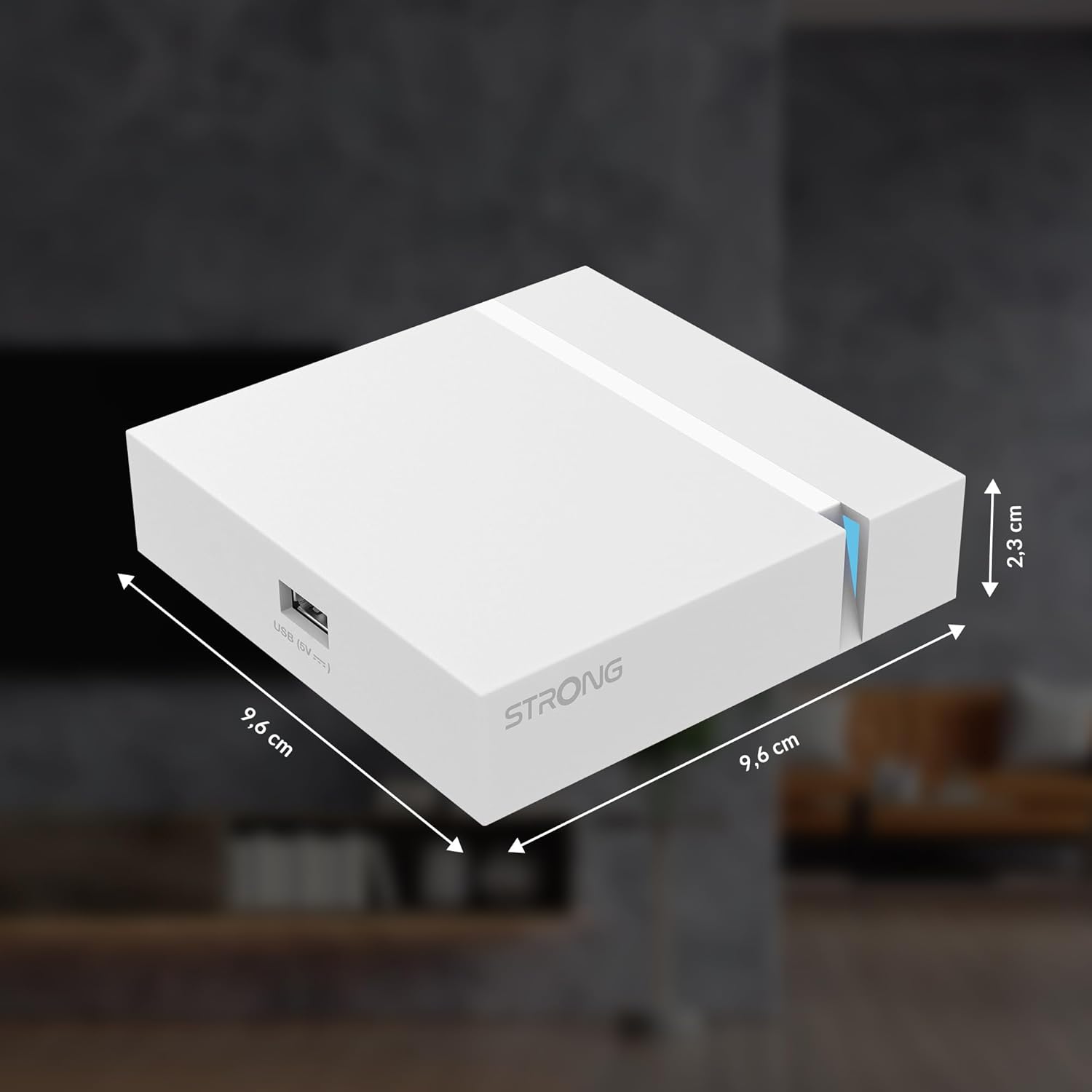
Image: The physical dimensions of the STRONG Leap-S3+ Android TV Box.
9. Garanti ve Destek
For warranty information and technical support, please refer to the documentation provided with your purchase or visit the official Strong website. Information regarding spare parts availability and software update guarantees is not available in this manual.


