1. Giriş
The Pronomic DX-50 USB MKII is a professional 4-channel DJ mixer designed for a wide range of applications, including discos, parties, restaurants, and presentations. Its user-friendly design ensures that both experienced and less experienced users can fully utilize its features. This manual provides detailed instructions for setting up, operating, and maintaining your mixer.
Key features include a recording function, integrated Bluetooth interface, USB player with transport controls, and multiple input channels.
2. Önemli Güvenlik Talimatları
- Talimatları okuyun: Ürünü kullanmadan önce tüm güvenlik ve kullanım talimatlarını okuyun.
- Talimatları Saklayın: Güvenlik ve çalıştırma talimatlarını ileride başvurmak üzere saklayın.
- Uyarıları Dikkate Alın: Ürün üzerindeki ve çalıştırma talimatlarındaki tüm uyarılara uyun.
- Talimatları izleyin: Tüm kullanım ve işletme talimatlarına uyun.
- Su ve Nem: Do not use this apparatus near water (e.g., bathtub, washbowl, kitchen sink, laundry tub, wet basement, or swimming pool).
- Havalandırma: Havalandırma açıklıklarını kapatmayın. Üreticinin talimatlarına uygun şekilde kurulum yapın.
- Sıcaklık: Radyatörler, kalorifer ızgaraları, sobalar veya diğer cihazlar (dahil) gibi herhangi bir ısı kaynağının yakınına kurmayın. amp(ısı üreten)
- Güç Kaynakları: Use only power sources specified by the manufacturer.
- Güç Kablosu Koruması: Güç kablosunun, özellikle fişlerde, prizlerde ve cihazdan çıktığı noktalarda üzerine basılmasını veya sıkışmasını önleyin.
- Temizlik: Sadece kuru bezle temizleyin.
- Servis: Bu ürünü kendiniz servis etmeye çalışmayın, kapakları açmak veya çıkarmak sizi tehlikeli buharlara maruz bırakabilir.tage veya diğer tehlikeler. Tüm servis işlemlerini kalifiye servis personeline yaptırın.
3. Paket İçeriği
Please check that all items listed below are included in your package. If any items are missing or damaged, contact your dealer immediately.
- Pronomic DX-50 USB MKII DJ Mixer
- Power Adapter (AC 12V)
- USB Stick (32 GB, if included in your specific bundle)
- Kullanım Kılavuzu (bu belge)
4. Ürün Bittiview
Familiarize yourself with the various controls and connections on your DX-50 USB MKII mixer.
4.1 Ön Panel Kontrolleri
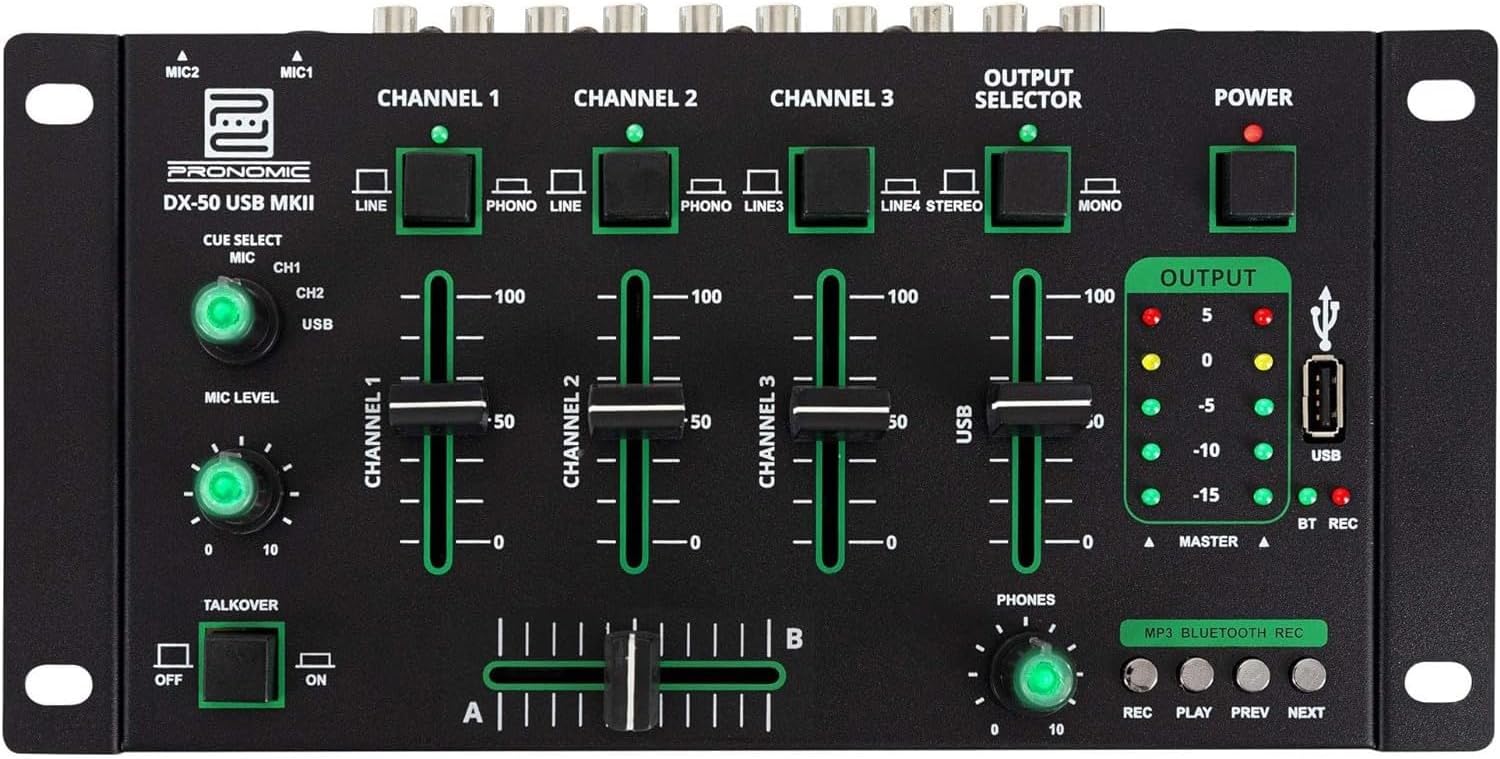
- MIC 1/2 Inputs: Connect microphones.
- Channel 1-4 Input Selectors: Switch between LINE, PHONO, or USB/Bluetooth inputs for each channel.
- Kanal Kısıcıları: Her kanal için ses seviyesini ayarlayın.
- CUE Select Buttons: Route specific channels to the headphone output for monitoring.
- MIC Level Knob: Adjust the volume of the microphone inputs.
- Talkover Switch: Activates the talkover function, which automatically lowers music volume when speaking into the microphone.
- Output Selector: Choose between Stereo or Mono master output.
- Güç düğmesi: Mikseri açar/kapatır.
- Çıkış Seviyesi Ölçerler: LED indicators showing the master output level.
- USB Bağlantı Noktası: Connect a USB drive for MP3 playback and recording.
- MP3/Bluetooth/REC Player Controls: Buttons for Play/Pause, Previous, Next, and Record functions for the integrated player.
- Telefon Seviye Ayar Düğmesi: Kulaklık çıkışının ses seviyesini ayarlar.
- Crossfader (A/B): Blends between channels assigned to A and B.
4.2 Arka Panel Bağlantıları

- AC 12V Power Input: Verilen güç adaptörünü buraya bağlayın.
- TELEFON Çıkışı: Kulaklık bağlamak için 6.3 mm jak.
- MASTER OUT L/R (RCA): Connect to your main amplifli veya güçlendirilmiş hoparlörler.
- Channel 1 & 2 Inputs (RCA Line/Phono): Connect turntables (Phono) or other line-level devices (CD players, media players). Use the front panel selector to switch.
- Channel 3 & 4 Inputs (RCA Line): Connect line-level devices.
- MIC 1 & 2 Inputs (6.3mm Jack): Connect microphones.
5. Kurulum
Follow these steps to set up your Pronomic DX-50 USB MKII mixer:
- Güç Bağlantısı: Ensure the mixer's power switch is in the OFF position. Connect the supplied AC 12V power adapter to the "AC 12V" input on the rear panel of the mixer. Plug the adapter into a suitable power outlet.
- Master Output Connection: Connect the "MASTER OUT L/R" RCA outputs on the rear panel to the inputs of your amplifli veya güçlendirilmiş hoparlörler.
- Giriş Cihazı Bağlantısı:
- Pikaplar: Connect turntables to the "CHANNEL 1" or "CHANNEL 2" RCA inputs. Set the corresponding input selector on the front panel to "PHONO".
- CD Players/Line Devices: Connect CD players, media players, or other line-level devices to "CHANNEL 1", "CHANNEL 2", "CHANNEL 3", or "CHANNEL 4" RCA inputs. Set the corresponding input selector on the front panel to "LINE".
- Mikrofonlar: Connect microphones to the "MIC 1" or "MIC 2" 6.3mm jack inputs on the rear panel.
- Kulaklık Bağlantısı: Connect your headphones to the "PHONES" 6.3mm jack on the rear panel.
- USB Drive (Optional): If using a USB drive for playback or recording, insert it into the "USB" port on the front panel.
- Güç Açık: Once all connections are made, switch the mixer's power switch to the ON position. The power indicator LED will illuminate.
6. Kullanım Talimatları
6.1 Temel Karıştırma
- Girişi Seçin: For each channel, use the input selector switch (LINE/PHONO/USB/BT) to choose the desired audio source.
- Adjust Channel Volume: Use the vertical faders for each channel to adjust its individual volume level.
- Ana Çıkış: Monitor the "OUTPUT" LED meters and adjust the master volume knob (if present, otherwise rely on channel faders and amplifier volume) to achieve a suitable overall output level without clipping.
- Çapraz geçiş: Use the crossfader to smoothly transition between channels assigned to A and B. Channels 1 and 2 are typically assigned to the crossfader.
6.2 Mikrofon Kullanımı
- Connect your microphone to one of the MIC inputs on the rear panel.
- Adjust the "MIC LEVEL" knob on the front panel to control the microphone's volume.
- Talkover Function: Activate the "TALKOVER" switch to automatically reduce the volume of the music when you speak into the microphone. This is useful for announcements.
6.3 USB Oynatma ve Kayıt
- USB Oynatma: MP3 içeren bir USB sürücüsü takın files into the "USB" port. Select "USB" as the input source for the dedicated USB channel. Use the "PLAY/PAUSE", "PREV", and "NEXT" buttons to control playback.
- USB Kaydı: Press the "REC" button to start recording the master output to the connected USB drive. Press "REC" again to stop recording. Ensure your USB drive has sufficient free space and is formatted correctly (FAT32 is commonly supported).
6.4 Bluetooth Bağlantısı
- Bluetooth'u etkinleştirin: Select "BT" as the input source for the dedicated Bluetooth channel. The mixer will enter pairing mode.
- Eşleştirme Cihazı: On your Bluetooth-enabled device (smartphone, tablet, etc.), search for available Bluetooth devices. Select "Pronomic DX-50 USB MKII" (or similar name) from the list to pair.
- Sesi Çal: Once paired, you can play audio from your device through the mixer. Control playback from your device or using the mixer's transport controls (if supported by your device).
6.5 Kulaklıkla İzleme
- Connect headphones to the "PHONES" output.
- Use the "CUE SELECT" buttons to choose which channels you want to monitor in your headphones without affecting the main output.
- Adjust the "PHONES" level knob to set your desired headphone volume.
7. Bakım
- Temizlik: Disconnect the power before cleaning. Use a soft, dry cloth to wipe the surface of the mixer. Do not use liquid cleaners, aerosols, or solvents.
- Depolamak: Mikseri serin, kuru ve doğrudan güneş ışığından ve aşırı sıcaklıklardan uzak bir yerde saklayın.
- Ses seviyesi ayar düğmesi ve bakım talimatları: Avoid excessive force when operating faders and knobs. Periodically check for dust or debris accumulation around moving parts.
- Kablo yönetimi: Ensure cables are not kinked or strained, which can lead to damage.
8. Sorun Giderme
| Sorun | Olası Neden | Çözüm |
|---|---|---|
| Güç yok | Power adapter not connected; Power switch off; Faulty power outlet. | Check power adapter connection; Ensure power switch is ON; Try a different power outlet. |
| No sound from main output | Master volume too low; Amplifier/speakers off or disconnected; Incorrect input selection; Channel faders down. | Increase master volume; Check amplifier/speaker connections and power; Verify correct input selected for channels; Raise channel faders. |
| Kulaklıktan ses gelmiyor | Headphone volume too low; Headphones not connected; No CUE selected. | Increase PHONES level; Connect headphones properly; Press CUE button for desired channel. |
| Bluetooth eşleştirmiyor | Mixer not in pairing mode; Device too far; Interference. | Ensure BT input is selected; Bring device closer; Restart mixer and device. |
| USB oynatma çalışmıyor | USB drive not inserted correctly; Incorrect file Biçimlendirme; USB sürücüsü doğru şekilde biçimlendirilmemiş. | USB sürücüsünü tekrar takın; Emin olun. files are MP3; Format USB drive to FAT32. |
9. Özellikler
| Örnek | Pronomic DX-50 USB MKII |
| Kanal Sayısı | 4 |
| Bağlantı Teknolojisi | Bluetooth, USB |
| Ses Girişi | RCA (line/phono), 6.3mm microphone, Bluetooth, USB |
| Çıkış Bağlantı Tipi | RCA (Master Out), 6.3mm (Phones) |
| Güç Kaynağı | Electric Cable (AC 12V adapter) |
| Dimensions (without corner brackets and controls) | 222 x 129 x 28 mm (Genişlik x Derinlik x Yükseklik) |
| Total Dimensions (with corner brackets and controls) | 267 x 136 x 51 mm (Genişlik x Derinlik x Yükseklik) |
| Ağırlık | 790 gr |
10. Garanti ve Destek
Garanti bilgileri ve teknik destek için lütfen satın alma işleminizle birlikte verilen belgelere bakın veya satıcınızla iletişime geçin. Garanti talepleriniz için satın alma belgenizi saklayın.
For further assistance, you may also visit the official Pronomic websitesine bakın veya müşteri hizmetleri departmanıyla iletişime geçin.


