Ürün Bittiview
The GBF Smart Full IP Video Door Station is designed for 2-unit apartment buildings, offering advanced security and communication features. This system integrates a 1080P camera with built-in PoE, allowing remote control of two locks. It provides convenient remote access and monitoring capabilities via mobile devices.
- Uzaktan Erişim: Answer and view callers from your iOS or Android device, whether at home or away. Receive push notifications and remotely unlock gates.
- Çift Yönlü İletişim: Initiate 2-way live video and audio monitoring from your mobile device.
- Yüksek Tanımlı Kamera: Features an integrated dual-stream full-featured 1080P HD camera with Wide Dynamic Range (WDR) and a 160-degree wide viewaçı.
- Dual Lock Control: Integrated two SPDT relays can trigger two remote door locks or gates, activatable from mobile devices or via permanent access codes.
- Smart Keypad: Built-in keypad programmable remotely through each tenant's app.
- Basitleştirilmiş Kablolama: Requires only three wires: one power line, one RJ45 internet cable, and one unlocking wire, reducing installation labor.
- Dayanıklı Yapı: Premium Brushed Aluminum faceplate and All Stainless Steel Back Box with Weatherproof IP65 rating.
- Kolay Yönetim: Integrated PMS allows administrators to edit tenant lists and room information remotely. Tenants can view entry history and visitor images.
Kutuda Neler Var?
- GBF Smart Full IP Video Door Station (GBF-PL963PM2U-POE)
- 12V DC güç adaptörü
- Locking wire accessories and hardware
- Kullanıcı Kılavuzu
Ürün Bileşenleri
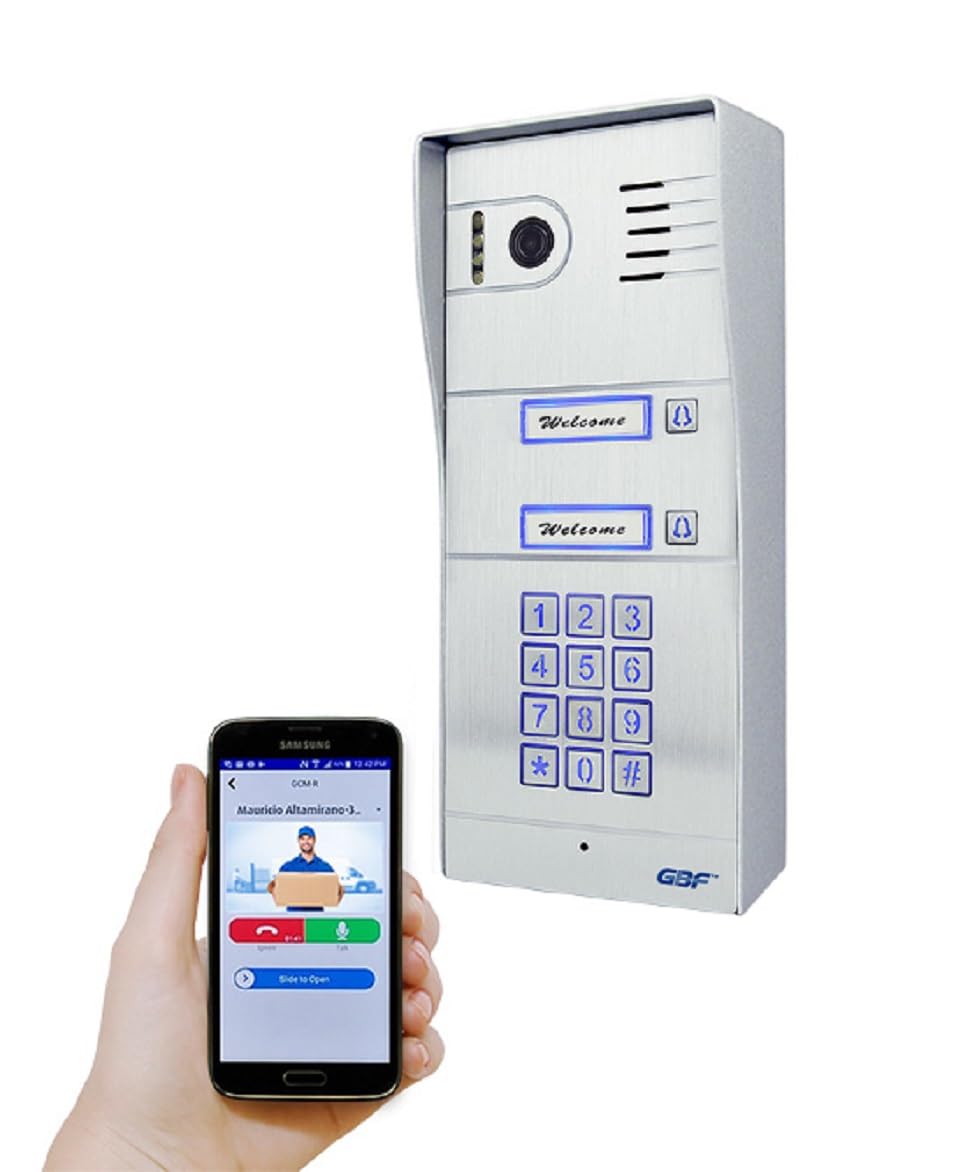
GBF-PL963PM2U-POE Smart Full IP Video Door Station: Ön view of the main outdoor unit with camera, call buttons for two units, and a keypad.

Installed Door Station: The GBF-PL963PM2U-POE unit mounted on a white wall, demonstrating its sleek integration next to a black metal gate.

DoorDeer App Interface: A smartphone displaying the DoorDeer app, showing a live camera feed and a 'Door unlocked' notification, along with controls for front door and side gate.

2-Unit Front View: Net bir ön cephe view of the GBF-PL963PM2U-POE door station, highlighting its call buttons and keypad.

Virtual Key Feature: A smartphone screen illustrating the virtual key function within the app for convenient access control.

Two Gate Control: The app interface demonstrating the ability to control two separate gates or locks, labeled 'Front Door' and 'Side Gate'.

Missed Call Notification: A smartphone screen displaying a 'Missed Call' notification from the door station, indicating a visitor was not answered.

Indoor Chime Unit: A white GBF indoor chime unit plugged into a standard wall outlet, designed to provide audible alerts.
Kurmak
1. Fiziksel Kurulum
The outdoor door station is designed for wall mounting. It features a robust aluminum alloy structure and stainless steel back box for durability and weather resistance. Ensure the mounting location allows for proper wiring access.
2. Kablo Bağlantıları
The system requires minimal wiring:
- Güç: Connect the provided 12V DC power adapter. Alternatively, the unit supports Power over Ethernet (PoE) for power and data transmission via a single RJ45 internet cable.
- Ağ: Connect an RJ45 internet cable for network connectivity.
- Kilit Kontrolü: Connect the unlocking wires to the integrated SPDT relays to control up to two remote door locks or gates.
3. App Integration (DoorDeer App)
The GBF Smart Video Intercom System is managed via the DoorDeer app, available for iOS and Android devices.
- Download and install the DoorDeer app from your device's app store.
- Hesap oluşturun veya giriş yapın.
- Add your device by selecting 'Add Device' and choosing 'WiFi Device' or 'LAN Search'.
- Follow the on-screen prompts to connect the door station to your local Wi-Fi network (supports 2.4GHz Wi-Fi only).
- Once connected, you can name your device (e.g., 'Driveway Gate Monitor') and confirm the setup.
Video: GBF Gate Intercom Indoor Station Monitor Unboxing and Setup. This video demonstrates the unboxing and initial setup of the indoor monitor, including power connection and basic configuration steps.
Video: Unboxing & Setting Up the GBF Smart Video Intercom System. A detailed guide on unboxing and setting up the GBF Smart Video Intercom System, covering physical installation and initial power-up.
Kullanım Talimatları
1. Çağrıları Yanıtlama ve İki Yönlü Ses
When a visitor presses the call button on the door station, your connected mobile device(s) will receive a push notification. You can then:
- View live video of the visitor.
- Engage in two-way audio communication.
- Remotely unlock the connected door(s) or gate(s) via the app.
2. Uzaktan Kilit Açma
The system allows for remote unlocking of up to two connected locks. This can be done through the DoorDeer app during a call or by entering a pre-programmed PIN on the door station's keypad.
3. Keypad Access and PIN Programming
The built-in keypad provides an alternative access method. PIN codes can be programmed remotely through each tenant's app, allowing for customized access control.
4. Hareket Algılama ve Kayıt
The 1080P HD camera supports motion detection. The system can record motion events to a user-supplied micro SD card. You can review these recordings via the app.
5. Indoor Chime (Optional)
An optional indoor chime can be integrated to provide audible alerts within the building when a visitor presses the call button. This is useful for tenants who may not have their mobile device nearby.
Video: GBF Wifi IP Indoor Chime Introduction. This video introduces the GBF Wifi IP indoor chime, explaining its features and how it integrates with the intercom system for audible notifications.
Video: Introduction for GBF Smart Video Intercom PL963PM/PL963M. This video provides a general introduction to the GBF Smart Video Intercom PL963PM/PL963M series, highlighting its key functionalities and benefits.
Özellikler
| Özellik | Detay |
|---|---|
| Model Numarası | GBF-PL963PM2U-POE |
| Marka | GBF |
| Önerilen Kullanımlar | Açık Hava Güvenliği |
| Bağlantı Teknolojisi | Wired (Ethernet, Wi-Fi) |
| Özel Özellikler | Apartment door bell, apartment intercom, door intercom, 1080P Camera, Built-in PoE, Remote Lock Control |
| İç/Dış Mekan Kullanımı | Outdoor (Door Station), Indoor (Monitor/App) |
| Uyumlu Cihazlar | Akıllı telefon (iOS, Android) |
| Montaj Tipi | Duvara Monte (Vidalı) |
| Renk | Gümüş |
| Muhafaza Malzemesi | Alüminyum |
| Su Direnç Seviyesi | Su geçirmez (IP65) |
| Uyarı Tipi | Yalnızca Hareket |
| Kontrol Yöntemi | Uygulama, Uzaktan |
| Güç Kaynağı | Corded Electric (12V DC), PoE |
| ViewAçı | 160 Derece |
| Video Yakalama Çözünürlüğü | 1080p |
| Video Yakalama Formatı | MPEG-4 |
| Gece Görüş Aralığı | 10 Metre |
| Ürün Boyutları | 10 x 5 x 2.5 inç |
| Ürün Ağırlığı | 4 Pound |
Garanti ve Destek
This GBF product comes with a 2 yıllık üretici garantisi. For technical support or warranty claims, please refer to the contact information provided in the user manual or visit the official GBF webalan.


