giriiş
Satın aldığınız için teşekkür ederizasing the Muse M-780 BTB Bluetooth Speaker. This portable speaker features 20W output, colored lights, IPX5 splash resistance, hands-free calling, and stereo pairing capabilities. It supports Bluetooth, Auxiliary input, and USB MP3 playback. Please read this manual carefully before use to ensure proper operation and to maximize your listening experience.
Güvenlik Bilgileri
- Cihazı aşırı sıcaklıklara, doğrudan güneş ışığına veya yüksek neme maruz bırakmayın.
- Hoparlörü düşürmekten veya sert darbelere maruz bırakmaktan kaçının.
- The speaker is IPX5 splash-resistant. Do not immerse it in water or expose it to strong jets of water.
- Hoparlörü sökmeye veya değiştirmeye çalışmayın. Bu, garantiyi geçersiz kılar.
- Use only the provided or approved charging cable.
- Çocukların erişemeyeceği yerde saklayınız.
Paket İçeriği
Lütfen tüm öğelerin mevcut olduğundan emin olun:
- Muse M-780 BTB Bluetooth Speaker
- USB-C Şarj Kablosu
- Yardımcı Giriş Kablosu
- Kullanım Kılavuzu (bu belge)
Ürün Bittiview
Hoparlörün kontrollerini ve bağlantı noktalarını iyice öğrenin.
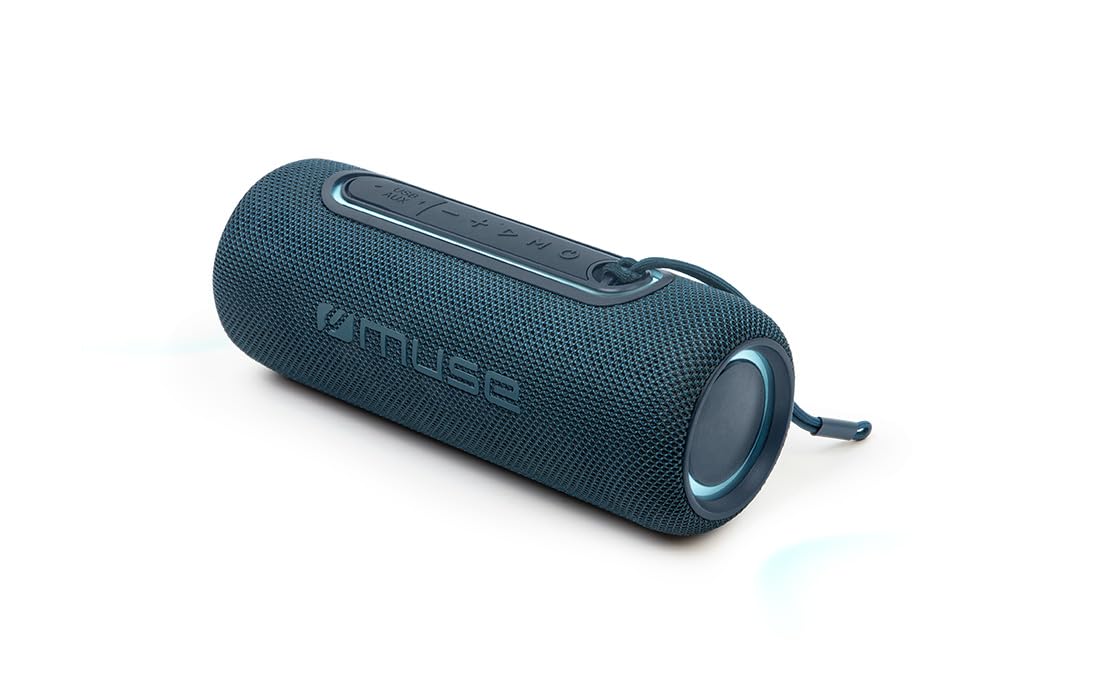
Şekil 1: Ön view of the Muse M-780 BTB Bluetooth Speaker, showing the speaker grille and control buttons on top.
Kontroller ve Göstergeler:
- Güç Düğmesi: Açmak/kapatmak için basılı tutun.
- Oynat/Duraklat Düğmesi: Müziği oynatmak veya durdurmak için basın. Çağrıları cevaplayın/sonlandırın.
- Sesi Aç (+): Sesi artırmak için basın. Sonraki parçaya geçmek için basılı tutun.
- Sesi kıs (-): Sesi azaltmak için basın. Önceki parçaya geçmek için basılı tutun.
- Mod Düğmesi (M): Press to switch between Bluetooth, Aux-in, and USB modes.
- Işık Modu Düğmesi: Press to cycle through different colored light effects.
- Bluetooth Pairing LED Indicator: Bluetooth bağlantı durumunu gösterir.
- Şarj LED Göstergesi: Pil şarj durumunu gösterir.
Limanlar:
- USB-C Şarj Portu: Dahili bataryayı şarj etmek için.
- AUX-IN Bağlantı Noktası: Harici ses cihazlarını 3.5 mm kablo ile bağlamak için.
- USB Bağlantı Noktası: For MP3 playback from a USB flash drive.
Kurmak
1. İlk Şarj
Before first use, fully charge the speaker. Connect the supplied USB-C cable to the speaker's USB-C charging port and the other end to a USB power adapter (not included) or a computer's USB port. The Charging LED indicator will illuminate during charging and turn off when fully charged. A full charge provides up to 10 hours of music playback.
2. Açma/Kapama
Basılı tutun Güç Düğmesi for approximately 3 seconds to turn the speaker ON or OFF.
Kullanım Talimatları
Bluetooth Eşleştirme
- Turn on the speaker. It will automatically enter Bluetooth pairing mode, and the Bluetooth Pairing LED indicator will flash.
- Enable Bluetooth on your smartphone, tablet, or other Bluetooth-compatible device.
- Arama "M-780 BTB" in the list of available devices and select it to connect.
- Once successfully paired, the Bluetooth Pairing LED indicator will stop flashing and remain solid. You can now stream music wirelessly from your device within a range of up to 10 meters.
Auxiliary Input (AUX-IN)
- Connect one end of the supplied 3.5mm auxiliary cable to the AUX-IN port on the speaker.
- Diğer ucunu harici ses cihazınızın kulaklık girişine veya ses çıkışına bağlayın.
- Basın Mod Düğmesi (M) to switch to AUX-IN mode.
- Harici cihazınızdan oynatmayı ve ses seviyesini kontrol edin.
USB MP3 Playback
- MP3 ses dosyası içeren bir USB flash sürücü takın fileHoparlörün USB portuna takın.
- Basın Mod Düğmesi (M) USB moduna geçmek için.
- The speaker will automatically begin playing MP3 fileUSB belleğinden s.
- Oynat/Duraklat, Sesi Aç (+) ve Sesi Kıs (-) düğmelerini kullanarak oynatmayı kontrol edin.
Eller Serbest Arama
Akıllı telefonunuza Bluetooth üzerinden bağlandığınızda:
- Çağrıyı Cevapla/Sonlandır: Basın Oynat/Duraklat Düğmesi bir kere.
- Çağrıyı Reddet: Basılı tutun Oynat/Duraklat Düğmesi 2 saniye boyunca.
Stereo Pairing (TWS - True Wireless Stereo)
You can pair two M-780 BTB speakers together for a true wireless stereo sound experience.
- Ensure both M-780 BTB speakers are turned on and not connected to any Bluetooth device.
- Bir hoparlörde (bu birincil hoparlör olacaktır), tuşuna basılı tutun Mod Düğmesi (M) for 2-3 seconds until you hear a confirmation tone. The speakers will attempt to pair with each other.
- Once successfully paired, you will hear another confirmation tone. The Bluetooth LED on the primary speaker will flash, and the LED on the secondary speaker will be solid.
- Now, connect your Bluetooth device to the primary speaker as described in the "Bluetooth Pairing" section. Both speakers will play audio in stereo.
Renkli Işıklar
Basın Işık Modu Düğmesi to cycle through various colored light effects. Press again to change the effect or turn the lights off.
Hoparlörü Şarj Etme
When the battery is low, the speaker may emit an audible alert. Connect the USB-C charging cable to the speaker and a power source. The Charging LED indicator will show the charging status. Disconnect the cable once fully charged to preserve battery life.
Bakım
- Temizlik: Hoparlörün yüzeyini temizlemek için yumuşak, kuru bir bez kullanın. Aşındırıcı temizleyiciler veya çözücüler kullanmayın.
- Suya Dayanıklılık: The M-780 BTB has an IPX5 splash-resistant rating, meaning it can withstand splashes of water. Do not submerge the speaker in water or expose it to running water. Ensure the port cover is securely closed to maintain water resistance.
- Depolamak: Uzun süre kullanılmayacaksa hoparlörü serin ve kuru bir yerde saklayın.
Sorun giderme
| Sorun | Olası Neden | Çözüm |
|---|---|---|
| Hoparlör açılmıyor. | Pil bitmiş. | Hoparlörü USB-C kablosu kullanarak şarj edin. |
| Ses yok. | Ses seviyesi çok düşük veya tamamen kısık. Giriş modu yanlış. | Increase volume on both the speaker and the connected device. Press the Mode button to select the correct input (Bluetooth, AUX, USB). |
| Bluetooth üzerinden eşleştirme yapılamıyor. | Hoparlör eşleştirme modunda değil. Cihaz çok uzakta. Parazit var. | Ensure speaker is in pairing mode (flashing LED). Move device closer to speaker (within 10m). Turn off other Bluetooth devices. |
| Stereo eşleştirme çalışmıyor. | Speakers not correctly paired. | Ensure both speakers are disconnected from other devices. Follow the stereo pairing instructions carefully. |
Özellikler
| Model Adı: | M-780 STB |
| Marka: | İlham perisi |
| Çıkış Gücü: | 20 Watt |
| Bağlantı: | Bluetooth, USB, AUX girişi |
| Bluetooth Aralığı: | 10 metreye (33 feet) kadar |
| Suya Dayanıklılık: | IPX5 Splash-Resistant |
| Oynatma Süresi: | 10 saate kadar (orta ses seviyesinde) |
| Şarj Portu: | USB-C |
| Boyutlar (U x G x Y): | 24.2 x 9.2 x 9.2 cm (9.5 x 3.6 x 3.6 inç) |
| Ağırlık: | 1 kg (2.2 lbs) |
| Uyumlu Cihazlar: | Akıllı Telefonlar, Tabletler, Dizüstü Bilgisayarlar |
| Özel Özellikler: | Colored Lights, Hands-Free Calling, Stereo Pairing (TWS) |
Garanti ve Destek
This product is covered by a standard manufacturer's warranty. For detailed warranty terms and conditions, please refer to the warranty card included with your purchase or contact your retailer. For technical support or service inquiries, please contact Muse customer service through their official webSite veya ürününüzle birlikte verilen iletişim bilgileri.


