1. Giriş
This manual provides essential information for the safe and efficient operation of your Metz MUD8500Z 43-inch 4K UHD Google Smart TV. Please read these instructions thoroughly before using the television and retain them for future reference. This television features a 43-inch Direct LED display with UHD 4K HDR resolution, integrated Google TV operating system, and a built-in soundbar with Wonder Audio technology.
2. Kutuda Neler Var?
Televizyonunuzu dikkatlice ambalajından çıkarın ve aşağıdaki tüm öğelerin eksiksiz olduğundan emin olun:
- Metz MUD8500Z 43-inch Smart TV
- Güç Adaptörü
- Uzaktan kumanda
- Kullanım Kılavuzu (bu belge)
- TV Sehpası Bileşenleri (varsa)
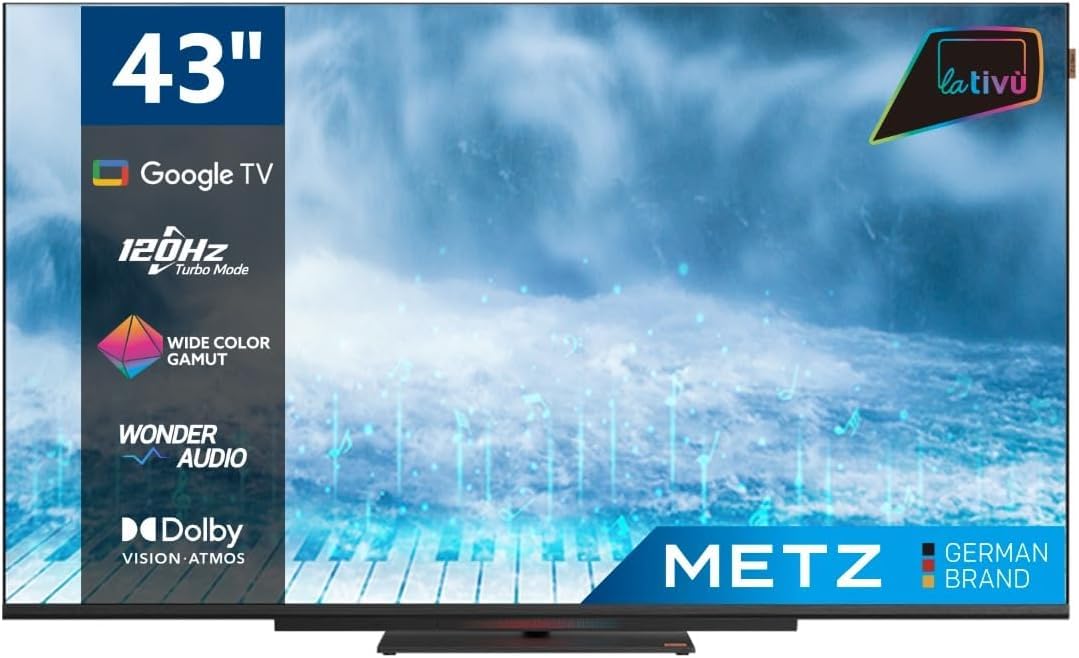
Resim: Ön view of the Metz MUD8500Z 43-inch Smart TV.
3. Kurulum
3.1. Paketin Açılması ve Yerleştirilmesi
Remove the TV from its packaging. Place the TV on a stable, flat surface or mount it on a wall using a compatible VESA mount (sold separately). Ensure adequate ventilation around the TV.

Image: Diagram showing the dimensions of the Metz MUD8500Z TV (96.6cm width, 57cm height, 11cm depth).
3.2. Gücü Bağlama
Connect the power adapter to the TV's power input, then plug the adapter into a wall outlet. The TV will enter standby mode.
3.3. İlk Kurulum (Google TV)
TV ilk açıldığında, ilk kurulum sürecinde size rehberlik edecektir. Bu adımlar şunları içerir:
- Dil Seçimi: Tercih ettiğiniz dili seçin.
- Ağ bağlantısı: Connect the TV to your home Wi-Fi network or via an Ethernet cable.
- Google Hesabı Oturum Açma: Google TV özelliklerine, uygulamalarına ve kişiselleştirilmiş önerilere erişmek için Google hesabınızla oturum açın.
- Kanal Tarama: Mevcut TV kanallarını tarayın (Anten/Kablo).
4. Kullanım Talimatları
4.1. Temel TV Fonksiyonları
- Güç Açma/Kapatma: Uzaktan kumanda veya televizyon üzerindeki güç düğmesine basın.
- Ses Kontrolü: Uzaktan kumandadaki Sesi Açma/Kapatma tuşlarını kullanın.
- Kanal Seçimi: Kanal Yukarı/Aşağı tuşlarını veya sayısal tuş takımını kullanın.
- Giriş kaynağı: Press the 'Input' button to select HDMI, AV, or other connected devices.
4.2. Google TV Navigasyonu
The Google TV interface provides access to streaming services, apps, and live TV. Use the directional pad and 'OK' button on your remote to navigate menus and select items.

Image: Remote control for the Metz Smart TV, highlighting dedicated buttons for popular streaming services and Google Assistant.
4.3. Google Asistan
Your TV has an integrated Google Assistant. Press the Google Assistant button on your remote or use the built-in microphone for voice commands to search for content, control smart home devices, and more.
4.4. App Access
Access a wide range of applications from the Google Play Store directly on your TV. Navigate to the 'Apps' section on the Google TV home screen to browse, download, and manage your applications.

Image: Screenshot of the Google TV interface displaying various streaming applications.
5. Özellikler
5.1. UHD 4K Resolution and HDR
Experience stunning visuals with a resolution of 3840x2160 pixels, providing exceptional clarity and detail. The 4K HDR (High Dynamic Range) support enhances contrast and color accuracy for a more lifelike picture.
5.2. Wide Color Gamut
The Wide Color Gamut technology allows the TV to display a broader spectrum of colors, resulting in more vibrant and realistic images.

Image: A visual comparison demonstrating the enhanced color range with Wide Color Gamut versus normal display.
5.3. Wonder Audio Soundbar
The integrated soundbar with Wonder Audio technology delivers an immersive and clear audio experience. This advanced sound processing algorithm improves treble and bass, offering a more realistic virtual surround sound.

Image: Diagram illustrating the internal structure of the Surging Soundbar, showing increased diaphragm area and net sound cavity volume.
5.4. Google TV Operating System
Powered by Google TV, this television provides a personalized experience with easy access to your favorite movies, shows, live TV, and apps from across your subscriptions. It also offers smart recommendations based on your viewalışkanlıklar.
5.5. 120Hz Turbo Mode
The 120Hz Turbo Mode enhances motion clarity, making fast-paced scenes and gaming content appear smoother and more fluid.

Image: Visual representation of the 120Hz Turbo Mode, illustrating enhanced smoothness for dynamic content.
5.6. Dolby Vision and Dolby Atmos
Enjoy cinematic picture quality with Dolby Vision, offering incredible brightness, contrast, and color. Dolby Atmos provides immersive, multi-dimensional audio that flows around you.
6. Bağlantılar
Your Metz MUD8500Z TV offers various ports for connecting external devices:
- HDMI (x3): Blu-ray oynatıcıları, oyun konsollarını, set üstü kutuları vb. bağlayın.
- USB 2.0 (x2): Medya oynatmak için USB depolama aygıtlarını bağlayın.
- LAN (Ethernet): Kablolu internet bağlantısı için.
- AV GİRİŞİ: Connect older devices with composite video and stereo audio outputs.
- RF Input (Antenna/Satellite): Karasal veya uydu anteninizi bağlayın.
- Optik Çıkış: For digital audio output to a sound system or soundbar.
- CI Yuvası: Ortak Arayüz modülleri için (örneğin, ücretli TV hizmetleri için).

Resim: Ayrıntılı view of the rear panel connections, including CI, AV IN, RF Input, USB 2.0, HDMI, Optical Out, and LAN ports.
7. Özellikler
| Parametre | Değer |
|---|---|
| Model Numarası | MUD8500Z (S9147779) |
| Ekran Boyutu | 43 İnç (108 cm) |
| Ekran Teknolojisi | NEDEN OLMUŞ |
| Çözünürlük | 4K UHD (3840x2160) |
| Yenileme Hızı | 60 Hz (with 120Hz Turbo Mode) |
| En Boy Oranı | 16:9 |
| Bağlantı | Ethernet, HDMI (x3), USB (x2), Wi-Fi |
| Özel Özellikler | Flat Screen, Google TV, Google Assistant, Wonder Audio Soundbar, HDR, Wide Color Gamut |
| Ürün Boyutları (GxDxY) | 96.6x10.9x56.9 cm |
| Ağırlık | 8.2 kilo |
| Enerji Verimliliği Sınıfı (SDR) | F |
| Güç Tüketimi (SDR) | 50.0 B |
| Enerji Verimliliği Sınıfı (HDR) | G |
| Güç Tüketimi (HDR) | 90.0 B |
| Hazırda bekleme gücü | 0.4 B |
For detailed energy information, please refer to the official EU energy label: https://eprel.ec.europa.eu/qr/1530402
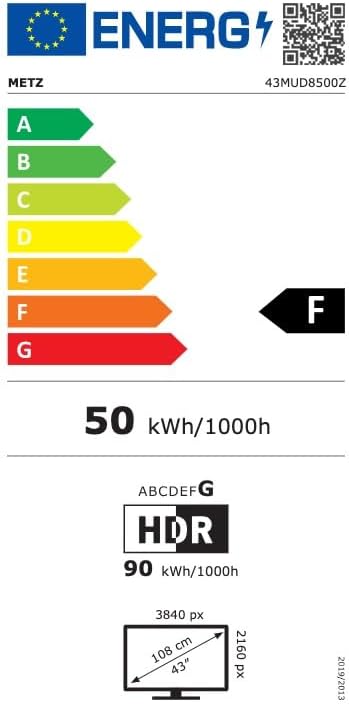
Image: EU Energy Label for the Metz MUD8500Z television, showing energy efficiency class F.
8. Sorun Giderme
Televizyonunuzla ilgili sorunlarla karşılaşırsanız, aşağıdaki yaygın sorunlar ve çözümlere göz atın:
- Güç Yok:
- Ensure the power cable is securely connected to both the TV and the wall outlet.
- Check if the wall outlet is functioning by plugging in another device.
- Press the power button on the remote or TV. - Görüntü/Ses Yok:
- Verify the correct input source is selected (e.g., HDMI 1, AV).
- Check all cable connections between the TV and external devices.
- For no sound, ensure volume is not muted or too low. - Uzaktan Kumanda Çalışmıyor:
- Uzaktan kumandanın pillerini değiştirin.
- Uzaktan kumanda ile televizyonun kızılötesi sensörü arasında herhangi bir engel olmadığından emin olun.
- Kumandayı doğrudan televizyona doğru tutun. - Ağ Bağlantı Sorunları:
- Restart your Wi-Fi router.
- Check Wi-Fi password and ensure it is entered correctly.
- Try connecting via an Ethernet cable if Wi-Fi issues persist. - Görüntü Kalitesi Sorunları (örneğin, bulanık, bozuk):
- Check the resolution settings of the input source.
- Ensure the signal source (antenna, cable box, streaming) is stable.
- Adjust picture settings in the TV menu (brightness, contrast, sharpness).
Bu çözümleri denedikten sonra sorun devam ederse lütfen müşteri desteğiyle iletişime geçin.
9. Bakım
9.1. Ekranın Temizlenmesi
Ekranı yumuşak, tiftiksiz bir bezle nazikçe silin. İnatçı lekeler için hafifçe silin.ampBezi su veya özel bir ekran temizleyici ile silin. Sert kimyasallar veya aşındırıcı malzemeler kullanmayın.
9.2. Dolabın Temizlenmesi
Wipe the TV cabinet with a soft, dry cloth. Avoid using liquid cleaners directly on the TV.
9.3. Havalandırma
Ensure that the ventilation openings on the back of the TV are not blocked. Proper airflow prevents overheating and prolongs the life of the TV.
10. Garanti ve Destek
The Metz MUD8500Z television comes with a standard manufacturer's warranty. According to specifications, the minimum general warranty duration provided by the supplier is 2 years.
For warranty claims, technical assistance, or further support, please refer to the contact information provided with your purchase documentation or visit the official METZ CONNECT webalan.